

Budget by packages
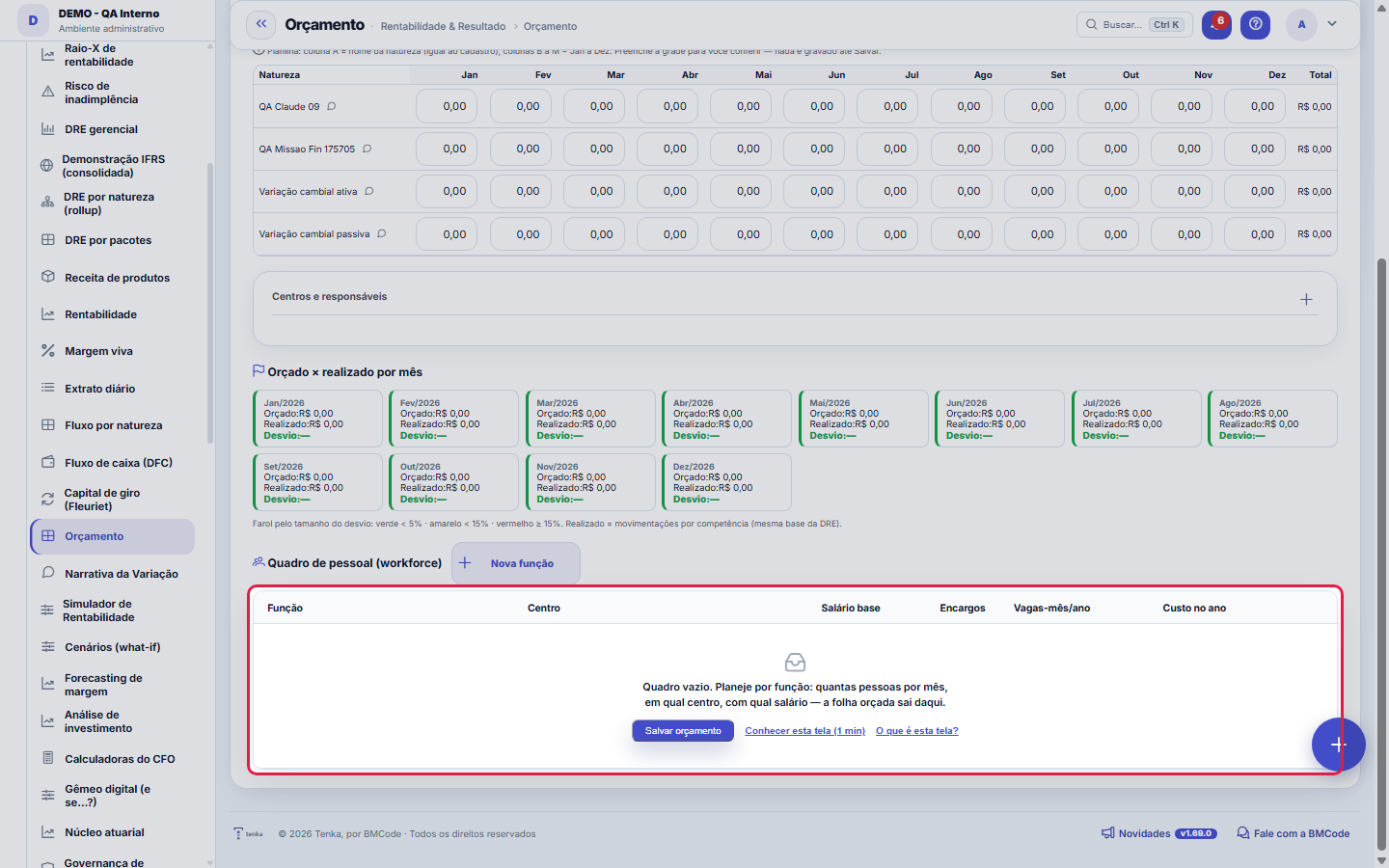
Month-by-month planning by category/package and a budgeted × actual comparison with a deviation status light.
The screen
The real screen, in the theme you picked above.
What you find on this screen
A portrait of the screen, read from the screen itself — it changes when the screen changes.
Available actions
Copy this year's actualsRecalculate packagesApply assumptionSave budgetSend for approvalBack to editingClose cycleReopen cycleCreate reforecastCompare versionsSpreadsheet templateSet up cycle centers+14
The list shows
CenterOwnerDue dateCenter onlyWith childrenStatusAccountBeforeAfter (current)ΔBudget:Actual:+9
Form fields
AnoAno do ciclo orçamentário exibido na grade e nos comparativos.
VersãoVersão do orçamento em uso, original ou reforecast, que define os valores mostrados.
Total anual da linhaSoma dos doze meses orçados da linha de natureza.
OrçadoValor planejado para o mês no ciclo do orçamento.
RealizadoValor efetivamente lançado no mês, para comparar com o planejado.
Desvio %Diferença percentual entre o realizado e o orçado do mês, que acende o farol.
DesvioDiferença em dinheiro entre realizado e orçado do centro de resultado no ano.
Soma do orçado dos centrosTotal orçado somando todos os centros e o corporativo, para conferir com o total da empresa.
Centros aprovadosQuantos centros de resultado já tiveram a fatia aprovada sobre o total do ciclo.
Fatias com prazo vencidoQuantidade de fatias de centro com prazo vencido sem entrega.
Salário baseSalário mensal planejado para a função no quadro de pessoal.
Custo total do quadro no anoCusto anual de todo o quadro planejado, com encargos e provisões, que gera a folha orçada.
Start here
O que você faz
Type in the planned value for each category in each month. The system compares it with the actual (accrual-based entries, the same basis as the DRE) and shows a deviation traffic light per month.
Impact
It generates the budget deviation alert and ties in with the DRE (same actuals basis). The package organization comes from the Category structure screen.
How to
Recalculate packages
The Recalculate button redoes the consolidation of the packages (the tree of natures) from the grid rows — use it after editing several months, applying an assumption or copying actuals, so the package totals match the rows that make them up again. It recalculates the displayed totals; what is saved, and when, follows the rule described in the "What is saved" item of this same help.
Copy the year’s actuals
One of the three ways to start the budget: the button brings the year's actuals, category by category and month by month, into the grid as the starting point for the budgeted figures. From there you adjust what changes in the new year — and you can apply an adjustment assumption on top of the copied base (the IPCA that the system already fetches from BACEN shows up as a suggestion). It's the fastest way to budget a year similar to the previous one without typing the whole grid.
A consolidação sobe a árvore de centros sozinha
The "Center only" column shows what was budgeted in that center; "With children" shows the total including all descendants in the result center tree — and only appears when the center has children. You budget at the leaves and read at the top, without adding anything by hand.
Aplicar premissa: o IPCA que o sistema já busca
The platform collects IPCA, Selic and exchange rates from the Central Bank's public series. In "Apply assumption" those numbers RECALCULATE the grid — adjusting what is already there, or starting from the previous year's actuals. Each recalculated row keeps a record of what was applied (the % next to the name), and a later manual adjustment clears the mark, because the row no longer belongs to the assumption.
Comparar versões e planilha por código
"Compare versions" shows what changed from a version in the history to the current one, nature by nature, biggest change first — identical rows are left out. And the "Spreadsheet template" downloads the grid with the nature's CODE in the first column: it is the same format the import reads back, and the code survives renaming the nature (the name does not).
Rules
A row says "investigate". What now?
Type the planned amount directly in the month's cell, on the account's row. The packages (rows in bold) are sums and cannot be typed — they change when the rows inside them change. After editing, use Save: up to this version the grid refused manual editing and crashed the screen on any click.
Pacotes (árvore de naturezas)
The grid groups by the tree: PACKAGES (synthetic groups, e.g., IT, People and Management) show automatic subtotals and are not editable; you plan on the LEAVES (analytic categories). Build the hierarchy in "Category structure". The "Recalculate packages" button updates the subtotals without saving.
Deviation traffic light
Green under 5% deviation, yellow under 15%, red from 15% up (based on the size of the deviation between budgeted and actual).
O que é gravado
Only the leaves (analytic categories) are persisted; packages are calculated sums. Empty cells are not saved. The actuals come from the accrual data.
Orçamento descentralizado: cada centro tem dono e rito
In the "Centers and owners" panel, click Build cycle centers: every ACTIVE result center starts to take part in the budget. Set the owner of each one — that person fills in their part and clicks Submit. The cycle closes when all centers are approved, and the scoreboard at the top shows how much is left. Anyone who prefers to budget centrally does not need to do anything: with no centers built, the grid stays company-wide, as it always has been.
Submeter, aprovar e devolver — e o que acontece sem alçada
Submission uses the platform's approval engine (event "Center budget"). If the company has an authority policy for that event, the center stays SUBMITTED until the approver decides — approving closes it, returning sends it back to the owner WITH the reason (which is mandatory: sending back without saying what to fix helps nobody). If the company has NO authority configured, submitting approves directly, and the message says so — a flow that stalls waiting for an approver who does not exist would be worse than no ritual at all.
Três formas de começar o orçamento
From scratch (typing), COPYING the year's actuals, or PROPOSING from history — which fills each nature with the MEDIAN of the last twelve periods. Median and not average on purpose: a single month with an unusual purchase would inflate the next twelve months. A nature with no history stays blank, never zero: "I have no basis" is information.
Headcount plan: payroll comes from the headcount
Instead of typing the payroll amount, plan the HEADCOUNT: role, center, salary, charges and how many people each month. The system calculates the cost (salary × people × charges, plus the monthly provision for 13th salary and vacation) and generates the payroll lines of the budget. What you edit is the headcount: the generated lines stay out of the grid and regenerating replaces only them — what you typed by hand is never touched.
Prazo e responsável por centro
Each slice of the budget can have an owner and a date. The screen shows how many are late (deadline passed and not yet delivered) and how many have no owner — the two classic holes in a budget cycle. The authority decision comes back here by itself: approved, the slice locks; returned, it goes back to the owner with the written reason.
Frequently asked questions
Alterei um pacote e os valores dos meses sumiram?
Não sumiram: o pacote é uma árvore de naturezas e o total dele é recalculado a partir das naturezas. Use Recalcular pacotes depois de mexer na árvore. Os valores digitados por natureza e mês ficam; o que muda é a soma do pacote.
Was this article helpful?
In the same module: Cash9
Financial AlertsThe proactive finance radar: rules watch margin, cash, budget, and fixed spend and alert BEFORE the problem g…Month's cashWhat I have, what I will receive, what I will pay and what I close the month with — and what is due this week.Working capital (Fleuriet)The Fleuriet model views the balance sheet through the lens of cash: it separates what is operations, what is…Cards and checksCard fees, receivables advance and the check portfolio — with the cost of each choice in plain sight.360 TowerWhere I am, where I'm going, what I promised, and how much I'm off — the owner's four questions on a single s…Extrato diárioO caixa dia a dia: quanto abriu, quanto entrou, quanto saiu e com quanto fechou — com a lista dos títulos por…Cash flow statementCash flow by the direct method, month by month: how much cash came in and out by activity, with runway, burn,…Flow by natureThe nature × day-of-month matrix — actual up to today, forecast from then on — and the bills due in the month.
Tenka Academy
Explore the AcademyStep-by-step learning paths for your industry, inside the platform.