

Employees
The people behind the operation: data, position, employment type (CLT/independent contractor), salary, and capacity — the basis for real cost and allocation.
The screen
The real screen, in the theme you picked above.
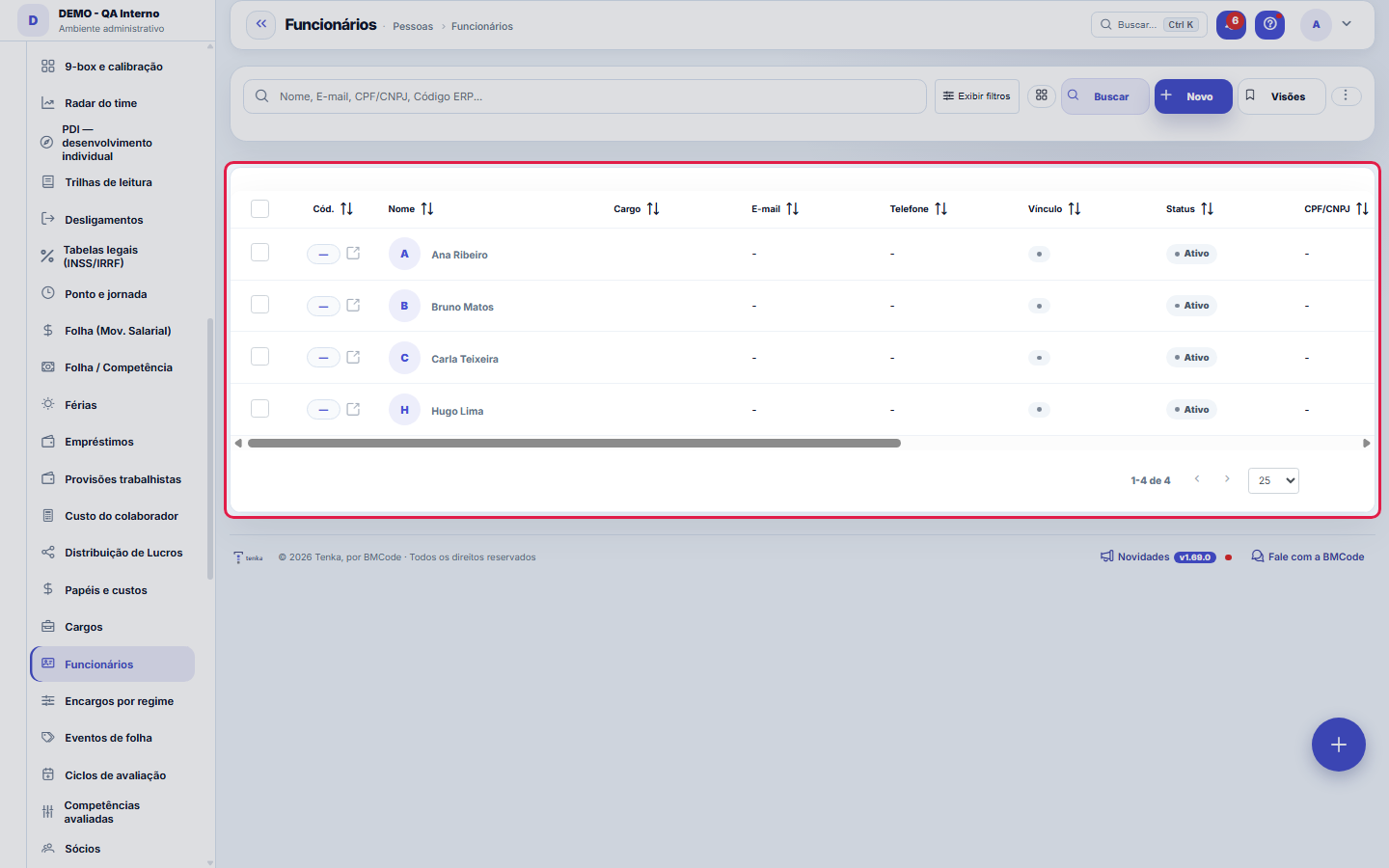
What you find on this screen
A portrait of the screen, read from the screen itself — it changes when the screen changes.
Form fields
Nome*Nome do funcionário.
Cargo*Cargo do funcionário.
E-mailE-mail de contato.
TelefoneTelefone de contato.
VínculoTipo de vínculo (CLT, PJ, estágio…).
StatusSituação do funcionário.
CPF/CNPJCPF ou CNPJ (PJ).
Início*Início do vínculo.
FimFim do vínculo (se desligado).
NascimentoData de nascimento.
Carga semanal (h)Carga horária semanal contratada (horas).
Usuário do sistemaVincula este funcionário ao login do sistema — necessário para roteamento de aprovações por gestor.
Dependentes (IRRF)Nº de dependentes para dedução do imposto de renda na folha. Cada dependente deduz R$ 189,59 da base; o motor usa o maior entre isso e o desconto sim…
Gestor imediatoGestor imediato deste funcionário; usado como aprovador quando a alçada é 'Gestor do solicitante'.
BancoCódigo FEBRABAN (ex.: 341) ou nome do banco.
AgênciaNúmero da agência.
ContaNúmero da conta com dígito.
Tipo de contaCorrente ou Poupança.
Tipo de chave PIXNatureza da chave PIX cadastrada.
Chave PIXChave PIX para pagamento (CPF/CNPJ, e-mail, telefone ou aleatória).
+ 3 more fields
Start here
What you do here
Register employees with position, employment regime, salary/compensation, work schedule and team affiliation. Salary changes stay in the history (never overwrite the salary without recording it).
O que esta tela responde
The person's record: employment type, job position, salary and manager. Two traps: the EMPLOYMENT TYPE (CLT or PJ) changes the calculation of the entire payroll, and the MANAGER is what builds the org chart — a person without a manager does not appear in the hierarchy, and an empty org chart is almost always that, not a defect of the screen.
O que esta tela faz
Complete employee record: identification, employment type, job position, direct manager, bank details and PIX on the Data tab — and three detail tabs that follow the life of the employment: Capacity (hours per period), Absences (vacations, leaves, absences) and Salary changes (salary and range history). With the record saved, the Tenkai conversation tab opens the employee's persona, which answers only with what is recorded.
How to
Antes de cadastrar: entreviste por PERFIL, não por técnica
Technical skills can be taught; behavior is what you hire. The rule every manager has learned the hard way: people are hired for their résumé and fired for their behavior. In the interview, ask for three real stories — the full script is in the following items — and listen to HOW the person tells them, not just what: someone who lived the story gives context details effortlessly; someone who made it up generalizes.
A história de CORAGEM
"Tell me about a tough decision you stood behind — even knowing it could go wrong or displease someone." What to look for: did the person take on the cost of the decision or outsource it? Do they distinguish courage from impulsiveness (did they assess before standing behind it)? Yellow flag: a story in which the tough decision was, deep down, other people's fault.
A história de INFLUÊNCIA
"Tell me about a time you persuaded people WITHOUT having authority over them." What to look for: how they built the argument, whom they listened to before proposing, what they gave up along the way. Someone who can only persuade with a title gets stuck on the first cross-functional project. Good sign: the person remembers the OTHER side's argument better than their own.
A história de RESILIÊNCIA
"Tell me about a failure of yours — a real one — and what happened afterwards." What to look for: does the person name their own part in the failure? What changed in their method (not their speech) the next time? Red flag: the candidate who "never failed" — either they never tried anything hard, or they won't tell. The three stories together (courage, influence, resilience) say more than any technical test: technical skills can be taught in weeks; work character cannot.
Direct manager, Dependents (income tax) and Weekly hours
The direct manager is the backbone of the org chart and of approval authority by manager — an employee without a manager appears as a pending item in the org chart. Dependents (IRRF) feeds the per-dependent deduction in the payroll tax calculation, together with the current legal tables. Weekly hours (h) declares the contracted working hours, the basis for capacity and for calculations that depend on hours.
Rules
Custo NÃO é o salário seco
The hourly cost used in margin adds up salary + regime charges (percentages configured in Charges per regime). CLT with typical charges costs ~60%+ above the gross.
Ausências e capacidade
Vacations and absences reduce the available capacity in schedules and allocations — register them so planning doesn't count on someone who isn't there.
A visão salva guarda busca, filtros, colunas e ordenação
When you save a view with the Views button, it stores four things: the search text, the applied filters, which columns appear (and in what order) and which column the list is sorted by. Applying the view restores everything at once — including resetting the sort and the page you were on, so the result is exactly what the view describes. Views saved before this version remain valid: whatever they didn't store simply doesn't change when applied.
O erro de preenchimento aparece no campo, ao sair dele
Nas fichas, sair de um campo já dispara a conferência do que dá para conferir na hora: campo obrigatório deixado em branco e e-mail mal formado. O aviso aparece embaixo do campo e desaparece quando você começa a corrigir. Campo numérico não precisa de aviso: ele simplesmente não aceita letra enquanto você digita. Isso é conforto, não a validação final: ao salvar, o sistema confere tudo de novo do lado do servidor.
The Tenka Family benefit and privacy
The top card shows only the benefit aggregate: how many employees sent their payslip to their own household, adoption in % and the households’ average score. With fewer than 5 households nothing shows (k-anonymity), so nobody can be identified. HR never sees a household’s budget, accounts or score: consent belongs to the employee, recorded on the payslip, and they can revoke at any time.
Vigência salarial é pré-requisito do custo
The employee's cost — and the hourly cost that feeds profitability — starts from the base salary recorded on the Salary changes tab. A newly registered employee without a salary change appears on the Employee cost screen with the warning that there is no salary in effect. Enter the first salary change (salary, job position, range and start date) right after saving the record, so that the cost exists from the start.
Uma anotação pode virar demanda
In the record's activity panel, each note has "Turn into request". The click creates a ticket with the note's text, who wrote it and the link to this record — nothing is retyped. Use it when the note is a request for action ("someone needs to review this"); the note stays where it was. The button only appears once the record has been saved; a read-only session (demo) doesn't create one.
Frequently asked questions
Who can access this screen
Access is granted by profile, on the Access screen: view, create, edit and delete are separate permissions. In addition, the R$ values on screens linked to the employee (cost, salary, payroll) obey the View Values permission — you can let someone operate the record without seeing compensation numbers. Restrict the screen to the HR and management roles that really need it.
Como descobrir quem mudou um campo desta ficha?
Open the record and look at the Timeline on the right: it shows each change as "from one value to another", with the person and the date. When there are many changes, use the two filters at the top of the timeline — one by field, the other by person. The search runs in the database, so old changes show up just the same. You can also ask Tenkai: "who changed contract 482?".
Connected screens
Usa encargos deEncargos por regimeOs percentuais por regime compõem o custo real.Analisa emCusto do colaboradorCusto-hora bruto × real, lado a lado.Paga emFolha / CompetênciaA folha por competência gera o "a pagar" de cada pessoa.AlimentaRentabilidadeO custo-hora real precifica as horas na margem.
Was this article helpful?
In the same module: People7
PositionsThe company's positions: title, seniority, and range — organizes the headcount and the org chart.Evaluation cyclesThe container for everything: which period is being evaluated, within what window it is filled out, which sca…Evaluated competenciesThe cycle's standard: what will be evaluated, how much each item weighs, and — the field that makes the diffe…Corporate ownership dataWho the partners are, with what stake, and what that means for profit distribution and obligations.Payroll charges by employment typeThe percentages that turn salary into COST: charge components by employment type (INSS, FGTS, 13th salary, va…Payroll eventsThe payroll entry types: earnings and deductions, fixed or variable.Partners (shareholders)The ownership structure: who the partners are, each one's stake, and the base data for profit distribution.
Tenka Academy
Explore the AcademyStep-by-step learning paths for your industry, inside the platform.