

Profitability
The crown jewel: billed × real cost × margin by customer, contract, project, and person — find out who generates profit and who generates hidden loss.
What you find on this screen
A portrait of the screen, read from the screen itself — it changes when the screen changes.
Available actions
Invoice overageSave current view
The list shows
CustomerBilledLaborTotal costMargin%OverheadResultOverageWaiverHour bankActions+19
Form fields
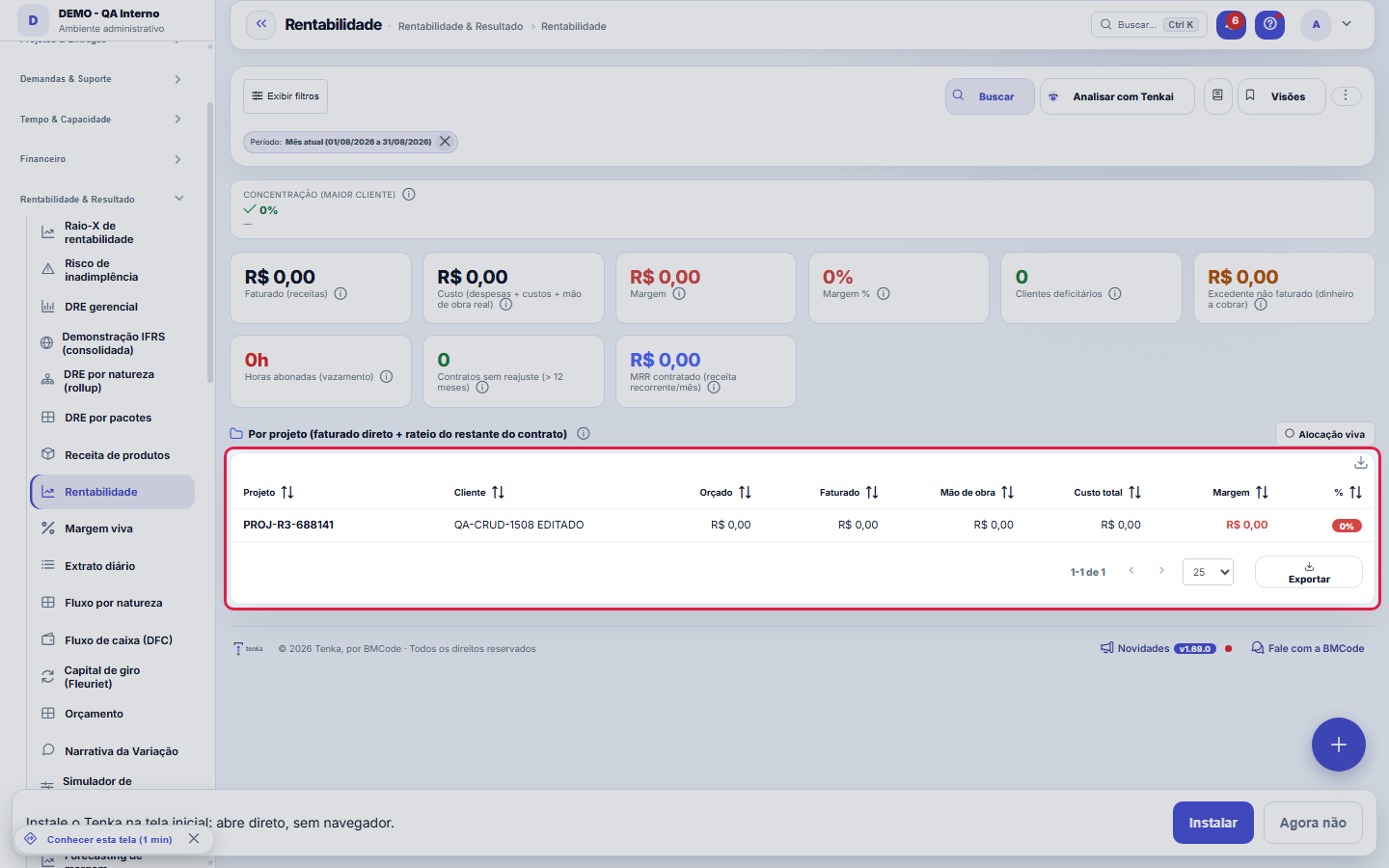
Faturado (receitas)Receita faturada no período e no escopo filtrado.
Custo totalSoma de despesas, custos lançados e mão de obra real, que são horas vezes custo-hora.
MargemFaturado menos custo no período.
Margem %Margem dividida pelo faturado; com custos indiretos é margem de contribuição.
Clientes deficitáriosQuantidade de clientes com margem negativa, custo maior que o faturado.
MRR contratadoReceita recorrente mensal dos contratos ativos.
Consumo do banco de horasHoras consumidas sobre horas contratadas no banco de horas, com alerta acima de 85 por cento.
ContratoNome do contrato que identifica a linha da lista de rentabilidade.
FaturadoReceita faturada atribuída ao contrato no período.
CustoCusto total atribuído ao contrato, incluindo mão de obra real.
MargemFaturado menos custo do contrato no período.
Margem % do contratoMargem do contrato dividida pelo seu faturado.
ProjetosQuantos projetos estão vinculados ao contrato no recorte.
Número do contrato
Cliente
Start here
What you do here
Analyze the operation's real margin: each client's/project's billed amount against the true cost of hours worked. Switch the view (client, contract, project, employee) and the period.
Who brings profit and who hides a loss.
The panel at the top, contracts in the list
At the top are Tenkai’s analysis, the comparison with the previous period, the cards (billed, cost, margin, loss-making, excess, MRR, hour bank), the 12-month trend and the sections by customer — with excess to bill and Bill excess —, partner, project and employee. Below, the list of contracts in the calculation, with billed, cost, margin, margin % and projects; each row opens the contract record.
How to
Profitability filters in the filter panel
Period, customer, project, program, team, employee, partner, contract and scope (this company or the group) are in the list’s filter panel; Apply redoes the calculation, the cards and the list together, and Clear goes back to the current month. The profitability filter views remain in the bar’s Views button, and ⋮ has the panel preferences and the full-screen PDF.
Rules
Custo-hora é REAL
The cost uses salary + regime charges (CLT with configured charges, PJ per contract). A client can look like +35% margin on the "bare" salary and be NEGATIVE in real cost — this screen shows the truth.
Excedente não faturado
Hours beyond what was contracted that haven't yet turned into a charge appear as surplus — it's money on the table; the action is to bill or renegotiate.
Margin plunging
Fixed-scope projects that blow past their hours melt the margin month by month (e.g.: 30% → 5% in 6 months). Use the margin curve and the margin alert to act early.
A faixa "estes números podem estar incompletos"
When the company imports data from an ERP, this screen shows a discreet banner if there's a document waiting to be linked to a record, a bill not yet classified or a sync in progress. It exists so that a partial number never presents itself as complete. A banner in a neutral tone just means "the import is running" — a normal state during implementation; in a warning tone, it means there's a document missing or on the wrong line, and the link takes you to the integration screen, where the fixing actions are. When there's no caveat at all, the banner doesn't appear.
A visão salva guarda busca, filtros, colunas e ordenação
When you save a view with the Views button, it stores four things: the search text, the applied filters, which columns appear (and in what order) and which column the list is sorted by. Applying the view restores everything at once — including resetting the sort and the page you were on, so the result is exactly what the view describes. Views saved before this version remain valid: whatever they didn't store simply doesn't change when applied.
O erro de preenchimento aparece no campo, ao sair dele
Nas fichas, sair de um campo já dispara a conferência do que dá para conferir na hora: campo obrigatório deixado em branco e e-mail mal formado. O aviso aparece embaixo do campo e desaparece quando você começa a corrigir. Campo numérico não precisa de aviso: ele simplesmente não aceita letra enquanto você digita. Isso é conforto, não a validação final: ao salvar, o sistema confere tudo de novo do lado do servidor.
Preferences of each table
Each support table (by customer, partner, project and employee) has its own gear next to the CSV download button: choose the columns, the order, the rows per page and the density. The CSV comes out as the table is on screen. The cards and charts of the screen are in the list Preferences, in the section Cards and charts on this screen.
Frequently asked questions
Who can access this screen
Access is granted by profile on the Access screen — and this screen is essentially sensitive numbers: billed amount, cost and margin per client, project and employee. Besides the view permission, amounts obey the "View Values" governance: without it the screen opens, but the values come out masked — including in exports, which respect the same mask. Margin per client is usually restricted to management and finance; grant it with judgment.
Como descobrir quem mudou um campo desta ficha?
Open the record and look at the Timeline on the right: it shows each change as "from one value to another", with the person and the date. When there are many changes, use the two filters at the top of the timeline — one by field, the other by person. The search runs in the database, so old changes show up just the same. You can also ask Tenkai: "who changed contract 482?".
Connected screens
Alimentada porApontar horasAs horas apontadas definem o custo real.Usa custo deFuncionáriosO custo-hora com encargos vem do cadastro de pessoas.Cruza comContratosO faturado vem dos contratos e títulos.
Was this article helpful?
In the same module: What is left8
Value Creation (EVA)EVA answers the question the owner most wants to know: "does my business really create value?" Positive accou…Management P&LManagement income statement for the last 12 months: from revenue to profit, with contribution margin, EBITDA,…ConnectorsConnects Tenka to external systems (ERPs, banks, messaging). Each connector holds a credential and a scope; r…Income Statement by PackagesShows the year's actuals on the SAME tree you used to plan the budget: each package (IT, People, Sales...) su…Demonstração IFRS (consolidada)A demonstração statutory do grupo, com a régua honesta: conversão só com cotação real, mapa por rubrica revis…Plan migration simulationWhat the account gains, what it loses, and how much it will pay — before switching.Product revenueConsolidated view of recurring revenue by product: MRR, active subscriptions, and trend — to see which produc…Value Added Statement (DVA)The DVA tells a social story of the result: how much wealth the company created and for whom it went. It's th…
Tenka Academy
Explore the AcademyStep-by-step learning paths for your industry, inside the platform.