

Log hours
Lightweight time entry per ticket — the source of truth for real cost, contract consumption, and profitability.
The screen
The real screen, in the theme you picked above.
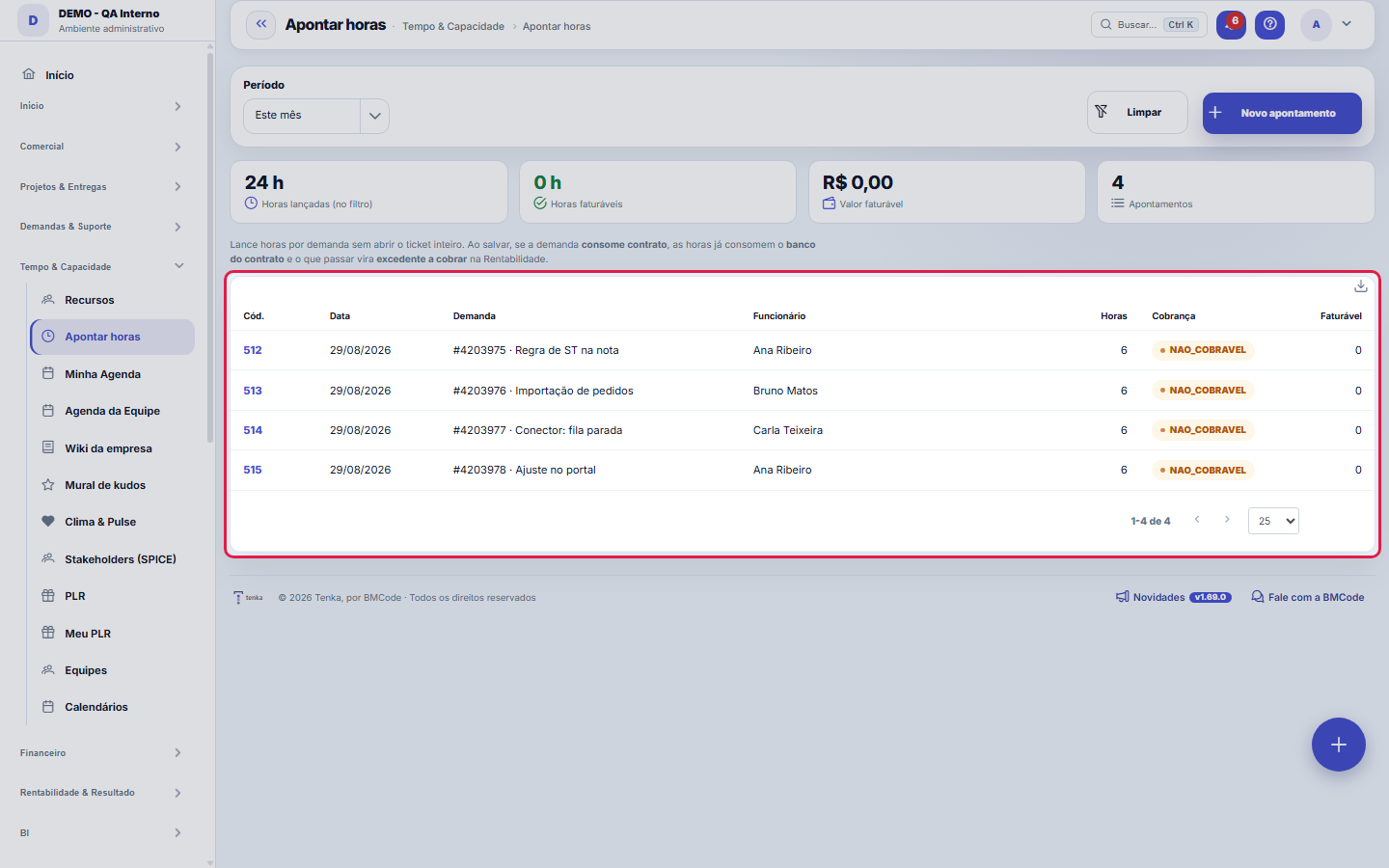
What you find on this screen
A portrait of the screen, read from the screen itself — it changes when the screen changes.
Available actions
New entryCancelLog the entry
Form fields
DemandaDemanda em que as horas foram apontadas.
PessoaQuem executou o trabalho.
O que foi feitoDescrição do trabalho. É o que o cliente lê quando questiona a hora.
InícioComeço do trabalho apontado.
FimTérmino do trabalho apontado.
Horas realizadasHoras efetivamente trabalhadas.
Horas faturáveisHoras que entram na fatura, já com o multiplicador de cobrança.
Valor horaValor da hora usado neste apontamento.
Valor totalHoras faturáveis multiplicadas pelo valor da hora.
TipoNatureza do trabalho apontado.
CobrançaSe a hora é cobrável, cortesia ou retrabalho.
Fora do horárioTrabalho executado fora do horário comercial.
AprovadoApontamento conferido pelo gestor. Só aprovado entra em fatura.
Start here
What you do here
Record the hours worked per request/project. Each logged hour feeds: the client's contract usage (if billable), the real cost (your hourly rate × cost with charges) and the profitability.
The period's numbers, summed in the database
The top adds up the logged hours, billable hours, value and number of entries for the period chosen on the filter rail (this month, last month, 30 days, all or dates). The sum is done in the database over the whole period; before, the screen only looked at the 200 most recent entries.
How to
Lançar horas sem sair da lista
The new time entry button opens a quick dialog on top of the list itself: choose the request (mandatory), the person, the date, the hours and the billing classification — the request and person combos have text search, just type part of the name. The description of what was done is optional but worth its weight in gold when justifying the invoice. When you post it, the table and the four indicators at the top update right away, without reloading the page.
Cobrável ou não cobrável — o que muda
Each entry carries a billing classification, shown as a badge in the list: BILLABLE goes into the billable hours and feeds the consumption of the customer's contract; what isn't billable counts only as hours worked — it measures the team's cost and occupancy, but doesn't become an invoice. That's why the screen shows two separate numbers at the top: hours logged and billable hours. The difference between them is exactly the work the company did and didn't charge for.
See only non-billable hours last month
On the filter rail pick "Last month" and Billing = Non-billable, and apply: KPIs and list show the same cut. Save it as a view to reopen in one click, and export to Excel or PDF from the ⋮ menu.
Rules
Aprovação de horas
When the approval gate is active, logged hours go through manager approval before counting toward billing — rejected entries go back for adjustment.
An hour costs the REAL value
The cost uses salary + regime charges (CLT/PJ) — not the "bare" salary. That's why the margin here is the true margin.
O período filtra os números e a lista juntos
The period selector (This month, Last month, Last 30 days, All or Custom, with From/To) narrows both the entries table and the four indicators at the top at the same time — hours logged, billable hours, amount and quantity. In other words: the card's number is always the sum of what is listed below, never of another set. The Clear button resets the filters to the default. If a total looks strange, first check which period is selected.
A visão salva guarda busca, filtros, colunas e ordenação
When you save a view with the Views button, it stores four things: the search text, the applied filters, which columns appear (and in what order) and which column the list is sorted by. Applying the view restores everything at once — including resetting the sort and the page you were on, so the result is exactly what the view describes. Views saved before this version remain valid: whatever they didn't store simply doesn't change when applied.
O erro de preenchimento aparece no campo, ao sair dele
Nas fichas, sair de um campo já dispara a conferência do que dá para conferir na hora: campo obrigatório deixado em branco e e-mail mal formado. O aviso aparece embaixo do campo e desaparece quando você começa a corrigir. Campo numérico não precisa de aviso: ele simplesmente não aceita letra enquanto você digita. Isso é conforto, não a validação final: ao salvar, o sistema confere tudo de novo do lado do servidor.
Logging is quick; correcting is in the ticket
New entry opens the dialog: ticket, employee, date, hours, hourly rate, billing, type and description. If there is an hours approval authority, the entry stays pending and only counts in margin and billing once approved; if it exceeds the contract's hour bank, it generates an excess to bill. The row opens the read-only record — to correct, open the ticket.
Frequently asked questions
Por que não vejo o valor em R$?
The amount card and the entry's "Hourly rate" field follow your profile's "View Amounts" governance: whoever doesn't have that permission sees the hours normally, but doesn't see money — neither on screen nor in the export, which comes out masked the same way. It's neither a defect nor a cache issue: it's the same rule that applies to every currency amount on the platform. If you need to see the amounts, ask the account administrator to enable "View Amounts" on your profile.
Como descobrir quem mudou um campo desta ficha?
Open the record and look at the Timeline on the right: it shows each change as "from one value to another", with the person and the date. When there are many changes, use the two filters at the top of the timeline — one by field, the other by person. The search runs in the database, so old changes show up just the same. You can also ask Tenkai: "who changed contract 482?".
Connected screens
Vem deDemandasHoras pertencem a uma demanda.AlimentaRentabilidadeCusto real das horas × faturado = margem.DebitaContratosHoras cobráveis consomem o saldo do contrato.
Was this article helpful?
In the same module: Hours and capacity6
Team agendaThe whole team's workload: who has what, capacity × allocated, and SLA per person.Whistleblower managementThe internal whistleblowing channel, with investigation and confidentiality for the whistleblower. Identity i…Team CapacityA future-utilization board: who's free and who's overloaded in the coming weeks, cross-referencing each emplo…Grade semanal de horasA semana do time numa tela: horas por pessoa e por dia, utilização da jornada, o que espera aprovação — e a a…My agendaYour unified view: appointments, tickets with a due date, and the day's hours — your work plan.ResourcesCross-project allocation: who is allocated where, at what percentage, and where there is conflict or idleness.
Tenka Academy
Explore the AcademyStep-by-step learning paths for your industry, inside the platform.