

Team agenda
The whole team's workload: who has what, capacity × allocated, and SLA per person.
The screen
The real screen, in the theme you picked above.
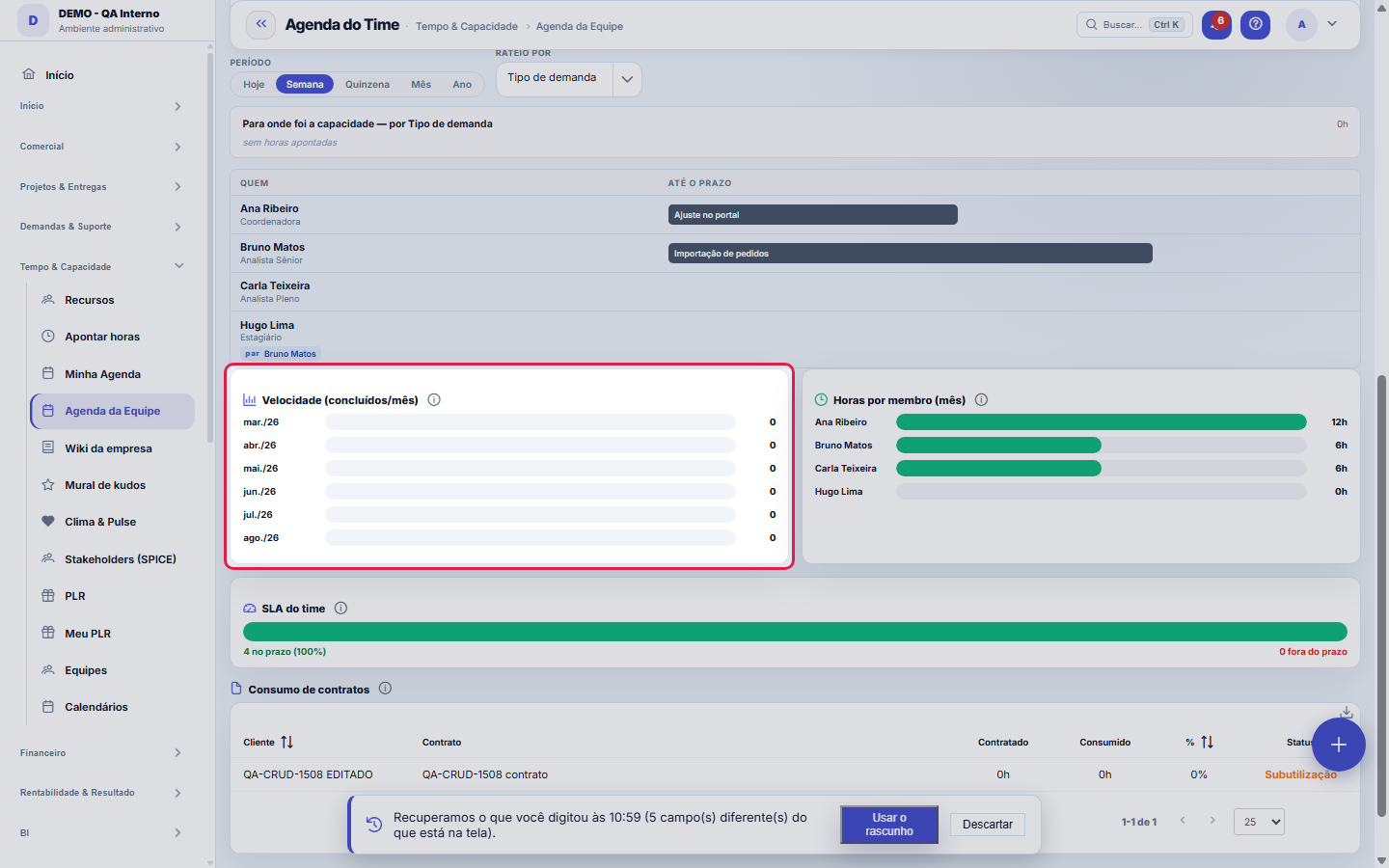
What you find on this screen
A portrait of the screen, read from the screen itself — it changes when the screen changes.
Available actions
RefreshViewsSave current viewApply filtersClearClose
The list shows
CustomerContractContractedConsumed%Status
Form fields
EquipeEquipe escolhida no filtro, que define de quem são os números da tela.
PeríodoRecorte de tempo dos indicadores: mês atual, trimestre, semestre ou ano.
MembrosPessoas ativas vinculadas à equipe selecionada.
Demandas abertas do timeDemandas atribuídas aos membros da equipe que seguem abertas.
Capacidade usadaHoras apontadas pelo time sobre a capacidade disponível no período.
SobrecarregadosMembros com horas acima da capacidade do período.
OciososMembros com carga bem abaixo da capacidade do período.
Entregas no períodoDemandas do time concluídas dentro do período filtrado.
SLA do timePercentual das demandas do time dentro do prazo de previsão.
Horas realizadasTotal de horas apontadas pelo time no período.
Farol da cargaFarol da carga de cada pessoa: sobrecarga, ocupado, OK ou ocioso.
Consumo do contratoHoras consumidas sobre as horas contratadas de cada contrato ativo.
Start here
What you do here
Management view of the team's week: requests per person, available capacity × allocated hours and SLA indicators. Spot overload and redistribute before things fall behind.
O que esta tela responde
How much the team has on its plate, who is overloaded, who is idle, what was delivered and how much of it was on time. It is the view of whoever plans allocation — not the request list, which lives in the Kanban.
How to
Equipe: "Todas as equipes" é o padrão
The filter opens on "All teams", and that is how you see the same person allocated to two teams at the same time — which is the overload no single team shows. Choosing a team scopes everything (KPIs, charts, SLA and contracts) to that team alone. Anyone in more than one team is counted only once.
Duas demandas em "Hoje" avisam, mas não bloqueiam
The board works with a limit of ONE request in progress per person. When a second one appears, the row shows the notice "N in progress — decide which one drops". It is a notice, not a lock: a team that serves customers gets interrupted, and a screen that refuses reality ends up being worked around from the outside — then it stops measuring anything. The limit exists to make visible the decision of which request waits, which today is made in silence and turns into two half-done jobs.
Rules
Como o SLA do time é calculado
By the FORECAST date of each request. The calculation includes the requests delivered within the chosen period AND all those still open today — an open request with its deadline already passed counts as late, because it is precisely the one that requires action. A request without a forecast date has no SLA: it stays out of the calculation and is shown separately, never added to "on time".
Whoever leaves the company stops counting here
Only ACTIVE employees go into the dashboard. The link to the team is kept on purpose (the history of who delivered what must remain intact), but this screen measures CAPACITY: a terminated person came in with a full workload and zero hours, that is, appeared as idle people available to receive work.
O período troca a UNIDADE, não só a largura
In **Today** each cell is a request: the board answers "what is this person doing right now". In **Week** and **Fortnight** it becomes a bar with a start and an end: it answers "when does this end and what comes next". In **Month** and **Year** it becomes a proportion: it answers "how much of this person's time went to each thing". This is not design fussiness, it is arithmetic. Eight people with one request per day make 9 cards in the today view and more than 2,000 in the year view — the same cell that works for a day is illegible for a year. In the year view nobody wants to know that on 03/14 someone did report X; they want to know how much of the year went to each front.
A fatia "sem classificação" é a mais importante da barra
When you choose allocation by PROJECT or by PRODUCT, everything that does not have that field filled in on the request falls into a hatched slice, with a notice of what percentage it represents. It appears on purpose, and it is never hidden. A pretty bar built on 60% of the hours is still pretty — and leads to wrong decisions without raising any error. While that slice is large, the bar is decoration; when it shrinks, it has become an instrument. The fix is not on the screen: it is filling in the project and product on the request. 🪤 Hours logged on a request with no linked product cannot be allocated by product — the time entry stores the request, not the product.
Frequently asked questions
Who can access this screen
Access is controlled by profile: whoever has the permission to view this screen in their access profile finds it in the menu and via Ctrl+K. Granting is done by the account's administrators on the Access screen, profile by profile. Besides the profile, the contracted plan needs to include the Operations module — the two locks are independent: without the module in the plan, not even someone with the permission can open the screen.
The screen said 100% SLA even with overdue requests. Does it still happen?
No. There were two combined defects, fixed in this version: the calculation looked only at requests already CLOSED (so, for it, no open overdue request existed) and it used a comparison that was true for any request closed after being opened — the violations counter had no way to leave zero. Now the rule is the same as the Kanban's, and the number matches the red cards you see there.
Por que alguém aparece com "par" e outros não?
The training pair is filled in on the team record, on the Members tab, in the "Training pair" field. It is for those in training or internship. It exists because people who are learning tend to pick up "whatever is left" when nobody writes down who they work alongside — which is the slowest way to train someone. With the pair on the board, the question "who is accompanying the intern this week" has a visible answer, without a meeting.
Connected screens
Baseada emEquipesOs times e membros vêm do cadastro de equipes.Aloca emRecursosA alocação cross-projeto detalha a capacidade.
Was this article helpful?
In the same module: Hours and capacity6
Whistleblower managementThe internal whistleblowing channel, with investigation and confidentiality for the whistleblower. Identity i…Log hoursLightweight time entry per ticket — the source of truth for real cost, contract consumption, and profitabilit…Team CapacityA future-utilization board: who's free and who's overloaded in the coming weeks, cross-referencing each emplo…Grade semanal de horasA semana do time numa tela: horas por pessoa e por dia, utilização da jornada, o que espera aprovação — e a a…My agendaYour unified view: appointments, tickets with a due date, and the day's hours — your work plan.ResourcesCross-project allocation: who is allocated where, at what percentage, and where there is conflict or idleness.
Tenka Academy
Explore the AcademyStep-by-step learning paths for your industry, inside the platform.