

Plan migration simulation
What the account gains, what it loses, and how much it will pay — before switching.
The screen
The real screen, in the theme you picked above.
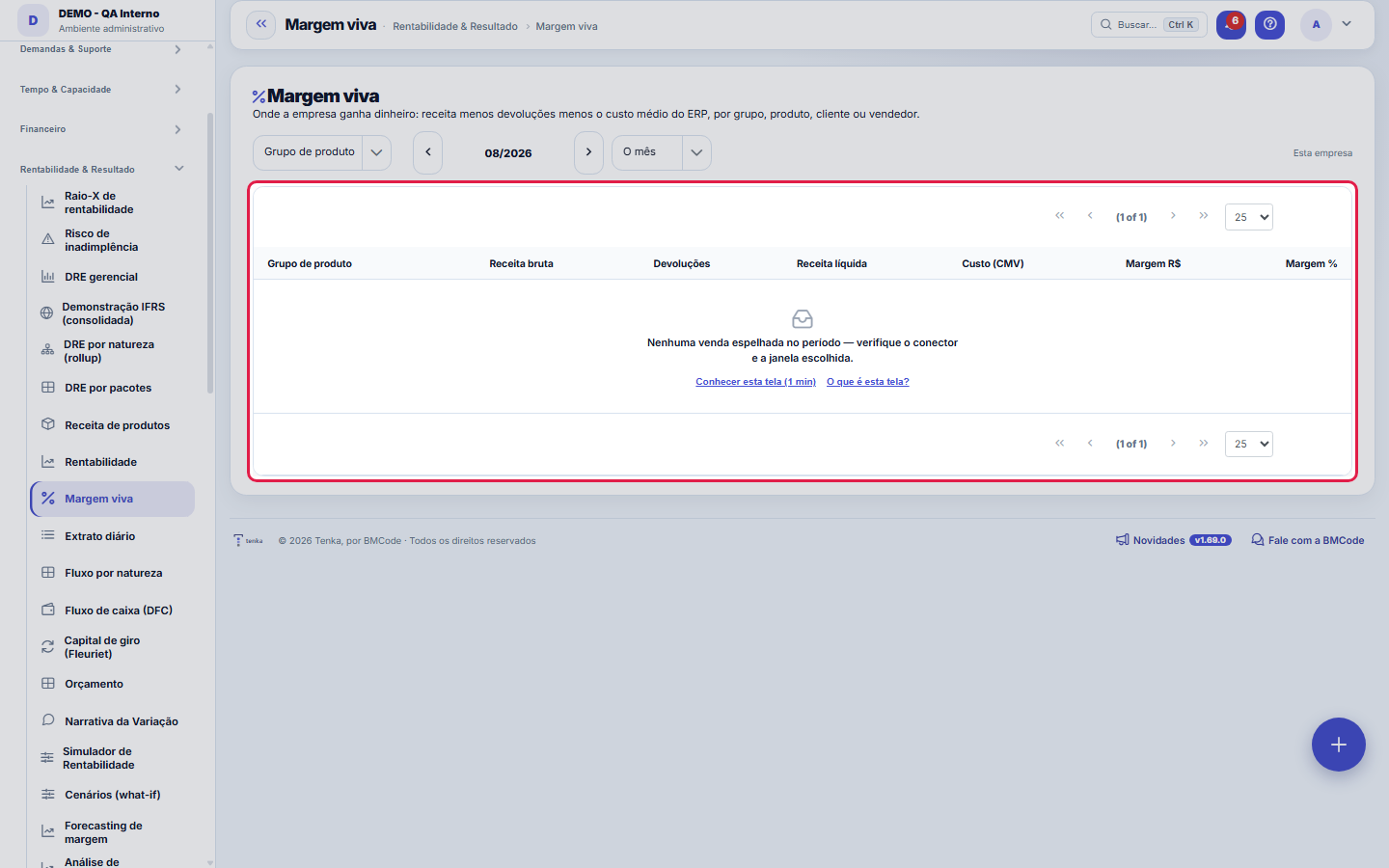
What you find on this screen
A portrait of the screen, read from the screen itself — it changes when the screen changes.
Available actions
Calculate portfolio
The list shows
Gross revenueReturnsNet revenueCost (COGS)MarginMargin %ProjectRevenue soldRevenue to dateCost to dateResult to datePlanned margin+1
Form fields
Nº do pedidoNúmero do pedido por empresa. É o número que o cliente cita ao ligar.
SituaçãoEm que ponto o pedido está: aberto, atendido parcialmente, faturado ou cancelado.
Valor totalValor cheio do pedido, o ponto de partida da margem.
DescontoDesconto concedido na negociação. É o primeiro lugar por onde a margem viva vaza.
ImpostosImpostos embutidos no preço; saem do valor antes de sobrar margem para a empresa.
Valor atendidoQuanto do pedido já foi entregue. Margem só se realiza no que saiu de fato.
Entrega previstaData combinada de entrega, que define quando o custo aparece.
ObservaçãoCombinados da negociação. Costuma ser aqui que está a explicação de um desconto fora do padrão.
Start here
What this screen answers
You sell a lot — but what are you actually making money on? This screen takes what already exists in your ERP and breaks margin down by product group, by product, by customer or by salesperson. It is the reading the source system usually does not deliver ready-made, and it changes decisions about mix, pricing and the sales team's focus.
How to
Group by
Product group answers "which family gives me margin"; Product goes down to the item; Customer shows who buys well and who only brings volume; Salesperson shows the team's result. Start with Group and only then drill down — the rule is to start broad.
A janela (o mês, 3, 6 ou 12 meses)
The arrows move month by month and the window defines how much time goes into the calculation, ending in the month shown. A single month suffers from seasonality and from one large invoice; 3 or 6 months show the real trend.
Head office + branches
It only appears when your company has branches. When on, it adds the head office and its branches — and only those. The other companies in the same account are left out on purpose: consolidating everything would answer a question you did not ask.
Rules
The calculation, in one line
Revenue from invoiced sales − returns − cost of goods sold = margin. The return reduces BOTH sides: it comes off revenue and off cost, because the goods physically came back. Deducting only from revenue would make the margin look worse than it is, every month.
O custo é o do seu ERP — o Tenka não recalcula
The average cost used here is exactly the one registered in your source system. Tenka does not redo that calculation on purpose: the ERP is the one with the full history of receipts, and two numbers for the same question always end with one of them wrong — usually ours.
Margem de 100% quase nunca é lucro
When a product has no average cost registered in the source, the cost comes in as zero and the margin on that line appears full. That is incomplete registration, not profitability. The screen marks those lines with a warning triangle and shows at the top how many items are in that situation — take the list to whoever maintains the registry in the ERP.
Por que os impostos aparecem só no total
The ERP reports tax per INVOICE, not per item. Spreading that tax across groups would require an allocation rule that nobody has checked, and invented margin is worse than missing margin. So the tax appears as a total at the top, where the number is exact.
Quem não pode ver valores não abre esta tela
The whole screen respects the profile's "View Values" permission. Whoever lacks it sees the notice and no numbers — and the same applies when the question is asked to Tenkai: it answers the ranking without the R$ amounts.
Frequently asked questions
What this screen answers
Because returns coming from the ERP do not carry a salesperson — they are tied to the document, not to the person on commission. In the Group, Product and Customer views the return is deducted; in the Salesperson view revenue is gross. Once the link comes from the source, that difference disappears.
A tela diz "—" na coluna de margem %. É zero?
No. "—" means there was no net revenue in the period, so the percentage does not apply. Zero percent would say "sold and made nothing", which is different information — and needlessly alarming.
Está vazio e eu sei que houve venda
Three causes, in this order: the chosen window does not cover the invoice's month; the connector has not yet brought in that period (check Connector monitoring); or the invoices of that period are pending operation-type classification — an invoice without a class does not enter the mirror, on purpose.
Where do I see the margin of all fixed-scope projects?
In Live margin, scroll to "Project portfolio (P&L)" and click "Calculate portfolio". Each project with sold roles appears: revenue sold, revenue, cost and result to date, planned and to-date margin — using the same calculation as the Project P&L tab. The alert icon flags a project with hours lacking a person, phase or hourly cost. The product margin figures above do not change.
Was this article helpful?
In the same module: What is left8
Value Creation (EVA)EVA answers the question the owner most wants to know: "does my business really create value?" Positive accou…Management P&LManagement income statement for the last 12 months: from revenue to profit, with contribution margin, EBITDA,…ConnectorsConnects Tenka to external systems (ERPs, banks, messaging). Each connector holds a credential and a scope; r…Income Statement by PackagesShows the year's actuals on the SAME tree you used to plan the budget: each package (IT, People, Sales...) su…Demonstração IFRS (consolidada)A demonstração statutory do grupo, com a régua honesta: conversão só com cotação real, mapa por rubrica revis…Product revenueConsolidated view of recurring revenue by product: MRR, active subscriptions, and trend — to see which produc…ProfitabilityThe crown jewel: billed × real cost × margin by customer, contract, project, and person — find out who genera…Value Added Statement (DVA)The DVA tells a social story of the result: how much wealth the company created and for whom it went. It's th…
Tenka Academy
Explore the AcademyStep-by-step learning paths for your industry, inside the platform.