

Management P&L
Management income statement for the last 12 months: from revenue to profit, with contribution margin, EBITDA, and net result, by period.
What you find on this screen
A portrait of the screen, read from the screen itself — it changes when the screen changes.
The list shows
CodeTypeAccountDescriptionCustomerDue dateAmount
Form fields
Receita brutaFaturamento total do período antes de deduções e impostos sobre venda.
Deduções e impostos sobre vendaImpostos sobre venda, devoluções e descontos que reduzem a receita bruta.
Receita líquidaReceita bruta menos as deduções e impostos sobre venda.
Custos variáveisCustos que variam com o volume vendido, incluindo o custo da mercadoria.
Margem de contribuiçãoReceita líquida menos custos variáveis: o que sobra para pagar gastos fixos.
Gastos fixosGastos que não variam com o volume vendido no período.
EBITDA gerencialResultado da operação antes de juros, impostos sobre lucro e depreciação.
Resultado líquidoLucro ou prejuízo final do período, depois de financeiro e IR/CSLL.
Ponto de equilíbrioFaturamento que zera o resultado no mês: gastos fixos divididos pela margem de contribuição.
Margem de contribuição %Quanto sobra de cada real de receita depois dos custos variáveis.
Margem de segurançaO quanto a receita atual está acima do ponto de equilíbrio, a folga antes do prejuízo.
Margem EBITDA (12 meses)Quanto do faturamento vira caixa da operação, no acumulado de 12 meses.
Start here
O que você vê
The month-by-month result cascade: Gross revenue → deductions (taxes) → Net revenue → variable costs → Contribution margin → fixed expenses → EBITDA → depreciation/interest → Net result. Each line sums the entries for that accounting period.
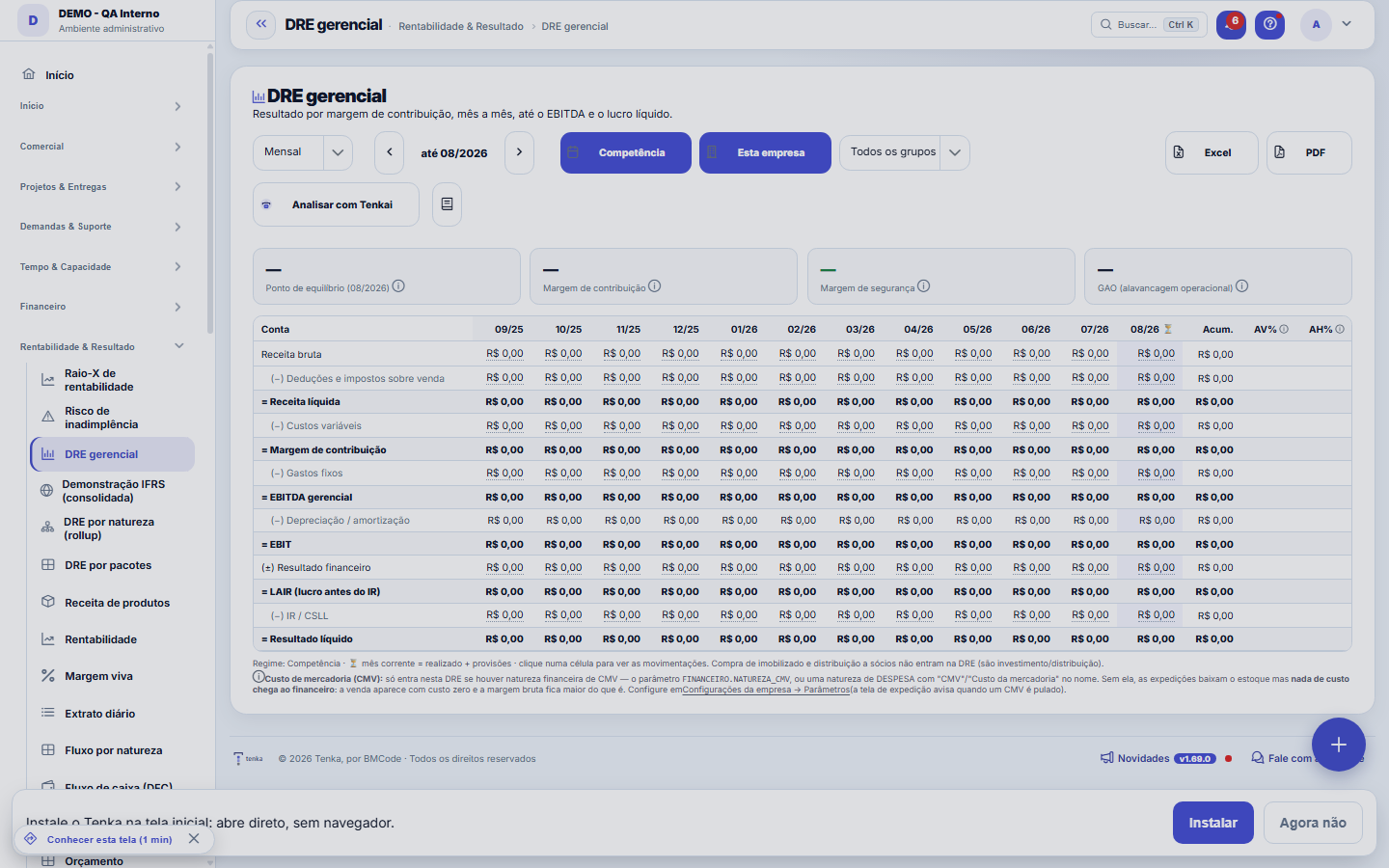
From revenue to profit, period by period.
Impact
The DRE feeds the Health Score, the Financial Alerts, the Budget comparison and the CFO letter. It's the source of truth for the management result.
How to
Filtrar o grupo por unidade, no seletor do topo
In the company selector at the top of the screen there's the group tree: "All" selects every company you have access to, and clicking a unit selects all the companies in that branch at once. The number next to each unit only counts the companies enabled for your user — and the choice made there is already applied on this screen. Important: "all companies" always means the companies you have access to, never the whole group; if a total looks smaller than expected, check with the administrator which companies are enabled for you.
Passo a passo: ler o DRE e chegar ao lançamento
- Choose the period. The income statement is built from what has been entered — accrual basis, not cash.
- Drill down into the line that caught your eye. Each number leads to the list that formed it: click to see the entries behind the total, instead of hunting for them by hand.
- Compare. Use the period comparison to tell variation from seasonality — a line that doubles in one month and comes back the next is rarely a structural problem.
Filters in the bar and saved views
The filters (granularity, basis, scope, product group) sit in the top bar and are not lost when the report redraws. Build the cut you repeat and save it as a view: it reopens the same, just for you.
Rules
Monthly / Quarterly / Half-yearly / Yearly views
The view button aggregates the 12 accounting periods in the selected range, adding up the months. The "Accumulated" column is the sum for the year; AV% compares each line with net revenue and AH% compares the month with the previous one.
Where each line comes from
From the CLASSIFICATION of the entry's financial category: type (revenue/expense), accounting group (operational/tax/financial/fixed asset/partner) and behavior (variable/fixed). Classify the categories well so the DRE comes out correct — it's what separates variable cost from fixed expense.
EBITDA margin and AI opinion
The EBITDA margin (EBITDA ÷ net revenue) measures operational cash generation. The analysis button generates an AI opinion using ONLY the figures calculated (with a calculation trail) — it doesn't make things up.
Drill-down per line
Click a line to open, in the side panel, the entries that make it up in the period — with a link to the movement and color-coded by revenue/expense.
Accrual vs. cash
Default = ACCRUAL regime (the result falls in the month the event happened, even without having paid/received yet). There's the "cash basis" option. A month with no entries on an accrual basis shows as zero — it's not an error, it's the absence of classified data.
A faixa "estes números podem estar incompletos"
When the company imports data from an ERP, this screen shows a discreet banner if there's a document waiting to be linked to a record, a bill not yet classified or a sync in progress. It exists so that a partial number never presents itself as complete. A banner in a neutral tone just means "the import is running" — a normal state during implementation; in a warning tone, it means there's a document missing or on the wrong line, and the link takes you to the integration screen, where the fixing actions are. When there's no caveat at all, the banner doesn't appear.
Frequently asked questions
DRE vs. DFC vs. cash balance
The DRE is PROFIT (accrual basis); the DFC is CASH (what actually came in/went out); the cash balance is today's position. Positive profit with low cash is common — that's why the three screens coexist.
Why does the contribution margin show 100%?
Because no cost in the period is classified as variable: without variable costs, everything that comes in looks like it is left over. Open Financial categories and mark as Variable or Direct the cost categories that grow with sales, such as raw materials, commission, freight and sales tax. Then open the income statement again: the contribution margin, break-even point and leverage become meaningful.
Connected screens
Soma deMovimentação FinanceiraCada célula é a soma das movimentações financeiras do período.Classifica porNaturezas FinanceirasA cascata usa a classificação contábil das naturezas.
Was this article helpful?
In the same module: What is left8
Value Creation (EVA)EVA answers the question the owner most wants to know: "does my business really create value?" Positive accou…ConnectorsConnects Tenka to external systems (ERPs, banks, messaging). Each connector holds a credential and a scope; r…Income Statement by PackagesShows the year's actuals on the SAME tree you used to plan the budget: each package (IT, People, Sales...) su…Demonstração IFRS (consolidada)A demonstração statutory do grupo, com a régua honesta: conversão só com cotação real, mapa por rubrica revis…Plan migration simulationWhat the account gains, what it loses, and how much it will pay — before switching.Product revenueConsolidated view of recurring revenue by product: MRR, active subscriptions, and trend — to see which produc…ProfitabilityThe crown jewel: billed × real cost × margin by customer, contract, project, and person — find out who genera…Value Added Statement (DVA)The DVA tells a social story of the result: how much wealth the company created and for whom it went. It's th…
Tenka Academy
Explore the AcademyStep-by-step learning paths for your industry, inside the platform.