

Financial categories
The managerial chart of accounts: classify each invoice by category (service revenue, payroll, taxes...) for clean analysis.
The screen
The real screen, in the theme you picked above.
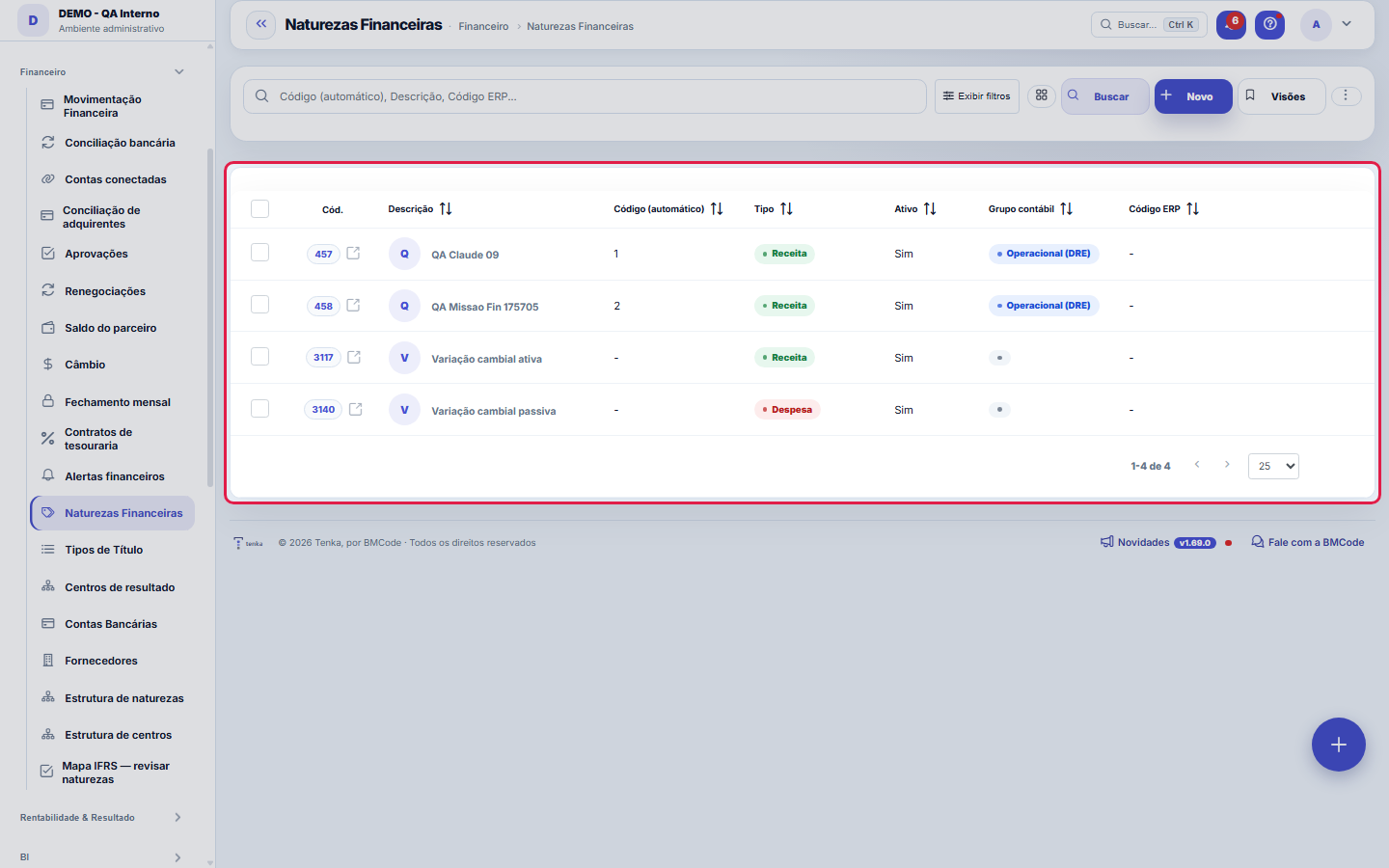
What you find on this screen
A portrait of the screen, read from the screen itself — it changes when the screen changes.
Form fields
Código (automático)Código gerado automaticamente pela posição na árvore (raiz "1", filha "1.01"). Mover a natureza na Árvore de Naturezas renumera o ramo.
Descrição*Nome da natureza — aparece nos lançamentos e relatórios.
Tipo*Receita (entra), Despesa (sai) ou Ajuste.
SinalEntrada (+) soma; Saída (−) subtrai no saldo.
AtivoNaturezas inativas não aparecem para seleção.
Grupo contábilOnde a movimentação entra na contabilidade: Operacional (DRE), Imposto, Imobilizado (Balanço, deprecia), Sócio (aporte/distribuição) ou Financeiro.
Papel fiscalSó para naturezas de IMPOSTO: decide se ele fica ABAIXO do resultado (IRPJ/CSLL, que incidem sobre o lucro) ou DEDUZ a receita bruta (ISS, PIS, COFIN…
Papel no IR (pessoa física)Na vertical Família: como a categoria entra no Imposto de Renda da pessoa — aluguel recebido (carnê-leão), IPTU e condomínio do imóvel alugado, saúde…
Código ERP
Essencial, necessário ou extraO corte do gasto da casa.
Start here
What you do here
Maintain the nature tree (revenues and expenses). Every transaction requires a nature — it's what gives management meaning to the cash flow (how much came in from services, how much went out for payroll).
O que esta tela faz
It is the catalog of financial natures — the classification every transaction carries and that builds the management income statement. The hierarchical code is automatic; Type and Sign say whether the nature adds (revenue) or subtracts (expense) in the totals; Accounting group and Tax role place the nature in the reports. A click on the row opens the record for editing, and the export takes the entire filtered set, not just the visible page.
O que esta tela responde
The nature is what turns an entry into information: it builds the income statement, cost and value added. Classifying everything as "other" does not raise an error anywhere — it just empties every report that depends on cost, such as the value added statement.
How to
Recorte por URL e visões salvas
?q= searches, ?fd_= filters by a dictionary field and ?excluidas=1 opens the recycle bin — links coming from other screens arrive here already narrowed to the right set. Column preferences and saved views are per user, and Ctrl+K finds any screen by name or synonym. Excel, PDF and CSV export the entire set of the current selection, not just the page on screen.
Grupo contábil, classe de custo e comportamento
Three fields decide where the entry lands in the management income statement: Accounting group (Operating, Tax, Financial, Fixed assets, Partner) chooses the block; Cost class separates direct from indirect — indirect costs such as rent, administrative and tools go into another level of the result; Behavior marks fixed or variable — direct variable costs make up the contribution margin. The panel at the end of the form shows, in real time, how the chosen combination enters the income statement: check it before saving, because a wrongly classified nature distorts the entire income statement.
Factory overhead
Turn it on for factory rent, production energy, machine maintenance, supervisor and planning salaries. The 3-month average of these categories is divided by the factory’s available minutes and becomes the overhead of the cost per minute — which the tech sheet allocates to each garment by the time it takes. Administrative and sales expenses stay off: they enter the price as margin, not the garment cost.
Rules
A visão salva guarda busca, filtros, colunas e ordenação
When you save a view with the Views button, it stores four things: the search text, the applied filters, which columns appear (and in what order) and which column the list is sorted by. Applying the view restores everything at once — including resetting the sort and the page you were on, so the result is exactly what the view describes. Views saved before this version remain valid: whatever they didn't store simply doesn't change when applied.
O erro de preenchimento aparece no campo, ao sair dele
Nas fichas, sair de um campo já dispara a conferência do que dá para conferir na hora: campo obrigatório deixado em branco e e-mail mal formado. O aviso aparece embaixo do campo e desaparece quando você começa a corrigir. Campo numérico não precisa de aviso: ele simplesmente não aceita letra enquanto você digita. Isso é conforto, não a validação final: ao salvar, o sistema confere tudo de novo do lado do servidor.
A natureza é a língua do seu DRE
Each entry points to a nature, and the management income statement adds up BY nature — creating a new nature means creating a new line in the result. Before creating one, check whether there is already one that says the same thing: two natures for the same subject split the number in two and hide the total.
Renomear muda o passado — e às vezes é isso que você NÃO quer
The nature's name appears on every entry that already uses it: renaming "Marketing" to "Sales" rewrites how the history reads. To change course from here on, prefer creating the new nature and deactivating the old one — the past keeps telling the truth of its time.
Uma anotação pode virar demanda
In the record's activity panel, each note has "Turn into request". The click creates a ticket with the note's text, who wrote it and the link to this record — nothing is retyped. Use it when the note is a request for action ("someone needs to review this"); the note stays where it was. The button only appears once the record has been saved; a read-only session (demo) doesn't create one.
Frequently asked questions
What the Signal (multiplier) decides
The Sign defines how the entry enters the calculation: 1 adds (receivable/revenue), -1 subtracts (payable/expense). It is what lets the same list of transactions produce Revenue, Expenses and Net result with no hidden rule — the total is the sum of the amounts already multiplied by the nature's sign. That is why changing the sign of a nature in use changes the reading of every entry that carries it: check Type and Sign together before saving.
Como descobrir quem mudou um campo desta ficha?
Open the record and look at the Timeline on the right: it shows each change as "from one value to another", with the person and the date. When there are many changes, use the two filters at the top of the timeline — one by field, the other by person. The search runs in the database, so old changes show up just the same. You can also ask Tenkai: "who changed contract 482?".
Connected screens
Was this article helpful?
In the same module: Finance27
Settlement between familiesQuem pagou pelos outros e quem deve no mês, pelas contas e cartões de cada família e pelo que cada uma consum…Release limitsThe approval bands: up to how much each role releases alone and from what amount it escalates to the superior.Credit cardsOs cartões da família: limite, dia de fechamento e vencimento, gasto em aberto. O gasto entra na fatura; a fa…Cost centersSplit the result by area/unit: each invoice can point to a center, enabling analysis by business unit.Bank accountsThe company's accounts: bank, branch, balance, and the link with settlements and reconciliation.Annual household billsIPVA, property tax, insurance, school supplies: the year’s amount becomes “save this much a month” in the hou…Rental contractsOs imóveis alugados: inquilino, valor, vencimento, prazo, índice de reajuste e garantia. O recebimento de cad…Monthly money talkThe 5-question agenda built from the month’s numbers for the couple to answer on the phone, and the household…
Tenka Academy
Explore the AcademyStep-by-step learning paths for your industry, inside the platform.