

Cost centers
Split the result by area/unit: each invoice can point to a center, enabling analysis by business unit.
The screen
The real screen, in the theme you picked above.
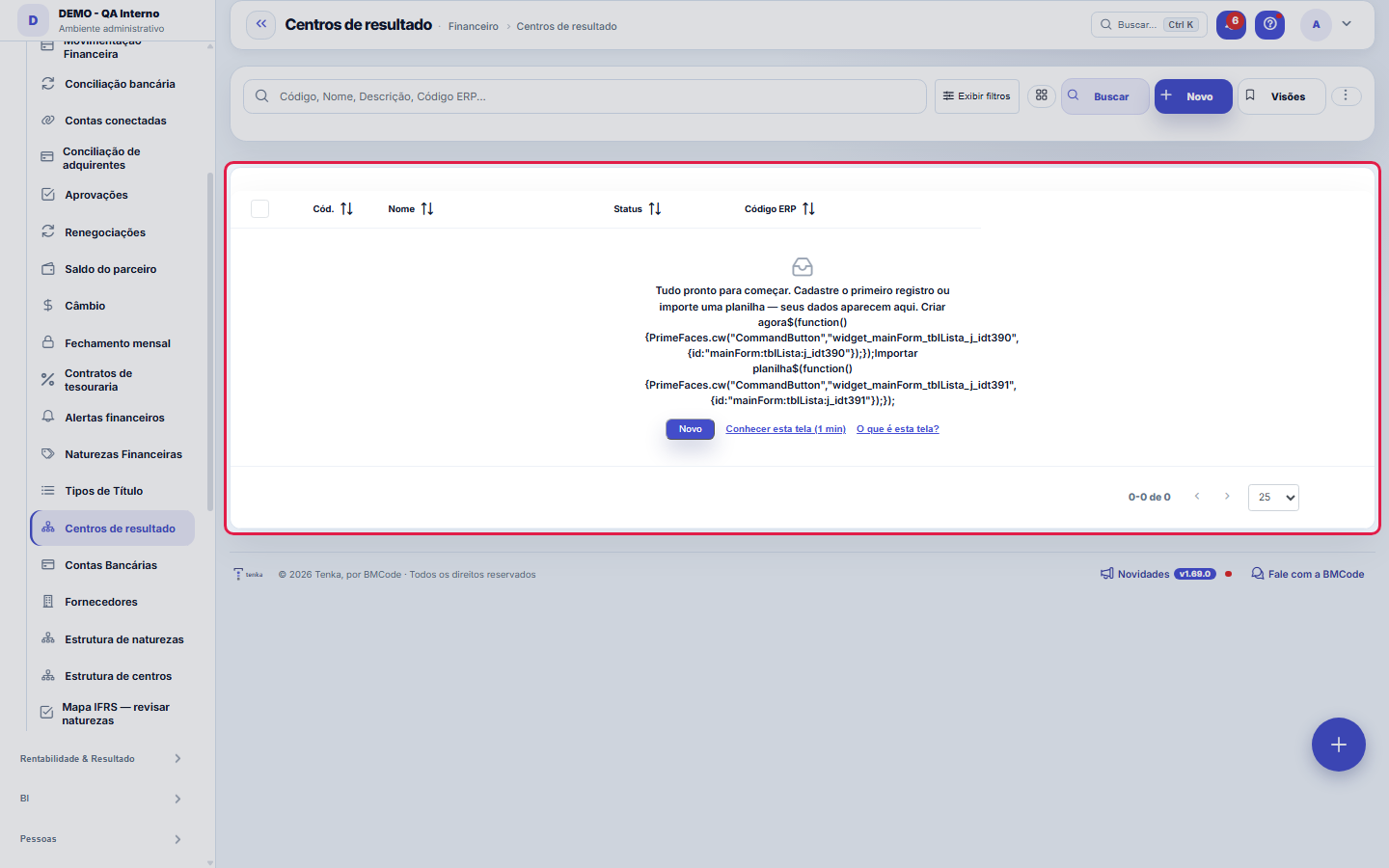
What you find on this screen
A portrait of the screen, read from the screen itself — it changes when the screen changes.
Available actions
CapexMoveSaveAdd target
The list shows
CenterProjectBudgeted capexActuals this yearSOURCE centerTargets
Form fields
CódigoCódigo curto do centro (ex.: TI).
Nome*Nome do centro de resultado (setor/área).
Centro paiCentro pai (hierarquia). Vazio = centro raiz.
DescriçãoDescrição/observação do centro.
StatusCentros inativos não aparecem para seleção.
TipoOperacional (padrão), Projeto, Pessoa ou Família. Pessoa e Família organizam o "para quem" da vertical Família, o IR por pessoa e o acerto entre famí…
Titular (de quem é)De quem é este centro: o imóvel é do dono, o dependente é de quem declara. Vazio = o próprio centro ou a pessoa acima dele.
ParentescoQuem é esta pessoa na casa (cônjuge, filho, pai ou mãe…).
Data de nascimentoServe para a idade dos dependentes e para lembrar o aniversário.
Dependente no IRMarque se esta pessoa é declarada como dependente de alguém (o titular dela, em "Titular"). O IR da família deduz o valor legal por dependente.
Código ERP
Start here
What you do here
Register profit centers (areas, squads, units). Classify invoices to answer "which area is profitable?" without a parallel spreadsheet.
O que esta tela faz
Registers and organizes the company's profit (or cost) centers. They're hierarchical — the Parent center field builds the tree — and they're reused in contracts and financial transactions, to read revenue, cost and result by area. The ERP Code ties each center to the source system's code when there's an integration. Clicking the row opens the record for editing.
How to
Busca e filtro direto pela URL
This list accepts filtering by link: ?q= searches, ?fd_= filters by a dictionary field and ?excluidas=1 opens the recycle bin. That's how a total clicked on another screen arrives here already narrowed to the same set that made up the number. Also: views saved per user, column preferences and Excel/PDF/CSV export of the entire filtered set — not just the visible page. And Ctrl+K finds any screen by name or synonym.
Centro pai e Código ERP
Parent center places the center in the hierarchy: leave it empty for a top-level center and point to a parent to create subdivisions (e.g. "Sales" with "Pre-sales" under it). This tree is what contracts and finance reuse to allocate and group results. ERP Code is the reference used to match the center with the source system in imports and integrations — if the company came from another ERP, filling it in avoids duplicate centers in the loads.
The structure at the top of the list
The collapsible Center structure block at the top of the list shows the tree: groups (summary) in bold and leaves (detail) below. On each node: Move (choose the parent group), Make root, Visibility by company and Type (operational or project/CAPEX). The Show inactive button only appears when there is an inactive center. The old structure address opens the list with the block already open.
Rules
A visão salva guarda busca, filtros, colunas e ordenação
When you save a view with the Views button, it stores four things: the search text, the applied filters, which columns appear (and in what order) and which column the list is sorted by. Applying the view restores everything at once — including resetting the sort and the page you were on, so the result is exactly what the view describes. Views saved before this version remain valid: whatever they didn't store simply doesn't change when applied.
O erro de preenchimento aparece no campo, ao sair dele
Nas fichas, sair de um campo já dispara a conferência do que dá para conferir na hora: campo obrigatório deixado em branco e e-mail mal formado. O aviso aparece embaixo do campo e desaparece quando você começa a corrigir. Campo numérico não precisa de aviso: ele simplesmente não aceita letra enquanto você digita. Isso é conforto, não a validação final: ao salvar, o sistema confere tudo de novo do lado do servidor.
Household members: relationship, birth date and dependant
When the type is Person, the form asks for the relationship, the birth date and whether the person is an income-tax dependant. The dependant goes into the return of their holder (the "Holder" field): the family income tax shows each person’s dependants and deducts the legal amount per dependant in the monthly tax, when you don’t use the simplified discount.
Invite a household member to have their own login
In a Family account, open the card of a member of type Person and use “Invite to the account”: enter the e-mail and, for a child, tick Child. The invite goes by e-mail with a link for the person to set the password (the link also shows on screen, to send another way). The member logs in with their own “for whom” already set on entries.
What the structure does not allow
A center cannot be its own parent or the parent of an ancestor (it would create a cycle), and a center that already has entries does not become a group — reclassify its entries to a leaf first. Importing the tree from the bar shows the review (name, status and parent) and only saves after confirmation; the parent is the code declared in the spreadsheet, never the prefix.
Frequently asked questions
Como descobrir quem mudou um campo desta ficha?
Open the record and look at the Timeline on the right: it shows each change as "from one value to another", with the person and the date. When there are many changes, use the two filters at the top of the timeline — one by field, the other by person. The search runs in the database, so old changes show up just the same. You can also ask Tenkai: "who changed contract 482?".
Connected screens
Was this article helpful?
In the same module: Finance27
Settlement between familiesQuem pagou pelos outros e quem deve no mês, pelas contas e cartões de cada família e pelo que cada uma consum…Release limitsThe approval bands: up to how much each role releases alone and from what amount it escalates to the superior.Credit cardsOs cartões da família: limite, dia de fechamento e vencimento, gasto em aberto. O gasto entra na fatura; a fa…Bank accountsThe company's accounts: bank, branch, balance, and the link with settlements and reconciliation.Annual household billsIPVA, property tax, insurance, school supplies: the year’s amount becomes “save this much a month” in the hou…Rental contractsOs imóveis alugados: inquilino, valor, vencimento, prazo, índice de reajuste e garantia. O recebimento de cad…Monthly money talkThe 5-question agenda built from the month’s numbers for the couple to answer on the phone, and the household…Approval delegationsWhen an approver is away (vacation/absence), delegate to someone so the flow doesn't get stuck.
Tenka Academy
Explore the AcademyStep-by-step learning paths for your industry, inside the platform.