

Partners (shareholders)
The ownership structure: who the partners are, each one's stake, and the base data for profit distribution.
The screen
The real screen, in the theme you picked above.
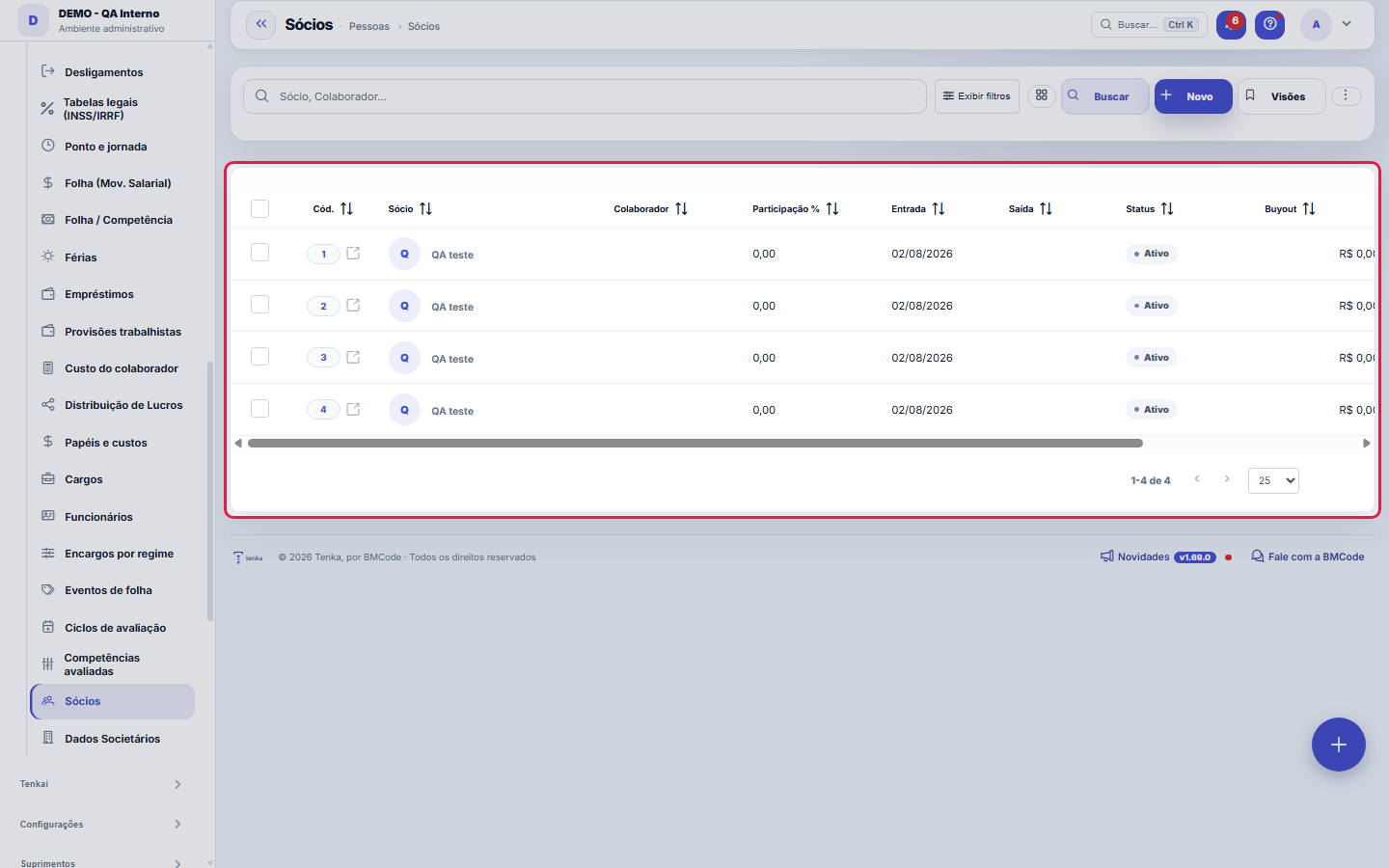
What you find on this screen
A portrait of the screen, read from the screen itself — it changes when the screen changes.
Form fields
SócioNome do sócio (use quando não for um colaborador cadastrado).
ColaboradorColaborador vinculado, se o sócio também for funcionário. Usado como pagador na distribuição.
Participação %Participação percentual vigente do sócio.
EntradaData de entrada do sócio na sociedade.
SaídaData de saída (preenchida ao registrar a saída).
StatusATIVO (participa) ou SAIU (deixou a sociedade).
BuyoutValor total do buyout pago na saída.
ObservaçãoObservações internas sobre o sócio.
Tipo de sócioPapel do sócio: administrador, cotista ou investidor.
Quotas/açõesQuantidade de quotas ou ações subscritas pelo sócio.
Capital subscritoCapital comprometido (subscrito) pelo sócio.
Capital integralizadoCapital efetivamente integralizado (pago) pelo sócio.
IntegralizaçãoData da última integralização de capital pelo sócio.
Start here
What it's for
The source registry of the corporate module: ownership percentages feed the profit distribution and the corporate documents.
Rules
Percentages
The Ownership % column shows each partner's current percentage on the board. This number isn't edited by hand with each change: it evolves through corporate events — entry, exit, change, and contribution — which record the previous percentage and the new one and form the partner's auditable history. When checking the board, add up the active partners' stakes: a divergence from the expected total usually points to a missing event (an unregistered exit, a half-entered contribution), not an accounting error.
Pró-labore vs. distribution
Pró-labore is monthly compensation (payroll, with charges); profit distribution is a result (no INSS, calculated in Profit Distribution). Mixing the two is a tax risk — handle each one in its own place.
Confidentiality
The ownership board carries the company's most sensitive data: each partner's stake, subscribed and paid-in capital, buyout value on exit. Access to the screen is controlled by profile, and the R$ values obey the View Values permission — whoever doesn't have it sees the fields masked, including in the table's CSV export, which comes out exactly as the screen shows it. Before granting access to this screen for a new profile, think about who needs to see stake and capital, not just the list of names.
A visão salva guarda busca, filtros, colunas e ordenação
When you save a view with the Views button, it stores four things: the search text, the applied filters, which columns appear (and in what order) and which column the list is sorted by. Applying the view restores everything at once — including resetting the sort and the page you were on, so the result is exactly what the view describes. Views saved before this version remain valid: whatever they didn't store simply doesn't change when applied.
O erro de preenchimento aparece no campo, ao sair dele
Nas fichas, sair de um campo já dispara a conferência do que dá para conferir na hora: campo obrigatório deixado em branco e e-mail mal formado. O aviso aparece embaixo do campo e desaparece quando você começa a corrigir. Campo numérico não precisa de aviso: ele simplesmente não aceita letra enquanto você digita. Isso é conforto, não a validação final: ao salvar, o sistema confere tudo de novo do lado do servidor.
Redistribute the stake on exit
When you record a partner's exit, the window shows one field per remaining partner, with the current percentage beside it; the sum of the new percentages appears below before you confirm.
Frequently asked questions
Did the ownership structure change?
Did the board change — a partner joined, a partner left, someone made a contribution, or the stake was redistributed? Record the fact as a corporate event in the partner's registry, with the date and the previous and new percentage: the current stake on the list then reflects the event, and the history becomes auditable. Don't edit the percentage directly to "fix the number": without the event, the board might be correct today, but the story of how it got there is lost — and that story is what a will, a contract, and an audit ask for.
Como descobrir quem mudou um campo desta ficha?
Open the record and look at the Timeline on the right: it shows each change as "from one value to another", with the person and the date. When there are many changes, use the two filters at the top of the timeline — one by field, the other by person. The search runs in the database, so old changes show up just the same. You can also ask Tenkai: "who changed contract 482?".
Was this article helpful?
In the same module: People7
PositionsThe company's positions: title, seniority, and range — organizes the headcount and the org chart.Evaluation cyclesThe container for everything: which period is being evaluated, within what window it is filled out, which sca…Evaluated competenciesThe cycle's standard: what will be evaluated, how much each item weighs, and — the field that makes the diffe…Corporate ownership dataWho the partners are, with what stake, and what that means for profit distribution and obligations.Payroll charges by employment typeThe percentages that turn salary into COST: charge components by employment type (INSS, FGTS, 13th salary, va…Payroll eventsThe payroll entry types: earnings and deductions, fixed or variable.EmployeesThe people behind the operation: data, position, employment type (CLT/independent contractor), salary, and ca…
Tenka Academy
Explore the AcademyStep-by-step learning paths for your industry, inside the platform.