

Leads
Contacts under qualification (pre-sale), before they become an opportunity and a customer. With import, duplicate warning, and conversion into a customer.
The screen
The real screen, in the theme you picked above.
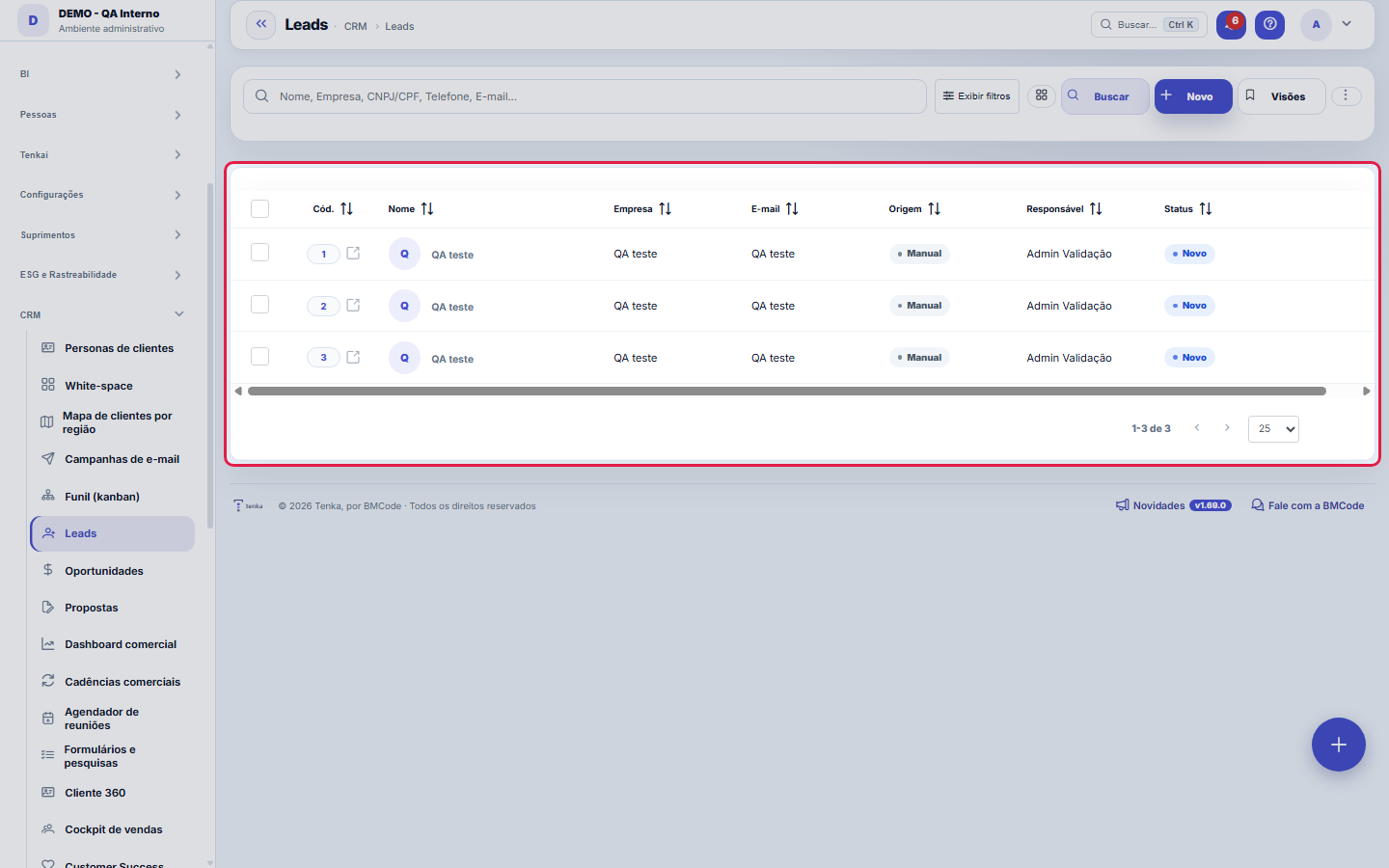
What you find on this screen
A portrait of the screen, read from the screen itself — it changes when the screen changes.
Form fields
CódigoCódigo sequencial (automático).
Nome*Nome do contato.
EmpresaEmpresa do prospect.
CargoCargo do contato.
CNPJ/CPFDocumento do prospect.
TelefoneTelefone/WhatsApp.
E-mailE-mail do contato.
OrigemComo o lead chegou.
CampanhaCampanha de origem.
ResponsávelVendedor responsável.
StatusEtapa de qualificação do lead.
Aderência ao cliente idealQuanto este lead se parece com os seus clientes mais rentáveis (0 a 100), por setor, UF e porte. Calculada em Comercial ▸ Perfil de cliente ideal ▸ P…
ParceiroO parceiro comercial que registrou o lead. Ele é o dono por 90 dias, renovados a cada visita anotada.
Start here
What you do here
Register and import leads (spreadsheet), qualify them (New → Qualifying → Qualified) and, once mature, convert to client — inheriting contact, document and source.
Para que esta tela existe
Contacts in qualification (pre-sales), with dedupe and conversion into customer. — this is the role of the "Leads" screen within the platform.
How to
Origem, campanha e responsável
Source records how the lead arrived; Campaign is the field that links the lead to the investment that brought it — it's through this field that campaign ROI attributes leads, opportunities and revenue to each campaign (UTM or name), so a lead without a campaign is a return nobody can prove later. Owner distributes the handling across the team, and Status tracks qualification. Filling in these fields at entry takes seconds; rebuilding them later is impossible.
Rules
Duplicate warning
When saving/importing, the system warns (does not block) if a lead or client with the same phone, email or CNPJ already exists — so you can decide before duplicating.
A visão salva guarda busca, filtros, colunas e ordenação
When you save a view with the Views button, it stores four things: the search text, the applied filters, which columns appear (and in what order) and which column the list is sorted by. Applying the view restores everything at once — including resetting the sort and the page you were on, so the result is exactly what the view describes. Views saved before this version remain valid: whatever they didn't store simply doesn't change when applied.
O erro de preenchimento aparece no campo, ao sair dele
Nas fichas, sair de um campo já dispara a conferência do que dá para conferir na hora: campo obrigatório deixado em branco e e-mail mal formado. O aviso aparece embaixo do campo e desaparece quando você começa a corrigir. Campo numérico não precisa de aviso: ele simplesmente não aceita letra enquanto você digita. Isso é conforto, não a validação final: ao salvar, o sistema confere tudo de novo do lado do servidor.
Reunião proposta pela Vendedora: o que aparece no lead
The three-time-slot proposal and the lead's reply go into the lead's history as activities, with date and time. When the lead chooses, the booking appears in the salesperson's calendar and the lead gets the "Meeting confirmed" activity. For the Saleswoman to be able to propose, the responsible salesperson needs an active scheduling link — without a link, she only records the interest and notifies.
Convert to client uses the company name
If the lead has a company, the new client gets the company name and legal name, and the person's name goes to the client contact. Without a company, the client gets the person's name. The lead email and phone go to the client. Client portal access is not created on conversion: set it up in the portal when the client needs it.
Frequently asked questions
Who can access this screen?
Whoever has the permission to view this screen in their profile, with the module enabled in the plan. Registering, editing and deleting leads are separate verbs, granted per profile — it's common for the entire sales team to see the queue and qualify, while deletion is kept to fewer people, because a deleted lead takes with it the source and the campaign that would allow measuring the return later. Converting to client preserves the trail: a converted lead keeps counting toward the campaign that brought it.
Como descobrir quem mudou um campo desta ficha?
Open the record and look at the Timeline on the right: it shows each change as "from one value to another", with the person and the date. When there are many changes, use the two filters at the top of the timeline — one by field, the other by person. The search runs in the database, so old changes show up just the same. You can also ask Tenkai: "who changed contract 482?".
Connected screens
ViraOportunidadesUm lead qualificado origina uma oportunidade.Converte emClientesO lead pode virar um cliente do cadastro.
Was this article helpful?
In the same module: The funnel11
Meeting schedulerSchedule links for the client to choose a free time slot on their own, without the back-and-forth of "what da…Commercial cadencesThe follow-up cadence that never forgets: a sequence of touches (e-mail, WhatsApp, a task) with the right int…Sales dashboardThe health of your pipeline: how much you should close (weighted), month-by-month forecast, sales cycle, and …Readiness (DoR/DoD)Two lists the team agrees on once and uses always: what needs to be ready for a demand to be ABLE to start (D…Pipeline (kanban)Your opportunities on a board by stage. Drag the cards to advance in the pipeline; win it to generate the con…Scheduling linkA meeting type with a public link: who attends, the duration, the days and times, the format, the reminder an…MercadoCruza a base pública da Receita Federal com a sua carteira: quanto do mercado do recorte você já atende, onde…OpportunitiesThe deals in the pipeline: one-time and recurring (MRR) value, stage, items, and closing (won turns into a co…
Tenka Academy
Explore the AcademyStep-by-step learning paths for your industry, inside the platform.