

Opportunities
The deals in the pipeline: one-time and recurring (MRR) value, stage, items, and closing (won turns into a contract / lost with a reason).
What you find on this screen
A portrait of the screen, read from the screen itself — it changes when the screen changes.
Form fields
CódigoCódigo sequencial (automático).
Título*Título do negócio.
ClienteCliente (se já existente).
LeadLead de origem (se pré-venda).
FunilFunil do negócio.
EtapaEtapa atual.
MRR (R$/mês)Receita recorrente do negócio.
Valor único (R$)Valor único/setup.
Probabilidade (%)Chance de fechar.
PrevisãoData prevista de fechamento.
ResponsávelVendedor responsável.
ConcorrenteConcorrente no negócio.
ResultadoABERTA/GANHA/PERDIDA (alterado pelo fechamento).
Esforço (1-5)Esforço estimado para GANHAR o negócio: 1 = baixo (fecha quase sozinho) a 5 = alto (concorrência, POC longa, muitos decisores). O kanban ordena os ca…
Start here
What you do here
Register the deal: title, client or source lead, funnel/stage, one-time and monthly value (MRR), proposal items and owner. Track it via the kanban or the list.
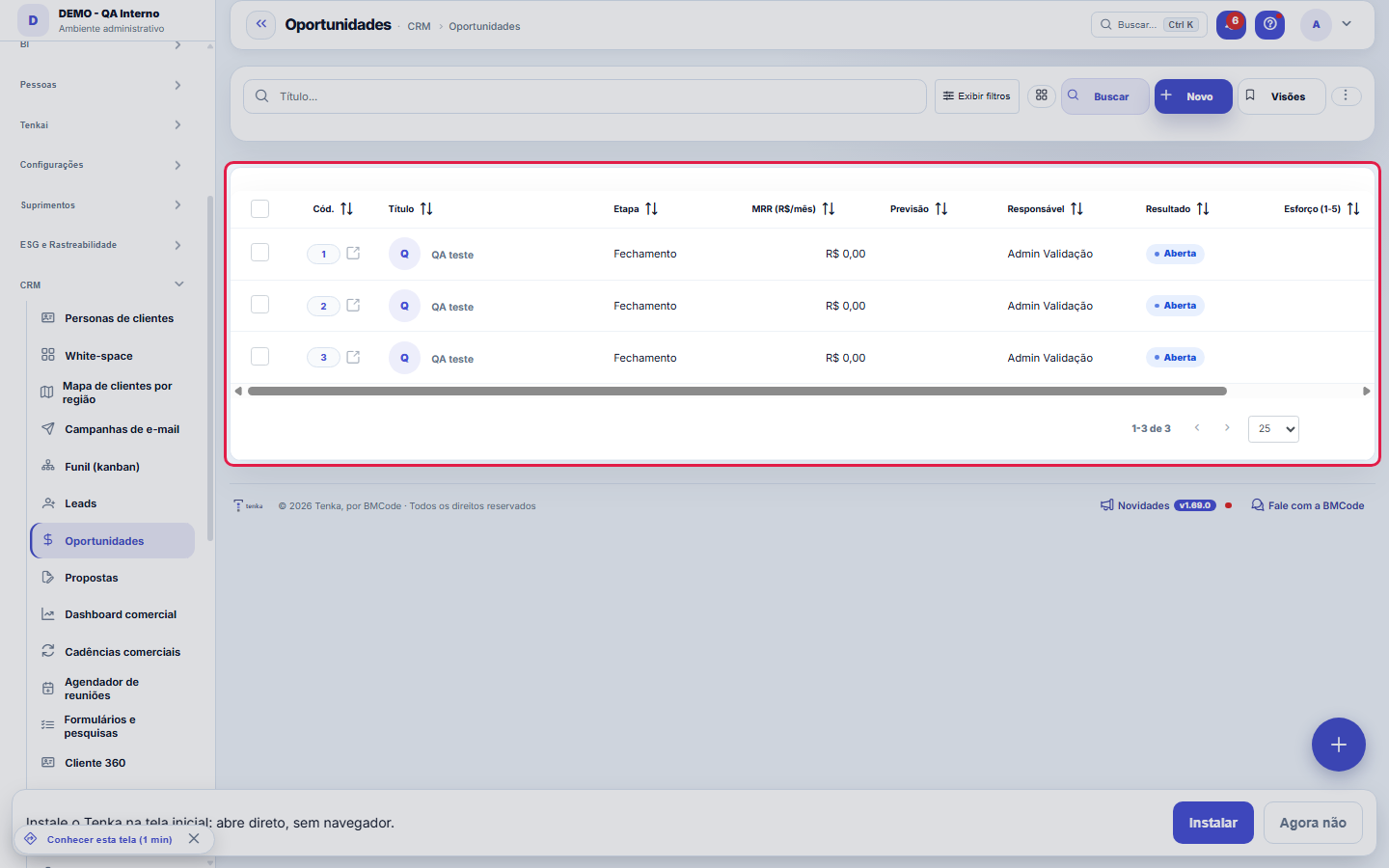
The funnel's deals, in a list.
Para que esta tela existe
Deals in the funnel: values, stage, items and closing. — this is the role of the "Opportunities" screen within the platform.
How to
MRR, valor único, probabilidade e esforço
Two values coexist in the deal: MRR (R$/month, the recurrence) and the one-time value (the one-off) — separating them is what lets you read the recurring portfolio without mixing in standalone projects. Probability (%) weights the deal in the pipeline: it's born from the stage's default and can be adjusted case by case. Effort (1–5) records how much the deal costs to pursue — useful for prioritizing when two are worth the same. Forecast is the expected closing date, and Result records the outcome against the competitor, when there is one.
Rules
Closing
In the Closing tab: Win creates the contract (and the client, if it came from a lead); Lose records the reason. Once closed, the opportunity leaves the kanban.
A visão salva guarda busca, filtros, colunas e ordenação
When you save a view with the Views button, it stores four things: the search text, the applied filters, which columns appear (and in what order) and which column the list is sorted by. Applying the view restores everything at once — including resetting the sort and the page you were on, so the result is exactly what the view describes. Views saved before this version remain valid: whatever they didn't store simply doesn't change when applied.
O erro de preenchimento aparece no campo, ao sair dele
Nas fichas, sair de um campo já dispara a conferência do que dá para conferir na hora: campo obrigatório deixado em branco e e-mail mal formado. O aviso aparece embaixo do campo e desaparece quando você começa a corrigir. Campo numérico não precisa de aviso: ele simplesmente não aceita letra enquanto você digita. Isso é conforto, não a validação final: ao salvar, o sistema confere tudo de novo do lado do servidor.
MRR only for subscription sellers
MRR is the recurring revenue of whoever sells licences, packs or monthly fees. In an industrial or goods business (knitting, spinning, apparel, light industry, retail and rental) the field shows as "Monthly value" and leaves the default list; the value stays stored and editable in the form. The company's line of business, in Company settings, decides.
Frequently asked questions
Who can access this screen
Whoever has the permission to view this screen in their profile, with the module enabled in the plan. Creating, editing and deleting opportunities are separate verbs per profile. The amounts (MRR, one-time value) obey the "View Amounts" permission — without it, you can still track stage, forecast and outcome without seeing the money, and whatever is masked on screen is also masked in the export. The visual board of the same opportunities is the Funnel (kanban).
Como descobrir quem mudou um campo desta ficha?
Open the record and look at the Timeline on the right: it shows each change as "from one value to another", with the person and the date. When there are many changes, use the two filters at the top of the timeline — one by field, the other by person. The search runs in the database, so old changes show up just the same. You can also ask Tenkai: "who changed contract 482?".
Connected screens
Aparece noFunil (kanban)As oportunidades abertas são os cards do kanban.GeraContratosGanhar gera o contrato vinculado.
Was this article helpful?
In the same module: The funnel11
Meeting schedulerSchedule links for the client to choose a free time slot on their own, without the back-and-forth of "what da…Commercial cadencesThe follow-up cadence that never forgets: a sequence of touches (e-mail, WhatsApp, a task) with the right int…Sales dashboardThe health of your pipeline: how much you should close (weighted), month-by-month forecast, sales cycle, and …Readiness (DoR/DoD)Two lists the team agrees on once and uses always: what needs to be ready for a demand to be ABLE to start (D…Pipeline (kanban)Your opportunities on a board by stage. Drag the cards to advance in the pipeline; win it to generate the con…LeadsContacts under qualification (pre-sale), before they become an opportunity and a customer. With import, dupli…Scheduling linkA meeting type with a public link: who attends, the duration, the days and times, the format, the reminder an…MercadoCruza a base pública da Receita Federal com a sua carteira: quanto do mercado do recorte você já atende, onde…
Tenka Academy
Explore the AcademyStep-by-step learning paths for your industry, inside the platform.