

Pipeline (kanban)
Your opportunities on a board by stage. Drag the cards to advance in the pipeline; win it to generate the contract automatically.
What you find on this screen
A portrait of the screen, read from the screen itself — it changes when the screen changes.
Available actions
Next actionCancelApplyRecord the loss
Form fields
FunilFunil de vendas escolhido, que define quais etapas e oportunidades o quadro mostra.
Oportunidades na etapaQuantidade de oportunidades abertas paradas na coluna daquela etapa do funil.
MRR da etapaSoma da receita recorrente mensal das oportunidades presentes naquela etapa.
Valor mensalValor recorrente por mês da oportunidade, exibido no cartão quando o perfil pode ver valores.
EsforçoEsforço estimado para ganhar a oportunidade, de 1 baixo a 5 alto, informado na ficha dela.
Parado demaisSinal de que a oportunidade está na etapa ha mais tempo que o limite definido para ela.
Sem próxima açãoSinal de que a oportunidade não tem nenhuma próxima ação agendada.
Start here
What you do here
Track open deals by funnel stage. Each column shows the quantity and the accumulated MRR. Drag a card to change its stage; the probability adjusts to the destination stage.
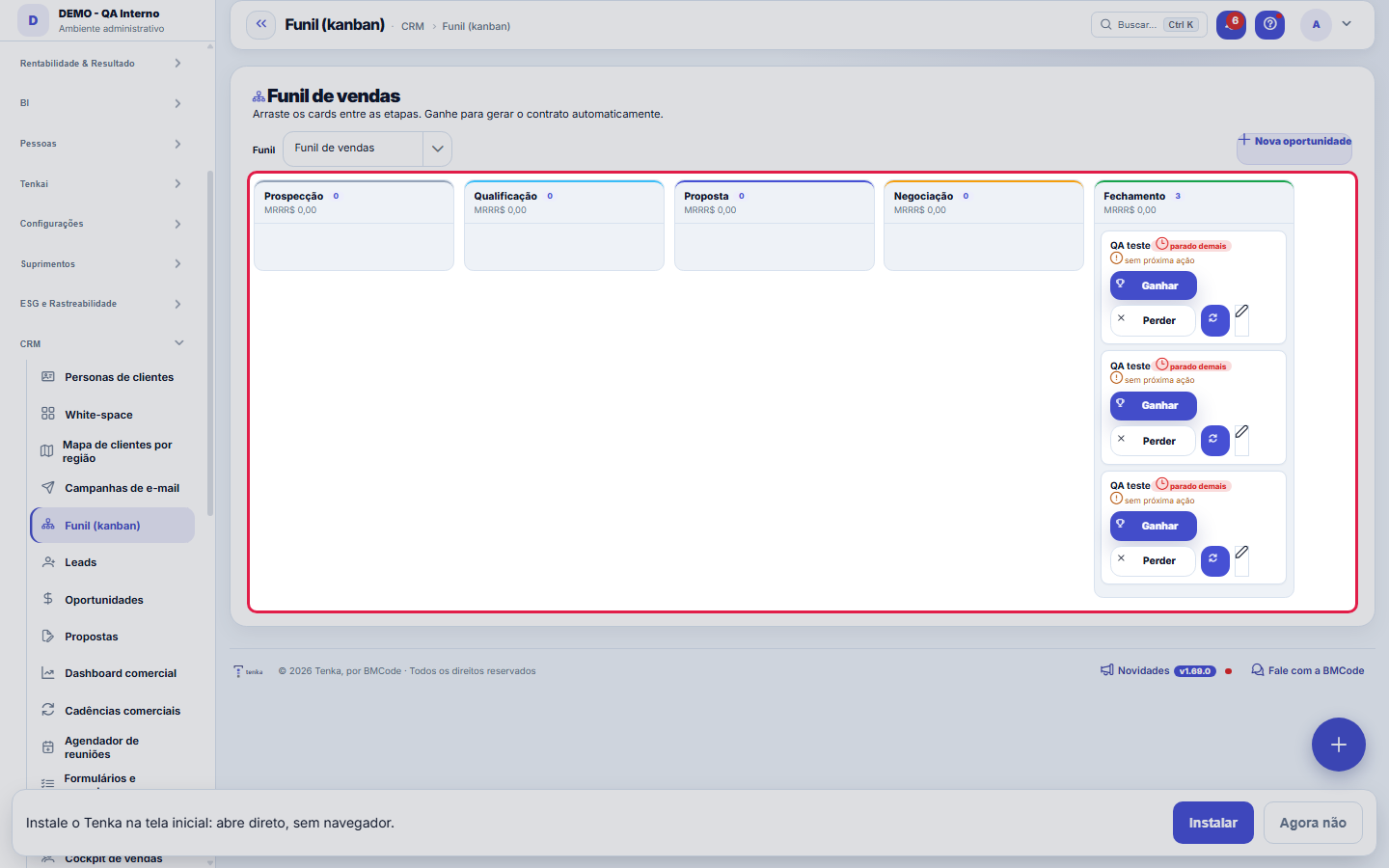
The funnel by stage; win it to turn it into a contract.
Rules
Winning creates a contract
When you click Win, the system creates the client (if the opportunity came from a lead) and the contract already linked, and marks the opportunity as WON. It's the sale flowing into operations in one click.
Funil configurável
The columns are the selected funnel stages (registered in Funnels, with color, order and probability). If there is no funnel, a default one (Prospecting→Closing) is created on first access.
Close by dragging: Win and Lose
Drag the card onto the strip above the columns. Win creates the contract right away (the lead becomes a client if needed); Lose opens the reason window, which is required. If you do not use the mouse, the same actions are under the card's three-dot button. The "no next action" warning moves to the top of the column when it applies to most of it; in a column where it is the exception, it stays on the card.
Total and weighted value of each column
The column total adds the one-time amount and the monthly recurring amount of all opportunities in it. The weighted value uses the same calculation as the sales dashboard: one-time amount plus twelve months of recurring, times the probability. When you move an opportunity, the history records the stage it left and where it went; when you change the value on the record, it records the value before and after.
Frequently asked questions
Who can access this screen
Whoever has the permission to view the screen in their profile, with the module enabled in the plan. Moving cards and winning/losing opportunities depend on the edit verbs, granted separately — it's common for a manager to see the whole board while only the deal owners move their own cards. The amounts (stage MRR, cards' monthly value) obey the "View Amounts" permission: without it, the board shows the flow and hides the money.
Connected screens
MostraOportunidadesOs cards são as oportunidades em aberto.GeraContratosGanhar a oportunidade cria um contrato.
Was this article helpful?
In the same module: The funnel11
Meeting schedulerSchedule links for the client to choose a free time slot on their own, without the back-and-forth of "what da…Commercial cadencesThe follow-up cadence that never forgets: a sequence of touches (e-mail, WhatsApp, a task) with the right int…Sales dashboardThe health of your pipeline: how much you should close (weighted), month-by-month forecast, sales cycle, and …Readiness (DoR/DoD)Two lists the team agrees on once and uses always: what needs to be ready for a demand to be ABLE to start (D…LeadsContacts under qualification (pre-sale), before they become an opportunity and a customer. With import, dupli…Scheduling linkA meeting type with a public link: who attends, the duration, the days and times, the format, the reminder an…MercadoCruza a base pública da Receita Federal com a sua carteira: quanto do mercado do recorte você já atende, onde…OpportunitiesThe deals in the pipeline: one-time and recurring (MRR) value, stage, items, and closing (won turns into a co…
Tenka Academy
Explore the AcademyStep-by-step learning paths for your industry, inside the platform.