

Suppliers
Who you buy from: supplier registry for accounts payable.
The screen
The real screen, in the theme you picked above.
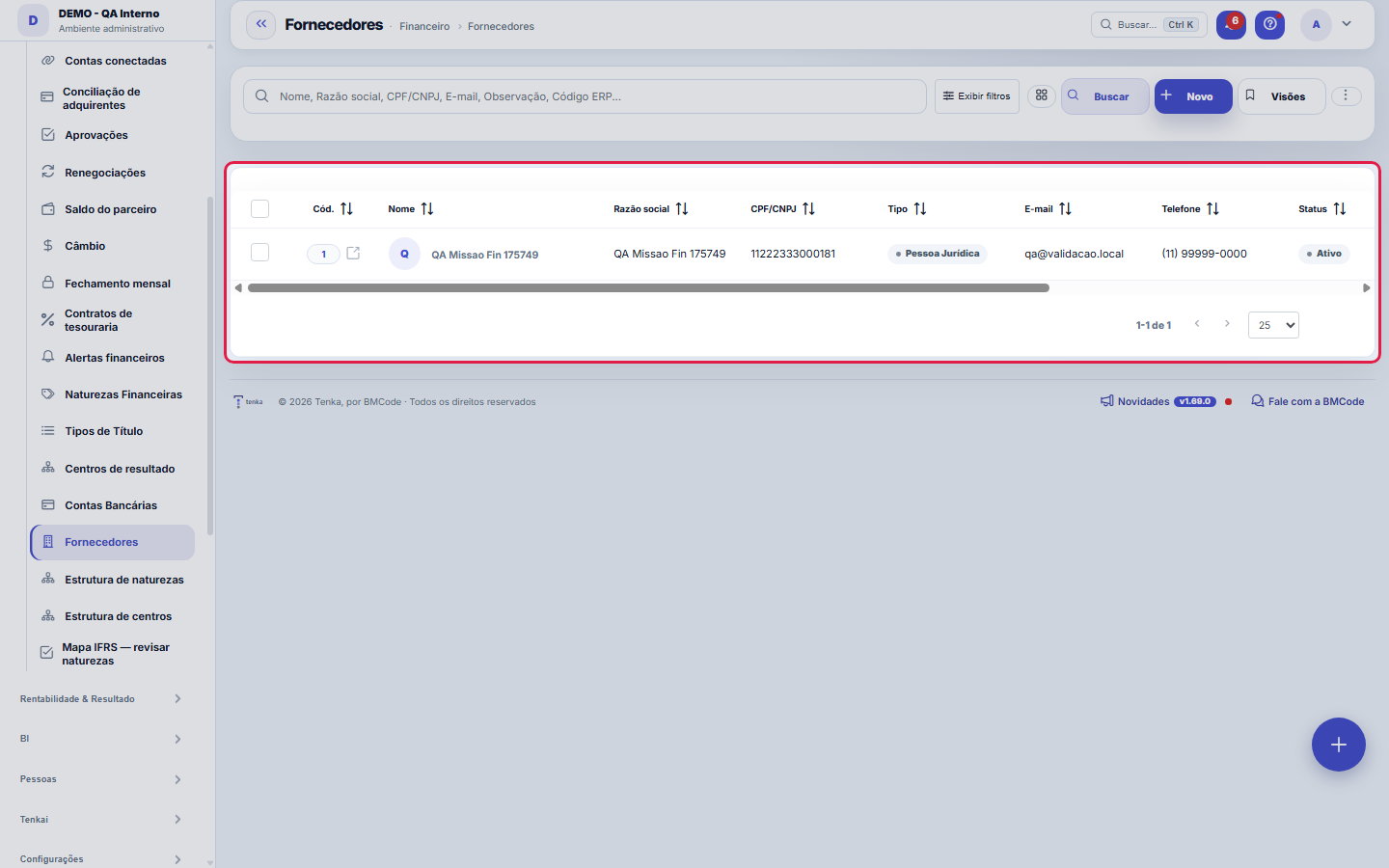
What you find on this screen
A portrait of the screen, read from the screen itself — it changes when the screen changes.
Form fields
Nome*Nome de exibição do fornecedor.
Razão socialRazão social (PJ).
CPF/CNPJCPF ou CNPJ do fornecedor.
TipoPessoa Jurídica ou Física.
Inscrição estadualInscrição estadual do fornecedor: só números (pontos e traços podem ficar) ou ISENTO. A nota de compra e o SPED pedem.
E-mailE-mail de contato.
O que forneceO que este fornecedor fornece: matéria-prima, aviamento, facção, serviço, transporte, revenda ou embalagem. É o filtro para achar quem vende cada coi…
TelefoneTelefone de contato.
StatusFornecedores inativos não aparecem para seleção em lançamentos.
ObservaçãoObservações gerais.
Sócio que é reembolsadoMarque quando este cadastro é um sócio que paga compras da empresa no cartão ou na conta dele e recebe o reembolso. Só um sócio marcado aparece em "Q…
BancoCódigo FEBRABAN (ex.: 341) ou nome do banco.
AgênciaNúmero da agência (sem o dígito, se houver campo separado).
ContaNúmero da conta com dígito.
Tipo de contaCorrente ou Poupança.
Tipo de chave PIXNatureza da chave PIX cadastrada.
Chave PIXChave PIX para pagamento (CPF/CNPJ, e-mail, telefone ou aleatória).
CEP
EndereçoRua e número. É daqui que sai a coordenada do roteiro do dia.
NúmeroNúmero do endereço (use S/N quando não houver).
+ 4 more fields
Start here
What you do here
Register suppliers (name, CPF/CNPJ, contact). Payable invoices point to a supplier — the basis for spend analysis per partner.
What this screen answers
Who you pay. The record feeds accounts payable and cost allocation by category; a supplier with no default category forces you to choose one on every entry. Duplicating a supplier is the shortest route to a cost report that doesn't add up.
O que esta tela faz
Supplier or service provider record: identification (name, legal name, CPF/CNPJ, type), contact (e-mail, phone), notes and payment details — bank, branch, account, account type and PIX key. The ERP Code ties the supplier to the source system in integrations. The previous/next arrows move between suppliers without going back to the list, and the supplier company's contacts are in the detail of this same record.
Subcontractor approval
The Approval tab holds the documents big retail demands from the chain (ABVTEX Programme): company registration with a garment activity code, operating licence, contract, FGTS, INSS and labour certificates, e-Social with the declared headcount and the dated audit. Each document has a status — valid, expiring (within 30 days), expired, missing from the checklist, or awaiting approval when the subcontractor sent it through the portal.
How to
Slice by URL and global search
?q= opens the list already searched, ?fd_= filters by a dictionary field and ?excluidas=1 shows the recycle bin — that's how a number clicked on another screen arrives here with the same filter that formed it. Ctrl+K finds any screen on the platform by name or synonym. Filter combinations you repeat can be saved as views, per user, and the columns displayed are also your preference.
How to import the Labour Ministry list
The Labour Ministry publishes the Employers Register on gov.br and updates it from time to time. Download the list, save it as text or CSV and, in the Due diligence tab, click Import the list with the publication date. Only a code of each CPF/CNPJ is kept from the file — never anyone’s name. Once the list’s validity passes, the check becomes pending until you import the new one.
Tipo de chave PIX e Código ERP
PIX key type qualifies the key entered (CPF/CNPJ, e-mail, phone or random key) — fill in both fields together, because a key without its type doesn't say which format to expect. ERP Code is the supplier's reference in the source system: in imports and integrations it's how records recognize each other, avoiding a duplicate supplier when data comes from outside. If the operation starts in Tenka, it can be left blank.
The subcontractor sends it through the portal
Through the same subcontractor portal link (the one used to report shipments), they upload the document with its expiry in “Your documents”. It arrives here as “awaiting approval”: check it and tap approve.
Rules
Exporting takes the whole set
The Excel, PDF and CSV buttons on this list export the ENTIRE filtered set, not just the visible page — the selection on screen is exactly what goes into the file. Monetary amounts masked by the "Show Values" governance come out masked in the export too, so sharing the file doesn't leak what the screen hides. For an external check, the way is: filter first, check the total, export afterwards.
A visão salva guarda busca, filtros, colunas e ordenação
When you save a view with the Views button, it stores four things: the search text, the applied filters, which columns appear (and in what order) and which column the list is sorted by. Applying the view restores everything at once — including resetting the sort and the page you were on, so the result is exactly what the view describes. Views saved before this version remain valid: whatever they didn't store simply doesn't change when applied.
O erro de preenchimento aparece no campo, ao sair dele
Nas fichas, sair de um campo já dispara a conferência do que dá para conferir na hora: campo obrigatório deixado em branco e e-mail mal formado. O aviso aparece embaixo do campo e desaparece quando você começa a corrigir. Campo numérico não precisa de aviso: ele simplesmente não aceita letra enquanto você digita. Isso é conforto, não a validação final: ao salvar, o sistema confere tudo de novo do lado do servidor.
Subcontractor due diligence: three sources, human decision
In the subcontractor record, the Due diligence tab checks every month the company registration status, the Labour Ministry’s Employers Register (the list of those who subjected workers to slavery-like conditions) and the ABVTEX audit in the onboarding — each check with date, source and a verification code. A source that is down becomes pending, never approved. Tenka never blocks on its own: when the subcontractor is listed or has an alert, whoever edits Approval limits decides to block or release new shipments, with the reason. The result belongs to your company only and never shows to another.
Mudou o dado bancário? A remessa fica suspensa até reaprovar
Anti-fraud protection for the payee: when a supplier's bank details are changed, payments by remittance file are suspended until the record is re-approved by someone with authority. The warning appears prominently at the top of this very screen, with the re-approval button. It's the defense against the "swapped payee" scam: the changed account only receives again after the change has been validated — so when you genuinely change the bank or PIX key, let the approver know so the month's payment isn't held up.
Uma anotação pode virar demanda
In the record's activity panel, each note has "Turn into request". The click creates a ticket with the note's text, who wrote it and the link to this record — nothing is retyped. Use it when the note is a request for action ("someone needs to review this"); the note stays where it was. The button only appears once the record has been saved; a read-only session (demo) doesn't create one.
Address, state registration and category
Type the ZIP code and leave the field: street, district, city and state fill in by themselves (what you already typed is not replaced). State registration takes numbers — dots and dashes may stay — or EXEMPT; the state, its two-letter code. The category says what the supplier supplies (raw material, trims, sewing contractor, service, transport, resale, packaging) and is the filter to find who sells each thing.
Shipment to a subcontractor with an expired document
When the shipment is opened, Tenka checks the subcontractor’s approval. An expired or missing document makes the shipment ask for the manager’s confirmation (“I confirm and take responsibility”). With the parameter “Block shipment to a subcontractor with an expired document” on, the shipment does not go until it is fixed.
Exposure to the supplier
The Exposure tab shows how much is open with the supplier and when the next bill is due, their share of your purchases over 12 months (high dependence above 30%), how many bills you paid and how late, and warns when bank details changed and are not yet re-approved.
Frequently asked questions
Where are the supplier’s contacts?
On the "Contacts" tab of the supplier record: name, job title, phone and e-mail. The e-mail is optional on purpose — contacts coming from an ERP often have only a name and phone, and requiring an e-mail was what caused those contacts to be discarded on import. This contact is NOT portal access: whoever needs to log in to the portal is the CUSTOMER's contact, where the e-mail is the credential. Contacts imported from the ERP are updated on each sync; the ones typed in here aren't touched.
Como descobrir quem mudou um campo desta ficha?
Open the record and look at the Timeline on the right: it shows each change as "from one value to another", with the person and the date. When there are many changes, use the two filters at the top of the timeline — one by field, the other by person. The search runs in the database, so old changes show up just the same. You can also ask Tenkai: "who changed contract 482?".
The government list as a PDF
In the contractor check, import the Labour Ministry list as the government publishes it, in PDF. Tenka reads the names and documents and checks them against your suppliers.
What is "Partner who gets reimbursed" for?
Check it on the record of the partner who pays company purchases with their card or account. With it, they appear in "Who gets paid" on the purchase invoice entry, and the payable for that purchase is created in installments in their name. Only those who can edit suppliers change this mark, and every reimbursement posted goes to the audit trail (who posted and who gets paid). To see how much is left to reimburse, ask Tenkai "how much does the company owe me in reimbursements?".
Connected screens
Was this article helpful?
In the same module: Finance27
Settlement between familiesQuem pagou pelos outros e quem deve no mês, pelas contas e cartões de cada família e pelo que cada uma consum…Release limitsThe approval bands: up to how much each role releases alone and from what amount it escalates to the superior.Credit cardsOs cartões da família: limite, dia de fechamento e vencimento, gasto em aberto. O gasto entra na fatura; a fa…Cost centersSplit the result by area/unit: each invoice can point to a center, enabling analysis by business unit.Bank accountsThe company's accounts: bank, branch, balance, and the link with settlements and reconciliation.Annual household billsIPVA, property tax, insurance, school supplies: the year’s amount becomes “save this much a month” in the hou…Rental contractsOs imóveis alugados: inquilino, valor, vencimento, prazo, índice de reajuste e garantia. O recebimento de cad…Monthly money talkThe 5-question agenda built from the month’s numbers for the couple to answer on the phone, and the household…
Tenka Academy
Explore the AcademyStep-by-step learning paths for your industry, inside the platform.