

Ticket types
Classification of tickets (bug, improvement, support, task...) with its own behavior: billing, SLA, and workflow.
The screen
The real screen, in the theme you picked above.
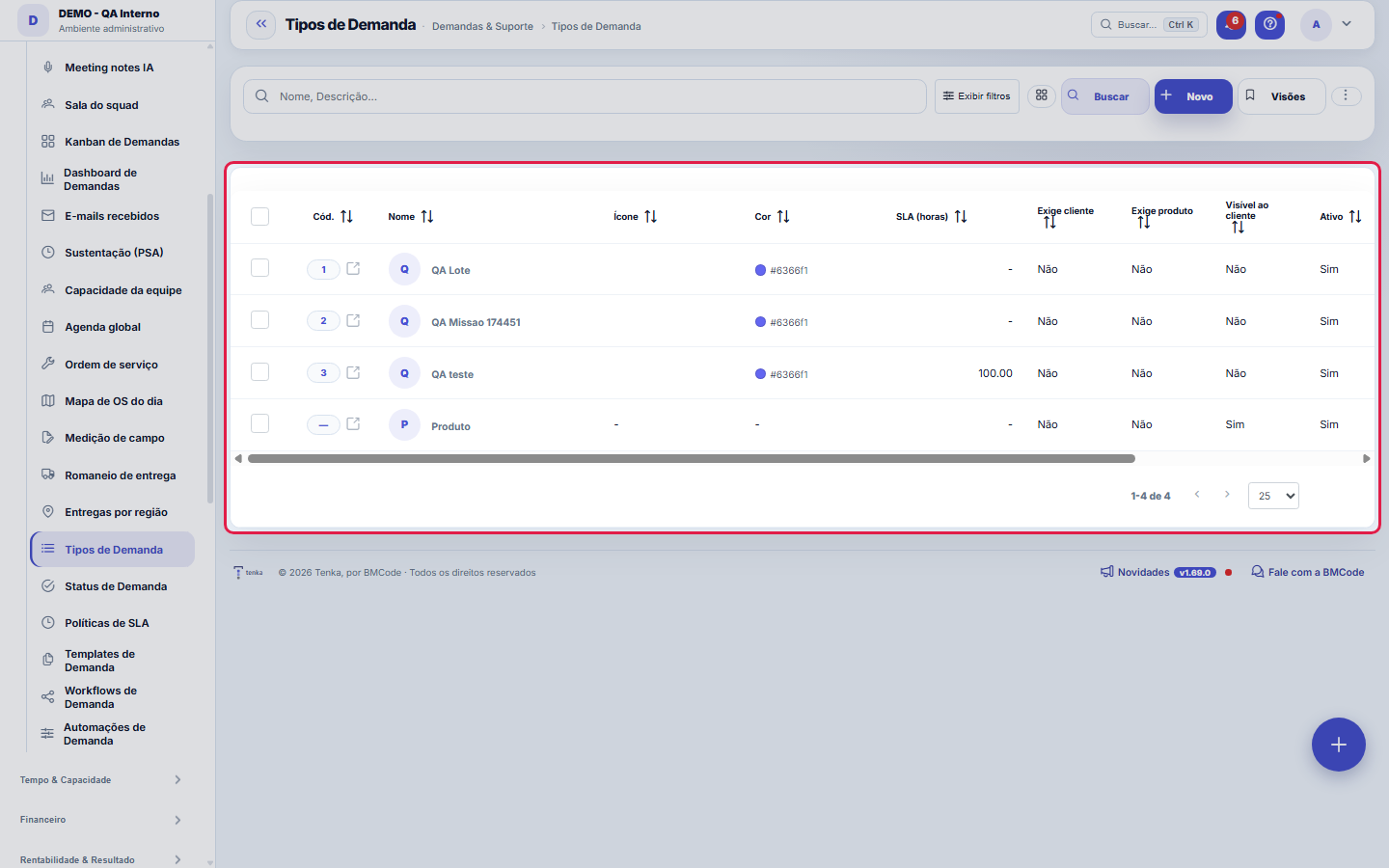
What you find on this screen
A portrait of the screen, read from the screen itself — it changes when the screen changes.
Form fields
Nome*Nome do tipo de demanda (ex.: Bug, Melhoria, Suporte).
ÍconeClasse do ícone (PrimeIcons). Ex.: pi pi-bug.
CorCor do badge (hex). Ex.: #6366f1.
SLA (horas)SLA em horas para atendimento (vazio = sem SLA).
Exige clienteExige informar o cliente ao abrir o ticket.
Exige produtoExige informar o produto ao abrir o ticket.
Visível ao clienteTipo disponível no portal do cliente.
AtivoTipos inativos não aparecem para seleção.
DescriçãoDescrição do tipo.
É chamado (sustentação)Tipo que é atendimento de sustentação vindo do portal do cliente.
Start here
What you do here
Define your operation's ticket types. The type determines defaults: billing policy (billable/not), applicable SLA and flow workflow.
What this screen answers
The type defines the workflow, SLA and template applied. It is the first choice of whoever opens the request and the one that most affects the rest: changing the type later can change the set of valid statuses.
O que esta tela faz
Here you create and maintain a request type: name, icon and color (the type's visual identity), reference SLA in hours, the client and product requirements at opening, visibility for the client and the active switch. The type is the first classification of every request — and it is one of the three values that choose its SLA rule.
How to
Exportar e filtrar como nas demais listas
The list runs on the platform's standard engine: export of the entire set to Excel, PDF and CSV, saved views per user, column preference per screen and a recycle bin for deleted records (?excluidas=1 in the URL). Search and filters work by URL — ?q=text and ?fd_=value open the list already filtered —, so you can bookmark "types visible to the customer" and check the portal's showcase in one click.
Requires customer / requires product: mandatory at opening
The two switches make fields required when opening requests of this type: "Requires client" prevents creating the request without saying WHO the work is FOR, and "Requires product" prevents creating it without saying WHAT it is ABOUT. Turn them on for the types where that information is indispensable later — a support ticket without a client isn't billed, doesn't consume a contract and doesn't enter any per-client report. For internal types (process improvement, administrative task), leave them off so as not to create useless friction.
SLA (horas) do tipo × políticas de SLA
The type's "SLA (hours)" is a simple reference deadline, the same for all requests of the type. SLA Policies do the fine work: their rules combine this SAME type with priority and severity to give different deadlines by criticality — including business hours and separate clocks for first response and resolution. If your operation uses SLA policies, that is where the deadline commitment lives; the type's field serves operations that want a simple deadline without setting up a policy.
Rules
O tipo é a primeira decisão de toda demanda
Everything the type carries propagates: the icon and color identify the task on boards and lists; the "requires customer" and "requires product" switches define what is mandatory when opening; customer visibility decides whether the type appears on the outside; and the type is one of the three values (with priority and severity) that choose the SLA rule. That is why a short, well-defined list is worth more than a long one: each extra type is one more decision when opening every task.
A visão salva guarda busca, filtros, colunas e ordenação
When you save a view with the Views button, it stores four things: the search text, the applied filters, which columns appear (and in what order) and which column the list is sorted by. Applying the view restores everything at once — including resetting the sort and the page you were on, so the result is exactly what the view describes. Views saved before this version remain valid: whatever they didn't store simply doesn't change when applied.
O erro de preenchimento aparece no campo, ao sair dele
Nas fichas, sair de um campo já dispara a conferência do que dá para conferir na hora: campo obrigatório deixado em branco e e-mail mal formado. O aviso aparece embaixo do campo e desaparece quando você começa a corrigir. Campo numérico não precisa de aviso: ele simplesmente não aceita letra enquanto você digita. Isso é conforto, não a validação final: ao salvar, o sistema confere tudo de novo do lado do servidor.
The studio ticket type
Textile companies have the "Studio service" type (nature ATELIE): on the portal, the customer who picks it enters the service (sample, pattern, pilot piece), the article, colour, quantity and desired deadline, and the ticket arrives with that data at the top of the description. The default response time is 120 hours; adjust it on the type. To hide it from the portal, untick "Visible to the customer".
Uma anotação pode virar demanda
In the record's activity panel, each note has "Turn into request". The click creates a ticket with the note's text, who wrote it and the link to this record — nothing is retyped. Use it when the note is a request for action ("someone needs to review this"); the note stays where it was. The button only appears once the record has been saved; a read-only session (demo) doesn't create one.
Quando marcar "É chamado (sustentação)" num tipo
Check it on the types that represent sustaining support — what the client opens through the portal with a contract behind it. These types start appearing on the Tickets screen and enter the contract's hours report. Project types, scoped improvements and internal requests stay unchecked: they remain on the Demands screen. The mark also separates what counts as support hours from what is project hours.
A marca "Visível ao cliente" decide o que aparece no portal
The portal's ticket opening form shows only the types marked as visible to the client. That is how you reduce the list of categories they see without deleting any type: uncheck the internal ones, and they disappear from the portal while still existing in here.
Frequently asked questions
Who can access this screen
Whoever has permission to view this screen in their access profile — generally whoever configures the service operation, because touching the types changes the classification, the opening requirements and the matching with the SLA rules of all new tickets. The grant is made by the account's administrators on the Access screen, and the contracted plan needs to include the module: profile and plan are independent locks.
Como descobrir quem mudou um campo desta ficha?
Open the record and look at the Timeline on the right: it shows each change as "from one value to another", with the person and the date. When there are many changes, use the two filters at the top of the timeline — one by field, the other by person. The search runs in the database, so old changes show up just the same. You can also ask Tenkai: "who changed contract 482?".
Connected screens
Was this article helpful?
In the same module: Operations13
Ticket automations"When X, do Y" rules on tickets: assign, move, notify — without manual intervention.CalendarsWork schedule and holidays: the base calendar that defines business days, hours per day, and holidays (nation…Classificação do statusAs fases do fluxo em que cada status da demanda se encaixa (Triagem, Em execução, Aguardando…): definem as se…TeamsWork teams with an owner and members — the basis for the team agenda, routing, and manager approvals.Roles and costsTable of roles (dev, QA, PM...) with cost and hourly rate — the feasibility ruler of the Studio.SLA policiesDefine response and resolution deadlines by priority/type — the clock that governs the tickets.Prioritization (WSJF)The backlog in the order the calculation recommends: value, urgency, and risk reduction add up to the cost of…Readiness (DoR/DoD)What needs to be resolved for a demand to ENTER a stage, and completed for it to LEAVE. It becomes a checklis…
Tenka Academy
Explore the AcademyStep-by-step learning paths for your industry, inside the platform.