

Calendars
Work schedule and holidays: the base calendar that defines business days, hours per day, and holidays (national and local).
The screen
The real screen, in the theme you picked above.
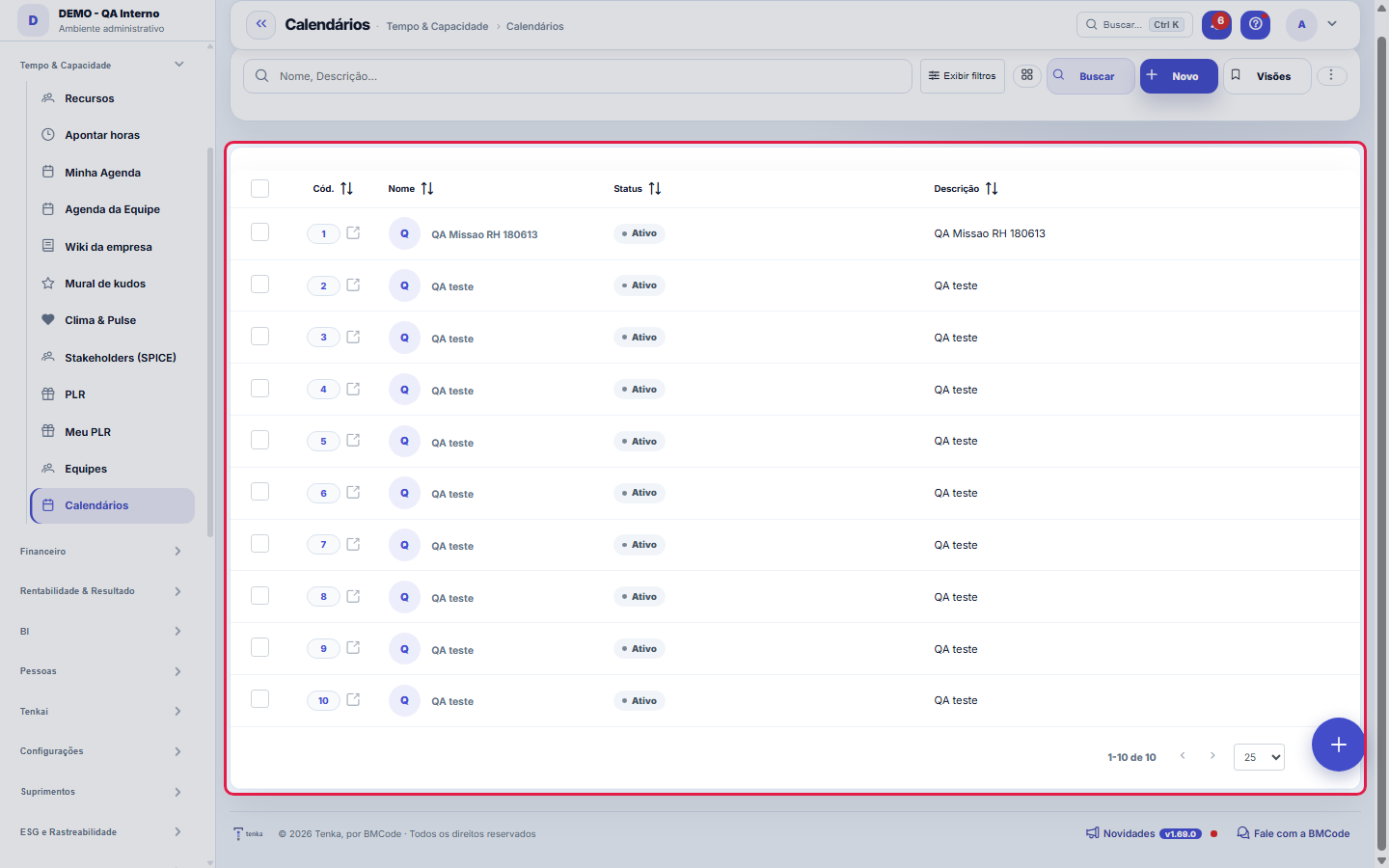
What you find on this screen
A portrait of the screen, read from the screen itself — it changes when the screen changes.
Form fields
Nome*Nome do calendário (ex.: Calendário Brasil, Filial SP).
StatusCalendários inativos não são usados nos cálculos de prazo.
DescriçãoDescrição do calendário.
Start here
What you do here
Maintain the work calendar (weekly working hours, holidays). Capacity, SLA deadlines and schedules use the business days set here — a registered holiday does not count toward a deadline.
O que esta tela responde
Which days do NOT count as working days for your company. Each calendar is a set of holidays; companies with branches in different states use more than one.
O que esta tela faz
Registers a working-day calendar: name, status and description in the Data tab, and the holidays in their own tab — each holiday with date, name and the recurring mark. It is this set that defines what counts as a working day in calculations that depend on the calendar. The form is the platform standard: you can adjust the display to 1, 2 or 3 columns and navigate between records with the previous and next buttons, without going back to the list.
How to
National holidays
Fixed-date national holidays (January 1st, Tiradentes, September 7th, Christmas…) are entered only once with the Recurring flag and apply to every year. Movable holidays — Carnival, Corpus Christi — change date each year and must be entered year by year, without that flag. Holidays are entered inside the calendar record, on the holidays tab: this list shows the calendars, not the holidays of each one.
Rules
Onde o calendário aparece sem você mandar
SLA deadlines, team capacity, shift schedules and time-clock calculation count WORKING days. A municipal holiday forgotten here becomes an overdue SLA that in fact wasn't overdue, and capacity calculated with one more day than the team had.
Feriado acrescentado hoje não recalcula o passado
The calendar applies from here on. Numbers already calculated (closed SLA, capacity of previous months) stay as they were calculated at the time — on purpose: recalculating the past would change an indicator that has already been used to make decisions.
A visão salva guarda busca, filtros, colunas e ordenação
When you save a view with the Views button, it stores four things: the search text, the applied filters, which columns appear (and in what order) and which column the list is sorted by. Applying the view restores everything at once — including resetting the sort and the page you were on, so the result is exactly what the view describes. Views saved before this version remain valid: whatever they didn't store simply doesn't change when applied.
O erro de preenchimento aparece no campo, ao sair dele
Nas fichas, sair de um campo já dispara a conferência do que dá para conferir na hora: campo obrigatório deixado em branco e e-mail mal formado. O aviso aparece embaixo do campo e desaparece quando você começa a corrigir. Campo numérico não precisa de aviso: ele simplesmente não aceita letra enquanto você digita. Isso é conforto, não a validação final: ao salvar, o sistema confere tudo de novo do lado do servidor.
Holidays live on the detail tab
The calendar itself has few fields (name, status, description) — the real content is the holidays, entered in the detail tab of this same form. Save the calendar before entering the holidays: the detail belongs to the saved record. Each holiday takes a date, name, description and the Recurring mark, which avoids re-entering fixed-date holidays every year.
Uma anotação pode virar demanda
In the record's activity panel, each note has "Turn into request". The click creates a ticket with the note's text, who wrote it and the link to this record — nothing is retyped. Use it when the note is a request for action ("someone needs to review this"); the note stays where it was. The button only appears once the record has been saved; a read-only session (demo) doesn't create one.
Frequently asked questions
Como descobrir quem mudou um campo desta ficha?
Open the record and look at the Timeline on the right: it shows each change as "from one value to another", with the person and the date. When there are many changes, use the two filters at the top of the timeline — one by field, the other by person. The search runs in the database, so old changes show up just the same. You can also ask Tenkai: "who changed contract 482?".
What about holidays that change date every year?
The Recurring mark is for fixed-date holidays: entered once, they apply every year on that same date. Movable holidays — Carnival, Corpus Christi, Good Friday — fall on a different date each year, so they cannot be recurring: enter them year by year, with that year's date, without marking Recurring. It is worth reviewing the calendar at the turn of the year to check whether the new year's movable holidays have already been entered.
Connected screens
Was this article helpful?
In the same module: Operations13
Ticket automations"When X, do Y" rules on tickets: assign, move, notify — without manual intervention.Classificação do statusAs fases do fluxo em que cada status da demanda se encaixa (Triagem, Em execução, Aguardando…): definem as se…TeamsWork teams with an owner and members — the basis for the team agenda, routing, and manager approvals.Roles and costsTable of roles (dev, QA, PM...) with cost and hourly rate — the feasibility ruler of the Studio.SLA policiesDefine response and resolution deadlines by priority/type — the clock that governs the tickets.Prioritization (WSJF)The backlog in the order the calculation recommends: value, urgency, and risk reduction add up to the cost of…Readiness (DoR/DoD)What needs to be resolved for a demand to ENTER a stage, and completed for it to LEAVE. It becomes a checklis…Squad roomsA room is a SLICE of the work plus that team's agreements. This is where it's decided what the big screen sho…
Tenka Academy
Explore the AcademyStep-by-step learning paths for your industry, inside the platform.