

Squad rooms
A room is a SLICE of the work plus that team's agreements. This is where it's decided what the big screen shows and what it leaves out.
The screen
The real screen, in the theme you picked above.
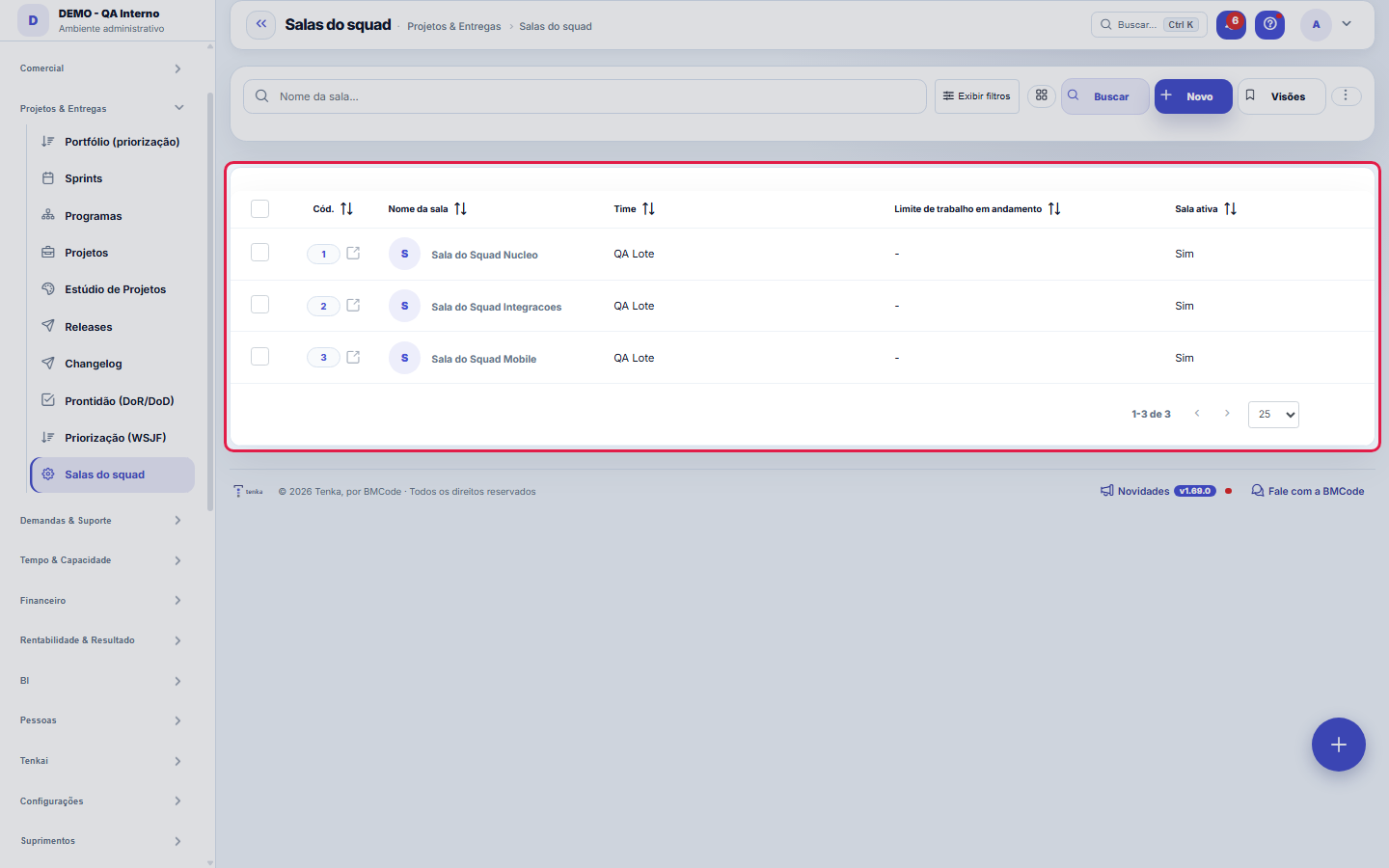
What you find on this screen
A portrait of the screen, read from the screen itself — it changes when the screen changes.
Form fields
Nome da sala*É este nome que aparece grande no telão. Use o nome pelo qual o time se chama, não o do projeto: a sala é das pessoas.
TimeDe quem é esta sala. O recorte das demandas segue o funcionário responsável de cada uma — quem está na equipe, aparece no quadro. Sem time definido, …
Só do projetoEstreita a sala a um projeto. Deixe vazio quando o time toca várias frentes — o radiador serve para ver tudo que disputa a atenção do time, não só um…
Só do tipoEstreita a sala a um tipo de demanda (só bugs, só melhorias). Vazio = todos os tipos.
Limite de trabalho em andamentoQuantas demandas o time aceita ter abertas ao mesmo tempo. Estourar o limite não é falha moral: é o sinal de que terminar o que já está aberto encurt…
Pulse do termômetroQual pesquisa alimenta o "clima do time" no painel. O número vem SEMPRE de nota que a pessoa declarou — nada é inferido de texto, de humor ou de comp…
Janela das métricas (dias)De quantos dias para trás as métricas de fluxo são lidas. Janela curta reage rápido e oscila; janela longa é estável e demora a mostrar mudança. Acei…
Atualiza a cada (s)De quanto em quanto tempo o modo TV se atualiza sozinho. Fica preso entre 30s e 900s: abaixo disso um monitor esquecido ligado vira carga contínua no…
Mostrar velocidadeExibe os pontos concluídos por sprint. Desligue se o time ainda não estima — a barra vazia não ensina nada.
Mostrar climaExibe o termômetro do time. Times pequenos podem preferir manter isso fora do telão: com poucas respostas, a média deixa de ser anônima na prática.
Mostrar ações da retroExibe o que ficou combinado na última retrospectiva e ainda não foi feito. É o item que mais costuma incomodar num telão — e é exatamente para isso q…
Sala ativaSalas inativas somem dos combos do radiador e do coach, mas o histórico de pareceres continua.
Start here
A sala é o recorte, e o recorte é a decisão inteira
Team, project and type of request are three filters that add up: the more you fill in, the narrower the panel gets. Leaving everything blank makes the room show the entire operation — which works for a single-team company and for nobody else.
The practical rule is: one room per team that meets. If two people look at the same panel and one of them has to ignore half the cards, those are two rooms.
The practical rule is: one room per team that meets. If two people look at the same panel and one of them has to ignore half the cards, those are two rooms.
What this screen answers
The room is the team's space: a board, a sprint goal and the work-in-progress limit the team itself agreed on. Here you only register the room and say which team it belongs to; day-to-day work happens in "Squad room", in the Cockpit. The work-in-progress limit is not a productivity target — it is the number above which the team starts switching tasks instead of finishing them.
O que esta tela faz
Here you configure a squad room — the team's radiator: name, owning team, optional filters by project and by demand type, WIP limit, the pulse survey used as a thermometer, the metrics window in days, the automatic refresh interval in seconds and what the room displays (velocity, mood, retro actions).
How to
Janela das métricas e atualização automática
Two fields control the room's timing: "Metrics window (days)" defines the period the numbers summarize — 14 days shows the recent snapshot, 90 shows the trend; the right value depends on the team's cycle. And "Refresh every (s)" is the auto-refresh: the room was made to stay open on a team monitor, so it refreshes itself at that interval, without anyone pressing F5. An interval that is too short only wastes queries — for a wall radiator, something in the range of minutes is usually enough.
O que a sala mostra — e o que você recorta
The three display switches turn blocks of the room on and off: velocity (the team's delivery pace), mood (the result of the pulse survey chosen in the "Thermometer pulse" field) and retro actions. The "Project only" and "Type only" fields, in turn, filter WHICH demands feed the numbers — a team with two projects can have one room per project, each looking only at its own slice. The work-in-progress (WIP) limit declared here is the ceiling the room uses to flag overload.
Rules
O limite de WIP é um acordo, não uma trava
The number you set here does not stop anyone from pulling more work: it changes the panel's color and message. That is on purpose — a limit imposed by software produces workarounds (the team creates cards outside the board), while a visible limit produces conversation.
Leaving it blank (or zero) means "no agreed limit", and the panel says so in plain words instead of pretending everything is fine.
How to choose the first number: start with the average WIP the team already practices, take off about 20% and watch for two sprints. A limit that is too loose changes nothing; one that is too tight becomes ignored decoration in the first week.
Leaving it blank (or zero) means "no agreed limit", and the panel says so in plain words instead of pretending everything is fine.
How to choose the first number: start with the average WIP the team already practices, take off about 20% and watch for two sprints. A limit that is too loose changes nothing; one that is too tight becomes ignored decoration in the first week.
What each panel agreement does
Pulse survey — this is what feeds the climate thermometer. Without choosing one, the block simply doesn't appear. The panel only reads the score declared by people: nothing there is inferred from text, behavior or mood.
Big-screen refresh — from 30 to 900 seconds; outside this range the system adjusts and warns. Applies only in TV mode.
Metrics window — from 7 to 365 days.
Show velocity / climate / retro — turn off what the team doesn't measure yet. An empty block on the big screen teaches the team to ignore the big screen.
Big-screen refresh — from 30 to 900 seconds; outside this range the system adjusts and warns. Applies only in TV mode.
Metrics window — from 7 to 365 days.
Show velocity / climate / retro — turn off what the team doesn't measure yet. An empty block on the big screen teaches the team to ignore the big screen.
O clima é casado pelo NOME da equipe
The pulse response stores the team's name as text, and it is through this text that the room finds the team's answers. Renaming the team erases the thermometer until there is a new round of answers with the new name.
If the climate disappeared without explanation, this is the first thing to check.
If the climate disappeared without explanation, this is the first thing to check.
A visão salva guarda busca, filtros, colunas e ordenação
When you save a view with the Views button, it stores four things: the search text, the applied filters, which columns appear (and in what order) and which column the list is sorted by. Applying the view restores everything at once — including resetting the sort and the page you were on, so the result is exactly what the view describes. Views saved before this version remain valid: whatever they didn't store simply doesn't change when applied.
O erro de preenchimento aparece no campo, ao sair dele
Nas fichas, sair de um campo já dispara a conferência do que dá para conferir na hora: campo obrigatório deixado em branco e e-mail mal formado. O aviso aparece embaixo do campo e desaparece quando você começa a corrigir. Campo numérico não precisa de aviso: ele simplesmente não aceita letra enquanto você digita. Isso é conforto, não a validação final: ao salvar, o sistema confere tudo de novo do lado do servidor.
Uma anotação pode virar demanda
In the record's activity panel, each note has "Turn into request". The click creates a ticket with the note's text, who wrote it and the link to this record — nothing is retyped. Use it when the note is a request for action ("someone needs to review this"); the note stays where it was. The button only appears once the record has been saved; a read-only session (demo) doesn't create one.
Frequently asked questions
Who can create and edit rooms?
Reading: everyone. Creating and editing: whoever manages the team (administration and management profiles). It is a configuration record — the whole team consumes the panel, but the WIP agreement needs an owner.
Como descobrir quem mudou um campo desta ficha?
Open the record and look at the Timeline on the right: it shows each change as "from one value to another", with the person and the date. When there are many changes, use the two filters at the top of the timeline — one by field, the other by person. The search runs in the database, so old changes show up just the same. You can also ask Tenkai: "who changed contract 482?".
Connected screens
Aparece emSala do squadA sala configurada aqui é o painel que fica no telão.Recorta porEquipesA equipe define quem é do time — o painel filtra pelo responsável da demanda.
Was this article helpful?
In the same module: Operations13
Ticket automations"When X, do Y" rules on tickets: assign, move, notify — without manual intervention.CalendarsWork schedule and holidays: the base calendar that defines business days, hours per day, and holidays (nation…Classificação do statusAs fases do fluxo em que cada status da demanda se encaixa (Triagem, Em execução, Aguardando…): definem as se…TeamsWork teams with an owner and members — the basis for the team agenda, routing, and manager approvals.Roles and costsTable of roles (dev, QA, PM...) with cost and hourly rate — the feasibility ruler of the Studio.SLA policiesDefine response and resolution deadlines by priority/type — the clock that governs the tickets.Prioritization (WSJF)The backlog in the order the calculation recommends: value, urgency, and risk reduction add up to the cost of…Readiness (DoR/DoD)What needs to be resolved for a demand to ENTER a stage, and completed for it to LEAVE. It becomes a checklis…
Tenka Academy
Explore the AcademyStep-by-step learning paths for your industry, inside the platform.