

Squad room
The panel that stays open on the room's monitor: board, goal, work in progress against the agreed limit, velocity, mood, and the debt from the last retro. Every number tells where it came from.
The screen
The real screen, in the theme you picked above.
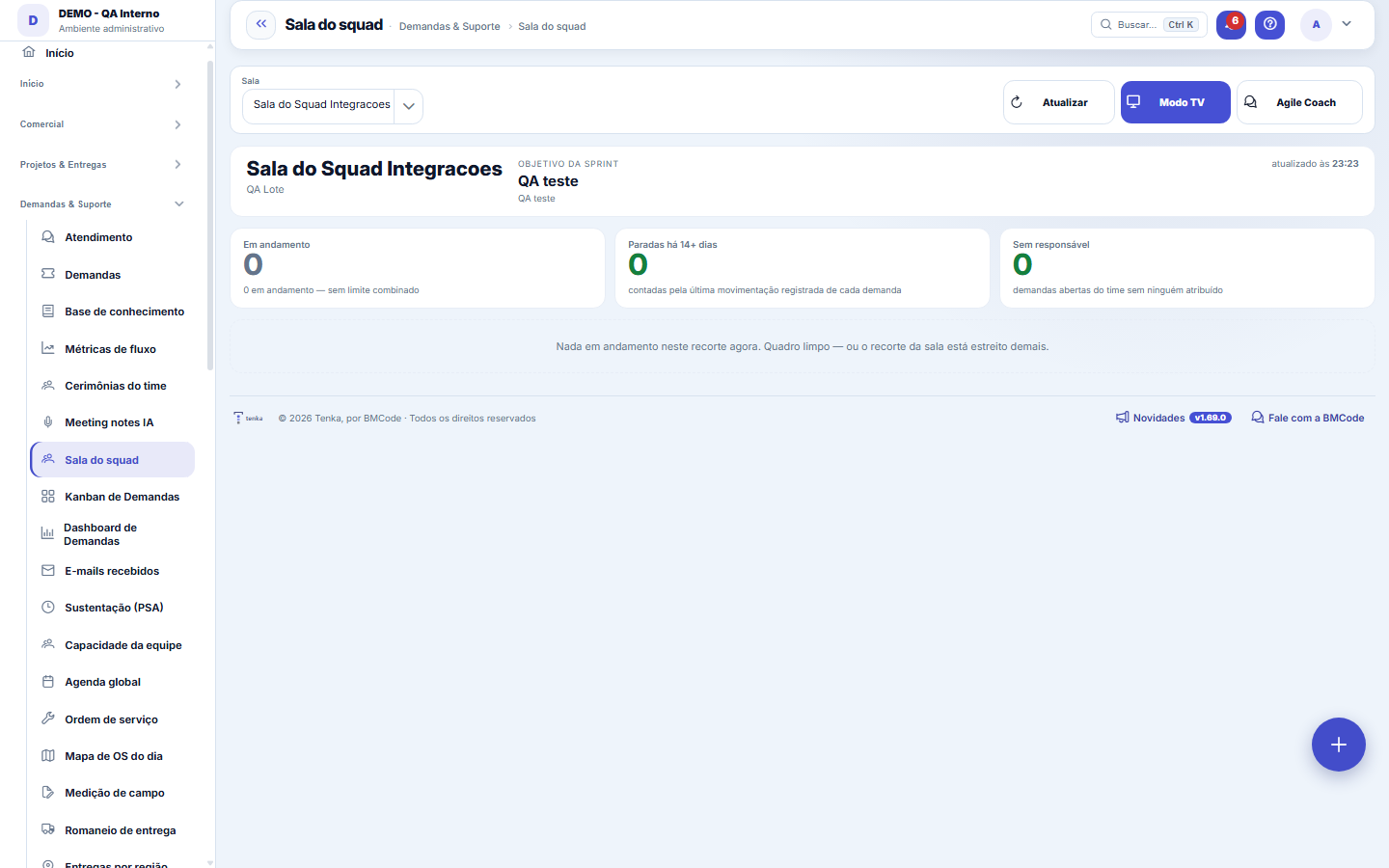
What you find on this screen
A portrait of the screen, read from the screen itself — it changes when the screen changes.
Available actions
RefreshTV modeExit TV mode
Form fields
NomeComo a sala do squad é chamada pelo time.
NºNúmero sequencial da sala por empresa.
EquipeEquipe cujas demandas alimentam esta sala.
ProjetoProjeto que a sala acompanha, quando o squad é dedicado a um só.
Tipo de demandaTipo de demanda considerado nos indicadores da sala.
Pesquisa de pulsoPesquisa cujo resultado aparece no painel de clima da sala.
Janela (dias)Quantos dias de histórico entram no velocity e no gráfico de fluxo.
Limite de WIPQuantas demandas o time aceita em andamento ao mesmo tempo. Acima disso a sala acusa.
AtivaSala inativa sai do painel, mas os indicadores já calculados continuam consultáveis.
Start here
It is a radiator, not a report
The difference is the audience: a report is read by those who demand results, a radiator is read by those who do the work. That is why the screen has no filter, no export and no detail — it answers from afar a single question: how is my team doing right now?
If you need to click to understand the panel, it has failed. Each card carries underneath the sentence that says where the number came from, precisely so nobody needs to ask.
If you need to click to understand the panel, it has failed. Each card carries underneath the sentence that says where the number came from, precisely so nobody needs to ask.
Rules
O que é WIP, e por que ele é o número mais importante da tela
WIP is work in progress: everything that has already been started and hasn't finished yet. It matters because starting is free and finishing is not — a team that pulls a new request before closing the previous one turns ten half-done jobs into zero deliveries.
Limiting WIP is the agreement that forces the right conversation: instead of pulling one more, what's missing to finish that one? The sentence changes color according to the state: within the limit (green), at the limit (amber, "only pull when one leaves"), above the limit (red, "finish before pulling") or with no agreed limit (gray).
Watch the slice: here WIP counts all open requests in the room's slice, not just those in the "in progress" column. If the slice includes the backlog, a limit designed for "5 in progress" will look exceeded forever. Either tighten the room's slice, or calibrate the limit to the number the room actually shows.
Limiting WIP is the agreement that forces the right conversation: instead of pulling one more, what's missing to finish that one? The sentence changes color according to the state: within the limit (green), at the limit (amber, "only pull when one leaves"), above the limit (red, "finish before pulling") or with no agreed limit (gray).
Watch the slice: here WIP counts all open requests in the room's slice, not just those in the "in progress" column. If the slice includes the backlog, a limit designed for "5 in progress" will look exceeded forever. Either tighten the room's slice, or calibrate the limit to the number the room actually shows.
Aging: o cartão fica velho, não a fila
Each card shows how many days that request has not been touched — the count is based on the last recorded movement (or on creation, if there has never been any). Green up to 7 days, amber from 7 to 14, red from 14 onwards; the card at the top counts how many have passed 14.
Aging is the indicator boards usually hide: a column with fifteen cards looks productive until you discover that three of them have been stuck for a month. A stalled request is not a request in progress — it is a decision nobody made.
The "forecast overdue" tag is something else: it looks at the promised date, not at the silence.
Aging is the indicator boards usually hide: a column with fifteen cards looks productive until you discover that three of them have been stuck for a month. A stalled request is not a request in progress — it is a decision nobody made.
The "forecast overdue" tag is something else: it looks at the promised date, not at the silence.
De onde vem cada bloco (e o que NÃO respeita o recorte)
These respect the room's slice (team, project, type): the board, the current sprint and its goal, the open retro actions, the head count and the climate.
These do NOT respect it, and it's good to know: the velocity, the "next by the numbers" block (WSJF) and the count of unscored backlog are read from the whole company. In a single-team company this changes nothing; with several teams, read these three as company context, not the squad's.
The team slice is by the request's person in charge — whoever is not a team member doesn't count, even if working on the same project. And the climate is matched by the team's name: renaming the team silences the thermometer until the next pulse round.
These do NOT respect it, and it's good to know: the velocity, the "next by the numbers" block (WSJF) and the count of unscored backlog are read from the whole company. In a single-team company this changes nothing; with several teams, read these three as company context, not the squad's.
The team slice is by the request's person in charge — whoever is not a team member doesn't count, even if working on the same project. And the climate is matched by the team's name: renaming the team silences the thermometer until the next pulse round.
O modo TV, e o único lugar onde o painel se atualiza sozinho
TV mode hides the menu, header and footer, darkens the background and enlarges the typography for reading from a few meters away. It is the only state in which the screen refreshes itself, at the interval configured in the room (from 30 seconds to 15 minutes).
Outside TV mode the screen freezes at the moment it was loaded — the "updated at HH:mm" clock is the clue. If the number looks wrong, look at that clock before looking at the data.
You can open it directly on the big screen with
Outside TV mode the screen freezes at the moment it was loaded — the "updated at HH:mm" clock is the clue. If the number looks wrong, look at that clock before looking at the data.
You can open it directly on the big screen with
?tv=1 at the end of the address (true, sim and on also work). Any other value opens in normal mode.Frequently asked questions
Por que ninguém consegue editar nada aqui?
Because nobody "registers" a panel. The squad room and the Agile Coach are read-only for all profiles, without exception — what is configured lives in Squad rooms, and what is worked on lives on the requests board.
Why does "in progress" show zero with a full board?
"In progress" counts only tasks that have left the opening statuses, that is, what someone has started. Newly created tasks stay out of the count and do not break the room’s work-in-progress limit.
Which columns and tasks appear in the room?
The columns of the flow of the room’s task types appear, plus any column that has tasks now. With a team, tasks of its members come in, by employee or by their user. If the team has no sprint of its own, the company’s open sprint applies. If the selection exceeds 600 open tasks, the room shows the 600 oldest and says so on screen.
How do I put the room on the team’s TV?
Open the room and click "TV mode": the menu and the top bar go away and the board fills the whole screen, on a dark background readable from afar. To go back, click "Exit TV mode".
Can I ask Tenkai about the room?
Yes. Ask "what is the squad velocity?", "how much does the team have in progress?", "is anyone over the limit?" or "which sprint is open?". Tenkai answers with the same numbers as the room and a link to open it; it only answers people who can see the Squad room.
Connected screens
É configurado emSalas do squadRecorte, limite de WIP, pesquisa de pulse e tempo de atualização do telão.Lê o quadro deKanban de DemandasAs colunas e os cards são as demandas do quadro — o trabalho acontece lá.Sugere as próximas dePriorização (WSJF)O bloco "próximas pela conta" vem do backlog priorizado.É interpretado emAgile CoachO coach lê estes mesmos números e devolve o parecer com a fonte.
Was this article helpful?
In the same module: Today's work21
ConversationsThe conversation hub: reply to portal customers, talk to colleagues (internal chat), and in groups. Everythin…Base de conhecimentoOs artigos que respondem antes de o chamado existir — e o número que mostra quantos chamados isso evitou.InboxYour personal inbox to jot down anything without classifying it at the moment of capture.Team ceremoniesWhere the team's meetings are recorded — planning, daily, review and retrospective — with the agreed duration…ChamadosOs atendimentos de sustentação dos seus clientes, com o relógio do SLA, a previsão calculada e as ações da li…Ticket dashboardManagement view of the service desk: SLA, queue by status and type, workload by owner, and resolution time.TicketsDay-to-day operational cockpit: bugs, improvements, support, and tasks — with SLA, owner, contract consumptio…Company documentA certificate, policy, power of attorney or license with the validity at the center: status, notice to the pe…
Tenka Academy
Explore the AcademyStep-by-step learning paths for your industry, inside the platform.