

Ticket dashboard
Management view of the service desk: SLA, queue by status and type, workload by owner, and resolution time.
The screen
The real screen, in the theme you picked above.
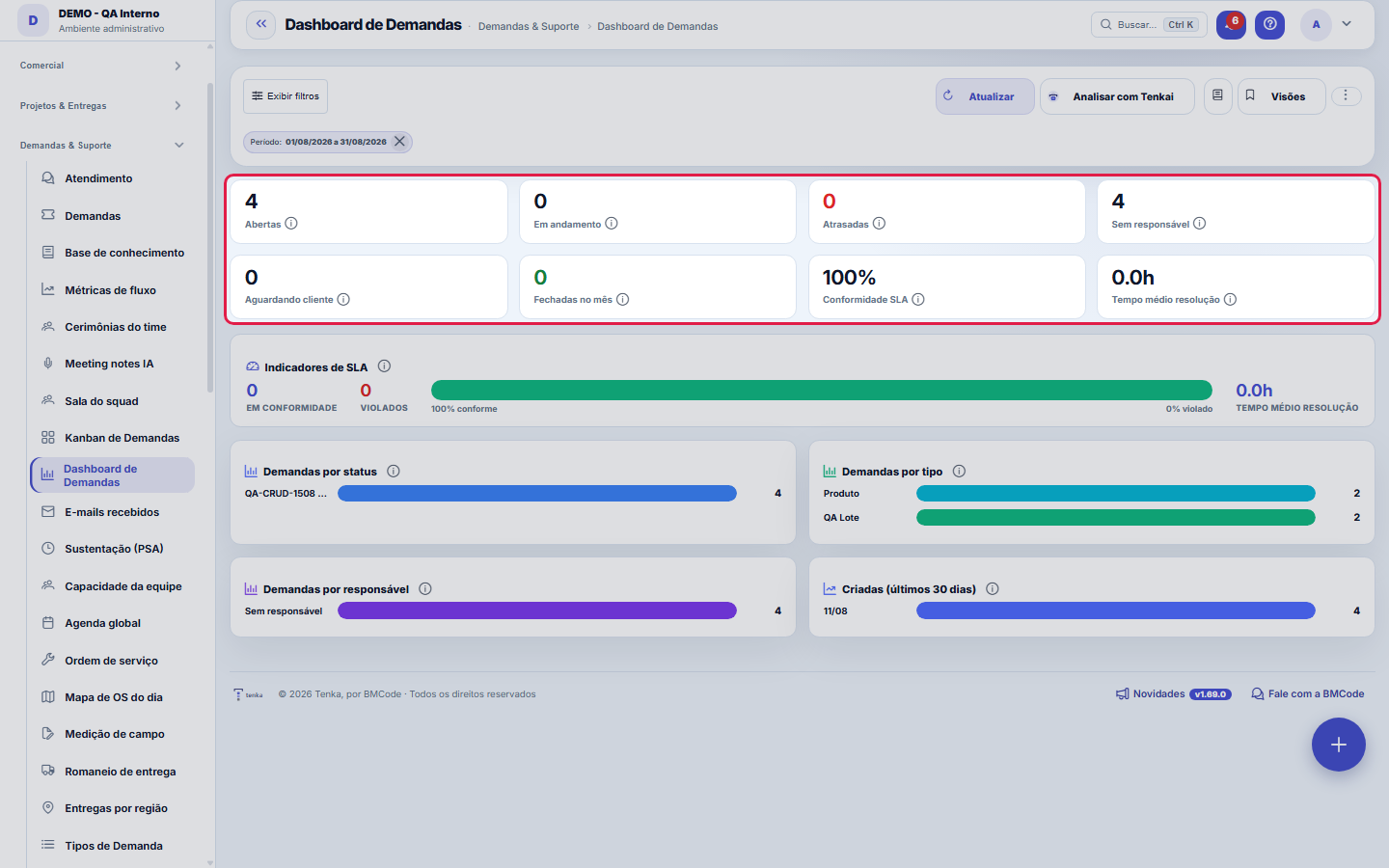
What you find on this screen
A portrait of the screen, read from the screen itself — it changes when the screen changes.
Available actions
RefreshViewsSave current viewApply filtersLast 30 daysClose
Form fields
AbertasDemandas em aberto, sem conclusão nem cancelamento, no período filtrado.
Em andamentoDemandas abertas cujo status pertence à categoria de execução.
AtrasadasDemandas abertas com previsão de entrega já vencida.
Sem responsávelDemandas abertas que ainda não têm responsável atribuído.
Aguardando clienteDemandas abertas paradas em status de espera por resposta do cliente.
Fechadas no mêsDemandas concluídas dentro do mês corrente.
Conformidade de SLAPercentual das demandas com SLA que foram atendidas dentro do prazo acordado.
Tempo médio de resoluçãoMédia de horas entre a abertura e o fechamento das demandas concluídas.
Em conformidadeQuantas demandas ficaram dentro do prazo de SLA.
SLA violadoQuantas demandas estouraram o prazo de SLA.
Demandas por statusContagem de demandas abertas agrupadas por status do fluxo.
PeríodoIntervalo de datas que define o recorte de todas as contagens da tela.
Start here
What you do here
Track service health: % of SLA met, overdue tickets, queue distribution and load per person. Good = high SLA, few overdue, distributed queue. Bad = backlog piled up in one status or concentrated load.
How to
Personalization
The ⋮ menu lets you choose the widgets shown (Screen Preferences). "Analyze with AI" summarizes the bottlenecks citing the real numbers.
Visões salvas, chips de filtro e export em PDF
The action bar holds three shortcuts worth making a habit: the Views button saves the current combination of period and filters under a name ("my on-call", "board — month") and reapplies it in one click; the chips below the bar show each active filter and the chip's X removes just that filter, without resetting the rest; and in the ⋮ menu are the screen Preferences, the guided tour and Export to PDF — a snapshot of the panel as it is, ready to attach to the weekly report.
Rules
How to read the SLA compliance bar
The green/red bar splits the filtered tasks between those that are (or finished) within the SLA deadline and those that breached it: the compliance rate is the green slice over the measured total. Watch the denominator — only tasks that HAVE a calculated deadline count (matched an SLA rule or have a forecast); that is why the rate can look high in a team that simply does not configure SLA for most of what it does. The average resolution time, next to it, measures something else: speed, not promise kept.
Frequently asked questions
Who can access this screen
Operation managers (PM, Administrator). Profiles with access to the dashboard but not to the list see the numbers without navigating to the detail.
Connected screens
Detalha emDemandasInvestigue as demandas por trás de cada indicador.Regido porPolíticas de SLAOs prazos medidos vêm das políticas de SLA.
Was this article helpful?
In the same module: Today's work21
ConversationsThe conversation hub: reply to portal customers, talk to colleagues (internal chat), and in groups. Everythin…Base de conhecimentoOs artigos que respondem antes de o chamado existir — e o número que mostra quantos chamados isso evitou.InboxYour personal inbox to jot down anything without classifying it at the moment of capture.Team ceremoniesWhere the team's meetings are recorded — planning, daily, review and retrospective — with the agreed duration…ChamadosOs atendimentos de sustentação dos seus clientes, com o relógio do SLA, a previsão calculada e as ações da li…TicketsDay-to-day operational cockpit: bugs, improvements, support, and tasks — with SLA, owner, contract consumptio…Company documentA certificate, policy, power of attorney or license with the validity at the center: status, notice to the pe…Documents (GED)The company's living archive: certificates, policies, powers of attorney, contracts and licenses with control…
Tenka Academy
Explore the AcademyStep-by-step learning paths for your industry, inside the platform.