

My Preferences
PERSONAL adjustments for the user: light/dark theme, density, font size, and rows per page — without affecting colleagues.
The screen
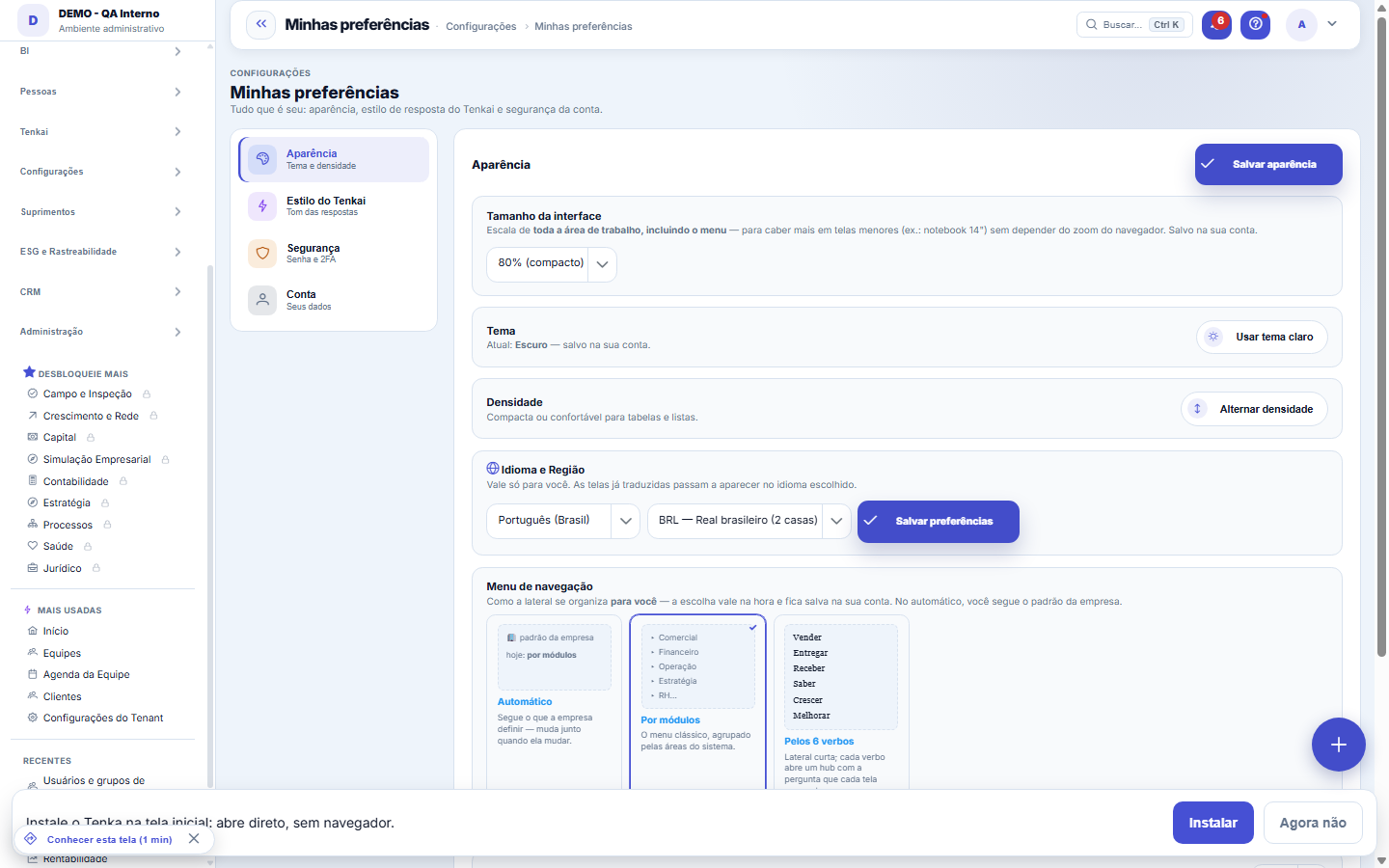
The real screen, in the theme you picked above.
What you find on this screen
A portrait of the screen, read from the screen itself — it changes when the screen changes.
Available actions
Edit my styleDelete my conversationsSet up 2FAChange passwordUse my initial only
Form fields
Tamanho da interfaceEscala em percentual aplicada a toda a área de trabalho, inclusive o menu.
Registros por páginaQuantidade de linhas que todas as listas do sistema mostram por página.
Conversas guardadasQuantidade de conversas suas com o Tenkai que estão guardadas hoje.
Prazo de retençãoPrazo em dias após o qual as suas conversas com o Tenkai são apagadas automaticamente.
Verificação em 2 etapasDiz se a verificação em duas etapas da sua conta está ativa ou inativa.
Start here
What it's for
Everything that's YOURS lives here: appearance (light/dark theme, density, interface size, records per page, form columns and menu mode), Tenkai's response style, account security (2-step verification, password), and the account itself (avatar, saved conversations). The choices are saved to your account and apply in any browser. What belongs to the COMPANY — billing, subscription, default language — lives in Company Settings, which is a different screen.
O que é uma passkey
It's a key stored on the device itself — protected by its fingerprint, face or PIN — and it replaces the password when signing in. It never leaves the device: the server only keeps the public half, which can't be used to get in anywhere. That's why a passkey can't be leaked in a database attack or typed into a fake page: the browser only offers it to the address it was created for.
How to
O número do dia: ligar, escolher o canal e o horário
It starts off. When turned on, you receive on business days a single number — the one that weighs most today — by email, WhatsApp or both, within business hours in YOUR company's time zone, once a day. If there's nothing relevant, nothing is sent. WhatsApp requires the channel to be configured on the account. If your profile doesn't allow seeing amounts, the amount arrives masked — just like on screen.
Rules
Appearance
The light/dark theme applies instantly and is already saved to your account — it applies in any browser you log into. The interface size scales the whole workspace, including the menu, to fit more on smaller screens (from 80% to 110%). Density compacts or spaces out the rows, and the navigation menu has two modes: automatic or grouped by the system's modules. Scale, records per page, and form columns are saved by the Save button in the Appearance section.
Por que o número aparece antes de confirmar
Because "delete everything" means very different things whether it's 3 questions or 3 years of history. The counter shows how many conversations are stored right now, before you decide.
Rows per page
Records per page sets how many rows the lists show at a time — and it applies to ALL tables in the platform, not just the screen you were on when you changed it. The choice is saved to your account. Next to it lives the form columns preference (1, 2, or 3), which sets the engine forms' global default — and each form screen can still have its own setting, which overrides that default on that screen.
Don't confuse it with Company Settings
BUSINESS rules (approvals, finance, integrations) live in Settings → Company/Parameters and apply to everyone — here it's just your visual comfort.
Rating an answer saves the question and the answer
When you click the thumb (up or down) on a Tenkai answer, the question and answer are kept for the team to analyze and improve the assistant. This is separate from your conversation and isn't removed by "Delete my conversations".
Curated by YOUR access and YOUR role
The briefing is built with your identity. An item whose screen your profile can't open doesn't go in — not even as a title. If you can't see amounts, the number arrives masked, just like the chat. And the order isn't chronological: what points to you (what you're responsible for) comes before what is merely serious in general.
Voce escolhe se quer, quando e por onde
It starts OFF. Nobody receives messages they didn't ask for. You turn it on, choose the time (default 8am), choose email, WhatsApp or both, and decide whether you also want it on weekends. Turning it off is one click in the same place.
What the error log keeps — and what to do with it
If there's nothing worth your 60 seconds, nothing is sent — and that's deliberate. A daily "good morning, nothing here" is the quickest way to train someone not to open the briefing on the day it matters.
WhatsApp precisa do canal configurado
A proactive WhatsApp message requires an active channel in the company and, outside the 24-hour window, a template approved per language by the WhatsApp platform. Without that, sending doesn't happen, and the reason is recorded. A preference that claims to be on and never arrives is worse than a preference that's off.
Uma passkey por aparelho — e é assim que tem de ser
The key doesn't cross machines. Register one on the laptop, another on the phone, another on the home computer: each gets the nickname you write, and the list shows when it was created and when it was last used. Lost the device? Remove its passkey here, from any other device — whoever has the lost device stops getting in immediately, without you needing to change your password.
A senha continua existindo, e de propósito
Registering a passkey does NOT turn off your password. If it did, losing your only registered device would be enough to lock you out of your own account — and there's nobody to ask for the key back, because nobody else has a copy. The password is the way back. It just stops being necessary day to day, which is already the gain.
Avatar: where the image comes from and who controls it
Three sources, one rule. The Google/Microsoft photo comes in on its own at the first login through the provider and is updated at each SSO login. An image you upload, or the choice "use only the initial", is an explicit decision — and social login never overwrites an explicit decision. The image is stored in the platform's storage (reduced to 256px), and only the user themselves sees it through the avatar address.
O formato das datas segue o idioma, não o país do servidor
When you choose a language here, day, month, time and the weekday name come out in that language's format throughout the platform: 18/09/2026 in Portuguese, 09/18/2026 in English, 2026/09/18 in Japanese. Without your own choice, the company's language applies; without the company's, the account's. CSV and Excel exports follow the same format — a date read the wrong way round in a spreadsheet becomes a wrong decision without anyone noticing.
Screen reader
The system works with screen readers (NVDA, VoiceOver, TalkBack): every filter and form field on the main screens has a spoken name, dialogs take focus when they open and give it back when they close, and Esc closes. In Tenkai, the wait ("consulting…") and the answer are announced without you having to look for them; the action to hear the answer aloud also appears when navigating by keyboard. If you find a field without a name or a shortcut that does not work, use "Send feedback" on the screen itself — that is how the accessibility list stays at zero.
My notifications: right away, in the daily digest or muted
In My preferences › Notifications you choose, for each kind of alert (approval, request, finance, Tenkai Watch…) and each channel (in the system, phone, email, WhatsApp), how you want to be told: right away, in the daily digest (a single alert per channel at digest time — 8 a.m. unless your company changed it) or muted. Your choice is saved as you change it and applies to every alert on the platform.
When an alert goes ahead of your choice
A critical alert (security, money going out wrong) always shows in the system, even when muted; outside the system your mute is respected. A high-priority alert (late approval, missed deadline, cash about to go negative) does not wait for the digest. A low-priority alert never interrupts you by phone, email or WhatsApp: it goes to the digest. WhatsApp starts muted — turn it on if you want alerts there.
Frequently asked questions
What "Delete my conversations" deletes
Everything YOU asked Tenkai IN THIS company, plus the working memory: the summary it distilled from the conversation and the facts you pinned. It doesn't delete other people's conversations, nor yours in another company of the group — each CNPJ has its own conversation. There's no undo.
Who defines how long conversations are kept
Your company does, in Company Settings, under the AI Plan, in the "Keep conversations for" field. The default is to keep them forever. If there's a period, the chat footer says what it is — and the daily cleanup deletes whatever has passed it.
Did my preference disappear?
This screen's preferences are saved to YOUR account, not the browser: theme, scale, records per page, and menu mode follow your login on any machine. If something seems to have reverted to default, first check whether you're on the same user — different accounts have different choices — and whether the change was actually saved via the section's button (theme is the only one that applies and saves by itself, with no button). Switching companies within the session doesn't change your appearance: the preference belongs to the person, not the company.
Instalei o Tenka como aplicativo. Como recarrego a tela sem a barra de endereço?
Use the reload icon (⟳) at the top of the screen, next to the bell — it only appears in the installed version, because in the browser the browser's own button already does this. Keyboard shortcuts work too: F5 or Ctrl+R (Cmd+R on Mac). It's worth knowing what it does: it fetches the page again from the network, instead of just redrawing what was already in memory. If a number seems stale, that's what you want — and you never need to close and reopen the application.
Your day in 60 seconds
Every morning, at the time you choose, Tenkai sends at most THREE things: the ones that weigh most today and that are yours. Each one comes with the link to the screen that formed the number, so you can check instead of believing. The ceiling of three is a rule, not a suggestion: a briefing with ten items is a report, and nobody reads a report in the morning.
Por que este cartão não aparece para mim?
For one of two reasons. Either the account hasn't turned the feature on yet — it starts off and depends on the administrator configuring the system's address, because a passkey created for the wrong address simply doesn't work. Or your browser doesn't speak WebAuthn: the button only reveals itself where the feature exists, instead of appearing and failing on click.
Where do I choose a table's columns?
In the gear in the corner of the table itself, next to the download button. It works on every table in the system — on lists and also on the tables inside screens, such as subscription invoices and seats, companies, Tenkai credit statement, notifications, item units and variations, portal orders and reports. There you show or hide columns, drag to change the order, choose how many rows to see and make the table compact. Your choice is saved to your account: on another computer the table opens the same way.
Why didn't I get an alert?
Below the table, "What happened to my alerts" shows your latest alerts and what happened to each one on each channel: delivered, kept for the digest, muted by your choice, or failed (for example, no phone number on file or no phone signed up for alerts). If it says "muted", change your choice for that kind of alert in the table.
How do I choose the notice for portal chat messages?
On the Notifications tab, find the row New message in Support. It applies to the notice you get when a customer writes in the portal chat. For each channel, choose whether the notice arrives right away, in the daily summary or stays silent. The other system notices stay as they are.
Was this article helpful?
In the same module: Platform and security38
Connected help screenAnchor screen of the detail dictionary. Does not appear in the menu.Platform accessThe record of when the platform's support team accessed your account, what they did and with what authorizati…White-spaceSee what's left to sell to those who are already customers — by cross-referencing the installed base with wha…Template itemAnchor screen of the detail dictionary (template items). Does not appear in the menu.Assistente fiscalQuatro passos para a nota sair do Tenka: estado, regime, código de segurança (CSC) e certificado A1 — com a r…ShippingControls the picking and dispatch of what was sold. Shipping confirms that the merchandise actually left: a m…Position bandAnchor screen of the detail dictionary (position bands). Does not appear in the menu.Blog — WordPress connectionWhere you connect your company's WordPress and teach the AI to write like you: the editorial line (what to ta…
Tenka Academy
Explore the AcademyStep-by-step learning paths for your industry, inside the platform.