

Email inbox
Connects your company's support address so that the client's email comes in as a demand, with attachments and conversation.
The screen
The real screen, in the theme you picked above.
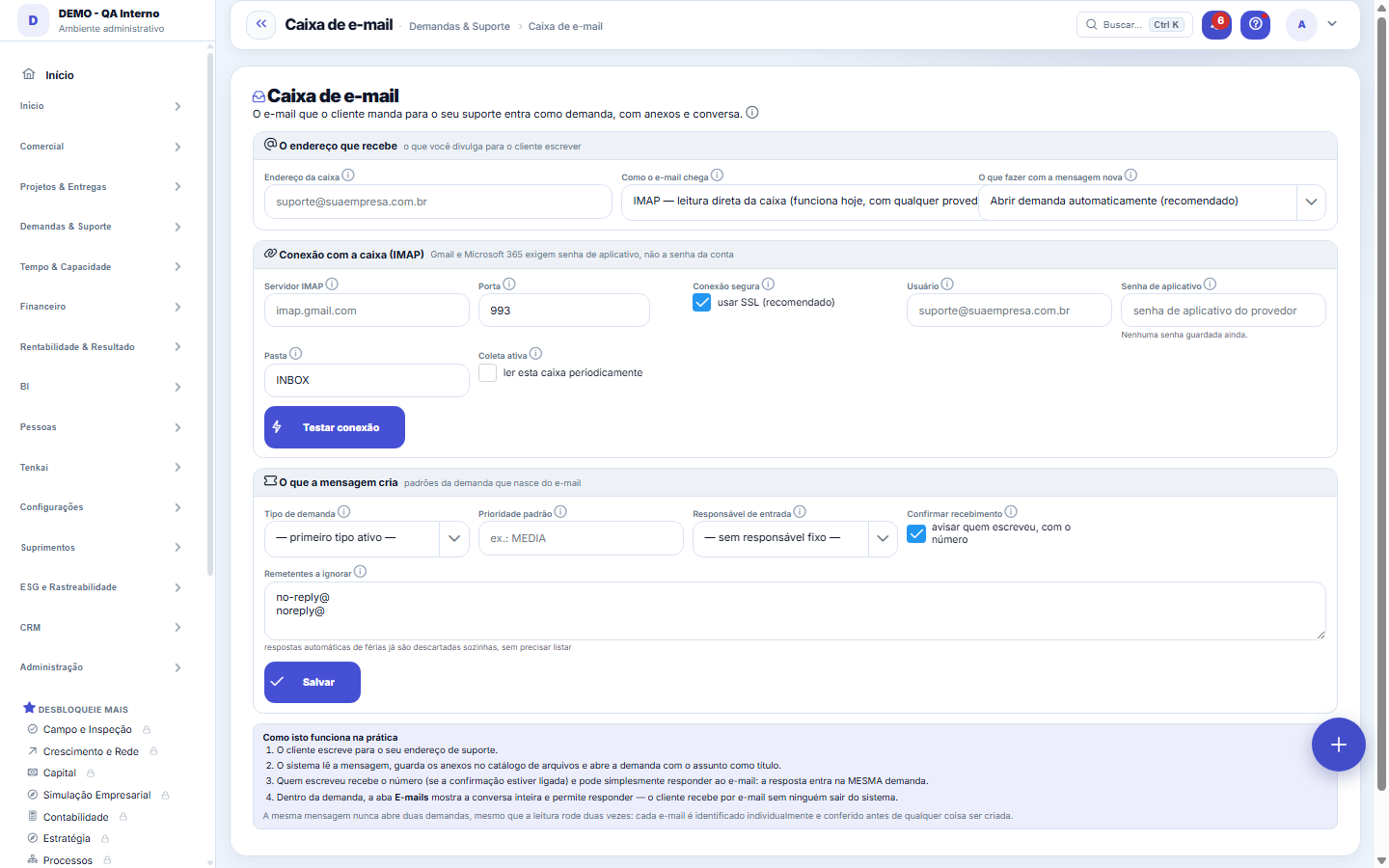
What you find on this screen
A portrait of the screen, read from the screen itself — it changes when the screen changes.
Available actions
Test connectionCollect nowDisconnectSave
Form fields
Endereço da caixaEndereço monitorado. É por ele que a caixa é reconhecida na operação.
ModoComo as mensagens chegam: leitura direta da caixa ou arquivo depositado.
Destino padrãoPara onde a mensagem vira registro quando nenhuma regra decide antes.
ServidorServidor de e-mail consultado na coleta.
PortaPorta usada para falar com o servidor de e-mail.
Conexão cifradaDesligar expõe a senha da caixa na rede; deixe ligado sempre que o servidor aceitar.
PastaPasta da caixa que é lida. Mensagem fora dela nunca é coletada.
Prioridade padrãoPrioridade dada à demanda criada a partir da mensagem.
Enviar confirmaçãoSe o remetente recebe aviso de que a mensagem virou atendimento.
Remetentes ignoradosQuem deve ser descartado na coleta, para robô e aviso automático não abrirem demanda.
AtivaCaixa inativa para de coletar, e a mensagem nova fica só no servidor.
Última coletaÚltima coleta concluída. Silêncio longo aqui é coleta parada, não caixa vazia.
Último erroO que falhou na última tentativa. É a primeira coisa a ler quando nada chega.
ProcessadosQuantas mensagens esta caixa já transformou em registro.
Start here
What it's for
Put an end to requests that live only in one person's inbox. What comes in through here becomes a request with a number, queue, owner and deadline — and starts to exist for the SLA and for reporting.
Rules
The same message never opens two requests
Each e-mail is individually identified and checked before anything is created. This holds even if the reading runs twice, if the system restarts midway, or if someone clicks "Collect now" repeatedly.
Gmail and Microsoft 365 require an app password
The account password doesn't work for reading the inbox with these providers: you need to generate a specific app password, which you can later revoke without changing the main password. It's stored encrypted and never shown back to you.
An out-of-office auto-reply would turn into a request — and it doesn't
Automatic messages (out-of-office, no-reply, robot notifications) are discarded before becoming a request, and are logged as ignored with the reason. Without this, every client's vacation notice would open a ticket that no one would ever close.
Frequently asked questions
What if the message can't become a request?
It stays on the "Received e-mails" screen marked with the reason, so you can link it to an existing request or open a new one with one click. No message is discarded silently.
Was this article helpful?
In the same module: Platform and security38
Connected help screenAnchor screen of the detail dictionary. Does not appear in the menu.Platform accessThe record of when the platform's support team accessed your account, what they did and with what authorizati…White-spaceSee what's left to sell to those who are already customers — by cross-referencing the installed base with wha…Template itemAnchor screen of the detail dictionary (template items). Does not appear in the menu.Assistente fiscalQuatro passos para a nota sair do Tenka: estado, regime, código de segurança (CSC) e certificado A1 — com a r…ShippingControls the picking and dispatch of what was sold. Shipping confirms that the merchandise actually left: a m…Position bandAnchor screen of the detail dictionary (position bands). Does not appear in the menu.Blog — WordPress connectionWhere you connect your company's WordPress and teach the AI to write like you: the editorial line (what to ta…
Tenka Academy
Explore the AcademyStep-by-step learning paths for your industry, inside the platform.