

WhatsApp Channels
Connect WhatsApp numbers to the platform (Meta's official Cloud API or your own provider) for support, CRM, and collections.
The screen
The real screen, in the theme you picked above.
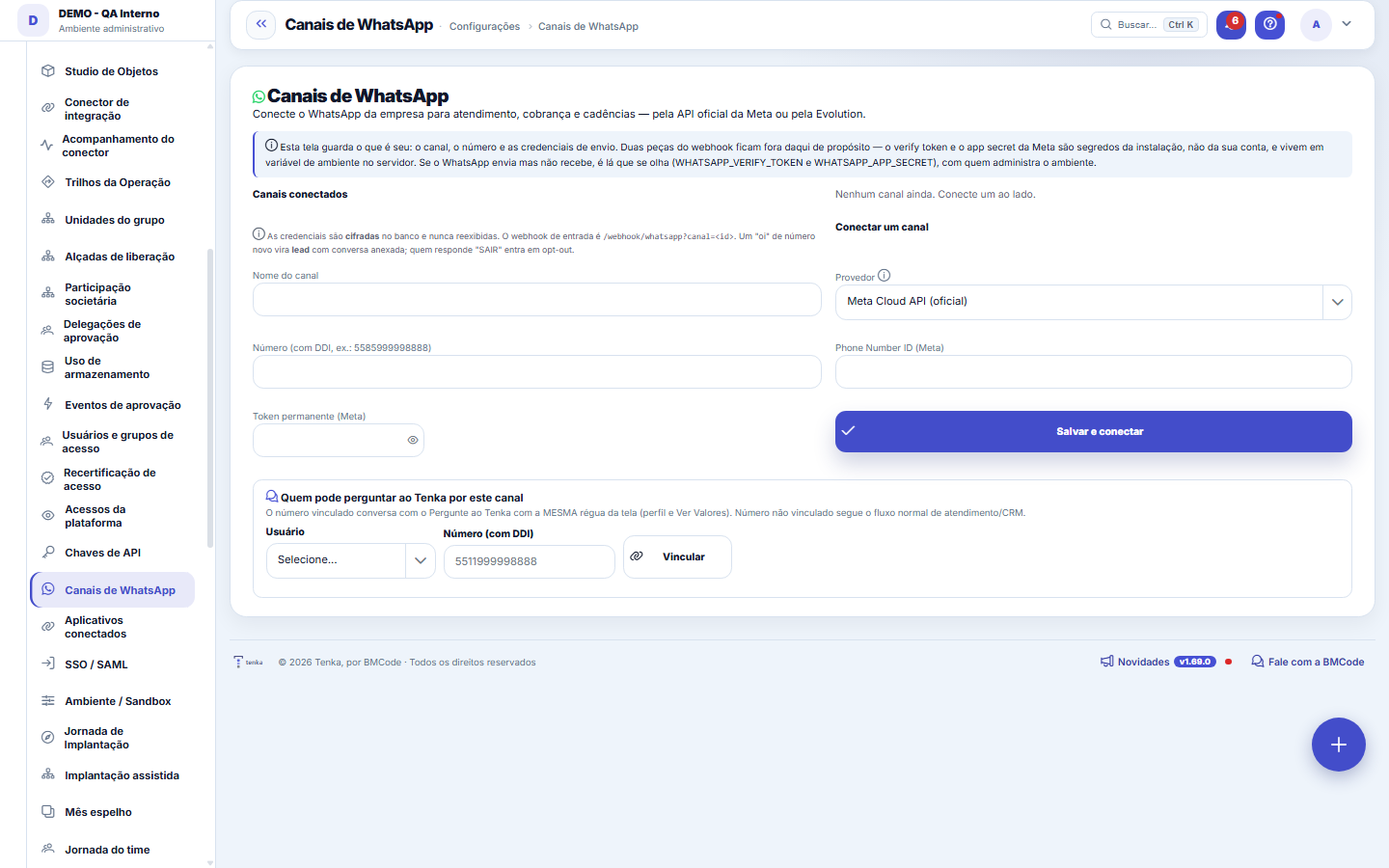
What you find on this screen
A portrait of the screen, read from the screen itself — it changes when the screen changes.
Available actions
ReconfigureDisconnectSave and connectSave only the Instagram tokenLink
Form fields
Situação da conexãoEstado do canal de WhatsApp: conectado, pendente de conexão ou desconectado.
Start here
What it's for
A "hi" from a new number becomes a LEAD on the kanban; customer conversations enter service; collection ladders and alerts can go out through the channel.
How to
Answer Instagram Direct in the same service
Tap Reconfigure on the channel, paste the Instagram page token (from the same Meta app) and tap Save only the Instagram token. The token is encrypted and never shown again. From then on, Direct messages come into Conversations and the 24-hour salesperson like WhatsApp ones. To remove Direct, save with the field empty.
Rules
Official vs. alternative
Cloud API (Meta) is the official path — it requires business verification with Meta (an external process). An alternative provider (BYO) exists for testing, with a RISK DISCLAIMER: never use it on the collection path (risk of the number being blocked).
Credentials
Tokens are ENCRYPTED in the database. The incoming webhook needs to be reachable over public HTTPS — set up the URL in the Meta panel.
Opt-out
Whoever replies "STOP" to a message enters opt-out: the number starts being treated as someone who asked not to receive messages, and sends from that channel stop going to them. Respect the request — insisting with someone who asked to opt out wears down your number's reputation with both the provider and the recipient. The record of who opted out follows the channel connected on this screen; a "hi" from a new number, on the other hand, becomes a lead with the conversation attached.
Whose Meta account it is
Platform number: Meta bills BMCode and messages count toward your plan allowance (500, 2,000 or 10,000 per month); the excess goes on the invoice at R$ 0.15 per message. Own account: the Meta account is yours, Meta bills you directly and those messages stay out of the Tenka meter.
Reading over WhatsApp: off switch and per-person cap
In Parameters > Tenkai, "Reading over WhatsApp" turns off questions through the channel for the whole company (the linked number gets the notice and the Tenka link). "Cap on messages per person in 24 h" limits how many messages each number exchanges with Tenkai per day (default 50; 0 = no cap). The same cap applies to Slack and Teams.
Reply in audio
Send "reply in audio" on WhatsApp to receive each reply also by voice, in your language; "reply in text" goes back to normal. The preference belongs to each person. The company can turn audio on for everyone in Parameters ▸ WhatsApp.
Shared WhatsApp number
A number marked as shared serves several accounts at once: the message goes to the account the sender's number is linked to, and never to another. Whoever writes from a number not linked to any account receives, once a day, the link to create the account by mobile. Messages count toward the allowance of the sender's account.
Pix sales and delivery on tomorrow's route
With automatic Pix turned on, a spoken sale paid by Pix waits for the payment: when you confirm, the QR code and the Pix copy-and-paste code arrive in the chat for you to forward to the customer, and the sale goes into the checkout by itself when the Pix arrives (you get a message; if the sale cannot be completed, the message says why and the paid Pix stays free to record the sale at the checkout). The QR code is valid for one day (the deadline can be changed in the checkout settings). Without automatic Pix, the sale is saved right away, as at the checkout. "To be delivered on tomorrow's route" opens the delivery with the address on the customer's record and adds the sale as a stop on tomorrow's delivery run; with no address on record, the proposal warns you before you confirm.
24-hour salesperson
When the customer writes the way she talks — "do you have 1234 in M black?", "what is the minimum?", "installments?", "when does it arrive?", "I want 12 of 1234 G blue" — the reply comes from the stock, the size pack and the terms and delivery text the store wrote in Parameters ▸ WhatsApp; the order becomes a quote for the salesperson to confirm. Nothing is made up: if the store did not write the terms, or the message was not understood, or the customer asks to talk to someone, the conversation shows up in Conversations for a person to answer.
Instagram Direct messages
Messages arriving through the store's Instagram Direct enter the Conversations list, marked as Instagram, and go through the same automatic service as WhatsApp. To reply through Tenka, whoever manages the channel enters the Instagram credential in the channel settings; without it, messages arrive in Conversations and the reply goes out through Instagram itself.
Audio replies chosen per person
In the list of linked numbers, each person has a choice: company default, text and audio, or text only. It is the same preference the person changes on their own by sending "reply with audio" or "reply with text" on WhatsApp — the last one saved applies.
Prices in the 24-hour salesperson conversation
When a customer asks the price of an item by its code ("how much is 1234?"), the 24-hour salesperson answers the wholesale price from the store's default price table, the same as the catalogue, with the price by quantity and the item's closed size pack and minimum, when there are any. It never shows cost or the price agreed with another customer. Without the item code, or if the item has no price in the table, the question goes to a person from the store. A store that only gives prices to registered retailers turns it off in Parameters, 24-hour salesperson, "answer the wholesale price". "Is 1234 back?" gets the same answer as "do you have 1234?": what is available by size and colour and, if sold out, when it will be ready.
Frequently asked questions
Message didn't arrive?
Split the problem in half. If Tenka SENDS but doesn't RECEIVE the replies, the missing piece doesn't live on this screen: the webhook's verify token and app secret are installation secrets and live in an environment variable on the server (WHATSAPP_VERIFY_TOKEN and WHATSAPP_APP_SECRET) — talk to whoever administers the environment. If nothing goes out, look at the channel badge: it shows the connection status (CONNECTED, PENDING, or disconnected); if it's not CONNECTED, start by reconfiguring the channel. Credentials are encrypted and never redisplayed — if in doubt, enter them again via the Reconfigure button.
What you can do through WhatsApp
From the number linked to your user: "sold 2 tops to Maria by pix" records the sale in today's register; "received 200 from Maria" settles what she owes; "spent 200 on freight" records the expense; "how much did I sell today?" and "who owes me?" answer with the figure and its source; "collect from Maria" returns the collection link for you to send. Everything that saves shows first what it will do and only happens after you reply CONFIRM with the code. What your profile can do on screen is what applies.
How to say the sale on WhatsApp
Say or write it the way you do at the stall, starting with "sold": "sold 5 size runs of the ribbed top" (the size run comes from the item record: which sizes and how many of each), "sold 5 pieces M of the ribbed top" (a single size), "sold 5 runs of A, 3 of B and 10 of C" (several items in one sentence). Say who it is for ("for Maria" or "for a walk-in customer"), the price list ("list price" or "wholesale list"), the terms ("plus 5%", "5% off") and how it was paid ("by Pix", "cash", "card in 3 installments", "on credit"). "With 5%" without saying which means a surcharge on installments and a discount when paid up front. Tenka shows each item with price, total and terms, and only saves after your CONFIRM; anything it cannot know (the colour of the run, which price list) comes back as a question. When Tenka asks, reply with just what was missing — "M red", "by Pix", "wholesale list", "discount" — and it rebuilds the proposal from the sentence you already sent (valid for 15 minutes; a new sale replaces the question).
Was this article helpful?
In the same module: Platform and security38
Connected help screenAnchor screen of the detail dictionary. Does not appear in the menu.Platform accessThe record of when the platform's support team accessed your account, what they did and with what authorizati…White-spaceSee what's left to sell to those who are already customers — by cross-referencing the installed base with wha…Template itemAnchor screen of the detail dictionary (template items). Does not appear in the menu.Assistente fiscalQuatro passos para a nota sair do Tenka: estado, regime, código de segurança (CSC) e certificado A1 — com a r…ShippingControls the picking and dispatch of what was sold. Shipping confirms that the merchandise actually left: a m…Position bandAnchor screen of the detail dictionary (position bands). Does not appear in the menu.Blog — WordPress connectionWhere you connect your company's WordPress and teach the AI to write like you: the editorial line (what to ta…
Tenka Academy
Explore the AcademyStep-by-step learning paths for your industry, inside the platform.