

Partner Hub
The accounting partners' space: companies served, materials, and payouts. It's the bridge between the accounting office and the platform — a company link without the partner's acceptance stays pending, not active.
The screen
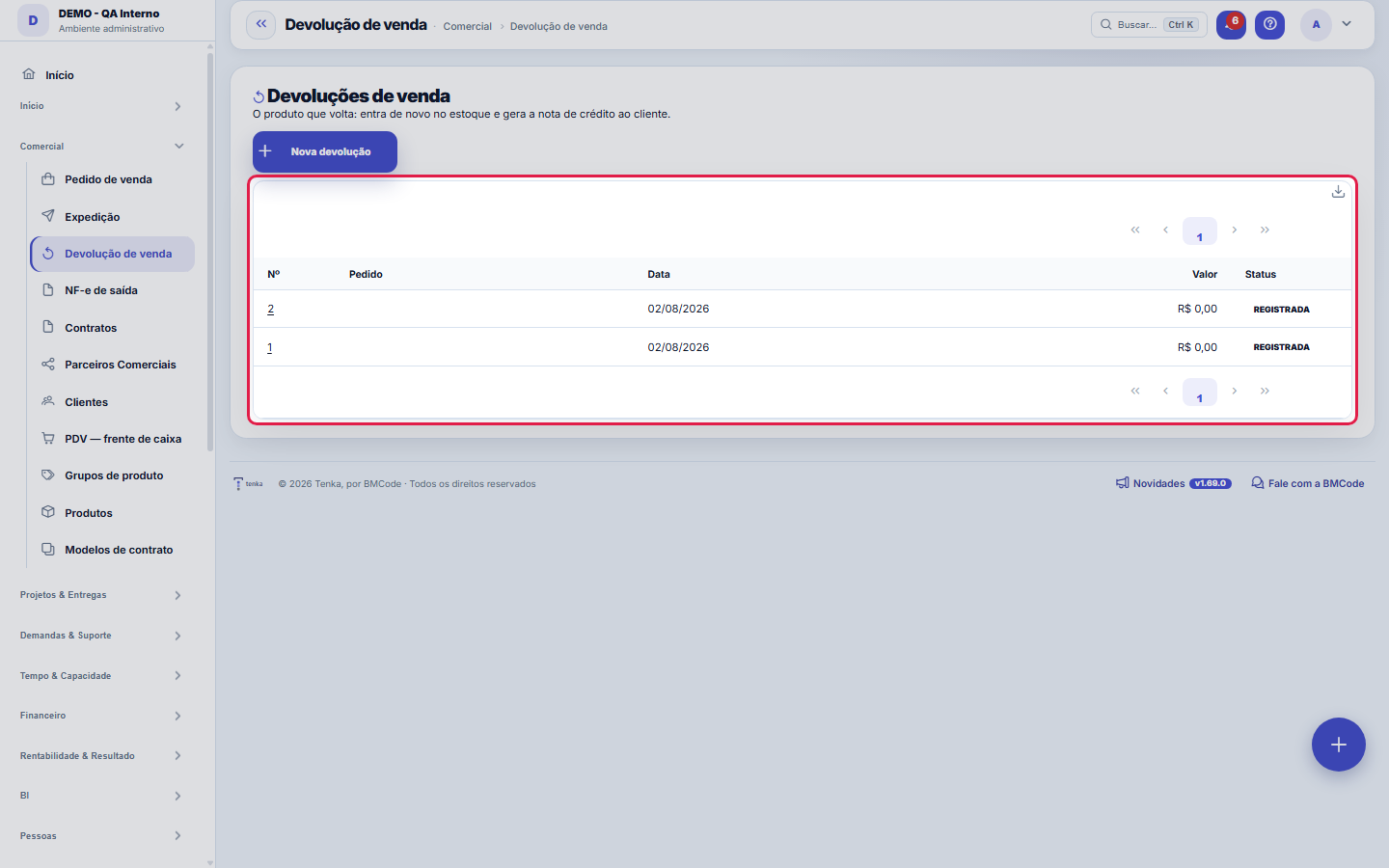
The real screen, in the theme you picked above.
What you find on this screen
A portrait of the screen, read from the screen itself — it changes when the screen changes.
Form fields
Pedido de vendaO pedido faturado de onde as peças voltam. Escolhido o pedido, "Puxar do pedido" traz os itens.
NºNúmero sequencial por empresa da devolução.
ClienteQuem devolve. Vem do pedido quando ele é informado.
TipoDevolução total ou parcial do pedido.
DepósitoPara onde as peças voltam ao processar a devolução.
SituaçãoEm que ponto a devolução está.
MotivoPor que o cliente devolveu. É o campo que aponta defeito recorrente.
Valor totalValor devolvido, que volta como crédito ou estorno.
DataData em que a mercadoria voltou.
Origem (ERP)Sistema de origem quando o registro veio de importação.
Código externoIdentificador do registro no sistema de origem.
Start here
What this screen solves
The return path for goods: the customer returned them, and now three things need to happen without anyone forgetting any of them — the item goes back to stock, the reason is recorded and finance is adjusted. Returns handled by email are the classic source of stock that doesn't reconcile at month-end.
Para que esta tela existe
Returns of sold products: each item returns to stock as a receipt (reversal) and generates the credit note / financial reversal for the customer. Linked to the originating sales order. — this is the role of the "Sales return" screen within the platform.
A ficha da devolução: o que voltou, de qual pedido e por quê
The Data tab holds the type (full or partial), the reason, the date and the amount. The Returned items tab holds the lines: "Pull from order" brings the items from the original sales order so you can adjust the returned quantities; you can also add them line by line. The reason is the field that points to a recurring defect — write the real one.
How to
What the list engine offers here
The list uses the standard engine: free search, column filters and saved views per user; a recycle bin for deleted returns (?excluidas=1); Excel, PDF and CSV export of the whole set — with amounts obeying the "View Amounts" permission of your profile, including in the file. The URL accepts ?q=text and ?fd_=, so a link from another report can open this list already filtered on the return of interest. Column preferences (which ones and in what order) are also yours, per user.
Origem (ERP) e Código externo
These two fields exist for returns mirrored from an external ERP through the connector: Source (ERP) says which system the record came from and External code keeps its key there at the source — it's by this pair that the integration recognizes the record in subsequent loads and avoids duplicates. A return created here inside has both empty, and that's normal. On an integrated record, avoid editing them by hand: it's the tie to the source system that gets lost.
Rules
REGISTRADA nao devolve nada ao estoque — PROCESSADA devolve
While the return is REGISTERED, it is only the notice that the goods are coming back: nothing changes in the balance. It's when you PROCESS it that the item enters the warehouse again and the financial adjustment is generated. The two states exist because in real life goods are announced before they arrive, and receiving what hasn't arrived yet is how stock starts to lie.
A visão salva guarda busca, filtros, colunas e ordenação
When you save a view with the Views button, it stores four things: the search text, the applied filters, which columns appear (and in what order) and which column the list is sorted by. Applying the view restores everything at once — including resetting the sort and the page you were on, so the result is exactly what the view describes. Views saved before this version remain valid: whatever they didn't store simply doesn't change when applied.
O erro de preenchimento aparece no campo, ao sair dele
Nas fichas, sair de um campo já dispara a conferência do que dá para conferir na hora: campo obrigatório deixado em branco e e-mail mal formado. O aviso aparece embaixo do campo e desaparece quando você começa a corrigir. Campo numérico não precisa de aviso: ele simplesmente não aceita letra enquanto você digita. Isso é conforto, não a validação final: ao salvar, o sistema confere tudo de novo do lado do servidor.
Esta tela agora é do padrão: colunas, visões e exportação
The list reads the screen's dictionary, so you choose the columns, filter by any of them, save views and export the whole set (not just the page). The form shows the dictionary fields in the Data tab; what is specific to this document — items, checking, picking, quote map — is in the following tabs.
Processar devolve ao estoque e gera o crédito — e não volta atrás
While in draft, everything can be edited. "Process" does three things at once: each item returns to stock as a receipt (reversal), the credit note or financial reversal for the customer is created, and the return is completed. After that the record is read-only — if you got the quantity wrong, make a new return (or a sale) to correct it.
Returning a product with a grid
A product with size and colour asks for the variant that came back (pulling from the order, it is already filled in). If any line cannot go back to stock, the return stays open and the screen says which — the credit note only comes out with every piece back.
Returning a kit
Returning a kit puts each component back in stock, in the returned quantity × quantity per kit, at each one's current average cost.
Refunding as customer credit
Tick Refund as customer credit before processing: the returned amount becomes a credit voucher for the customer (used on a next order with the Customer credit method, or at the POS) and the credit note for that part is created settled — there is no cash to refund. The return needs the customer.
Frequently asked questions
Why is the reason mandatory?
Because it's the only piece of data that turns a return into information. Three returns of the same item for the same reason aren't bad luck: it's a batch defect, a specification defect or a wrongly sold expectation. Without the reason written down, each return looks like an isolated case and the pattern never shows up.
Como descobrir quem mudou um campo desta ficha?
Open the record and look at the Timeline on the right: it shows each change as "from one value to another", with the person and the date. When there are many changes, use the two filters at the top of the timeline — one by field, the other by person. The search runs in the database, so old changes show up just the same. You can also ask Tenkai: "who changed contract 482?".
Was this article helpful?
In the same module: Sales and shipping7
Payment termsAs condições que a venda oferece: em quantas parcelas divide, quando vence a primeira e o intervalo. O fatura…Consignment and approvalConsignment, approval and samples: what left, what is out, and the settlement that becomes a receivable.EncomendasA venda que vai pela transportadora ou pelo guichê do ônibus: volumes, rastreio e o andamento avisado no What…Process documentsStores the documents that support a process (procedure, evidence, attachment) linked to the right step. A loo…Textile chain mapFrom order to cash, every stage of the textile chain in one graph: each box is a screen with your company’s n…5W2H action planThe action plan in 5W2H format. An action with no owner and no date isn't a plan, it's an intention — those t…Foreign exchangeRecords and tracks operations in foreign currency using the day's rate. The result changes between closing an…
Tenka Academy
Explore the AcademyStep-by-step learning paths for your industry, inside the platform.