

5W2H action plan
The action plan in 5W2H format. An action with no owner and no date isn't a plan, it's an intention — those two fields are what turns the list into an accountable commitment.
The screen
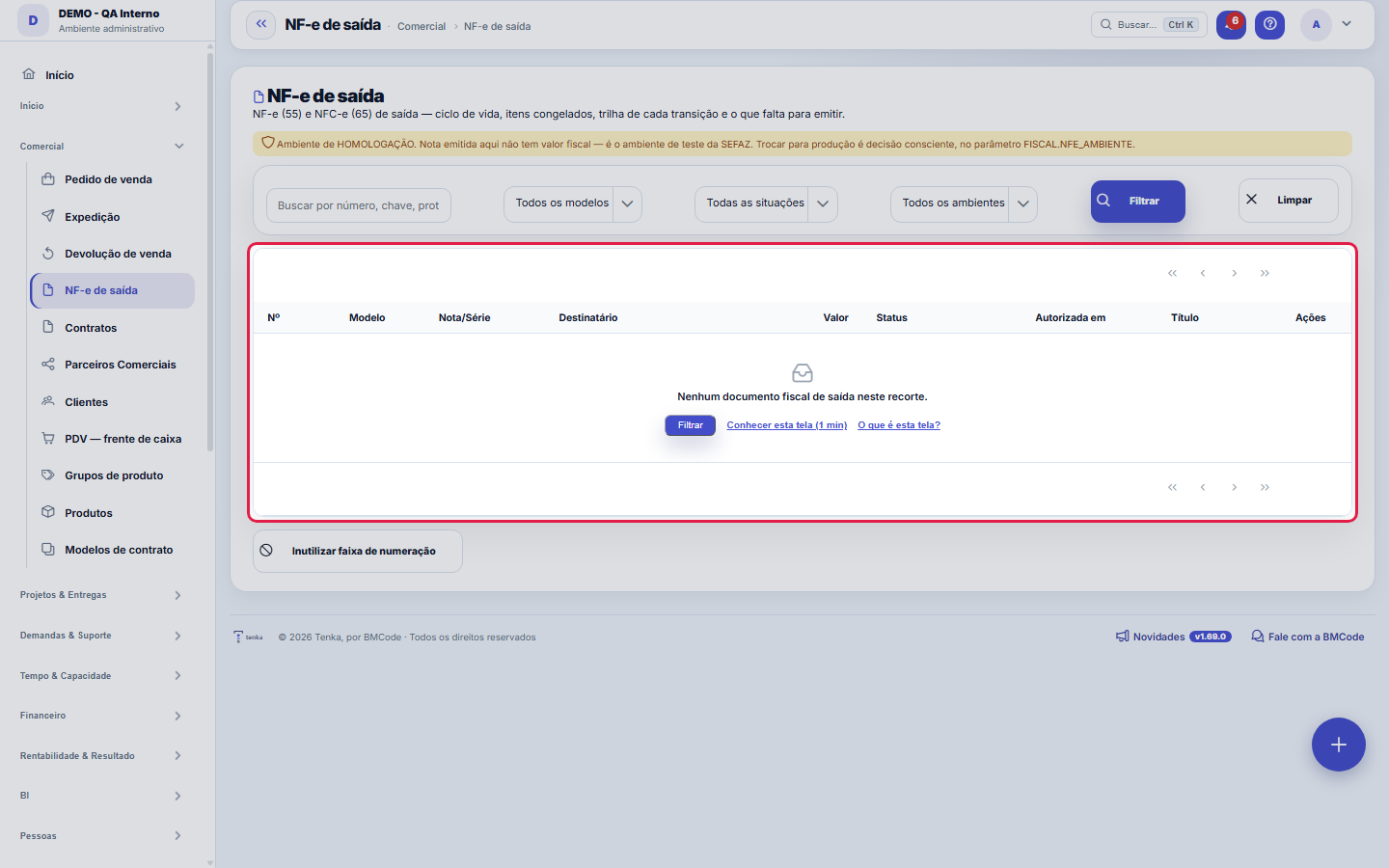
The real screen, in the theme you picked above.
What you find on this screen
A portrait of the screen, read from the screen itself — it changes when the screen changes.
Available actions
Confirm voidingCloseVoid a number range
Form fields
NºNúmero sequencial por empresa do registro.
Nº da notaNúmero da nota fiscal emitida.
SérieSérie da nota fiscal emitida.
Chave de acessoOs 44 dígitos que identificam a NF-e na SEFAZ.
SituaçãoEm digitação, autorizada, rejeitada ou cancelada.
ProtocoloProtocolo devolvido pela SEFAZ na autorização.
Valor totalValor total da nota emitida.
EmissãoData e hora da emissão.
HomologaçãoNota emitida no ambiente de homologação não tem valor fiscal.
Mensagem da SEFAZO que a SEFAZ respondeu. É onde se lê o motivo da rejeição.
Modelo55 = NF-e de mercadoria (do pedido de venda) · 65 = NFC-e de consumidor (da venda de balcão). Uma lista só, de propósito: quem pergunta "quantas nota…
Ambientehomologacao ou producao. Nota de homologação NÃO tem valor fiscal — é o ambiente de teste da SEFAZ. Só o que sai em produção existe no governo.
Natureza da operaçãoO que a nota é: venda, remessa, devolução, transferência. É o primeiro campo que o destinatário lê na DANFE.
Transmitida emQuando a nota foi enviada ao provedor. Entre este momento e a autorização a nota está TRANSMITIDA e o desfecho ainda não é conhecido.
Autorizada emQuando a SEFAZ autorizou. É a partir daqui que a nota existe fiscalmente — e que cancelar passa a ter prazo.
Cancelada emQuando o cancelamento foi aceito pela SEFAZ.
JustificativaO motivo do cancelamento ou da inutilização, com no mínimo 15 caracteres — a SEFAZ recusa justificativa curta.
Por que não saiuO que faltava para a nota ser emitida. Existe para "pendente" não se confundir com "esquecida".
DestinatárioNome do destinatário COPIADO no ato da emissão. Não muda quando o cadastro do cliente muda: nota fiscal é fotografia.
CPF/CNPJ do destinatárioDocumento do destinatário no ato da emissão. Sem ele a NF-e é recusada aqui, antes de virar rejeição do provedor.
+ 3 more fields
Start here
Esta tela e para MERCADORIA — servico e outra nota
The NF-e is the product invoice: it's issued here when you send equipment, parts or anything physical. Services (hours, projects, subscriptions) use the NFS-e, issued in the fiscal module and with a completely different municipality, tax and rules. If you only sell services, this screen stays empty — and that's correct, not a pending issue.
The simulated invoice the customer can read
In the test environment the invoice stays SIMULATED, but its XML is a complete NF-e (key with check digit, issuer, recipient, items and totals) marked as a demo three times: environment 2, complementary information and protocol. That is what lets the whole chain demo work without misleading anyone.
A nota não se digita aqui — ela se acompanha aqui
The NF-e comes from the sales order and the NFC-e from the POS; this record shows the document as it stands with the government — status, items frozen at the moment of issue, a trail of everything that happened and the recipient — and offers the cycle's three actions in the header: Transmit (when it's in draft or pending), Check status (when it was transmitted and has no outcome yet) and Cancel (within SEFAZ's deadline). That's why there is no Save button: changing a field here would be tampering with a document SEFAZ has already authorized.
How to
What must be filled in for the invoice to go out
From the issuer: CNPJ, State Registration (use ISENTO when applicable), tax regime (CRT), full address with the municipality's IBGE code, a valid A1 certificate and the provider token. From the invoice: series, nature of operation and environment. From the recipient: name, CPF/CNPJ, municipality, state and postal code. From each item: 8-digit NCM, 4-digit CFOP, CST or CSOSN according to the regime, origin, unit, quantity and amount. Something missing? The screen says exactly what, and doesn't issue.
From the total back to the invoice
This list accepts links with a filter: ?q= searches by number, key or recipient; ?fd_status=AUTORIZADA, ?fd_modelo=55 and ?fd_ambiente=producao narrow the list down. That's how a total on the dashboard leads to the invoices that made it up.
Click the invoice to open its record; the range is voided from the bar
Since 18/09/2026 the list uses the house engine: the number, recipient and key on each row open the invoice record; the filters (status, model, environment, series, issue date) are in the side panel and export takes the whole set. The URL keeps the filter — ?fd_status=AUTORIZADA&fd_modelo=65 opens only the authorized NFC-e. Voiding a range of numbers is a COMPANY operation, not an invoice one: the button is on the list's bar.
Lot, dye lot and rolls on the invoice item
When the line was shipped by rolls, the item’s additional information carries the lot, the dye lot and each roll with its weight (e.g. Lot LF-2603 | Dye lot P-1188 | Rolls: 7=28.40kg; 12-A=10.20kg). Whoever receives the XML knows which rolls the fabric came from.
Rules
REJECTED is not ERROR, and they are handled differently
REJECTED means SEFAZ read the invoice and refused it for a rule (diverging data, duplication, recipient registration) — the returned message says which, and the path is to correct and issue with a new number. ERROR means the invoice never got evaluated: communication, the certificate or the service went down. In that case resending the SAME invoice usually solves it. Treating a rejection as an error creates a duplicate, which is the next rejection.
An authorized invoice can’t be deleted
An authorized fiscal document is immutable: the path is to CANCEL within the legal deadline or issue a return invoice after it. The platform deliberately doesn't offer deleting an authorized invoice — if it did, the next step would be a discrepancy between what you declared and what happened.
The invoice goes through states, and each step is recorded
DRAFT is the invoice put together here that hasn't gone out yet. TRANSMITTED was sent to the provider and the outcome isn't known. AUTHORIZED has a SEFAZ protocol — from then on it exists with the government. REJECTED comes with the reason. CANCELLED was authorized and then undone, with its own justification and protocol. VOIDED is a burnt number that never became an invoice. Every transition records an event with who did it, when and what the provider answered — including an attempt that was REFUSED for missing data.
SIMULADA não é AUTORIZADA — e antes isso não dava para ver
Until now, when the certificate was missing, the system recorded an invoice with a plausible 44-digit key and protocol, marked ISSUED. On screen it was indistinguishable from an invoice that exists at SEFAZ. Now the demonstration is called SIMULATED, and the default has changed: without credentials the issue is REFUSED, with the list of what's missing. Simulating only happens if someone deliberately turns on the demonstration switch.
Homologação é o padrão, e trocar para produção é decisão consciente
The environment comes from the FISCAL.NFE_AMBIENTE parameter, whose default is homologacao. An invoice issued in production exists with the government at that very instant: it enters the customer's tax calculation, appears in the tax cross-check and cancelling has a legal deadline. Never change this parameter to check whether "it's working".
A visão salva guarda busca, filtros, colunas e ordenação
When you save a view with the Views button, it stores four things: the search text, the applied filters, which columns appear (and in what order) and which column the list is sorted by. Applying the view restores everything at once — including resetting the sort and the page you were on, so the result is exactly what the view describes. Views saved before this version remain valid: whatever they didn't store simply doesn't change when applied.
O erro de preenchimento aparece no campo, ao sair dele
Nas fichas, sair de um campo já dispara a conferência do que dá para conferir na hora: campo obrigatório deixado em branco e e-mail mal formado. O aviso aparece embaixo do campo e desaparece quando você começa a corrigir. Campo numérico não precisa de aviso: ele simplesmente não aceita letra enquanto você digita. Isso é conforto, não a validação final: ao salvar, o sistema confere tudo de novo do lado do servidor.
Offline invoice rejected
An invoice the register issued offline is rejected when: the number is outside the register's ranges or in a closed range; the register has no approval; the key belongs to another company; the signature does not match; the certificate is neither the register's nor the company's; or the key was already used in another sale. The sale stays saved and the invoice becomes a pending item with the reason. Resolve it from the invoice list, filtering the pending ones.
The invoice straight to SEFAZ, the PDF and sending
With the company's provider set to SEFAZ and the certificate registered in the Tax setup assistant, the NF-e goes straight to SEFAZ — a path that is ready to switch on and being certified — and a rejection comes back as a sentence saying what to fix. Cancellation and number voiding follow the same path. On the invoice record, "Download DANFE (PDF)" and "Send to customer" send the PDF and the invoice file by email or WhatsApp, in the customer's language. The invoice's public link shows the PDF to whoever has the access key; the full file only with the order code or the recipient's tax ID.
O que falta para emitir aparece antes do botão
When the invoice has a pending issue — issuer CNPJ without a state registration, item without an NCM, recipient without an address —, the red box at the top says WHERE the problem is, WHAT is missing and HOW to fix it, before you click Transmit. Transmitting with a pending issue doesn't reach SEFAZ: the platform refuses and keeps the list. Fix it on the screen indicated and come back.
Homologação não vale; produção existe no mesmo instante
The line below the status states the model (55 or 65) and the ENVIRONMENT. In homologation the invoice has no fiscal value — it's for testing the flow. In production it exists with the government as soon as it's authorized, and cancelling has a legal deadline. The actions require the edit permission on this screen; those who already transmitted and cancelled from the old list received this permission on 18/09/2026.
IBS and CBS when sending the NF-e
With the FISCAL.NFE_IBSCBS_ENVIO parameter set to HOMOLOGACAO (default), test invoices already carry IBS/CBS; in production sending stays off until validation (SEMPRE turns it on, NUNCA turns it off). FISCAL.NFE_IBSCBS_MODO: CALCULADORA (default) sends only CST, classification and base, and the tax provider's official calculator computes the rest, as long as it is enabled in the company's registration at the provider; MANUAL sends the state IBS, municipal IBS and CBS rates and amounts calculated here, with the invoice totals. In manual mode IBS is split between state and municipality by law (2026: all state; 2027 and 2028: half each) or by the FISCAL.NFE_IBS_FRACAO_MUNICIPAL parameter.
Commercial unit and taxable unit
Each NF-e item goes out with two units: the commercial one, the one that was sold (2 boxes of 12 at R$ 60.00), and the taxable one, the item's primary unit (24 units at R$ 5.00). The item value is the same in both. If you sold in the primary unit, the two are the same. What goes to the tax provider is what the invoice saved when it was built — changing the order or the item record afterwards does not change the invoice.
Frequently asked questions
Emiti a nota e o título não apareceu no financeiro. Por quê?
The receivable is created when the invoice is AUTHORIZED, not when it's transmitted — and it's linked to the order, not to the invoice, when the order had already been billed before. The "Receivable generated" column shows which transaction the invoice went into; if it's empty with the invoice authorized, it's because the company has no revenue category or receivable type registered, and the system doesn't invent either of them.
Como descobrir quem mudou um campo desta ficha?
Open the record and look at the Timeline on the right: it shows each change as "from one value to another", with the person and the date. When there are many changes, use the two filters at the top of the timeline — one by field, the other by person. The search runs in the database, so old changes show up just the same. You can also ask Tenkai: "who changed contract 482?".
The invoice is pending. What do I do?
Open the invoice: the pending reason says what to fix (customer record, the operation's tax code, the item's tax or an expired certificate). Fix it on the indicated screen and use Send again. Until the direct path to SEFAZ is switched on for your company, the invoice comes out as a demo and is marked that way — that is not a pending item.
I want to see the XML before transmitting the invoice. How?
On an invoice that has not been transmitted yet, click "XML preview". The file is built on the spot by the same path as the transmission, in the test environment, unsigned and with the "no tax value" notice at the top; it takes no number and does not change the invoice. Check the complementary information (infCpl) — for a certified sale, the certificate number shows there. Once transmitted, the authorized XML applies and the button goes away.
Was this article helpful?
In the same module: Sales and shipping7
Payment termsAs condições que a venda oferece: em quantas parcelas divide, quando vence a primeira e o intervalo. O fatura…Consignment and approvalConsignment, approval and samples: what left, what is out, and the settlement that becomes a receivable.Partner HubThe accounting partners' space: companies served, materials, and payouts. It's the bridge between the account…EncomendasA venda que vai pela transportadora ou pelo guichê do ônibus: volumes, rastreio e o andamento avisado no What…Process documentsStores the documents that support a process (procedure, evidence, attachment) linked to the right step. A loo…Textile chain mapFrom order to cash, every stage of the textile chain in one graph: each box is a screen with your company’s n…Foreign exchangeRecords and tracks operations in foreign currency using the day's rate. The result changes between closing an…
Tenka Academy
Explore the AcademyStep-by-step learning paths for your industry, inside the platform.