

External processing
Dispatch to a sewing shop, dyer or embroiderer and the return: dispatched − returned − loss = balance at the third party, always.
The screen
The real screen, in the theme you picked above.
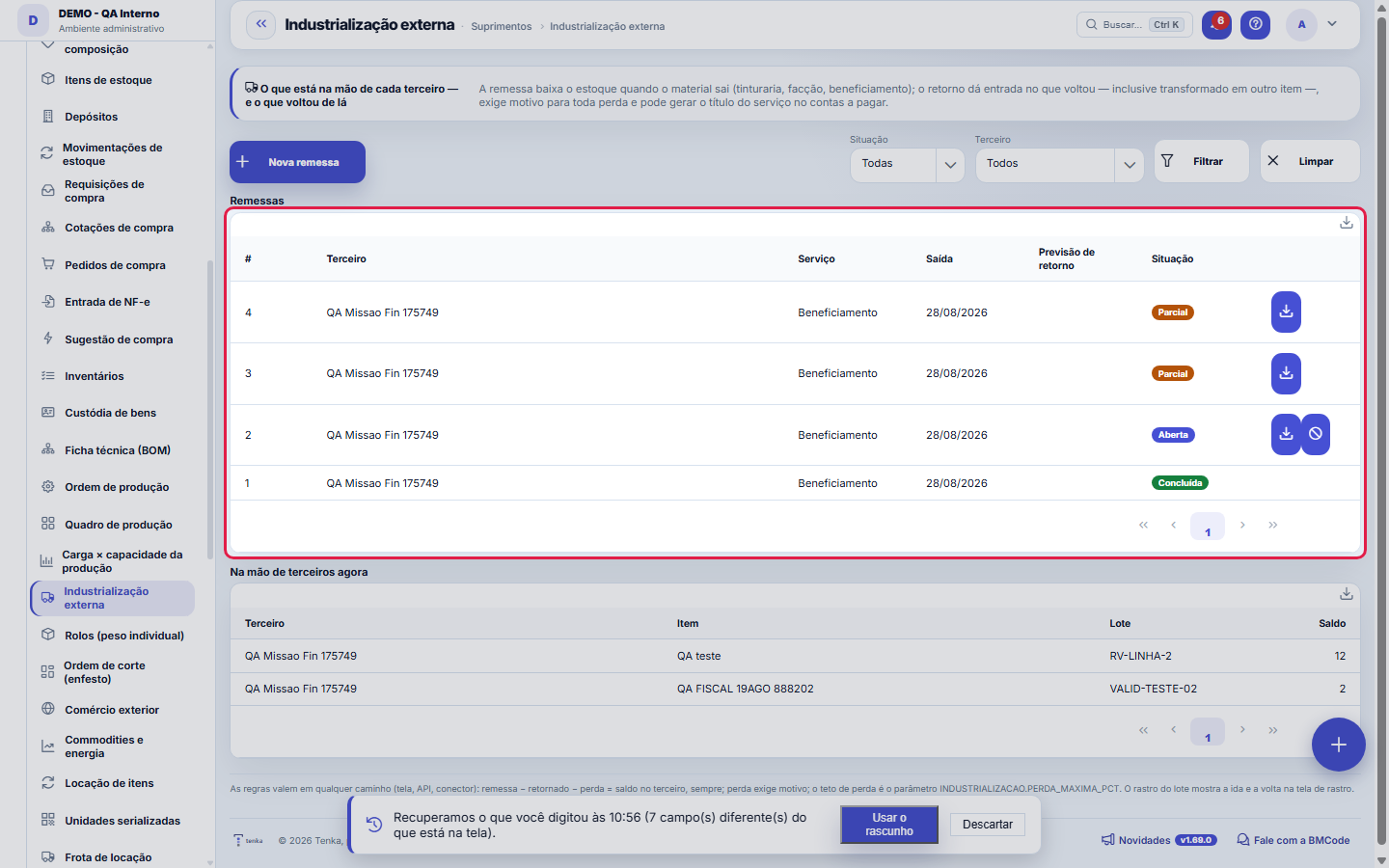
What you find on this screen
A portrait of the screen, read from the screen itself — it changes when the screen changes.
Available actions
CheckRejectCreate link
The list shows
Third partyReturnsOn timeAverage delay (days)Open and lateQualityBadgeItemBatchBalanceShipmentContractor+14
Form fields
Tiposervico
Situação
Dtsaida
Dtprevisaoretorno
Observação
Dhcadastro
Start here
A remessa É a baixa de estoque
When material leaves for the dye house or the sewing contractor, it's no longer in-house — and the balance has to say so right away, not on the day the third party's invoice arrives. Opening the shipment issues the items from stock; from then on the material appears in the "in third-party hands" panel, which is what the spreadsheet was trying to track.
How to
The material can come back TRANSFORMED
Raw yarn goes out, dyed yarn comes back. In the return item, "Came back as" declares the transformed item — the stock receipt is for it, not for what went out, and the lot trail links the two through the ledger. If nothing is declared, the same item that went out comes back.
Pick the dye house by score and table
When opening the shipment, the dye-house panel shows the valid table price and each one’s scorecard — lead time, right first time, ΔE, loss and billing divergence. The return links the return invoice and the service invoice that arrived in Received invoices, and billing is checked in Dye-house billing.
Standard list and form
The screen became the standard list: search, filters, saved views, columns, export and trash with Undo. Click the record (or New) to open the form, with the detail tabs when there are any.
Unannounced visit to the subcontractor
Open the shipment to the subcontractor and go to the Unannounced visits tab. Record visit asks who went, when, how many people were working and where, and brings what the shipment declares in production (sent minus returned minus loss). At the workshop, count each line (up to 5% difference matches) and record undeclared production — another brand's pieces or work passed to another workshop, always a discrepancy. Close the visit as compliant or discrepant, with the findings.
Shipment to the embroiderer
Open the shipment with the Embroidery type and choose the design that goes with the pieces. Without a design, an embroidery shipment cannot leave. The return and the loss are posted as in any shipment.
The name list goes with the shipment to the embroiderer
In a new shipment of type Embroidery, besides the design, choose the Uniform name list (the contract). Once the shipment is open, the record shows the Names to embroider tab: person, piece, size, the name to embroider, estimated stitches and cost, with the total. Export the table as a spreadsheet to send to the embroiderer. The list only goes in an embroidery shipment.
Rules
Shipment − returned − loss = balance at the subcontractor, always
A return that sends back more than is pending is refused, not adjusted. Adjusting silently would hide either a typing error or material coming in with no origin — and in both cases someone needs to check with the third party before the number enters the ledger.
Perda sem motivo não entra
Process losses exist — a dye house loses 2 to 5% to dyeing breakage — but "it vanished" isn't an entry. Every kilo lost requires a written reason, and a loss above the ceiling in the INDUSTRIALIZACAO.PERDA_MAXIMA_PCT parameter is refused until someone checks: a 30% loss is almost always swapped digits, and accepting it silently hides the error or the diversion.
Cancelar devolve o estoque — e só existe sem retorno
Cancelling a shipment returns to stock everything the opening issued; without that, the in-house balance would be lying on the low side. A shipment with a return already posted can't be cancelled: post the return of what's missing, with the loss explained, and the shipment completes on its own when the pending amount reaches zero.
Shipment invoice, conversion and cost of the return
The invoice button on each shipment builds the NF-e for shipment to toll manufacturing (CFOP 5901 within the state, 6901 outside), at the cost of what left and with tax suspended. On the return, record the number of the contractor’s symbolic return invoice; if a different item came back in another unit (kg of fabric returning as pieces), "returned" is the declared consumption of the input and "Quantity in" is what enters stock. What comes back enters at the cost of the material consumed plus its share of the service. What stayed with the contractor and won’t come back is declared in "Close the shipment", with the reason.
Lead time and quality per subcontractor
The punctuality table shows, over 90 days, each subcontractor’s returns, how many came back by the shipment’s forecast, the average delay and the open shipments already late, next to the inspection quality score. On the shipment, the WhatsApp icon chases the subcontractor: through the account channel (the message stays in the supplier’s conversation) or, without a channel, from your phone with the message ready.
Shipment to a subcontractor with an expired document
When the shipment is opened, Tenka checks the subcontractor’s approval. An expired or missing document makes the shipment ask for the manager’s confirmation (“I confirm and take responsibility”). With the parameter “Block shipment to a subcontractor with an expired document” on, the shipment does not go until it is fixed.
Contractor return past the deadline
A return the contractor proposed through the link must be checked here. Once the deadline in the parameter "Contractor: days to check a proposed return" passes (2 days by default), whoever checks gets a notification.
Processing return deadline
Material sent out for processing has a deadline to come back — the ICMS suspension on the shipment usually lasts 180 days, and the company deadline is in "Processing: shipment return deadline (days)" (Parameters, Production). The Return deadline box shows open shipments due in 30 days and the overdue ones, with the balance still with the subcontractor; the shipment number opens its record.
Which workshop takes it and the return through the link
On a new shipment, "Which workshop takes it?" suggests who delivers on the date based on the capacity registered in the Workshop plan, with the "what if" for lead time and cost; Use fills in the workshop, the type and the expected date. When the workshop returns through the portal link or its own Tenka account, "The workshop returned, check" appears: it opens the return already filled in; saving confirms it, refusing asks for the reason.
The workshop badge: gold, silver and bronze
Each subcontractor gets an internal badge calculated only from your own data, over the last 180 days and with at least 3 returns. Gold badge: on time in 90% or more of returns, defects on return up to 2%, approval documents up to date and declared capacity with this week's load fitting in it. Silver badge: on time in 75% or more, defects up to 5% and documents up to date. Bronze badge: on time in 60% or more and defects up to 10%. The rest, or anyone with fewer than 3 returns, gets no badge. On time = return by the shipment's agreed date; defects = lost pieces ÷ (returned + lost). The badge never uses data from another company and does not use photos of the premises or location.
Which period the subcontractor lead time and quality table looks at
The table looks at subcontractor returns over the last 180 days — the same period that adjusts the date promised to the customer and decides the workshop seal. The table title shows the period. In the assistant, asking about punctuality without a period uses the same 180 days.
Frequently asked questions
E a cobrança do serviço?
Enter the cost of the service on the return and choose the category: the payable is created in accounts payable, for the shipment's supplier, with the due date you declare. Without a chosen category the payable is NOT generated — and the screen warns right away, because finding out at reconciliation is too late.
How does the subcontractor accept or decline the batch?
Through the same subcontractor portal link: each open shipment shows "Waiting for your acceptance", with the Accept the batch and Decline buttons. To decline, the subcontractor writes the reason (it is required). Here in Outsourced processing, the "Batch acceptance" table shows each open shipment of subcontractors with a link, declined ones first, with the reason and the time. While the shipment is open, the subcontractor can change the answer; the last one counts.
Was this article helpful?
In the same module: Production54
Production log entryOne log entry: who did it, on which production order, how many good pieces, the scrap and the hours. Read-onl…Cell balancingPeople per operation, bottleneck and pieces per day for a style in a cell, from the standard minute of the te…Fashion knowledge baseFormulas, rules and the house way, with the source.Biblioteca de operaçõesAs operações de costura da casa com o tempo padrão por tipo de máquina: monta o roteiro e cota o custo da peç…Bolsa da redeHoras de tear e de facção paradas e sobras (retalho, ponta de rolo, fio parado, encalhe) circulando entre as …Caminho críticoOs marcos da coleção e do pedido, planejado × real: o atraso de um marco empurra a entrega, a tela diz a nova…Opportunity itemsOpportunity detail (dictionary anchor).CertificationA certification (GOTS, OEKO-TEX, ISO 14001…) of the company, a supplier, an item or a lot: issuing body, numb…
Tenka Academy
Explore the AcademyStep-by-step learning paths for your industry, inside the platform.