

Trust Center
Your account's trust showcase: uptime, your data's backup tested (with the date of the last restore rehearsal), WHERE your data lives (cloud region), and the published certificates and documents — DPA, sub-processors, residency, and retention — all downloadable. Where a number still applies to the …
The screen
The real screen, in the theme you picked above.
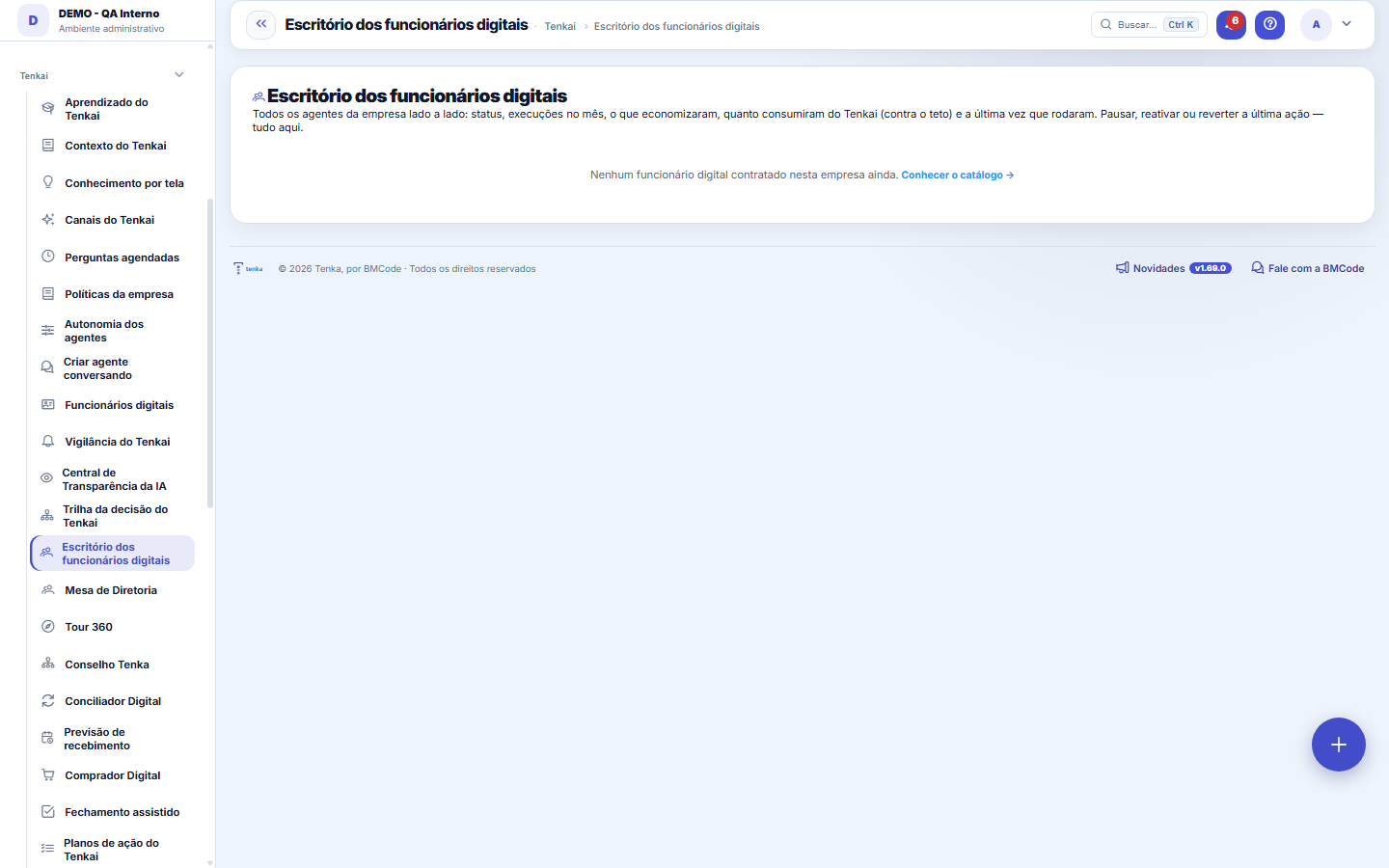
What you find on this screen
A portrait of the screen, read from the screen itself — it changes when the screen changes.
Available actions
Take ownershipSet goalPause allPauseActivateRevertExplore the catalog →
The list shows
Digital workerStatusExec. in the monthSavings/gainTenkai cost × capCost × resultLast runActionsPeriodRunsGainAI cost+1
Form fields
NomeComo o funcionário digital é chamado no escritório.
IdentificadorNome curto e fixo do agente, usado nas referências internas.
CargoA atribuição do agente, escrita como descrição de cargo.
SituaçãoSe o agente está em operação, em teste ou desligado.
ContratadoAgente sem aceite aparece no escritório mas não trabalha.
AutonomiaO quanto este agente decide sem passar por gente.
Teto por açãoValor máximo comprometido por ação sem aprovação humana.
Teto de açõesLimite de ações por rodada antes de o agente ter de pedir aval.
Teto de gasto no mêsOrçamento mensal de IA do agente. Estourado, ele para sozinho.
Contratado emData de entrada do agente no escritório.
Start here
The agents’ HR
All of the company's digital employees side by side: status, runs this month, what they saved, how much AI they cost against the cap, and the last time they ran. The whole cycle lives here: hire (in the catalog) → follow the scoreboard → pause or roll back when needed.
What this screen is
All of the company's agents side by side, on a comparison screen: status (active/paused), runs this month, what each one saved, how much AI it cost against the monthly cap and the last time it ran. At the top, the total saved against the total spent on AI and the aggregate return. Pause, reactivate or roll back each agent's last action without leaving here. Values masked for anyone who cannot see values.
How to
The top scoreboard
Total saved × total spent on AI × return (gain ÷ cost). With no AI cost in the month, the return shows a dash instead of a made-up number. The fourth card counts how many agents are in automatic cutoff — if it is greater than zero, start with them.
Pause, Activate, Revert
Pause stops it immediately, without erasing history or the scoreboard; Activate resumes it. Roll back undoes the agent's last reversible run — the standard safety net for digital employees. None of the three actions requires a ticket or support: the autonomy to manage the agent belongs to whoever hired it.
Custo × resultado, por agente
The return column shows how many R$ of results each R$ of AI produced for that agent. Below 1×, the agent costs more than it returns — it is worth looking at its record before deciding between reconfiguring and pausing.
A ficha completa fica na Central de Transparência
The eye icon on each row opens the Transparency Center: the agent's auditable scoreboard, run by run — what it did, what it spent, what it produced and what was rolled back. It is the answer to "what exactly has this robot been doing?".
Rules
Teto mensal e corte automático
Each agent has a monthly AI spending cap; the bar shows consumption against it. Once exceeded, the agent goes into AUTOMATIC CUTOFF and does not run until the month rolls over — the cost never gets away without anyone seeing. An agent in recurring cutoff is a sign of a cap that is too low or of an agent working beyond what was agreed: both cases deserve a decision, not silence.
O que "Pausar todos" faz — e o que ele não faz
Pause all puts all of this company's active digital employees on pause at once. They stop running the automatic cycles from that moment on. What has already been done stays done: no collection already sent is canceled, no reconciliation is undone, no order is deleted. If you want to undo something an agent did, the way is the run's Roll back button, which exists row by row. Reactivating is individual, one click per agent, on purpose: bringing everything back at once without looking is like stopping everything without looking.
Os três riscos que aparecem no topo do Escritório
These are questions about the IDENTITY of your digital employees, and each one has a practical consequence. "No owner": nobody answers for that agent, so when it makes a mistake the notice goes to the administrators group instead of going to a person. "Permission granted and unused": it can do something it has not done in ninety days — if one day it is led to do it, it can, and nobody remembered that. "Step in EXECUTE with no one who authorized it": every step starts out only suggesting and moves up by someone's decision, which is recorded; without that record, the step came from a data load or a script, and the agent acts on its own under an authorization nobody gave.
O painel "Ao vivo" é companhia, não histórico
It shows the steps the instant they happen and keeps only the most recent ones, in the server's memory: after a restart it starts out empty, and that is expected. The real record is the step-by-step inside each decision, in the Trail, which is read from the database. And no line of the panel carries a monetary value: since the notice is sent to everyone who has the screen open, including those who cannot see values, the number is hidden at the source — hiding it at the destination would not work, because there is no way to know there who received it.
Governance: owner, idle powers and goal
Every digital employee has a human owner (who receives the auto-pause and the inbox). A routine without an owner appears here with the Take ownership button. An EXECUTE power unused for 90 days is listed for you to decide whether to keep it. The goal (e.g. collect within 35 days) shows the DSO measured over the last 90 days against target; Collections and the Reconciler take part. Collections warns Sales when a customer is escalated; Closing warns the Reconciler.
How much each digital employee run costs
The plan includes a monthly allowance of runs. Each completed run counts as one; a run with an error or interrupted does not count. Beyond the allowance, each run uses one credit from the purchased package; with no package, it goes to the month’s invoice at the overage price, which is higher than the package price. The "Runs this month" card shows what has been used, the package balance and what goes to the invoice; the buttons buy +1,000, +5,000 or +20,000 runs (the package invoice is issued right away and the runs are added when it is paid). At 80% and 100% of the allowance, whoever administers the account is notified. The agent never stops for lack of balance — whoever wants a ceiling uses the company’s AI ceiling.
Frequently asked questions
Which question this screen answers
Which agent is worth what it costs — all at once. Each row compares status, runs this month, what the agent saved and how much it cost in Tenkai against the monthly cap, with the last run in view. At the top, the aggregate: total saved against total spent on AI and the overall return. And the action is immediate: pause, reactivate or roll back each agent's last action without leaving the screen. The detailed record of each one remains in the Transparency Center.
Um agente apareceu pausado sem que ninguém pausasse. Por quê?
It paused itself after failing three times in a row. This almost always points to something outside the agent — an integration that went down, a record that changed shape, a permission that was removed. The reason is recorded in the Decision Trail, and the person responsible for the routine receives a notice. After fixing the cause, just reactivate it here. If your operation prefers the agent to keep trying anyway, the number of failures that triggers the pause is a parameter, and zero turns the behavior off.
What "never ran" next to the agent means
It means exactly that: the agent is hired, but the first cycle has not happened yet — usually because it was hired today and the automatic cycle is daily. It is different from "ran and found nothing", which is the healthy outcome of a day with no pending items. The two situations looked the same until this version, as an empty list, and led to opposite conclusions: one calls for patience, the other calls for nothing.
O que o botão de histórico mostra, e por que "sem atividade" não é zero
It opens the last twelve periods of that digital employee: how many times it ran, how many actions it took, how much it recovered or saved, how much AI it cost and the return (gain divided by cost). The gain comes from the month's consolidated scoreboard, with the same calculation the calculation breakdown shows. A month in which the agent did not run appears as "no activity" — not as zero gain. The two look the same in a table and are opposites: one is the agent standing still, the other is the agent working and finding nothing to do.
A conta à vista de cada agente
Below each digital employee's gain appears the calculation that produced it, summarized in one line. Hovering over it, it opens number by number — runs, actions, errors, rollbacks, human interventions, AI cost and amount recovered — each with the query that produced it. This is what lets you check the scoreboard instead of believing it. The amount recovered is a declared CORRELATION: these are the receivables the agent touched that were settled in the same month; it does not prove that the collection caused the payment, and the source text says so. The calculation appears only to those with permission to see values.
Was this article helpful?
In the same module: Digital employees23
Sprint developerAnchor screen of the detail dictionary (allocated devs). Does not appear in the menu.Workflow transitionAnchor screen of the detail dictionary. Does not appear in the menu.Caixa de entrada dos funcionários digitaisO que os agentes estão esperando de você, reunido num lugar só e separado por urgência.Accountant's cockpitThe accountant's dashboard: what's pending, what's due, and what needs approval, per company in the portfolio…My hiresThe marketplace transactions with the flow open: the ones I hired (I am the buyer) and the ones that hired me…Proprietary credit scoreThe credit risk of each drawee (customer) measured by the OBSERVED BEHAVIOR in your own operation — not a bur…Auditor package (SOC 2)The package handed to an auditor: the Segregation of Duties (SoD) matrix with the violations found — profiles…Agent builderFrom a request in Portuguese to the agent: interpret, review the powers one by one, rehearse without executin…
Tenka Academy
Explore the AcademyStep-by-step learning paths for your industry, inside the platform.