

Bank reconciliation
Match the bank statement with the system's invoices: import, automatic suggestion, and an immutability lock on what already matched.
The screen
The real screen, in the theme you picked above.
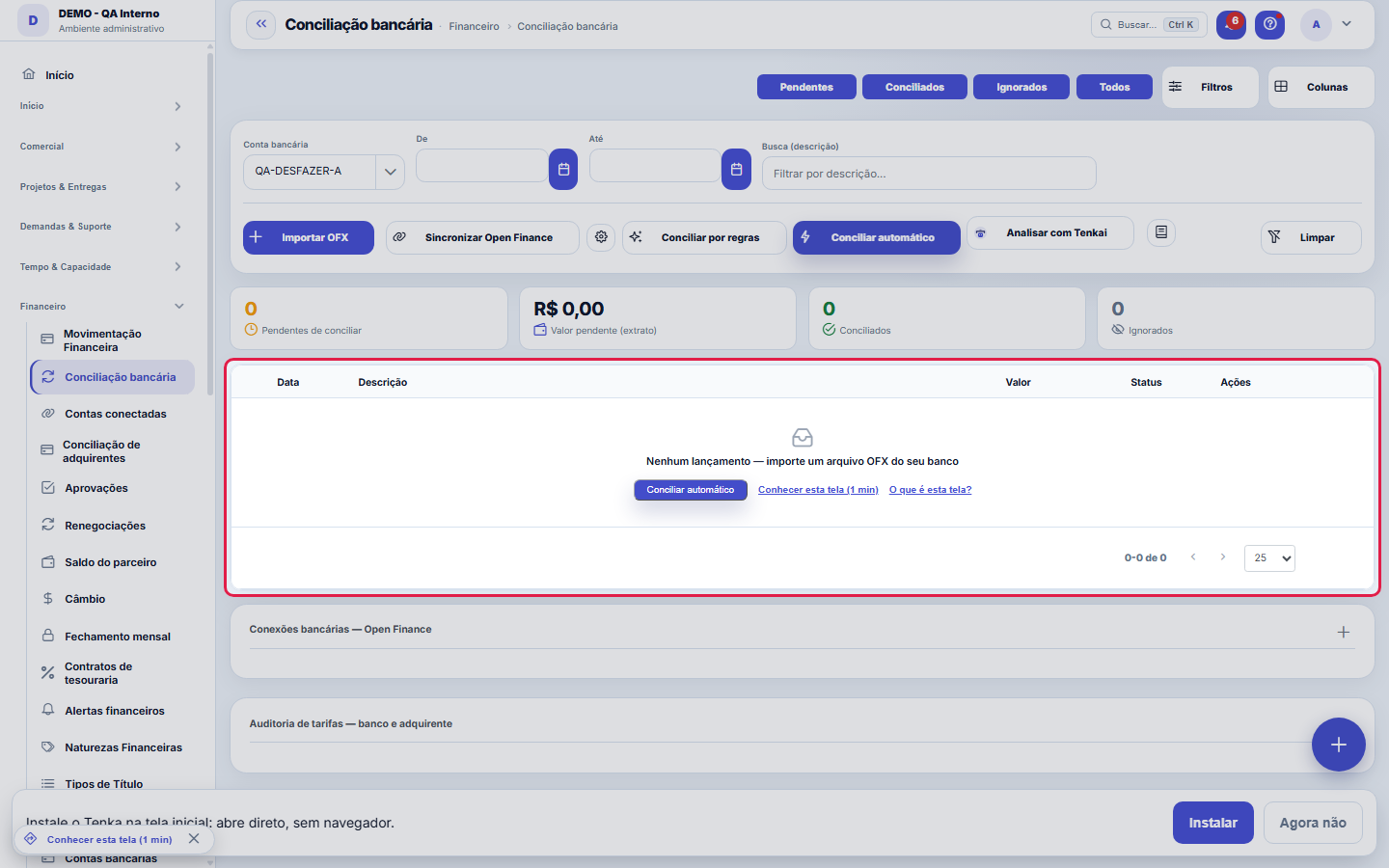
What you find on this screen
A portrait of the screen, read from the screen itself — it changes when the screen changes.
Available actions
FiltersColumnsSync Open FinanceReconcile by rulesReconcile automaticallyClearReconcileIgnoreLink connectionFetch item accountsSave connectionCancel+5
The list shows
DateDescriptionAmountStatusActionsAccountProviderStatementConsentFeePattern in the statementContracted+4
Form fields
Pendentes de conciliarQuantidade de lançamentos do extrato ainda sem título vinculado.
Valor pendente no extratoSoma em dinheiro dos lançamentos do extrato ainda não conciliados.
ConciliadosQuantidade de lançamentos do extrato já vinculados a um título.
IgnoradosQuantidade de lançamentos do extrato marcados para não conciliar.
Situação do lançamentoSituação do lançamento do extrato: pendente, conciliado ou ignorado.
Valor do lançamentoValor do lançamento do extrato bancário, crédito ou débito.
Cobrado a mais no períodoTotal cobrado acima do contratado no período, dinheiro passível de contestação e recuperação.
Tarifa bancária acima do contratadoParte do valor recuperável que vem de tarifas bancárias acima da tarifa contratada.
Taxa de cartão acima da contratadaParte do valor recuperável que vem de taxa de cartão acima da taxa contratada.
Tarifas sem referênciaTarifas detectadas no extrato sem valor contratado cadastrado, portanto não auditáveis.
Vendas divergentesQuantidade de vendas em que a taxa cobrada pelo adquirente ficou acima da contratada.
Diferença da tarifaQuanto o valor cobrado no extrato excedeu o valor contratado da tarifa, linha a linha.
Start here
What you do here
Import the statement and reconcile each entry with the corresponding invoice. The system suggests pairs (same amount, nearby due date); ambiguous ones are left for manual decision. KPIs at the top show progress.
Rules
Conciliar dá baixa
Reconciling isn't just marking: when you match the statement line with the entry, the system settles the invoice — it becomes Reconciled and leaves the pending list. From then on the invoice is locked for editing (reconciled is immutable in finance). If you matched it wrong, use Unreconcile, which reverses the settlement and returns both sides to the queue. That's why the right order is to check amount and date before confirming the pair — undo exists, but it costs an extra step.
Unreconciling reverts everything
Undoing the reconciliation reverses the settlement (the invoice goes back to open) and reopens the statement entry — nothing is left halfway.
Automático só quando é único
The automatic suggestion only reconciles when the pair is unambiguous (a single candidate within the day window). Two invoices with the same amount = manual decision.
Conexão bancária: o extrato que chega sozinho
The "Bank connections — Open Finance" panel links an account of yours to the matching account at the aggregator. From then on the statement comes in by itself, on this same screen, with the same reconciliation — the OFX file remains valid as an alternative and as plan B. The import is idempotent: syncing twice never duplicates an entry.
Consentimento vence — e conexão vencida NÃO dá erro
Open Finance requires the consent at the bank to be renewed periodically. When it expires, the connection doesn't break: it simply STOPS bringing in statements, and the position on screen becomes the one from the last sync pretending to be current. That's why the platform shows "updated X ago" on each connection, warns the owner 7 days before expiry and marks the connection as EXPIRED once it passes — instead of letting silence look like normality.
Fee audit: reconciling says "it matched", auditing says "they charged wrong"
Register each fee AGREED with the bank (name, the snippet as it appears on the statement and the agreed amount) and click Audit period: the platform scans the statement's debits, matches them by pattern and shows everything charged ABOVE the agreed amount — with the difference in reais, which is the number to dispute with the account manager. The acquirer divergence (card fee charged above the contracted one, worked out sale by sale when importing the CSV) goes into the same report, totaled in reais.
Tarifa sem referência nunca aparece como "ok"
A debit that looks like a fee (FEE, PACKAGE, MAINTENANCE, BUNDLE...) but doesn't match any registered fee goes into the report as NO REFERENCE, with the total added up. It isn't an accusation — it's an invitation: register the agreed amount for those fees so the audit can reach them. Optimistic silence ("I found no reference, so everything's fine") is the classic flaw in this category, and the screen refuses to commit it.
Frequently asked questions
Conciliei o lançamento errado. Como desfaço?
Desconciliar reverte tudo: a baixa do título volta e o lançamento do extrato volta para a lista. Só não dá para desconciliar o que já foi contabilizado e fechado no mês — nesse caso a correção é um lançamento de ajuste.
Connected screens
Baixa emMovimentação FinanceiraA conciliação dá baixa nos títulos da movimentação.Por contaContas BancáriasCada conciliação pertence a uma conta bancária.
Was this article helpful?
In the same module: Money on the move12
Approval limitsConfigure who approves what: events, limit amounts, and routing (role, person, or manager).ApprovalsYour approvals inbox: everything waiting on your decision — payments, hours, discounts — in one place, with S…Automation radarPoints out the repetitive, manual steps worth turning into automation, ranked by effort saved. The estimated …Employee's salary movementAnchor screen of the detail dictionary (salary movement). Does not appear in the menu.ReleaseGroups what went into a version. It's the basis of the changelog the customer reads: a release with no items …Monthly closingCloses the period: freezes the P&L, generates the CFO letter, and locks retroactive entries.Financial transactionsAccounts payable and receivable: invoices, due dates, settlements, installments, and invoice/receipt — the op…Multas do varejistaO que o grande varejo desconta (atraso, etiqueta, aviso de embarque, quantidade…): motivo, título que abate, …
Tenka Academy
Explore the AcademyStep-by-step learning paths for your industry, inside the platform.