

Release
Groups what went into a version. It's the basis of the changelog the customer reads: a release with no items communicates nothing, and an item with no release reaches no one.
The screen
The real screen, in the theme you picked above.
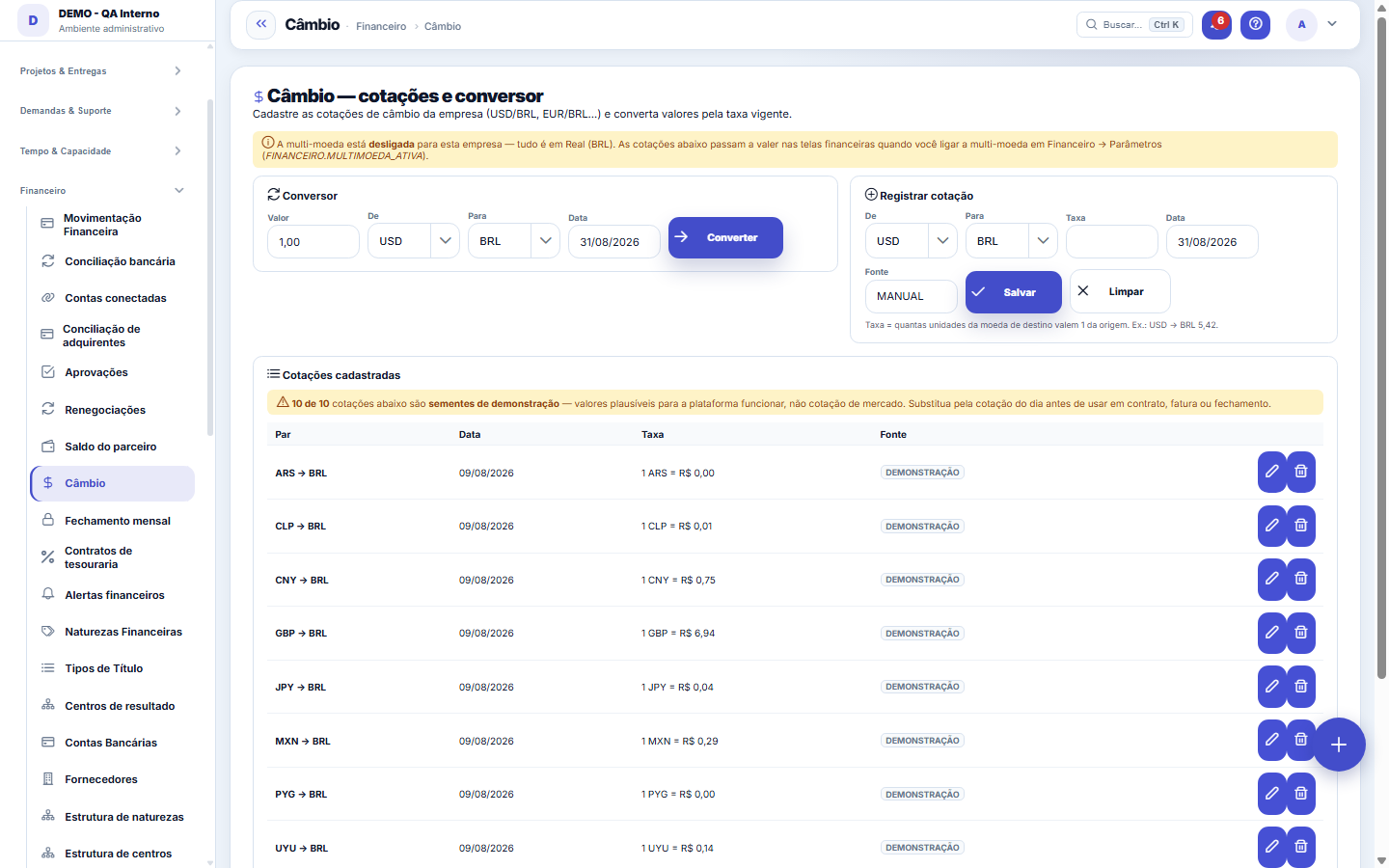
What you find on this screen
A portrait of the screen, read from the screen itself — it changes when the screen changes.
Available actions
ConvertSaveClear
Form fields
Moeda de origemMoeda de partida da conversão, no padrão ISO (BRL, USD, EUR).
Moeda de destinoMoeda de chegada da conversão.
DataDia a que a cotação se refere. Sem cotação do dia a conversão bloqueia.
TaxaQuantas unidades da moeda de destino valem uma da moeda de origem.
FonteDe onde a cotação veio: banco central, provedor ou lançamento manual.
Start here
O que esta tela responde
Which exchange rate the system uses to convert amounts in foreign currency. You register the rates your company uses (for example USD/BRL, EUR/BRL) with the date of each one, and the converter beside them instantly shows what any amount comes to at that rate.
Rules
Qual cotação vale para um título
Converting a bill uses the latest rate registered with a date EQUAL TO OR BEFORE the entry date — not the most recent one on the screen. That way a March bill stays converted at the March rate even if you later register today's rate.
Cotação faltando bloqueia; cotação velha NÃO avisa
These are two different behaviors, and the difference matters. If there's no rate at all for the currency pair, the conversion is REFUSED with a message saying which pair and which date are missing — the system never converts "at one" or makes up a rate. But if there's an old rate, it's used silently, with no expiry: a bill from today can be converted at a rate from three months ago without any warning. Keep the update frequency your operation requires — the system has no way of knowing what it is.
Frequently asked questions
Por que uma cotação aparece como "demonstração"?
Some rates may be demo seed data: plausible values created so the platform works before you register the real rates. The screen tells you how many there are, the Source column marks each one, and the converter shows where the applied rate came from — with a warning when it's seed data. To replace it, register the real rate for the same pair: since conversion uses the latest rate dated on or before the entry date, your rate takes effect from then on.
Was this article helpful?
In the same module: Money on the move12
Approval limitsConfigure who approves what: events, limit amounts, and routing (role, person, or manager).ApprovalsYour approvals inbox: everything waiting on your decision — payments, hours, discounts — in one place, with S…Bank reconciliationMatch the bank statement with the system's invoices: import, automatic suggestion, and an immutability lock o…Automation radarPoints out the repetitive, manual steps worth turning into automation, ranked by effort saved. The estimated …Employee's salary movementAnchor screen of the detail dictionary (salary movement). Does not appear in the menu.Monthly closingCloses the period: freezes the P&L, generates the CFO letter, and locks retroactive entries.Financial transactionsAccounts payable and receivable: invoices, due dates, settlements, installments, and invoice/receipt — the op…Multas do varejistaO que o grande varejo desconta (atraso, etiqueta, aviso de embarque, quantidade…): motivo, título que abate, …
Tenka Academy
Explore the AcademyStep-by-step learning paths for your industry, inside the platform.