

Storage usage
How much space your account's files occupy, where that space comes from (contracts, projects, attachments...) and how it has evolved month by month — with secure download and deletion that frees up space.
The screen
The real screen, in the theme you picked above.
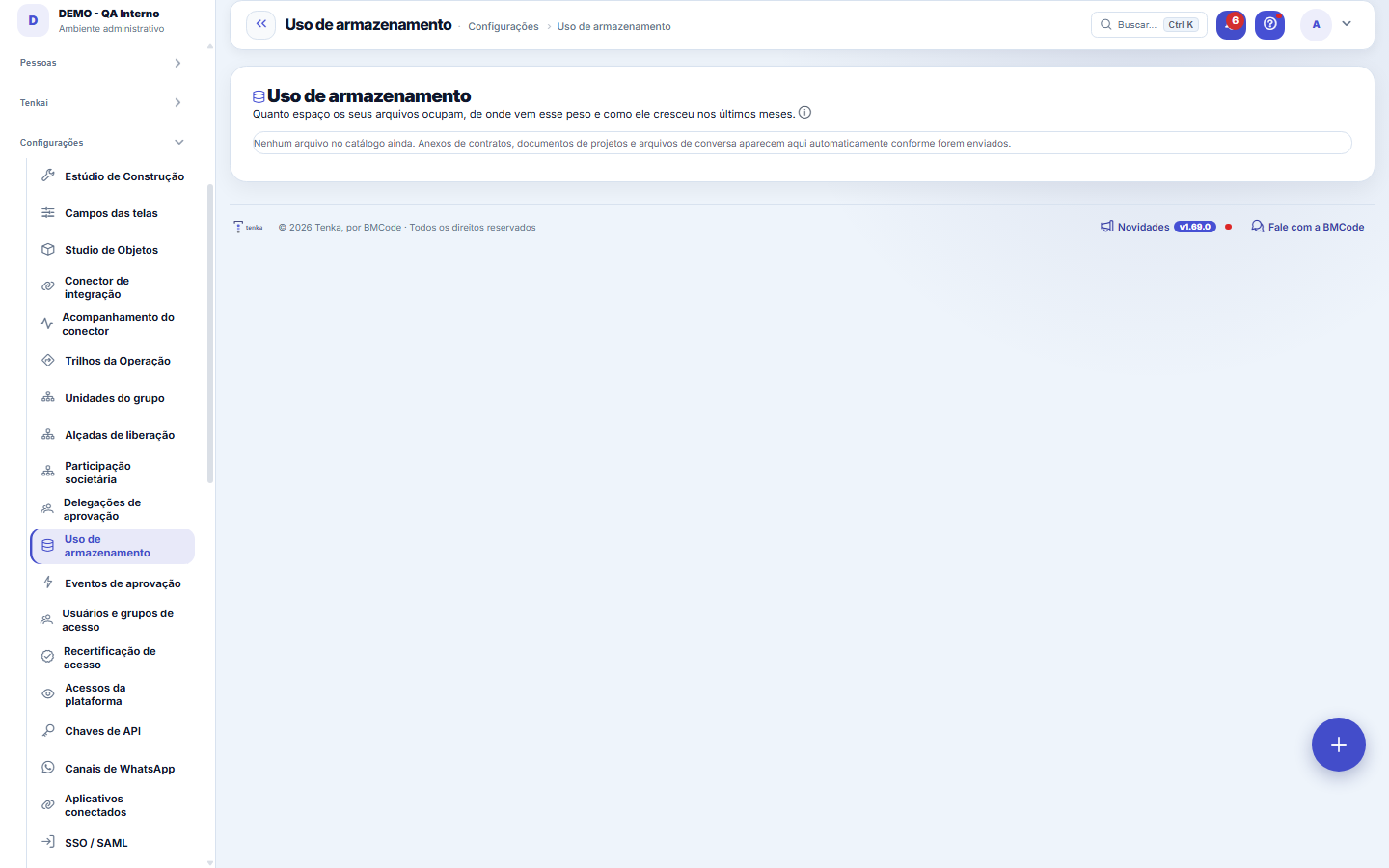
What you find on this screen
A portrait of the screen, read from the screen itself — it changes when the screen changes.
Available actions
Apply policy to the bucket
The list shows
FileAreaSizeUploaded on
Form fields
Nome do arquivoComo o arquivo foi enviado. É por ele que se reconhece o que pode ser descartado.
OrigemQue parte do sistema guardou este arquivo: anexo de título, contrato, ticket.
Detalhe da origemA qual registro o arquivo está pendurado, para não apagar anexo em uso.
TipoFormato do arquivo. Vídeo e imagem grande são o que costuma inflar a conta.
TamanhoEspaço ocupado. A soma da lista é o consumo real do recorte que está na tela.
ArmazenamentoOnde o arquivo está fisicamente guardado, se em nuvem ou no próprio servidor.
Start here
What it's for
Give transparency to what is normally invisible: files come in easily and never leave. Here you see the total, the trend and WHICH source is growing — before space becomes a cost or backup slowdown.
O que cada número desta tela responde
SPACE USED is the sum of the size of all your tenant's active files — it's what counts toward the quota. FILE(S) is the count, and it answers another question: many small files bother organization, few large files are what squeeze the quota. Consumption BY SOURCE is a percentage of SIZE, not of the count: a source with 1 file of 2 GB appears ahead of another with 500 files of 1 KB, because that's where the weight to tackle is.
Como reduzir espaço sem perder o que importa
Start with the "largest files" list: almost always a few items account for a lot of space. Deletion is done on the screen where the file was attached (contract, project, request), not here — that way the link to the source record goes with it and no orphan reference is left behind. A document with the padlock icon has a legal retention period and will be refused if someone tries to delete it within that period, even with permission.
Rules
Where the numbers come from
The total adds up the catalog's ACTIVE files (files in the trash don't count) plus the legacy not yet migrated, marked separately. The monthly trend is a snapshot taken by a daily job: the current month updates itself; closed months don't change.
Deletion returns space, with a safety net
Deleting here is always LOGICAL deletion first (trash): the file disappears from the screens and immediately stops counting toward the total. The physical byte is only erased when NO other active reference points to the same content — two contracts with the same PDF share a single physical file (deduplication), and deleting one doesn't break the other.
Download with an audit trail
Every download goes through a permission check (the file needs to belong to YOUR account) and gets logged: who downloaded what, when. Download links expire in ~60 seconds — a link forwarded by mistake dies on its own.
Going over quota doesn't delete anything — and might not even cost anything
When you exceed the contracted space, the behavior depends on the platform's configuration: either the extra space is added to the next invoice (and the amount shows up on this screen BEFORE the invoice, so you can free up files and reduce it), or new uploads are blocked with a warning. In both cases, nothing that already exists is removed. And when the price per GB isn't defined, the screen warns you that you went over quota and that NOTHING is being charged — we'd rather not charge than make up a value.
The projection of when the quota will run out comes from measurement, not guesswork
The "at the current pace, it will last X months" is calculated from the real growth between the last two monthly snapshots of your usage. When there's no measured growth — because the history is still short or usage has dropped — the product simply does NOT project, instead of showing a made-up number in a conversation that involves money.
Tax and payroll documents can't be deleted within the legal retention period — not even to free up space
Service invoices and payroll documents have a mandatory retention period. Deleting these files is refused while the period hasn't expired, and the refusal shows the exact date they become free. They appear with a lock icon in the list of largest files, so you don't waste time trying. Saving storage space isn't a reason to lose tax evidence.
Os números desta tela estavam trocados até esta versão
Until the previous version, SIZE appeared in place of QUANTITY and vice versa: the screen said things like "Space used 12 B — 20,602,880 file(s)" when it was 12 files taking up 19.6 MB. Since the quota, the percentage used and the month's change come from those two numbers, everything here was wrong together. It's fixed. If you looked at this screen before and concluded something about your space, it's worth looking again — the number was different.
O "legado a migrar" aumentou — e é porque agora está completo
This number shows what's still outside the file catalog and will be migrated. It used to add up only the attachments stored in the database and IGNORED the documents stored on disk, so it started out smaller than reality. Now it adds up both. If the value went up from one version to the next, it's not new files: it's the part that was missing from view. Planning the migration by the old number would end with only half the way done.
What an extra GB costs
Once past the plan's quota, you keep working and each extra GB is added to the invoice at the list price of R$ 1.50 per GB (minimum of R$ 10 in the month). The amount shows on this screen before the invoice. On the Free plan the excess is not charged.
Frequently asked questions
Why does "legacy still in the database/server" appear?
These are files recorded before the unified catalog (bytes inside the database or in a server folder). They keep opening normally and will be migrated to the definitive storage by the platform, without you doing anything — the number exists so the count is honest right from the start.
Was this article helpful?
In the same module: Platform and security38
Connected help screenAnchor screen of the detail dictionary. Does not appear in the menu.Platform accessThe record of when the platform's support team accessed your account, what they did and with what authorizati…White-spaceSee what's left to sell to those who are already customers — by cross-referencing the installed base with wha…Template itemAnchor screen of the detail dictionary (template items). Does not appear in the menu.Assistente fiscalQuatro passos para a nota sair do Tenka: estado, regime, código de segurança (CSC) e certificado A1 — com a r…ShippingControls the picking and dispatch of what was sold. Shipping confirms that the merchandise actually left: a m…Position bandAnchor screen of the detail dictionary (position bands). Does not appear in the menu.Blog — WordPress connectionWhere you connect your company's WordPress and teach the AI to write like you: the editorial line (what to ta…
Tenka Academy
Explore the AcademyStep-by-step learning paths for your industry, inside the platform.