

Business partners
Registry of partners who refer or resell: partner data and the link with the customers they brought in.
The screen
The real screen, in the theme you picked above.
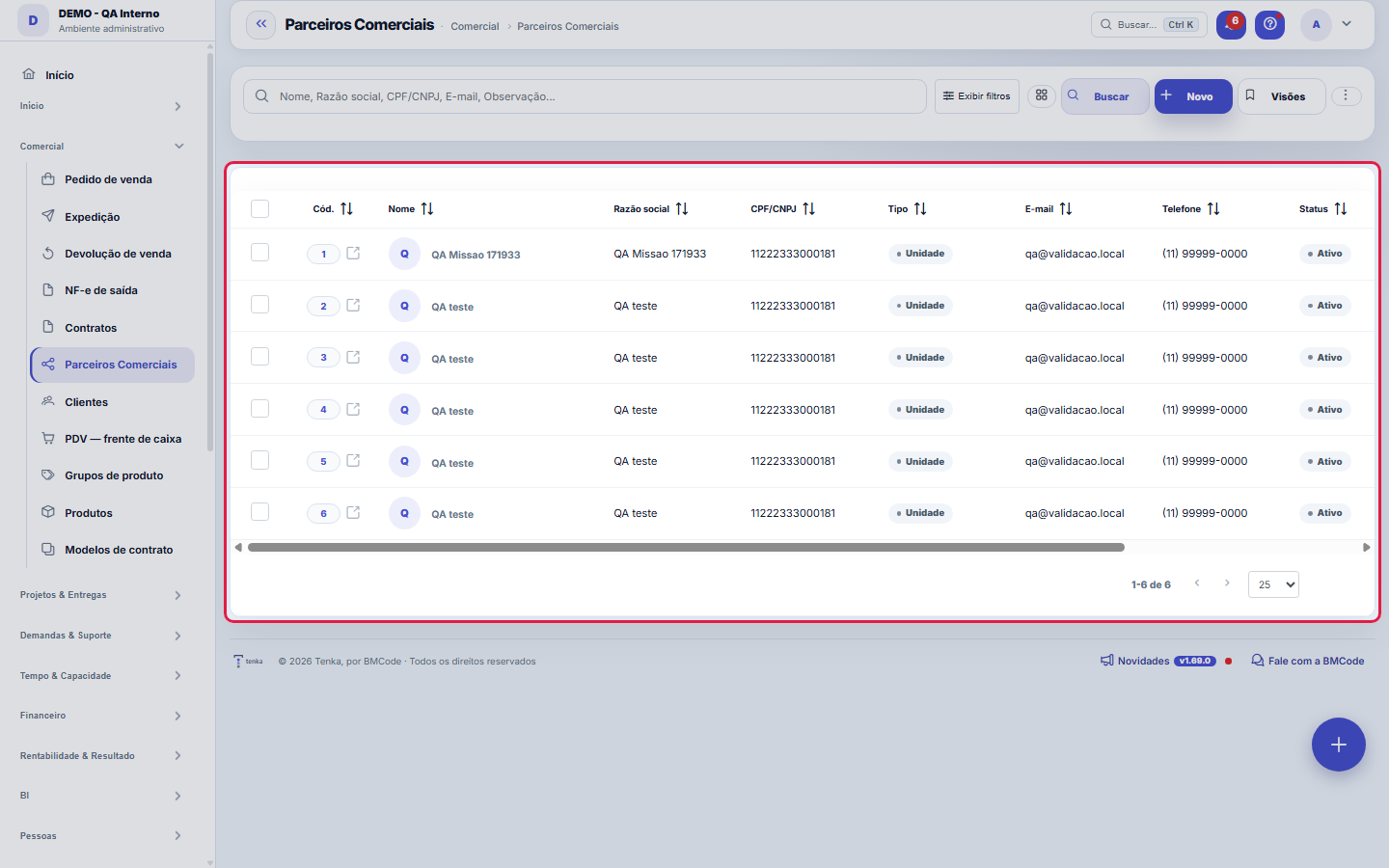
What you find on this screen
A portrait of the screen, read from the screen itself — it changes when the screen changes.
Form fields
Nome*Nome do parceiro comercial.
Razão socialRazão social (PJ).
CPF/CNPJCPF ou CNPJ.
TipoTipo de parceria.
E-mailE-mail de contato.
TelefoneTelefone de contato.
StatusParceiros inativos não aparecem para seleção.
ObservaçãoObservações gerais.
Nome do contatoNome da pessoa de contato no parceiro.
RepresentanteO representante que carrega as regras de comissão e o fechamento do mês deste parceiro. Sem representante, a conta vendida fica atribuída, mas não ge…
Código ERP
Start here
What you do here
Register partners (referrers, resellers, integrators) and link them to the clients of origin — the basis for tracking where your business comes from and paying referral commissions.
Para que esta tela existe
Units, resellers, consultancies and sales channels — this is the role of the "Sales Partners" screen within the platform.
What this screen answers
Who refers or resells, and how much they receive for it. The commission rule applies from the date you enter: changing the percentage does not recalculate the past, on purpose — a commission already calculated is a commitment made. To change the past, use an explicit adjustment.
O que esta tela faz
Registers and edits a sales partner — unit, reseller, consultancy or channel — with the identification data (name, legal name, tax ID, type, email, phone, status and notes) on the main tab, and two details as automatic tabs: Movements (the partner's financial statement) and Users (who at the partner accesses the portal and with which permissions). It is a master-detail: everything about the partner is handled on this screen, without jumping to separate records.
How to
Busca, export e visões salvas
The list runs on the standard engine: it exports Excel, PDF and CSV of the entire set, keeps saved views per user and column preferences, and has a recycle bin through ?excluidas=1 in the URL. Search and filters also work by link — ?q=texto and ?fd_=valor open the list already narrowed, which makes any selection shareable: copy the URL with the filter applied and send it to your colleague, who will open exactly the same set.
What the partner record carries
Besides identification (name, legal name, tax ID, email, phone), the partner has Type — unit, reseller, consultancy or channel —, Status and Notes. Opening the record, the form brings two detail tabs: the Movements (the financial statement that feeds the commission receivable in the Partner Portal) and the partner's Users, with individual permissions over what each login sees in the portal. The list is the door; management happens in the form.
Tipo, status e observação
The Type field classifies the partner (unit, reseller, consultancy, channel) and is what guides the readings by type of partnership. Status controls whether the partner is in operation — an ended partnership changes status instead of deleting the record, preserving the history of movements and links. Notes is free text for context that does not fit in a structured field: agreed conditions, alternative contacts, particulars of the agreement.
Rules
A visão salva guarda busca, filtros, colunas e ordenação
When you save a view with the Views button, it stores four things: the search text, the applied filters, which columns appear (and in what order) and which column the list is sorted by. Applying the view restores everything at once — including resetting the sort and the page you were on, so the result is exactly what the view describes. Views saved before this version remain valid: whatever they didn't store simply doesn't change when applied.
O erro de preenchimento aparece no campo, ao sair dele
Nas fichas, sair de um campo já dispara a conferência do que dá para conferir na hora: campo obrigatório deixado em branco e e-mail mal formado. O aviso aparece embaixo do campo e desaparece quando você começa a corrigir. Campo numérico não precisa de aviso: ele simplesmente não aceita letra enquanto você digita. Isso é conforto, não a validação final: ao salvar, o sistema confere tudo de novo do lado do servidor.
Movimentos e usuários moram nas abas de detalhe
The Movements tab is the partner's statement: each entry with type, date, amount and status — it is what produces the commission receivable the partner sees in the Partner Portal. The Users tab defines who at the partner enters the portal and what each one sees: permissions are per user (view tickets, view customers, view finance, approve quotes, view commission), so you can give financial visibility to the owner and only tickets to operations staff.
Uma anotação pode virar demanda
In the record's activity panel, each note has "Turn into request". The click creates a ticket with the note's text, who wrote it and the link to this record — nothing is retyped. Use it when the note is a request for action ("someone needs to review this"); the note stays where it was. The button only appears once the record has been saved; a read-only session (demo) doesn't create one.
Frequently asked questions
Who can access this screen
Whoever has permission to view this screen in their profile, with the module unlocked in the account's plan. Browsing the list and touching the records are separate verbs: create, edit and delete are granted per profile. It's worth remembering that the partner has an outward-facing side — the users linked to it access the Partner Portal with the permissions defined in the record —, so whoever edits here is also administering what third parties see.
Que pergunta do dia a dia se responde aqui
"Where do I see sales partners?" — when that question comes up, this is the screen where it is answered.
Como descobrir quem mudou um campo desta ficha?
Open the record and look at the Timeline on the right: it shows each change as "from one value to another", with the person and the date. When there are many changes, use the two filters at the top of the timeline — one by field, the other by person. The search runs in the database, so old changes show up just the same. You can also ask Tenkai: "who changed contract 482?".
Connected screens
Was this article helpful?
In the same module: Sales24
Online sales channelsCatalog feed, order webhook and fetching from Shopify and Nuvemshop.CustomersCentral registry of who you serve. It gathers contact and document data, the customer's access to the Portal,…EDI com o varejistaO pedido do grande varejista que entra pela VAN, o de-para dos GTIN, o aviso de embarque com os SSCC e a fatu…ExcursõesO ônibus de sacoleiras: agência, guia, poltronas, quem veio, o que comprou, os volumes etiquetados e a comiss…Sales FunnelsThe rails of your sales process: each funnel has stages with probability and a "rot" deadline — the foundatio…Product groupsProduct grouper (one level above the product) to see revenue, margin, and P&L by group — not just by product.Loja virtual e liveA sua loja na internet sem taxa por venda e o pedido-relâmpago da live: link público, estoque ao vivo, reserv…Team targets and commissionsSalespeople and reps side by side: target, sold, attainment, the tier that applies and the month’s projected …
Tenka Academy
Explore the AcademyStep-by-step learning paths for your industry, inside the platform.