

Valuation
How much the company is worth, with the calculation breakdown open.
The screen
The real screen, in the theme you picked above.
What you find on this screen
A portrait of the screen, read from the screen itself — it changes when the screen changes.
Available actions
Tenkai gives a nudgeCreate the official Academy tracks
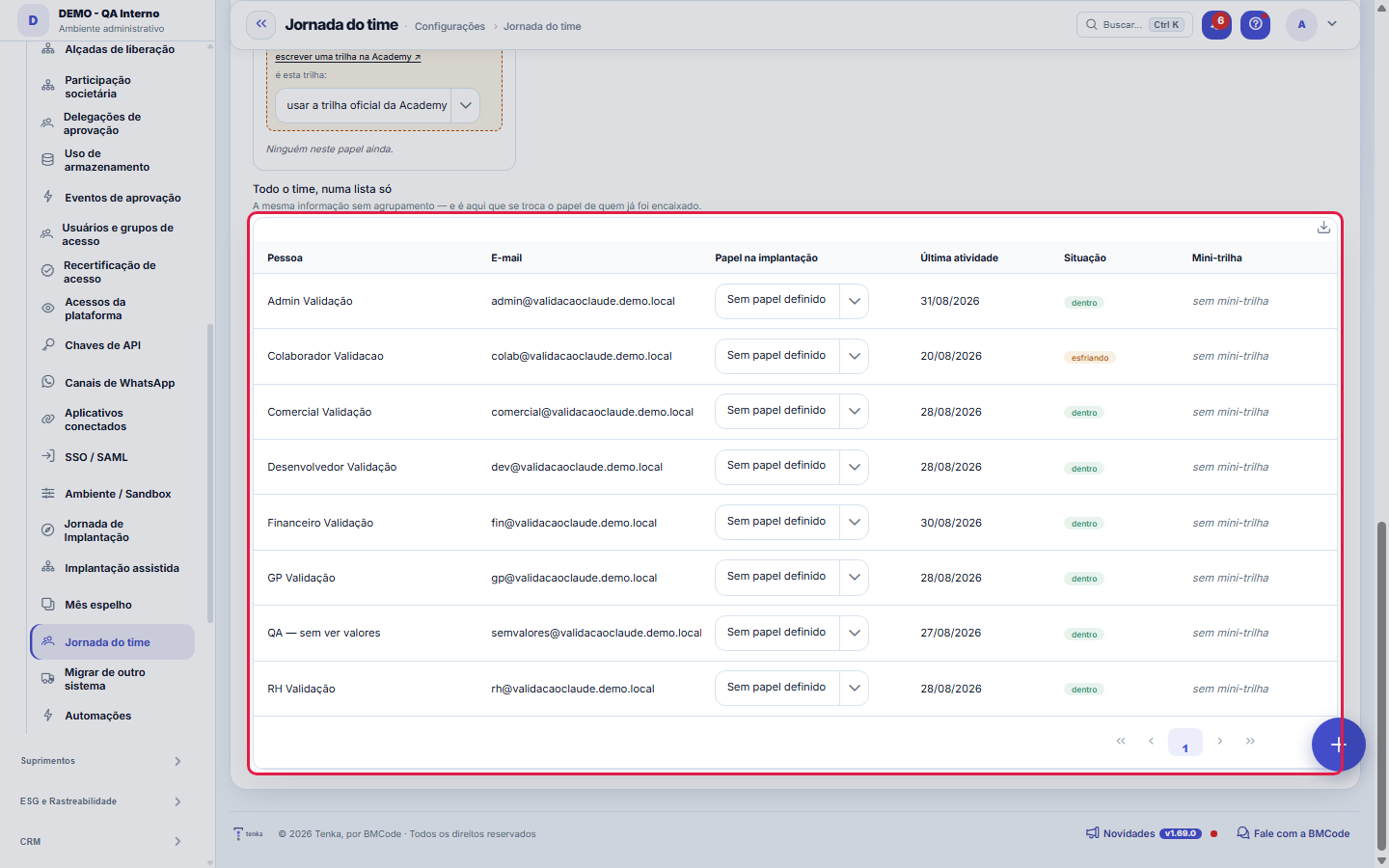
The list shows
PersonE-mailRole in the rolloutLast activityStatusMini path
Form fields
Time ativo na semanaFatia do time com atividade na última semana; fica vazio quando não há time.
Pessoas com atividade recenteQuantas pessoas usaram a plataforma na semana, sobre o total do time.
EsfriandoQuantas pessoas passaram do limite de dias sem usar a plataforma.
Convidadas que nunca entraramPessoas convidadas que nunca acessaram a plataforma.
Situação de adoçãoClassificação de adoção da pessoa: dentro, esfriando, abandono ou nunca entrou.
Última atividadeData do último uso da plataforma pela pessoa.
Dias paradoQuantos dias se passaram desde a última atividade da pessoa.
Progresso na mini-trilhaProgresso da pessoa na mini-trilha da Academy do seu papel, ou o motivo de não haver número.
Papel na implantaçãoPapel atribuído à pessoa na implantação, que define a mini-trilha dela.
Start here
O que esta tela responde
Who ELSE is on board. The owner's journey answers whether the system is configured; this one answers the question that decides the fate of the implementation. The number one cause of failure is human, not technical: the system can be 100% ready and the company keeps using the spreadsheet because finance never logged in and the field team does not know there is an app.
How to
What this screen answers
On board: used it in the last seven days. Cooling off: seven days or more without using it, and this is when a nudge works. Abandoned: thirty days or more, when a reminder no longer helps and a conversation is worthwhile. Never logged in: the invitation was sent and not used. Cooling off is a state, not an event — the warning goes out BEFORE it turns into abandonment, on purpose.
Papel na implantação — e por que não é o perfil de permissão
Profile says what the person CAN do; role says what they came to do in the implementation. They are different things: whoever checks the mirror month may have the same profile as whoever posts invoices. That is why the role is chosen here, in each row's dropdown, and not deduced from the profile — deducing it would put the external accountant in the same bucket as the financial analyst.
Time vazio não é 0% de adoção
When nobody has been invited, the percentage appears as a dash, not as zero. Zero would say the team does not use the system; the truth is that there is no team — and the two situations call for opposite actions.
Invite and follow up without leaving here
The invite button opens Users and permissions in a new tab. In the queue of those who need a nudge, the "Tenkai gives a nudge" button notifies the person through the platform itself — internal notification and e-mail, with the number of idle days in the message, because "so-and-so stopped" does not move anyone —, and the sending is recorded in the journey log.
É esta trilha
It ties which Academy track is the mini-track for that role. Leaving it on "use the official track", the platform searches by the name of the standard curriculum ("Academy: Financeiro", for example). The explicit link exists because searching by name breaks the day someone renames the track — and it would break silently, with the panel going back to saying that nobody has a track.
Rules
Ativo é ATIVIDADE, não convite aceito
The panel does not count who has a login created — that measures HR, not adoption, and it is exactly the number that makes an implementation look successful while nobody uses the system. Here a person is on board when they have OPENED some screen of this company. That is why someone with access for months can show up as never logged in.
You see what your role is allowed to see
The owner goes through the entire track. The field person needs two minutes to learn how to log hours on the phone — and asking them to do the full track is a guarantee they will do none of it. It is this proportion that separates adoption from ignored training.
What this screen answers
Without them the mirror month does not close, and charging a seat for someone who only checks would be the wrong incentive: the company would stop inviting precisely the person who validates the implementation.
Implantação que só o dono usa é a forma mais comum de fracasso
And the one that most disguises itself as success, because the system is configured and the owner's panel is green. When the team has more than one person and only one used it during the week, this warning appears highlighted — it is the most important signal on this screen.
A mini-trilha vem da Academy — este painel só LÊ o progresso
Each role points to a Tenka Academy track (the same LMS as /pages/rh/trilhas.xhtml). The percentage shown here is what the Academy calculated from the items the person accepted; nothing is typed on this screen and nothing is recalculated. Having a second calculation of the same number would mean having two truths about it.
Nothing is saved
Zero is a statement: it says the person did not study. When the track does not exist, was not created in this account, has no items, or the person has no employee record, there is no way to measure — and the panel says exactly which of the four cases it is, with the path to resolve it. Showing zero in these situations would make you chase people who had nothing to do.
O empurrão sai pela plataforma, e fica registrado
The button creates an internal notification for the person and queues an e-mail with the same message — the e-mail is a complement, not decoration: whoever has cooled off is precisely who is not logging into the system, and an in-app-only warning would be a note slipped under a locked door. Each nudge is recorded in the journey log.
O aviso automático precisa de alguém no papel Dono
The platform warns the owner on its own when someone cools off, at most once a week per person. If nobody is marked as Owner, there is no recipient and the warning does not go out — the strip at the top of the screen shows whether it is on or off, precisely so that silence is not mistaken for "everything is fine".
What this screen answers
The warning to the owner goes out at cooling off, never at abandonment. After thirty days idle, the person does not come back because of a reminder: that has become a re-implementation, and sending "we missed you" at that point is the noise that teaches the owner to ignore the next warning.
Frequently asked questions
Alguém do meu time não aparece na lista
The list shows the ACTIVE users linked to this company. If the person is not here, either the user is inactive or the link to this company does not exist — both are resolved in Users and permissions.
The person used the system and shows as never logged in
Activity is counted by COMPANY. Someone who works in another company of the same account and never opened a screen in this one appears as never having logged in here — and that is correct: the adoption this panel measures is that of this implementation.
Urgency for the business
Because the Academy has no track written for the external accountant, and inventing four links just to fill the panel would have you send someone to take a course nobody wrote. If you want one, write it in the Academy and tie it here in the dropdown.
A pessoa tem login mas aparece como "sem ficha de funcionário"
The Academy enrolls employees, not users — the enrollment hangs on the HR record. Partners, external accountants and any login without a record have nowhere to be enrolled, and that is why the panel says so instead of showing a percentage.
Was this article helpful?
In the same module: First steps5
Campos do cliente (Studio)Crie campos que só a sua empresa precisa, sem esperar desenvolvimento. Eles aparecem numa aba própria da tela…Portfolio (prioritization)The order of projects by an explicit criterion, with the math shown.Migrar de outro sistemaEscolha o sistema de origem e o tipo de dado, suba o CSV exportado de lá e baixe o arquivo já no layout do Te…Migrate from previous systemProducts with grid and stock, customers, suppliers and open items, with preview and undo.Network TemplatesInstall ready-made reports and publish your own.
Tenka Academy
Explore the AcademyStep-by-step learning paths for your industry, inside the platform.