

Portfolio (prioritization)
The order of projects by an explicit criterion, with the math shown.
The screen
The real screen, in the theme you picked above.
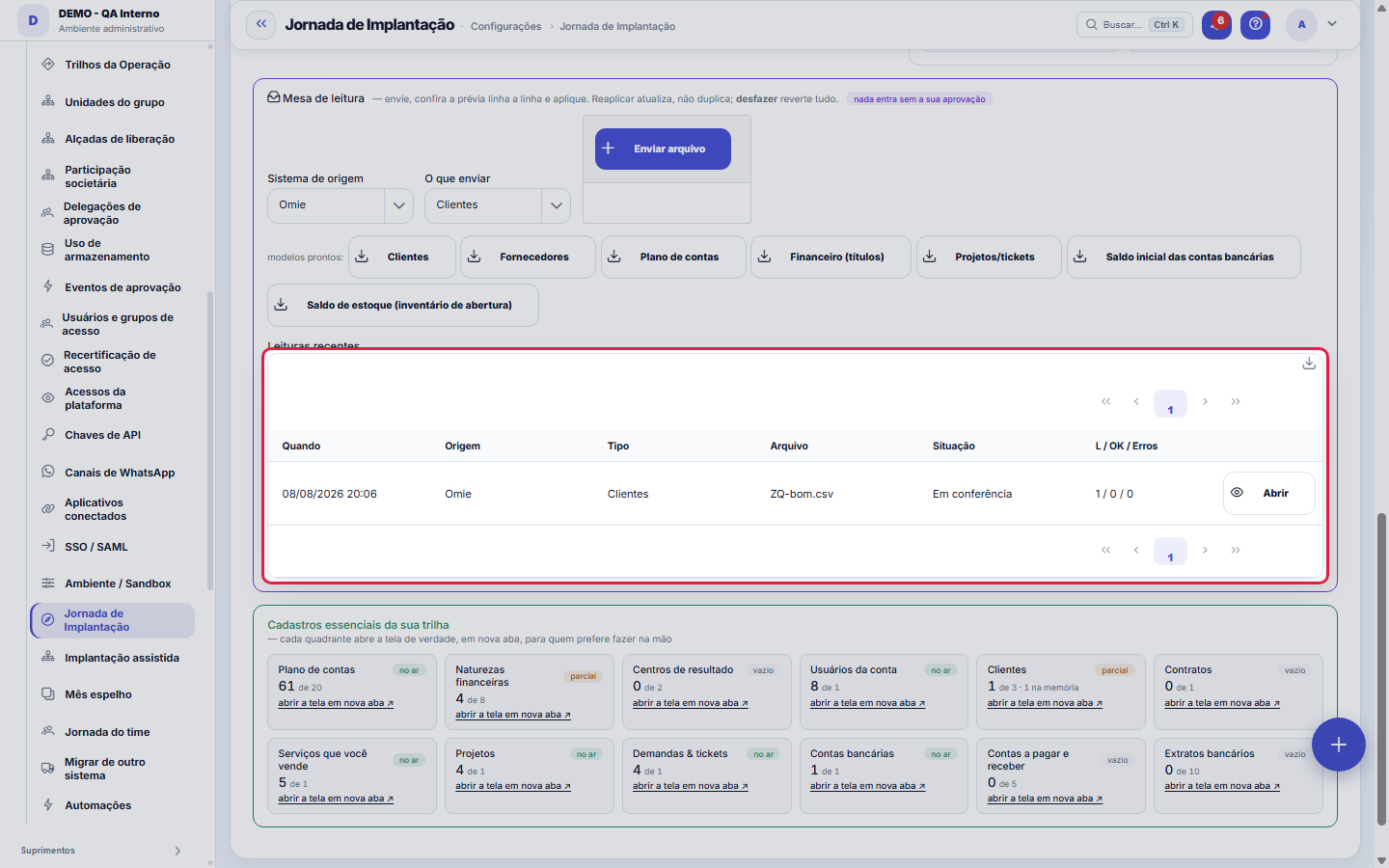
What you find on this screen
A portrait of the screen, read from the screen itself — it changes when the screen changes.
Available actions
🧭 Guided — one step at a time📋 Checklist — the whole track openI want help from a specialistTalk to a specialistSuggest the mapping with TenkaiGenerate previewApplyUndoOpenback to my trackreview and apply
The list shows
File columnField in TenkaRowExternal codeStatusNoteWhenSourceTypeFileL / OK / Errors
Form fields
Trilha percorridaQuanto da trilha de implantação já foi conquistado a partir dos dados reais.
Fases conquistadasQuantas fases da trilha já foram concluídas, sobre o total de fases.
Próximo passo sugeridoNome do cadastro ou passo recomendado agora pela trilha.
CadastradosQuantos registros o cadastro já tem hoje na empresa.
Alvo do cadastroQuantidade que a trilha considera suficiente para o cadastro estar conquistado.
Na memóriaRegistros já preparados em lote e ainda não aplicados ao cadastro.
Estado do cadastroSelo do cadastro na trilha: OK, memória, parcial ou vazio.
Linhas do arquivoQuantas linhas o arquivo enviado tem na leitura atual.
Linhas a gravarLinhas válidas que serão gravadas ou já foram gravadas pelo lote.
Linhas inválidasLinhas recusadas por erro de validação na leitura do arquivo.
Start here
O que esta tela responde
Where your implementation stands, and which single next step unlocks the most. Progress doesn't come from a checklist ticked by hand: it comes from counting your own data. If the number says there are three customers, it's because there are three customers saved — and that's why it can't be fooled, neither up nor down.
How to
See a project's account
The request becomes a traceable record in the same channel as "Talk to BMCode" — you follow the answer in My feedback —, and it goes with a snapshot of the implementation attached: current phase, percentage, what is pending, the batches in memory and the steps that got stuck. It's the difference between support that starts with "tell me what happened" and one that starts with the answer.
Invite the accountant
The accountant comes in as a read-only external user — they check the mirror month and the reports at no seat cost. Without them the mirror month doesn't close, because their closing is what serves as the answer key.
Rules
Nada é gravado sem o seu clique
Everything you send goes into a holding area, becomes a line-by-line preview and is only applied when you approve. Reapplying updates instead of duplicating, and undoing reverts the whole batch. That's why it's possible to send the spreadsheet as it is, without tidying anything up first.
O Tenkai oferece ajuda antes de você desistir
When the same step is attempted twice without completing — the same reading undone twice, or the same screen opened twice with nothing saved —, a notice appears offering a specialist, without you asking. This exists because whoever gets stuck in an implementation rarely clicks "help": they close the tab. The offer needs to arrive before that, and the number of attempts is configurable in JORNADA.AJUDA_APOS_TRAVADAS.
Tentativa antiga não conta como travamento
Only a step attempted in the last 48 hours counts. A screen opened five times three months ago and never filled in isn't someone stuck right now: it's a matter you've already solved another way or abandoned on purpose, and offering help there would just be noise.
A IA sugere o de-para; quem grava é você
After uploading the old system's spreadsheet, the "Suggest mapping with AI" button reads the column names and three sample rows and proposes the destination for each one. Nothing is saved in this step: the suggestion only fills in the screen's fields, as if you had chosen. The path remains the same — check, generate the preview, apply.
Coluna em branco não é falha: é a IA dizendo "não sei"
The request made to the model is explicit: with no clear match, return empty. A plausible guess here would become wrong data in the records of someone just starting out — the worst moment to lose trust. When the AI suggests with low confidence, the screen warns and asks for a check; when it invents a field that doesn't exist in Tenka, the suggestion is discarded and that appears in writing.
Implementation plan: where the steps come from
The plan is built from the company's verticals, the account modules and the country of operation, in the order the modules depend on each other. Each screen appears only once: whatever your vertical adds about a screen goes into the same step. The plan suggests; the account's subscription is still what unlocks the screens. With no vertical chosen, the plan shows the steps that apply to every company.
Frequently asked questions
I clicked specialist without being stuck. Is that a problem?
None. The request goes out the same way, and the attached context says explicitly that the proactive rule had not fired — whoever handles it knows the request came from you, and not from the system.
Why does "community" show as coming soon?
Because it doesn't exist yet. A link to an empty community would be worse than a declared absence: you'd click, find nobody, and start distrusting the two paths that do work as well.
A minha planilha é enviada para fora?
The column NAMES and up to three sample rows are sent — without seeing values you can't tell "document" from "code". If your company requires masking personal data and the configured AI provider is external, the suggestion is REFUSED and the screen explains: names and documents from your spreadsheet don't leave here. With a local model, nothing leaves the network.
Why do some steps say "check it yourself"?
Because the system only marks a step on its own when it can measure it from the data: customers, suppliers, products, contracts, bank accounts, financial categories, cost centers, chart of accounts, transactions, reconciliation, projects, tickets, employees and a second person on the team. The other steps depend on you checking the screen — the plan does not pretend to know.
Where is my industry's implementation playbook?
Implementation playbooks became guides built from the catalog: in the Help Center, under Implementation guides, each vertical has its own, with the steps of the modules it uses, in the order one depends on another. An operation that combines several verticals (the group's textile chain, the software house with HR consulting) has a single guide, without repeating a screen. Strategy, Processes and Tenkai have their own guide. The old playbook address still opens, now with the new guide.
Was this article helpful?
In the same module: First steps5
Campos do cliente (Studio)Crie campos que só a sua empresa precisa, sem esperar desenvolvimento. Eles aparecem numa aba própria da tela…ValuationHow much the company is worth, with the calculation breakdown open.Migrar de outro sistemaEscolha o sistema de origem e o tipo de dado, suba o CSV exportado de lá e baixe o arquivo já no layout do Te…Migrate from previous systemProducts with grid and stock, customers, suppliers and open items, with preview and undo.Network TemplatesInstall ready-made reports and publish your own.
Tenka Academy
Explore the AcademyStep-by-step learning paths for your industry, inside the platform.