

What I'm accountable for
Everything that points to you in one place — and what is overdue first.
The screen
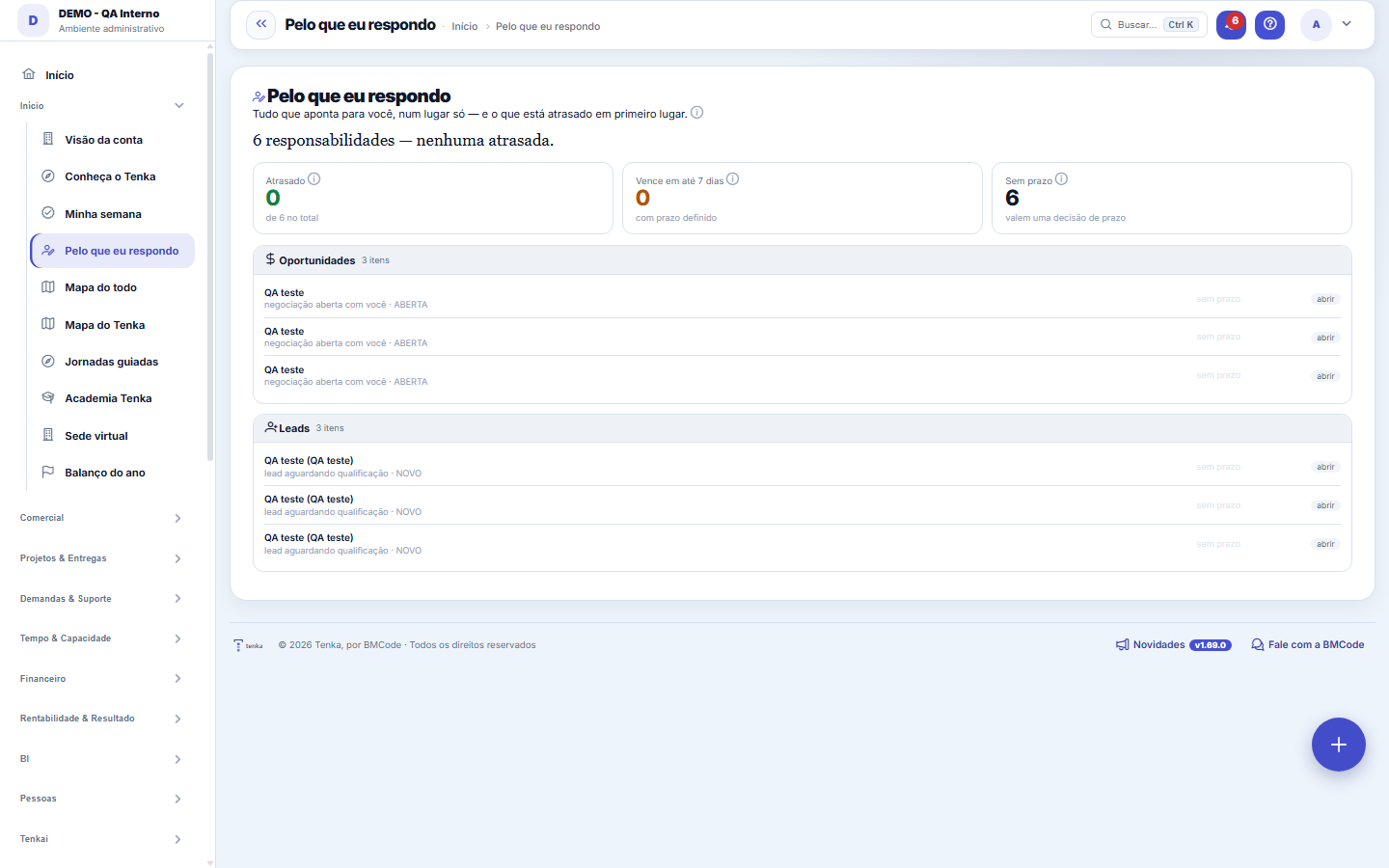
The real screen, in the theme you picked above.
What you find on this screen
A portrait of the screen, read from the screen itself — it changes when the screen changes.
Available actions
back to myver
Form fields
AtrasadosItens sob sua responsabilidade cujo prazo já passou.
Total de itensTotal de itens que apontam para você somando todas as áreas.
Vencem em até 7 diasItens com prazo definido que vencem nos próximos sete dias.
Sem prazoItens que apontam para você sem data combinada, calculado pelo total menos os com prazo.
Prazo do itemData limite do item listado.
Situação do itemEstado atual do item na tela de origem.
Itens da áreaQuantos itens você tem naquela área de origem.
Atrasados da áreaQuantos itens daquela área já passaram do prazo.
Itens por pessoaQuantos itens apontam para cada pessoa que responde a você.
Atrasados por pessoaQuantos itens dessa pessoa já passaram do prazo.
Start here
What it's for
Answer in ten seconds "what's mine and what's already overdue". The information existed scattered across twelve screens; what didn't exist was the consolidated view, and without it, accountability is just an org chart, not management.
What this screen answers
"What's mine and what's late", in ten seconds. It gathers what points to you across all modules — requests, approvals, actions, receivables and payables — into a single list.
How to
What this screen answers
Whoever has people below them in the org chart also sees the team's consolidated view. The chain is the one in the employee record (Superior field) — if someone on your team doesn't appear, the link there is the place to look.
Rules
The screen doesn't create anything: it brings things together
Requests, meeting and root-cause action items, approvals, contracts, projects, risks, opportunities, leads, processes and documents with expiration. If something points to you, it shows up here with a link to the screen that resolves it.
What this screen answers
Nothing is executed here. That's on purpose — a decision taken from within a consolidated list, without the context of the source screen, is a decision taken blind.
An item without a deadline is the most dangerous kind
It's not urgent — it's invisible. The "no deadline" number exists so you can set a date or take it off your name, instead of letting it rot without any alarm.
Nothing showing up might mean there's no owner registered
The screen can only show items that have the owner field filled in on the source record. If you expected to see something and don't, the item probably exists but has no owner — which is exactly the problem this screen helps expose.
Frequently asked questions
Can my manager see my panel?
Whoever has you as their direct superior in the org chart sees your scoreboard (total and overdue) and can open your panel. No one sees the panel of someone who isn't below them.
Was this article helpful?
In the same module: Today's work21
ConversationsThe conversation hub: reply to portal customers, talk to colleagues (internal chat), and in groups. Everythin…Base de conhecimentoOs artigos que respondem antes de o chamado existir — e o número que mostra quantos chamados isso evitou.InboxYour personal inbox to jot down anything without classifying it at the moment of capture.Team ceremoniesWhere the team's meetings are recorded — planning, daily, review and retrospective — with the agreed duration…ChamadosOs atendimentos de sustentação dos seus clientes, com o relógio do SLA, a previsão calculada e as ações da li…Ticket dashboardManagement view of the service desk: SLA, queue by status and type, workload by owner, and resolution time.TicketsDay-to-day operational cockpit: bugs, improvements, support, and tasks — with SLA, owner, contract consumptio…Company documentA certificate, policy, power of attorney or license with the validity at the center: status, notice to the pe…
Tenka Academy
Explore the AcademyStep-by-step learning paths for your industry, inside the platform.