

Localization by tenant
Super admin screen to localize each account (tenant): country, currency, and locale. The country is what decouples the Brazilian tax regime — when the account is from another country (Mexico in v1), the NF-e, SPED, eSocial, Reinf, and similar screens become inaccessible, and the platform runs on th…
The screen
The real screen, in the theme you picked above.
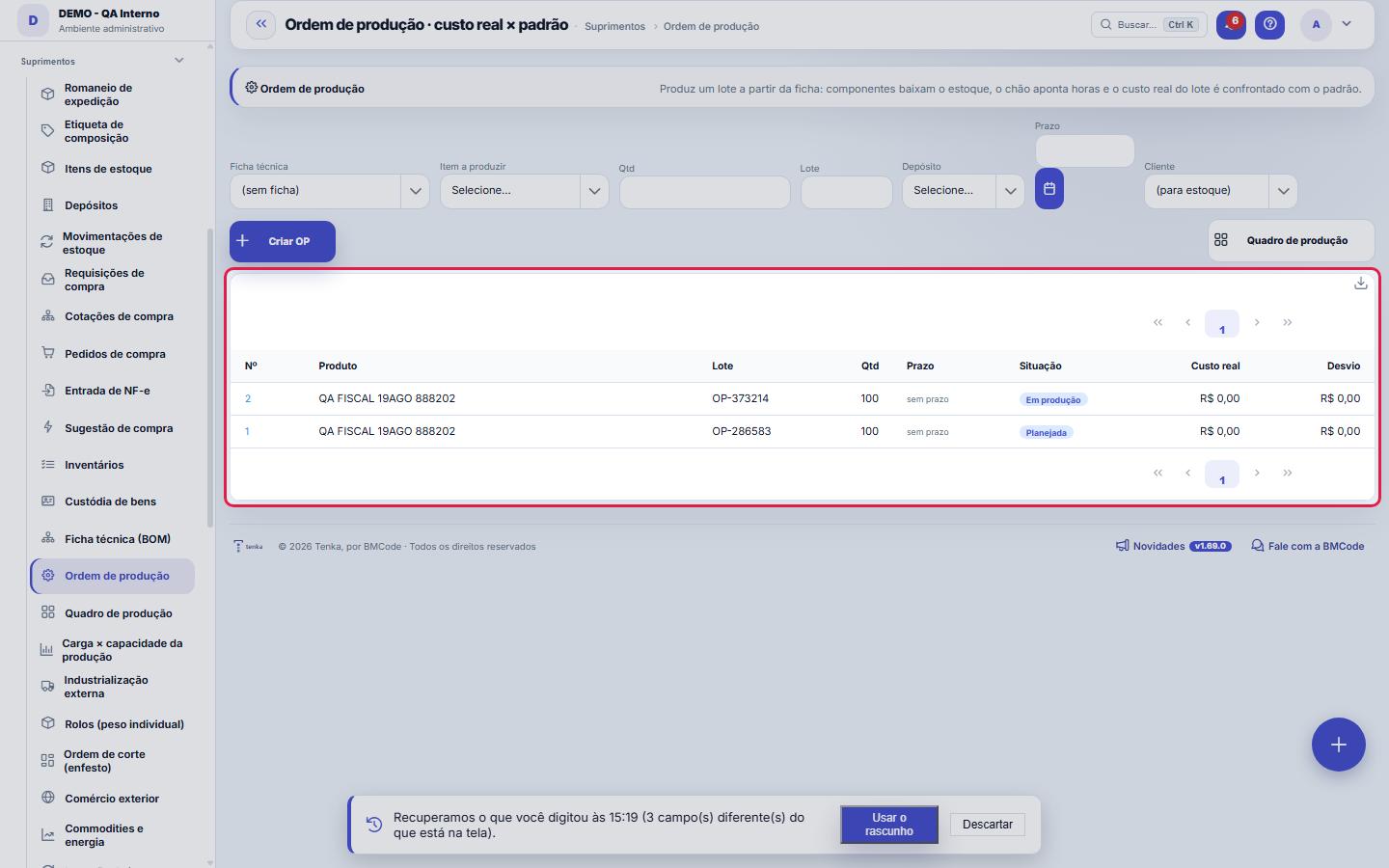
What you find on this screen
A portrait of the screen, read from the screen itself — it changes when the screen changes.
The list shows
Variance
Form fields
LoteLote produzido. É por ele que se rastreia a produção.
Quantidade a produzirQuantidade planejada para esta ordem.
RefugoQuanto se perdeu no processo. Entra no custo do que sobrou.
SituaçãoAberta, em produção, concluída ou cancelada.
Componentes baixadosSe os componentes da ficha técnica já saíram do estoque.
Custo padrãoCusto previsto pela ficha técnica.
Custo realCusto apurado no fechamento. A diferença contra o padrão é a variação.
Custo real — materiaisParte do custo real que veio de material consumido.
Custo real — horasParte do custo real que veio de mão de obra apontada.
AberturaQuando a ordem foi aberta.
ConclusãoQuando a produção foi concluída.
Start here
The life cycle of a work order
Create → log hours → issue components → complete and calculate. At the end, the screen answers the question that matters: how much THIS batch really cost, and how much it should have cost according to the bill of materials.
What this screen is
Produces a batch from the bill of materials: components are issued from stock, the shop floor logs hours by phone and, on completion, the batch's actual cost (materials issued + hours) is compared with the BOM's standard cost. The finished product enters stock at actual cost.
Uma ordem raramente produz UMA coisa
In the textile industry the same order delivers the main product, the co-product and the second-quality goods — and all three came from the same cost. Classified outputs state what came out and with what share of the cost, so each one enters stock worth what it really cost.
Laydown: a fiação não consome UM fardo, consome uma mistura
A yarn lot is born from several bales, and its cost is the weighted average of what went in. The laydown records which bales and how much of each — and returns the weighted average cost of the lot produced together with each bale's share of the blend.
How to
Time entry
Record operator, hours and what was done, on the day it happened. Hours become cost on completion (hours × cost/hour) — logging everything from memory at month-end produces a fictional actual cost.
Sem internet, o chão continua apontando
When the device has no network, the "Log offline" button appears. The entry is stored on the device itself and uploads on its own when the connection comes back. While there are records in the queue, the panel just below shows how many — and it only disappears when everything has been uploaded. Don't close the device with the panel lit: the queue lives in it.
The "Source" column in the time entries list
It says whether the entry was typed with a network or uploaded through the queue. When the batch's cost comes out different from expected, that's the first question — and without the column the answer would exist in the database and exist for nobody.
Segunda qualidade não é refugo
Scrap is loss: it left the process and doesn't become product. Second quality IS product — it sells for less, but it enters stock, has a SKU and takes up space. Treating the two as the same thing hides revenue that exists and inflates a loss that doesn't.
Standard list and form
The screen became the standard list: search, filters, saved views, columns, export and trash with Undo. Click the record (or New) to open the form, with the detail tabs when there are any.
Production lot and rolls
The lot entered when opening the order is the production lot: rolls weighed with this order inherit it. For a lot-controlled item, the order does not open without it. The order’s rolls show in Rolls, under the "Production order" filter.
Rules
Criar com ficha técnica (o caminho bom)
Select the bill of materials and the system already knows the components, proportions and standard cost of the batch. Without one, you enter just the item and quantity — the production order works, but is born without a ruler: there will be no standard cost or variance to compare.
Baixar componentes: uma vez, e do depósito certo
The button consumes from stock the BOM quantities in the batch's proportion. It disappears after use — the issue happens only once per production order. Check the warehouse chosen at creation: that's where the material comes from.
Complete and settle
Enter the cost/hour and the scrap (what was lost in the process) and complete. Actual cost = components issued + hours logged × cost/hour; the variance is the difference against standard cost. Scrap raises the unit cost: produced 100 and lost 5, the batch cost the same but yielded 95.
Desvio vermelho pede causa, não culpado
Actual cost above standard (red card) has three usual suspects: an optimistic bill of materials, a component price that went up, or hours beyond plan. Find out which before the next production order — a recurring variance in the same direction is the BOM lying.
O apontamento offline NÃO duplica ao reenviar
Each entry gets a key before it leaves. If the network drops after sending and before the response, the resend finds the entry already recorded and doesn't create a second one. That's not a nicety: good and scrapped quantities become the batch's cost, and one extra entry would make the actual cost come out wrong without raising any error.
Conflito não é resolvido pelo sistema
If the server already has that record with numbers different from the ones the device brings, the item stays in the queue marked as CONFLICT, with the difference written out. The system doesn't pick a side: choosing the server's would discard what the operator typed, and choosing the device's would erase what someone else recorded. You decide, with both numbers in front of you.
As fatias de custo têm de somar exatamente 100%
A cost that doesn't close at 100% is cost that vanished or doubled, and in both cases the margin lies — up or down, without anyone noticing. The screen shows the sum at all times precisely so you see the gap BEFORE trying to save, rather than finding out from the refusal.
Exatamente UMA saída principal
The main output is the one that answers for the order. Two main outputs make it ambiguous which product the production order delivered; none leaves the order without an owner. The classification defines this, not the order in which the rows were typed.
Every laydown portion declares the LOT
The laydown is exactly the record of WHICH bales went in. Blending "without a lot" would produce a fabricated trail, worth less than no trail at all: when the customer complains about the yarn, nobody will know which cotton it came from. A share without a declared cost uses the current average cost of the balance.
Scrap reason and the step checklist
When you choose the step in the report, its work instruction and checklist appear. Good pieces are only reported with the checklist confirmed; if the step requires a reason, scrap is only accepted with the reason (hole, stain, crooked seam). A report made offline records the scrap with "reason not given", so the shift's number does not disappear.
External step: the subcontractor inside the order
An external step is done by a third party. Link it to the processing shipment that took the lot (the field appears while there is an external step without a shipment). When the shipment's return is recorded, the step adds what came back as good pieces and the loss as scrap, and is completed when the shipment closes.
Cost by stage and abnormal loss
The "Cost by stage" table adds, step by step: the material that goes into it, the conversion (hours logged × resource hourly cost; * = resource without a rate, used the general hourly cost) and the subcontractor service (~ = estimated from the agreed price until the return brings the value). The accumulated total is the value of the semi-finished good leaving the step. At closing, scrap up to the tolerance ("Normal loss accepted in production" parameter) stays in the cost of the good pieces; anything above goes to expense and does not enter stock.
Actual vs standard consumption
The table compares, for each input, what the BOM says this lot should use (already with normal loss) with what left stock for the order. Positive variance in red = used more than planned; "not in the BOM" = an input the BOM does not have was issued. If the main input ran out and an alternate was issued, it counts toward the main one. Ask Tenkai "consumption of work order 12" or "where is the bottleneck" for the same reading in conversation.
Contractor linked to the order, and closing the order
Link the contractor step to the shipment that took the batch (Link external step): from then on, what was shipped counts as the order’s consumption, the return moves the step and the finished garment enters stock at order completion, at the computed cost. The order only completes with all steps closed, and each step only closes with its output recorded (good or lost pieces).
Order grid (size × colour)
When the product has a grid, the order shows the "Order grid": enter how many pieces of each size and colour the batch makes (or use "Split evenly") and save — the total must match the order quantity. Sewing bundles follow that grid and, on completion, the good pieces enter stock by variant, in the same proportion and at the same unit cost.
Frequently asked questions
Which question this screen answers
"How much did producing this batch really cost — and how far did it stray from the standard cost?" The production order accumulates both halves of actual cost: the materials issued from components and the hours logged by the shop floor. On completion, the total is compared with the BOM's standard cost and the finished product enters stock at actual cost. The variance (actual − standard) is the screen's answer: if positive, the batch came out more expensive than the recipe predicted — investigate materials and hours separately, because the causes are usually different.
How do I find what is delaying production most this week?
Ask Tenkai "what is delaying production most this week". It shows, by step, how many lots are stuck, how many days the oldest has been there and how many are past the planned date. To check, open the production order list filtered by the step.
Was this article helpful?
In the same module: Production54
Production log entryOne log entry: who did it, on which production order, how many good pieces, the scrap and the hours. Read-onl…Cell balancingPeople per operation, bottleneck and pieces per day for a style in a cell, from the standard minute of the te…Fashion knowledge baseFormulas, rules and the house way, with the source.Biblioteca de operaçõesAs operações de costura da casa com o tempo padrão por tipo de máquina: monta o roteiro e cota o custo da peç…Bolsa da redeHoras de tear e de facção paradas e sobras (retalho, ponta de rolo, fio parado, encalhe) circulando entre as …Caminho críticoOs marcos da coleção e do pedido, planejado × real: o atraso de um marco empurra a entrega, a tela diz a nova…Opportunity itemsOpportunity detail (dictionary anchor).CertificationA certification (GOTS, OEKO-TEX, ISO 14001…) of the company, a supplier, an item or a lot: issuing body, numb…
Tenka Academy
Explore the AcademyStep-by-step learning paths for your industry, inside the platform.