

Bidding radar
Scans public tenders and brings up the ones that match what the company sells. The radar suggests based on the tender's text — the decision to participate (qualification, deadline, margin) is still yours; it doesn't assess legal requirements.
The screen
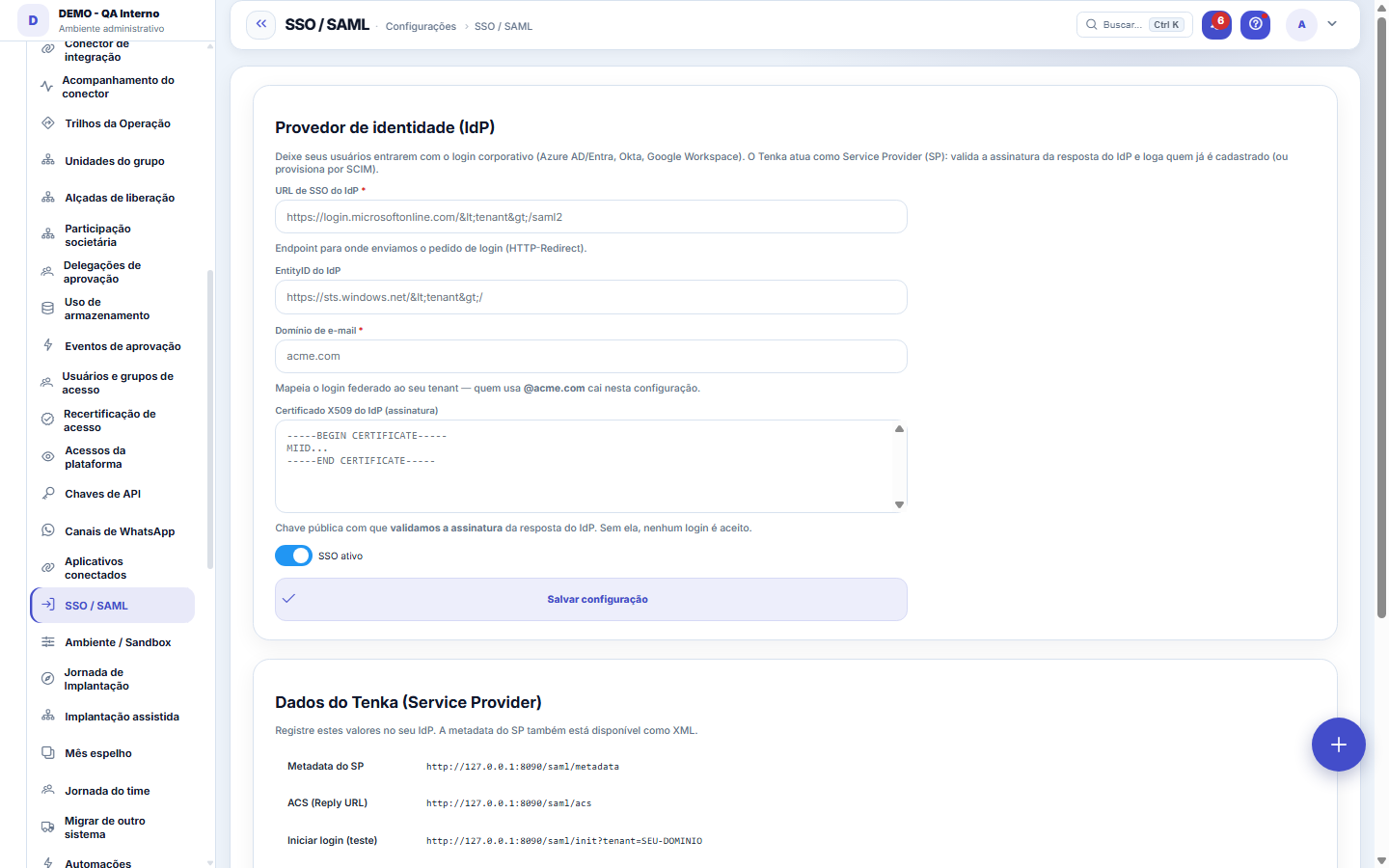
The real screen, in the theme you picked above.
What you find on this screen
A portrait of the screen, read from the screen itself — it changes when the screen changes.
Available actions
Save configuration
Form fields
Domínio de e-mailDomínio que manda o usuário para este login corporativo. Domínio errado joga a empresa toda no provedor errado.
Identificador do provedorComo o provedor de identidade se apresenta. Tem de bater exatamente com o que ele envia.
Endereço de loginPara onde o usuário é enviado ao entrar. É o endereço que o provedor publica como SSO.
AtivaConfiguração inativa faz o login voltar a pedir senha da plataforma, sem passar pelo provedor.
Start here
What this screen answers
Configures corporate login via an identity provider (SSO). Wrong metadata or certificate locks EVERYONE out, not just one user — test with one account before making SAML mandatory.
O que esta tela faz
Federated login via SAML: the customer uses their own identity provider (Azure AD/Entra, Okta, Google Workspace) to authenticate. Configure the IdP (entityId, SSO URL, X509 certificate and the email domain that maps to your tenant), see the SP metadata and test. It complements provisioning via SCIM.
Para que esta tela existe
Federated login via SAML: the customer uses their own identity provider (Azure AD/Entra, Okta, Google Workspace) to authenticate. Configure the IdP (entityId, SSO URL, X509 certificate and the email domain that maps to your tenant), see the SP metadata and test. It complements provisioning via SCIM. — this is the role of the "SSO / SAML" screen within the platform.
Rules
O que registrar no seu provedor — e como testar
The screen's second section lists the Tenka-side addresses (the SP) that your identity provider needs to know: the metadata URL, the ACS — where the IdP sends the response back — and the login start URL. Register them in Azure AD/Entra, Okta or Google Workspace, save the configuration and use the "Test login" button to go through the real flow before releasing it to the team. Without the IdP's X509 certificate pasted into the configuration, no login is accepted: the response signature is validated against it (fail-closed).
Frequently asked questions
Que pergunta do dia a dia se responde aqui
"Where do I see SSO / SAML?" — when that question comes up, this is the screen that answers it.
SSO ativo cria usuário sozinho?
By default, no: only people already registered in the tenant get in — automatic provisioning at first login (JIT) is opt-in. To create and maintain users in bulk from your directory, the way is SCIM (/scim/v2/Users, with the tenant's API key), which complements SAML. The configured email domain is what maps federated login to your tenant: whoever signs in with an email from that domain lands in this configuration. Current bindings: HTTP-Redirect on the request and HTTP-POST on the response, with NameID by email.
Was this article helpful?
In the same module: Platform and security38
Connected help screenAnchor screen of the detail dictionary. Does not appear in the menu.Platform accessThe record of when the platform's support team accessed your account, what they did and with what authorizati…White-spaceSee what's left to sell to those who are already customers — by cross-referencing the installed base with wha…Template itemAnchor screen of the detail dictionary (template items). Does not appear in the menu.Assistente fiscalQuatro passos para a nota sair do Tenka: estado, regime, código de segurança (CSC) e certificado A1 — com a r…ShippingControls the picking and dispatch of what was sold. Shipping confirms that the merchandise actually left: a m…Position bandAnchor screen of the detail dictionary (position bands). Does not appear in the menu.Blog — WordPress connectionWhere you connect your company's WordPress and teach the AI to write like you: the editorial line (what to ta…
Tenka Academy
Explore the AcademyStep-by-step learning paths for your industry, inside the platform.