

Projects
The PMO cockpit: projects with milestones, ceremonies, hours, costs, baseline, and rollup — from kickoff to delivery.
The screen
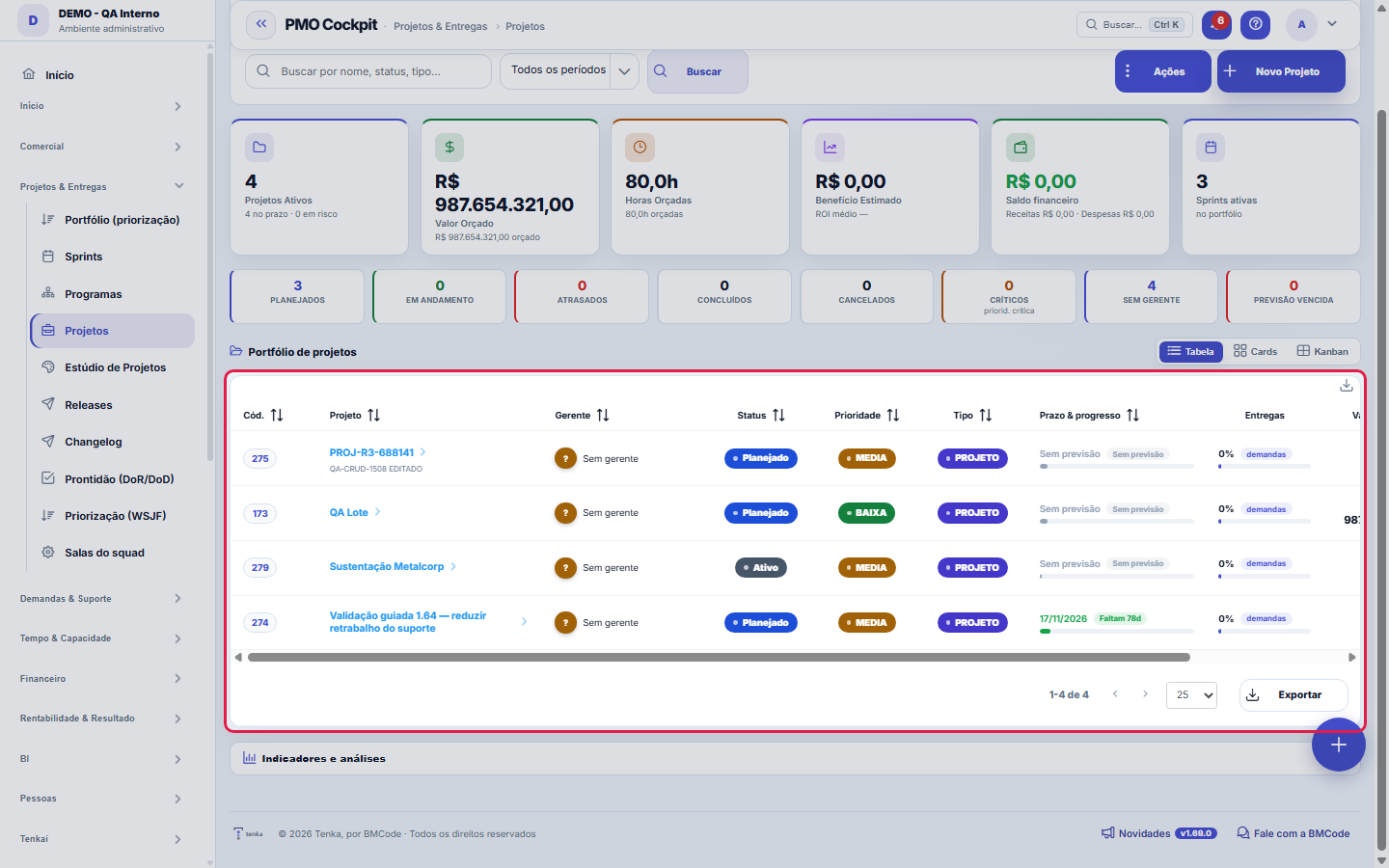
The real screen, in the theme you picked above.
What you find on this screen
A portrait of the screen, read from the screen itself — it changes when the screen changes.
Available actions
Create projectCancel
Form fields
NºNúmero sequencial por empresa do projeto.
Nome*Como o projeto é chamado no dia a dia.
Tipo*Natureza do projeto (implantação, evolução, sustentação).
SituaçãoEm que ponto o projeto está.
PrioridadePrioridade relativa dentro do portfólio.
ClienteCliente para quem o projeto é executado.
ContratoContrato que financia o projeto.
EquipeEquipe responsável pela execução.
GerenteQuem responde pelo prazo e pelo orçamento.
ProgramaPrograma a que este projeto pertence.
DescriçãoO que o projeto entrega.
InícioData de início planejada.
Previsão de términoData de término prevista hoje.
TérminoData em que o projeto foi efetivamente encerrado.
Horas orçadasHoras previstas no orçamento do projeto.
Valor orçadoValor aprovado para o projeto.
Benefício estimadoRetorno esperado, para comparar com o valor orçado.
ObjetivoO resultado que o projeto persegue.
JustificativaPor que o projeto existe — o problema ou a oportunidade que justifica o investimento.
RiscoNível de risco atribuído ao projeto.
+ 4 more fields
Start here
What you do here
Manage complete projects: phases and milestones (with per-milestone billing), governance rites, team and capacity, planned × actual hours, costs and benefits. Switch between views (list, kanban, summary).
The portfolio in the standard list, the record in the standard layout
The project list has search, filters by status, type and priority, the period cut on the rail (due in 30 days, late, in progress, active, completed), saved views and export. At the top, the portfolio board: drag a card to another column and the status changes. The record opens with cycle, summary, EVM and baseline above the tabs; the Data tab has name, type, status, customer, contract, team, manager, program, dates, amounts, objective, justification and risk.
What this screen answers
The project brings together milestones, tasks, hours and money. On the Schedule tab the timeline is NAVIGABLE: drag the background to move through time and drag a milestone to reschedule it — the new date is saved immediately. The burndown only makes sense when milestones have a planned date; without a date, it has nothing to project.
O que esta tela faz
It is the complete record of a project, organized in tabs: Data (customer, contract, team, manager, program, type, status, priority and dates), Milestones and Tasks, Risks, Costs and Benefits, Financial, Insights, Team, Schedule, Feed, Documents, Time entries and Activities. In other words: it is not just the record — it is the place where the project's execution, money and communication meet on a single screen.
How to
The record’s tab groups
Above the record’s tabs, the Planning, Execution, Financial and Analysis and risks buttons show only that group’s tabs (the Data tab and the system tabs appear in all). The rituals — start, complete, reopen, PDF status report, generate alerts, run automations and save as template — are in the header ⋮, next to Save.
Horas orçadas, valor orçado e benefício estimado
Three numbers that are often confused: budgeted hours are the planned size of the effort — the yardstick against which the time entries on the Time entries tab will be read; budgeted amount is how much the project should cost or be worth in money; and estimated benefit is the expected return — what justifies doing the project, not what it costs. Filling in the benefit is what allows initiatives to be compared with each other when prioritizing the portfolio: two projects of the same cost rarely have the same return.
Cliente, contrato e programa: as três amarras do projeto
The project gains context through three optional links: the customer says who the work is done for; the contract ties execution to the commercial agreement — it is the path for consumption and billing to talk to what was sold; and the program hangs the project on a portfolio, together with other initiatives with the same objective. An internal project can live without a customer and without a contract, but if a contract exists and it is not linked, that agreement's profitability is blind to these hours.
Third-party licenses
The Licenses tab records tools, cloud and APIs paid by the project, with monthly amount and due date; the monthly total shows at the top. Deleting sends it to the trash. Ask Tenkai "how much do we spend on licenses in project X" or "licenses due".
Rules
Marco concluído fatura
A milestone with linked billing automatically generates the invoice upon completion; reopening the milestone reverses it. A closed contract doesn't bill.
The baseline keeps what was agreed
The baseline freezes the plan (deadline/hours/cost) — the deviation shown always compares against it, not against the re-edited plan.
Project margin
A fixed scope that blows past its hours melts the margin month by month. Track the margin curve — the margin alert warns when it crosses the threshold.
A visão salva guarda busca, filtros, colunas e ordenação
When you save a view with the Views button, it stores four things: the search text, the applied filters, which columns appear (and in what order) and which column the list is sorted by. Applying the view restores everything at once — including resetting the sort and the page you were on, so the result is exactly what the view describes. Views saved before this version remain valid: whatever they didn't store simply doesn't change when applied.
O erro de preenchimento aparece no campo, ao sair dele
Nas fichas, sair de um campo já dispara a conferência do que dá para conferir na hora: campo obrigatório deixado em branco e e-mail mal formado. O aviso aparece embaixo do campo e desaparece quando você começa a corrigir. Campo numérico não precisa de aviso: ele simplesmente não aceita letra enquanto você digita. Isso é conforto, não a validação final: ao salvar, o sistema confere tudo de novo do lado do servidor.
Deleting a project is permanent
Projects do not go to the trash: deleting really removes them, after confirmation — that is why the list offers no Undo. To get a project out of the way without losing history, complete or cancel it. Duplicate does not exist on the record either: save the project as a template and use "From template" in the list, which carries milestones and team.
Uma anotação pode virar demanda
In the record's activity panel, each note has "Turn into request". The click creates a ticket with the note's text, who wrote it and the link to this record — nothing is retyped. Use it when the note is a request for action ("someone needs to review this"); the note stays where it was. The button only appears once the record has been saved; a read-only session (demo) doesn't create one.
Team and member removed from the project go to the trash
Removing a team or a member from the project does not erase the link: it goes to the tab's recycle bin, with who removed it and when, and comes back with Undo. The hours logged by that person keep counting in the project's actuals — removing from the team does not rewrite the past.
Engineering: the project's repository and the three measures
On the Engineering tab of the project record, choose the GitHub or GitLab repository that holds its code (the one connected in Integrations) and save. Under Measure the last 30 days, Tenka reads Git and shows the average time to merge, the deploys per week and the time to recover from incidents (issues closed with the incident label). Nothing is written to Git. If no repository is connected in the account, the tab tells you where to connect one.
Licences count towards the project's cost
The licences entered on the Licences tab (tools, cloud, services) count towards the project's actual cost and margin in Profitability: the monthly amount times the months since the licence was entered, up to today or to its expiry date. The cost card shows how much of it comes from licences. A removed licence no longer counts.
Frequently asked questions
Como descobrir quem mudou um campo desta ficha?
Open the record and look at the Timeline on the right: it shows each change as "from one value to another", with the person and the date. When there are many changes, use the two filters at the top of the timeline — one by field, the other by person. The search runs in the database, so old changes show up just the same. You can also ask Tenkai: "who changed contract 482?".
What changes when the project waits for the client?
Use Wait for the client in the record’s menu when the team has delivered its part and depends on the client (validation, data, sign-off), and say what you are waiting for. While the project waits, an overdue forecast does not become a team delay: it leaves the Late column on the board and goes to Waiting for the client, and the PMO panel shows the client wait separately. The record shows since when, and the reason stays in the history. When the client replies, use Resume the project.
Connected screens
Pertence aProgramasProjetos podem compor um programa.Planeja emSprintsO trabalho do projeto é fatiado em sprints.Executa emDemandasDemandas carregam a execução do projeto.Mede margem emRentabilidadeFaturado × custo real das horas do projeto.Entrega emReleasesVersões e pacotes de entrega do projeto.
Was this article helpful?
In the same module: Projects and scope4
Project StudioFrom idea to project with AI: describe the initiative in conversation, generate a canvas, feasibility (roles …AI evaluationRuns a fixed set of questions with known answers, several times each, and measures both accuracy AND variance…KudosRecognize a colleague in two taps.ProgramsStrategic grouping of projects (portfolio): objectives, linked projects, and a consolidated view.
Tenka Academy
Explore the AcademyStep-by-step learning paths for your industry, inside the platform.