

Email queue
Everything the system tried to send by email: what went out, what failed and why.
The screen
The real screen, in the theme you picked above.
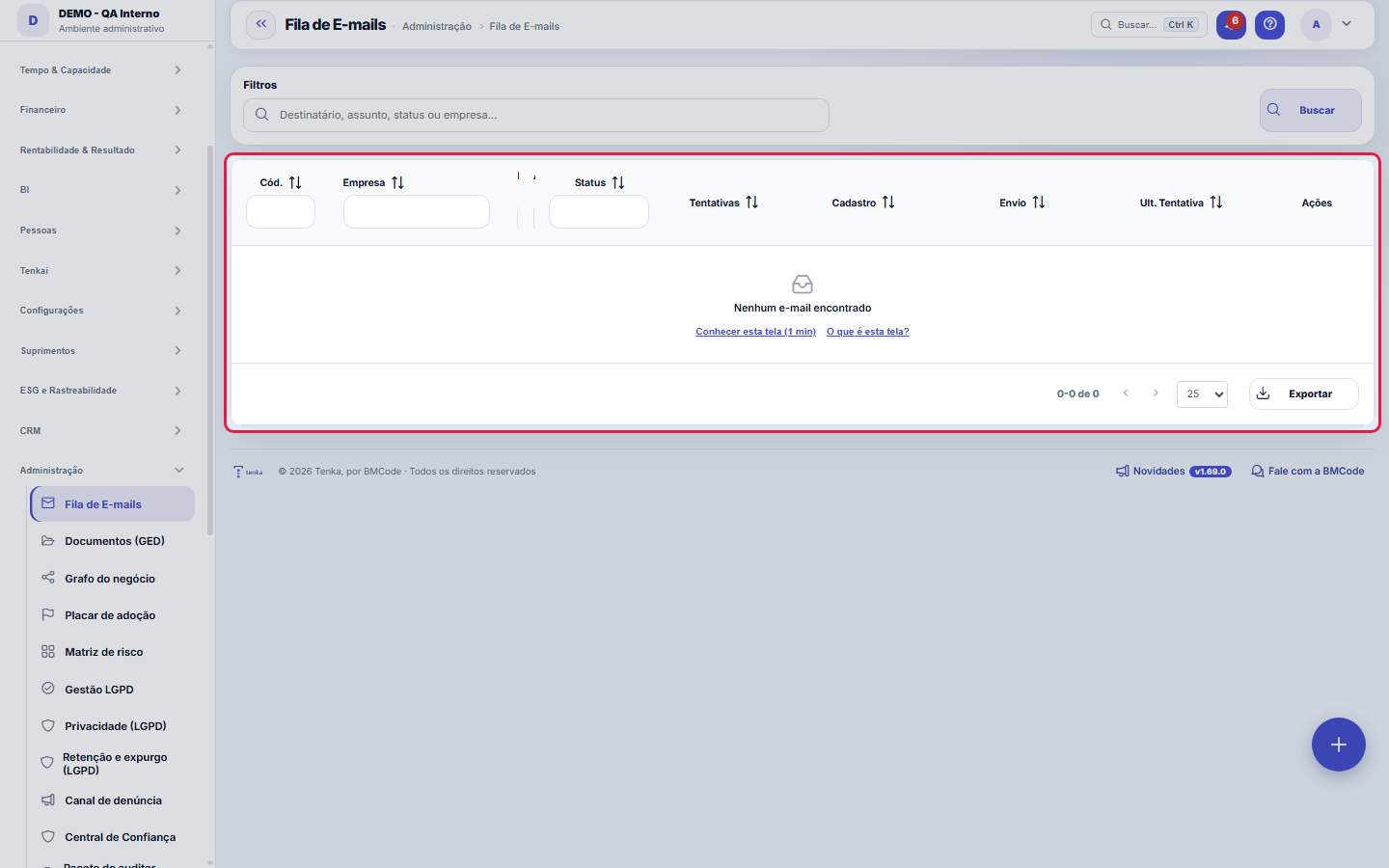
What you find on this screen
A portrait of the screen, read from the screen itself — it changes when the screen changes.
Tabs
DetailsBodyError
Available actions
Close
Form fields
Destinatário
Assunto
Empresa
Usuário
Situação
Tentativas
Criado em
Enviado em
Última tentativa
Escopo
Erro
Nome do anexo
Start here
What it's for
Answer the question "did the client receive it?" with fact. Instead of guessing, you see the attempt, the time and the server error when there was one.
Você vê a fila da SUA empresa
Each company sees the emails sent on its behalf — user invitation, daily briefing, collection, notification. The platform (BMCode) sees the whole set, because it operates the sending service.
How to
See the whole e-mail
The envelope on the row opens the e-mail with the sending data, the body and the error, if any. To find a failed e-mail, filter the status by ERRO and search by recipient.
Rules
Sending is asynchronous on purpose
The e-mail enters a queue and goes out through its own process, with a retry in case of temporary failure. This keeps the user's screen from getting stuck waiting for the e-mail server to respond.
Failure here is usually a configuration issue, not the system
Authentication error, unverified sender and domain without sending authorization are the most common causes — and all of them are resolved in the e-mail configuration, not in the queue.
Falha de envio não some — e é assim que se descobre cadastro errado
An email that fails is recorded with the error. If the same recipient fails repeatedly, the problem is almost always the registered address — and each repeated attempt worsens the platform's sending reputation. Correcting the record solves both.
An e-mail marked as sent doesn't guarantee it reaches the inbox
Sent means the server accepted it. If the client didn't receive it, the message may be in spam or blocked due to domain reputation — it's worth checking your domain's authentication configuration.
A visão salva guarda busca, filtros, colunas e ordenação
When you save a view with the Views button, it stores four things: the search text, the applied filters, which columns appear (and in what order) and which column the list is sorted by. Applying the view restores everything at once — including resetting the sort and the page you were on, so the result is exactly what the view describes. Views saved before this version remain valid: whatever they didn't store simply doesn't change when applied.
O erro de preenchimento aparece no campo, ao sair dele
Nas fichas, sair de um campo já dispara a conferência do que dá para conferir na hora: campo obrigatório deixado em branco e e-mail mal formado. O aviso aparece embaixo do campo e desaparece quando você começa a corrigir. Campo numérico não precisa de aviso: ele simplesmente não aceita letra enquanto você digita. Isso é conforto, não a validação final: ao salvar, o sistema confere tudo de novo do lado do servidor.
"Undetermined delivery": what it means and what to do
A message gets this error when the transmission started and the system did not know how it ended — because the server went down midway, or because the connection was lost after the provider had already accepted the message. There is no way to ask the provider whether it delivered. That is why the platform does NOT resend on its own: resending by reflex is what makes the same email reach the customer twice. What to do: confirm with the recipient or through their history whether the message arrived; if it did not, resend it manually from this screen. If this error appears frequently, let support know — it usually indicates the server is being restarted while the system is in use.
Search, filter, save a view and export
This list is read-only: records cannot be edited or deleted here, because they are evidence of what happened. The top search looks in the text fields; the Filters button opens the side panel with the cuts (status, type, company…); the combination can be saved as a view and reopened with one click. In the ⋮ menu, Excel and PDF take the whole filtered set — not just the page on screen — and "export everything" asks for your password. The eye on each row opens the detail on the side.
Frequently asked questions
O convite não chegou — o que olhar primeiro?
Search by the recipient's email. Status "sent": it left here — ask them to check spam and confirm the address. "Waiting": it is in the queue and goes out in the next cycle. "Failed": the reason appears on the row (nonexistent address, mailbox full) — correct the record and resend.
Can I resend it?
There's no resend button on this screen — it's the window into the queue, not the trigger. Reprocessing of failures is automatic: the Attempts column and the date of the last attempt show the system insisting. If the recipient was wrong, fix the record and repeat the action that generated the e-mail (resending the invitation, for instance) — this creates a new entry in the queue. The exact failure error is in the e-mail detail, Error tab.
Como descobrir quem mudou um campo desta ficha?
Open the record and look at the Timeline on the right: it shows each change as "from one value to another", with the person and the date. When there are many changes, use the two filters at the top of the timeline — one by field, the other by person. The search runs in the database, so old changes show up just the same. You can also ask Tenkai: "who changed contract 482?".
Was this article helpful?
In the same module: Governance and compliance12
DRE tree viewThe DRE navigable by nature (account category): open the line and drill down to the entry that formed it. It'…Central LGPDOs documentos vivos da proteção de dados com estado e data — DPA, RIPD, runbook de incidente e conformidade d…Advance receivablesReceivables advancing as a BUTTON: the not-yet-due receivable invoices already in your accounts receivable tu…Service order mapDistributes service orders on the map by technician and region to build the day's schedule without overlap. T…LGPD management (old address)Old address of LGPD management: opens and goes on to the consent list.Error logThe exceptions the system recorded: when, on which screen, with which user, and what the technical failure wa…SDCA routineStructures the improvement routine (Standardize–Do–Check–Act) around a process. The cycle only closes if the …Risk matrix (old address)Old address of the risk matrix: opens and goes on to the risk list.
Tenka Academy
Explore the AcademyStep-by-step learning paths for your industry, inside the platform.