

Advance receivables
Receivables advancing as a BUTTON: the not-yet-due receivable invoices already in your accounts receivable turn into working capital today. Select one or more, see the simulator with the EFFECTIVE COST (% and R$) and the transparent breakdown of the three components — partner cost (funding), Tenka …
The screen
The real screen, in the theme you picked above.
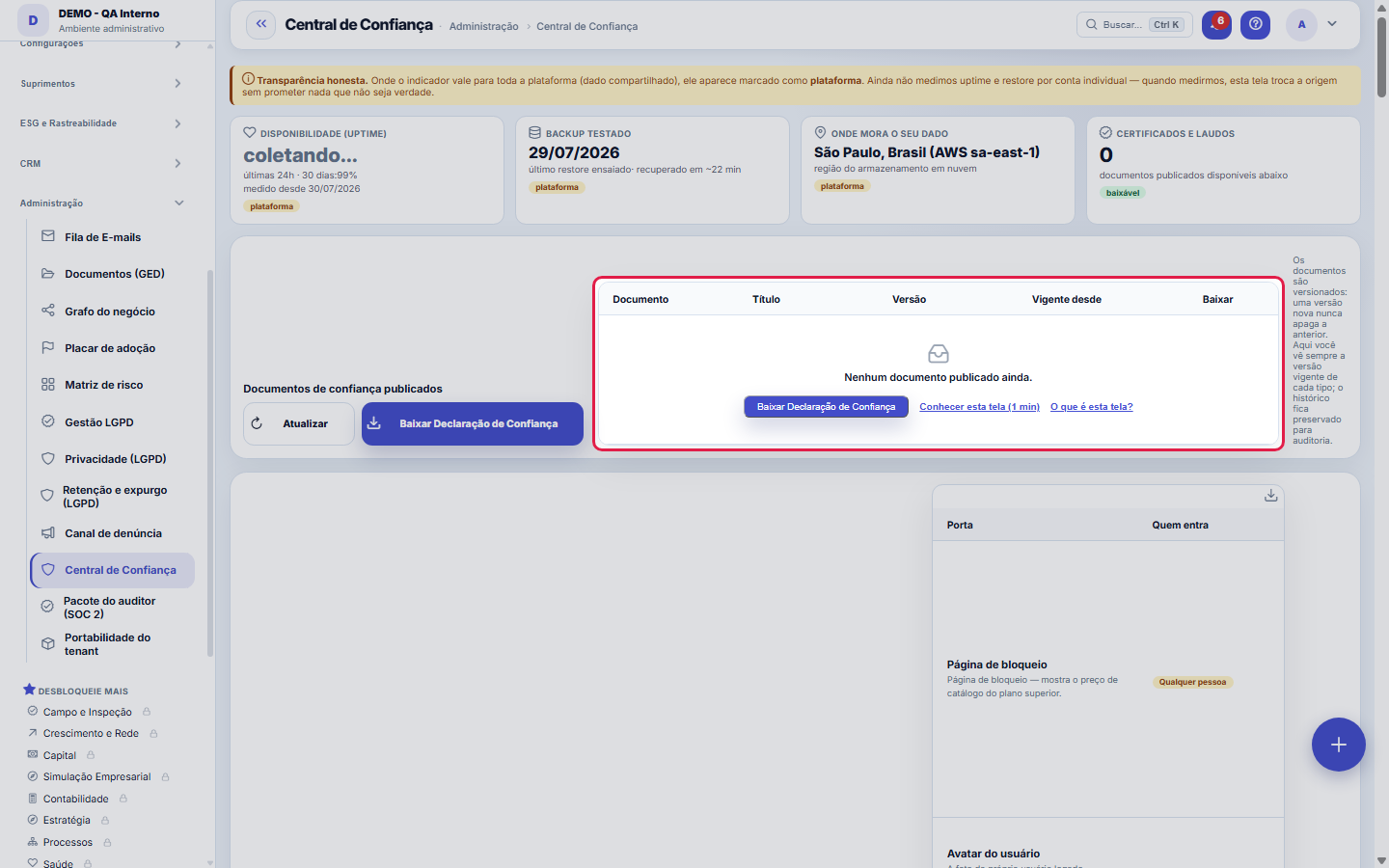
What you find on this screen
A portrait of the screen, read from the screen itself — it changes when the screen changes.
Available actions
RefreshDownload Trust Statement
The list shows
DocumentTitleVersionEffective sinceDownloadDoorWho gets inAddressUsageState
Form fields
TítuloNome do documento como o cliente o pede na diligência.
TipoQue documento é: DPA, lista de subprocessadores, residência de dados, retenção, certificado.
VersãoVersão do documento. Cliente em auditoria quer saber exatamente qual versão aceitou.
Vigente desdeDesde quando esta versão vale.
PublicadoSó documento publicado aparece na central para o cliente; o resto fica em rascunho.
Start here
A resposta para "posso confiar meus dados a vocês?"
When a customer (or their security committee) asks, the answer is here: measured availability, truly tested backup, where the data physically lives and the published legal documents — all downloadable, including the Trust Statement in one click.
What this screen is
Your account's trust showcase: uptime, your data's tested backup (with the date of the last rehearsed restore), WHERE the data lives (cloud region) and the published certificates and documents — DPA, subprocessors, residency and retention — all downloadable. Where a number still applies to the whole platform and not to your specific account, the screen says so plainly: nothing is invented per account.
Portas Externas: tudo por onde alguém de FORA chega à sua conta
A door is any path that does not go through your team's login screen: your customer's portal, the public quote and approval pages, the API, the signed links you send by email and the technical channels. The list is not handwritten — it is the registry the system itself consults to decide who gets in, so what you see here is what really applies.
How to
Como ler os cartões
Uptime in the last 24h and over 30 days ("collecting…" = the series has no baseline yet). Tested backup = the date of the last rehearsed RESTORE and how many minutes it took to recover — a backup that has never been restored is a lottery, which is why the card shows the rehearsal, not the existence of the backup. Residency = the cloud region where the data lives.
Published documents
DPA, subprocessors, residency, retention and certificates — always the current published version of each type, with individual download. Versions are immutable: a new one never erases the previous one, and the history is preserved for auditing.
Quem entra: as cinco credenciais possíveis
Customer login: the person identifies themselves on the portal. Anyone with the link: the address is the credential (see the warning above). API key: system talking to system, with a key you issue and revoke. Technical token: an integration channel, not for people. Open: anyone can reach it, and it is intentional — the case of a public quote page.
Account isolation: two layers, one switch
The first layer is the application: every request carries the account of the person signed in and every query is filtered by it. The second is the database (RLS — Row Level Security): every table holding account data has a rule that only returns rows of the account in context. All rules go through a single switch: in CLOSED mode, a query without an account in context sees nothing — instead of everything. The database has a dedicated application user that cannot bypass these rules; the switch to it happens in a scheduled window. Only platform processes (scheduled routines, migration) receive the platform door, never a screen. A new migration that creates an account table without the rule is blocked in the build and in the rehearsal, before going live. Auditors can request the list of tables, rules and the switch state at any time.
Rules
Transparência honesta — o selo de escopo
An indicator marked "platform" applies to the shared infrastructure, not to your account individually — uptime and restore are not yet measured per account, and the screen says so instead of pretending. When per-account measurement exists, the source changes without ever having promised what it was not.
Nas portas de "quem tem o link entra", o endereço É a credencial
These doors have no login: whoever receives the address gets in. Sharing the link is granting access — it is not like sending a website address, it is like lending the key. Forwarding an email with such a link gives the same permission to whoever receives it. If the link leaked, turn off the door here and generate another.
As da sua conta você liga e desliga; as da plataforma são só leitura
The doors of YOUR account have a switch: turning it off cuts access immediately, for everyone who used that path. The platform's doors appear without a switch on purpose — they are BMCode's decision, not your company's, and showing them as if you could change them would be offering a control that does not exist.
Por que os blocos desta tela são cartões, e não barras de filtro
The filter bar class lays out what is inside it side by side, on purpose: it was made to align search fields on one side and buttons on the other. Used to wrap a header, table and footnote, it throws the note beside the table instead of below — which is what happened here until September 2026. A content block uses the common card, which stacks. This applies to any new screen: if the content has to sit one below the other, the component is the card.
Frequently asked questions
Who feeds this screen
The platform super admin, in Trust documents — only what has been reviewed and published arrives here. If an expected document does not appear, it is still a draft on the other side.
Which question this screen answers
If my customer or my legal team asks where my data lives, whether there is a tested backup and which certificates exist — can I show and download it?
Desligar uma porta derruba quem está usando agora?
Yes. The cut applies to the next request, including from those who already had the page open. It is intentional: a door that keeps accepting "only those who already got in" would not really be turned off, and you turn it off precisely when you need it to stop now.
Was this article helpful?
In the same module: Governance and compliance12
DRE tree viewThe DRE navigable by nature (account category): open the line and drill down to the entry that formed it. It'…Central LGPDOs documentos vivos da proteção de dados com estado e data — DPA, RIPD, runbook de incidente e conformidade d…Email queueEverything the system tried to send by email: what went out, what failed and why.Service order mapDistributes service orders on the map by technician and region to build the day's schedule without overlap. T…LGPD management (old address)Old address of LGPD management: opens and goes on to the consent list.Error logThe exceptions the system recorded: when, on which screen, with which user, and what the technical failure wa…SDCA routineStructures the improvement routine (Standardize–Do–Check–Act) around a process. The cycle only closes if the …Risk matrix (old address)Old address of the risk matrix: opens and goes on to the risk list.
Tenka Academy
Explore the AcademyStep-by-step learning paths for your industry, inside the platform.