

AI consumption
How much AI cost during the period: consumption per user/screen, plan ceiling, and balance status.
What you find on this screen
A portrait of the screen, read from the screen itself — it changes when the screen changes.
Available actions
RefreshViewsSave current viewApply filtersCurrent monthClose
The list shows
DateUserTools (order · ms · rows)DataRowsModelCompanyInteractionsCreditsTokensCharged cost% of total+7
Form fields
Total cobrado no períodoCusto total do Tenkai cobrado no período filtrado.
InteraçõesQuantidade de chamadas ao Tenkai registradas no período.
TokensTotal de tokens consumidos pelas chamadas do período.
Empresas com consumoQuantas empresas tiveram consumo do Tenkai no período.
Interações da empresaChamadas ao Tenkai feitas pela empresa no mês.
Tokens da empresaTokens consumidos pela empresa no mês.
Custo cobradoValor cobrado à empresa pelo consumo do mês.
Participação no totalParticipação da empresa no consumo total do período.
Tokens do lançamentoTokens de um lançamento individual de consumo.
Custo do lançamentoCusto cobrado de um lançamento individual de consumo.
Situação da chamadaResultado da chamada do lançamento: OK, erro ou outro estado.
CompetênciaCompetência que define o recorte do consumo exibido na tela.
Start here
What you do here
Track the company's AI usage (tokens/cost) by period, user and feature. The plan defines the monthly cap; with BYOK (your own key), consumption runs on your provider account.
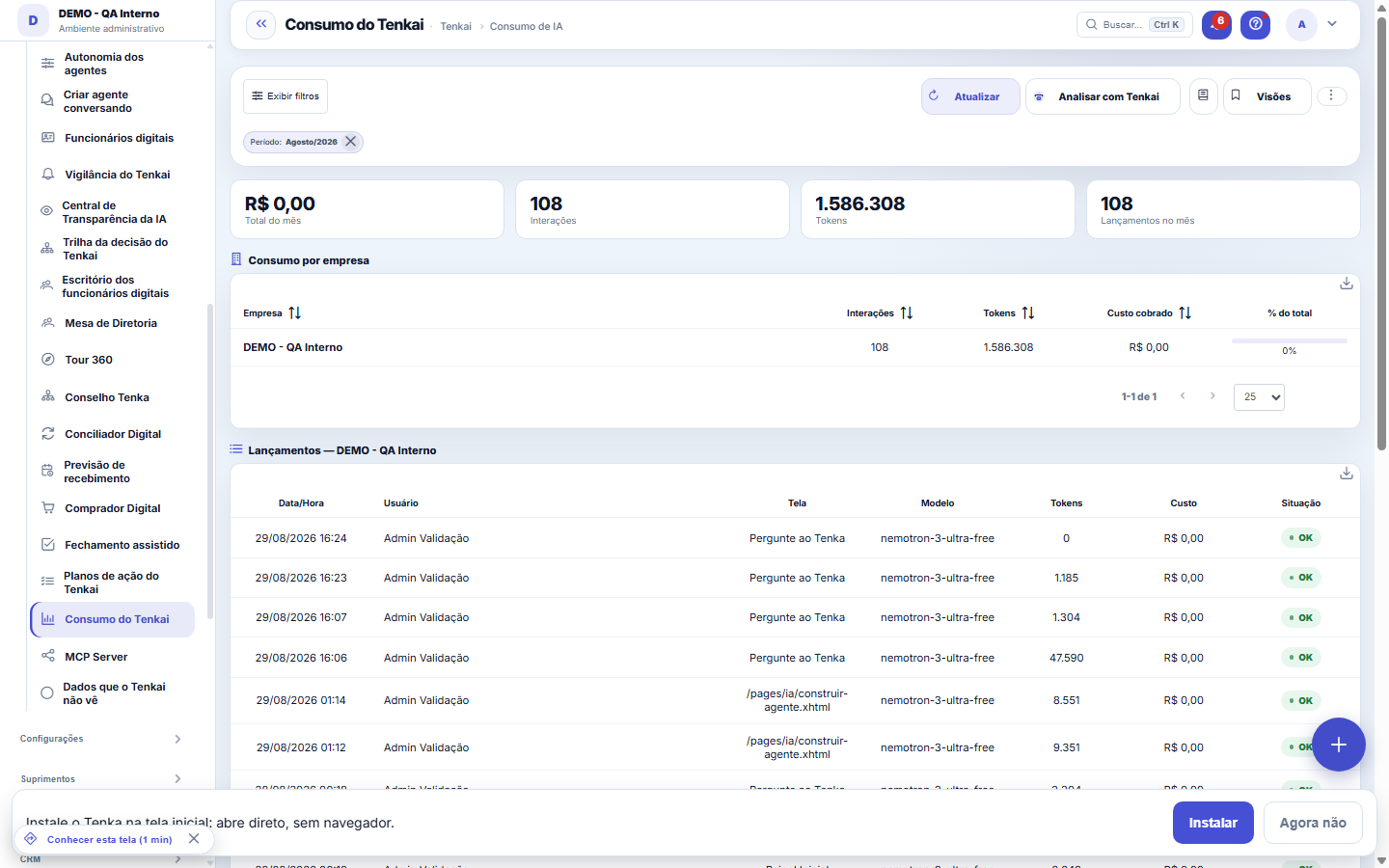
The period's consumption, against the plan's cap.
How to
Custo da casa × margem (visão da plataforma)
In the platform view, the "In-house cost (provider)" and "Month's margin" cards separate what IS our cost from what runs on the customer's own key (BYOK): the gross spend of those using their own key comes out of THEIR account and therefore stays out of the in-house cost. The "Platform — internal use" line gathers translation, public help, evaluation and onboarding — consumption that doesn't belong to any company.
Do total ao lançamento: clique na empresa
The "Consumption by company" table is the master: click a row and, right below, you see that company's consumption by person and the entries one by one — date/time, user, screen, model, tokens, cost and call status. It's the way to investigate an out-of-line month: from the card's total down to the exact call that produced it. The period comes from the Month/Year filter in the side panel, and combinations you repeat can be saved as Views, per user.
Créditos: o número que dá para comparar
Each interaction with Tenkai is worth a fixed number of credits based on the type of request — 1 to choose a tool, 2 for a chat question, 5 for an analysis or summary, 10 for an agent step, 20 to generate a document. A call that didn't answer (block, error) is worth 0. That's how the market charges (Copilot, GitHub, QuickSight), and it's what lets you compare months and people without talking about tokens. The cost in reais is still in the column next to it, for those allowed to see amounts.
Tenkai credits: allowance, wallet and price
Tenkai is measured in credits. Each interaction is worth a fixed amount: question and answer 2, fill-in suggestion 2, summary 5, analysis 5, document extraction 5, agent step 10, generated document 20. Your plan has a monthly credit allowance that refills every month and does not accumulate. Beyond the allowance, each extra credit uses the account wallet, which you top up by buying packs under Settings ▸ AI; purchased credit arrives when the invoice is paid and does not expire while the contract is active. When allowance and wallet run out, Tenkai warns and stops until the month turns or a new purchase. Ask Tenkai "how many credits do I have?" to see allowance, usage and balance right away.
Model of each answer
In the By answer list, the Model column tells which AI model wrote that answer. “No AI” means the answer came straight from the database, without writing — that is information too: that question cost no AI.
Rules
The plan's cap
Once the plan's AI cap is reached, calls get blocked until the next cycle (or an upgrade). Consumption is measured per call, with estimated cost per model.
Usage per person and the anomaly watch
When you select a company, the "By person" table shows who used AI in the period. A daily watcher compares each person's consumption with their own 14-day average: if it exceeds the factor and the floor (parameters IA.ANOMALIA_*), an operational warning goes out. Legitimate spikes happen — closing, data loads — so the warning asks you to check here before drawing conclusions.
Por que a mesma pergunta pode custar menos amanhã
With automatic routing turned on (Settings ▸ AI ▸ Parameters), short questions go to the cheapest model among those the account has enabled and document writing goes to the strongest; the rest stays on the default model. The "routing savings" scoreboard, in Settings ▸ AI, shows how much the account avoided spending in the month because of it — the same tokens, at the default model's price, minus what they actually cost.
What Tenkai did for you
The last-30-days block shows questions answered, how many had no data, positive and negative ratings, median and p95 response time, cost charged and the amount recovered by the digital employees. Zeros are declared: a month without use shows zero, not blank. Ask Tenkai "how much did Tenkai cost and earn me this month?".
Frequently asked questions
Chegamos ao teto do plano. O Tenkai para de responder?
Para o que consome IA de verdade (perguntas, análises), sim, até o próximo ciclo ou até ampliar o teto; o que é regra ou busca continua. O vigia avisa quem administra antes de chegar lá, e o consumo por pessoa mostra onde o custo está.
Was this article helpful?
In the same module: Platform and security38
Connected help screenAnchor screen of the detail dictionary. Does not appear in the menu.Platform accessThe record of when the platform's support team accessed your account, what they did and with what authorizati…White-spaceSee what's left to sell to those who are already customers — by cross-referencing the installed base with wha…Template itemAnchor screen of the detail dictionary (template items). Does not appear in the menu.Assistente fiscalQuatro passos para a nota sair do Tenka: estado, regime, código de segurança (CSC) e certificado A1 — com a r…ShippingControls the picking and dispatch of what was sold. Shipping confirms that the merchandise actually left: a m…Position bandAnchor screen of the detail dictionary (position bands). Does not appear in the menu.Blog — WordPress connectionWhere you connect your company's WordPress and teach the AI to write like you: the editorial line (what to ta…
Tenka Academy
Explore the AcademyStep-by-step learning paths for your industry, inside the platform.