

Consistency checks
Runs rules that flag contradictions in the data (active contract with no billing, completed demand with no hours logged). Each check is a symptom, not a verdict: some have a legitimate exception — address the recurrence, not the isolated case.
The screen
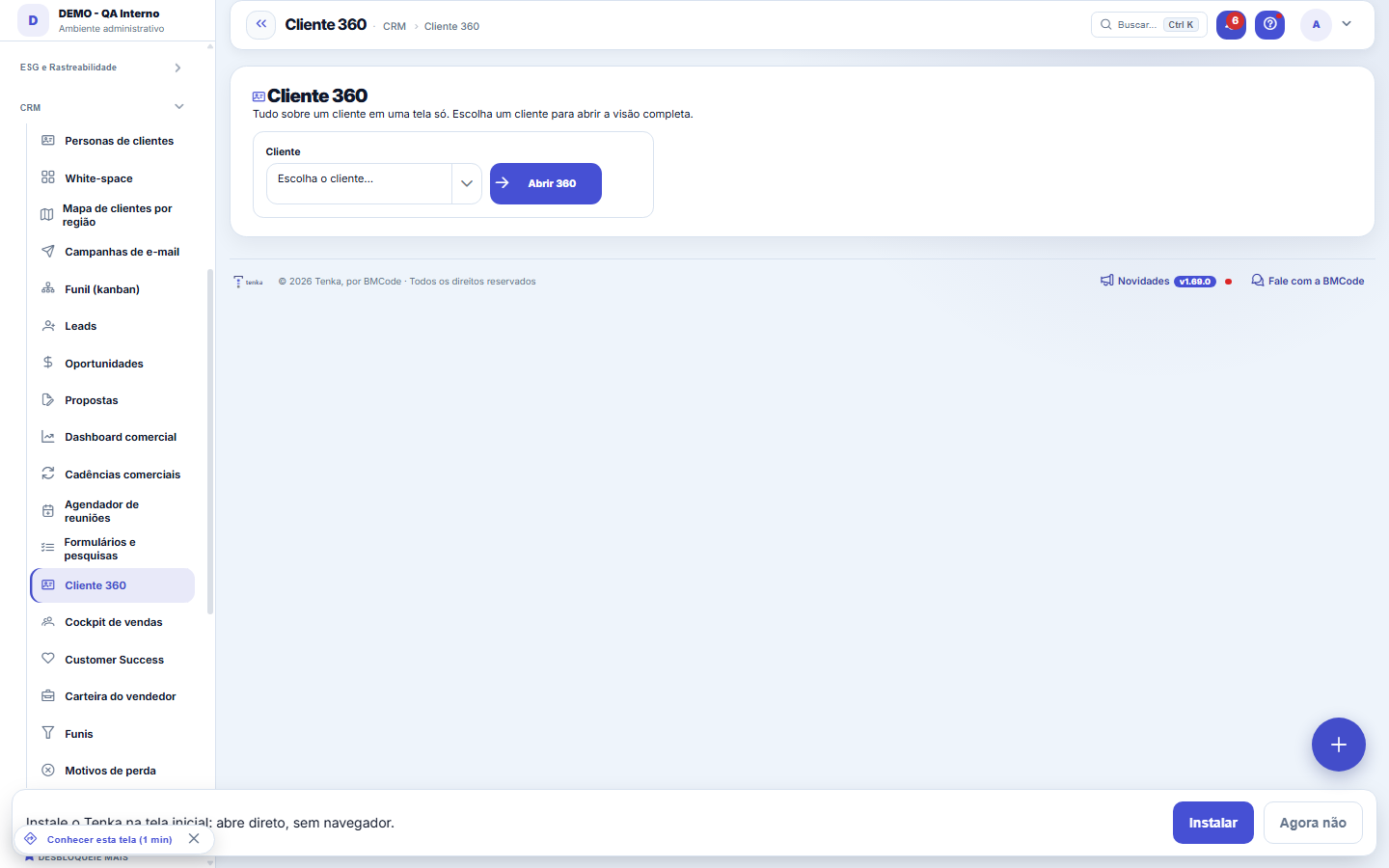
The real screen, in the theme you picked above.
What you find on this screen
A portrait of the screen, read from the screen itself — it changes when the screen changes.
Tabs
TimelineHealthBuying profileMargin X-rayWhite-spaceSchedule a visit
Available actions
Open 360Create opportunitySchedule visit
Form fields
NomeNome do cliente. É o que abre o 360 e o que todo mundo cita na reunião.
Razão socialRazão social registrada, usada em contrato e nota fiscal.
CPF/CNPJCPF ou CNPJ do cliente. É a chave que junta cadastro, títulos e notas na mesma visão.
Código externoCódigo do cliente no sistema de origem. É o que casa o cadastro com a carga do ERP.
E-mailE-mail principal do cliente, para onde vão fatura e aviso.
TelefoneTelefone de contato do cliente.
ContatoPessoa que responde pelo cliente no dia a dia.
SiteSite do cliente. Serve para conferir porte e mercado antes de negociar.
SegmentoMercado em que o cliente atua.
Último acesso ao portalÚltima vez que o cliente entrou no portal. Silêncio longo aqui é sinal de risco de saída.
Acessos ao portalQuantas vezes o cliente já entrou no portal. Separa quem usa de quem só recebe a fatura.
MoedaMoeda em que o cliente é cobrado; vazia herda a da empresa.
IdiomaIdioma em que o cliente recebe e-mail, PDF e portal.
AtivoCliente inativo sai das listas de trabalho, mas o 360 continua mostrando o histórico.
Start here
What this screen answers
The single view of the customer: contracts, finance, service, visits and conversations in one place. It's a consolidated reading — to CHANGE anything, the way is the data's source screen. Here you understand; you don't edit.
O que esta tela faz
Everything about a customer on a single screen: the unified timeline (contracts, invoices, requests, conversations, opportunities, activities and visits), the relationship health with the scores open, the margin they give summing the contracts, what they don't have yet (white space) and what the next action is. Each number brings its calculation breakdown — nothing stated without a source. You can schedule an external visit straight from here.
Para que esta tela existe
Everything about a customer on a single screen: the unified timeline (contracts, invoices, requests, conversations, opportunities, activities and visits), the relationship health with the scores open, the margin they give summing the contracts, what they don't have yet (white space) and what the next action is. Each number brings its calculation breakdown — nothing stated without a source. You can schedule an external visit straight from here. — this is the role of the "Customer 360" screen within the platform.
How to
As notas de saúde e de onde saem
The health light (green/attention/critical) summarizes three scores from 0 to 100: Payments, derived from the Delinquency risk score (higher = better); Service, from the CSAT of ticket ratings (1–5 converted to 0–100) and stalled requests; and Contract, from the term and how close renewal is. The Health tab opens each score with the supporting numbers — open and stalled requests, average CSAT, overdue amount — and suggests the recommended action. Nothing is stated without a source.
Rules
White-space vira oportunidade em um clique
The White-space tab lists what the customer doesn't have yet, with the average reference value and the calculation memo of why that pack was suggested — and each row has the "Create opportunity" button, which opens the deal in the funnel without retyping. On the visit tab, schedule the field visit right from here: planned date and time, owner and objective (optional). The margin shown at the top adds up ALL of the customer's contracts: billed minus labor cost and other costs.
Customer buying profile
The Buying profile tab builds itself from the last 12 months of purchases (orders and register sales) and the messages the customer sent on WhatsApp: size (small, medium or large, by average ticket and your store's limits in Parameters › Customers), average ticket, how often she buys, the groups and items she buys most and the items and sizes she asks about. Quotes, cancelled and returned orders do not count as purchases. The 24-hour salesperson uses this profile to suggest items when she asks what's new.
Frequently asked questions
Que pergunta do dia a dia se responde aqui
"How is this customer doing — history, health, margin and what's the next action?" — when that question comes up, this is the screen that answers it.
Where do I see a customer’s clienteling messages?
In Customer 360, Timeline tab: each message sent shows the rule and the reason, and says whether the customer replied or bought. At the top of the tab, the amount that came back through clienteling in the last 90 days opens the clienteling screen.
Does Customer 360 show in my language?
Yes. Labels, the next action, the timeline and the statuses show in your profile's language. A ticket status name is the one your company registered: if it registered the translation, the translation shows. Amounts stay isolated left-to-right, so “R$ 1,234.00” stays readable in Arabic.
Why does the Health tab show "loading" for a moment?
The Health, White space and Schedule visit tabs load when you click them, so the card opens faster. The first time, the tab fetches the figures (the partner's Tenka Score, the payment score and the 30, 60 and 90-day trend); after that it stays ready while the card is open.
Was this article helpful?
In the same module: After the win5
Contract trackingThe portfolio management view: which contracts are expiring, which will be adjusted, which are not being bill…Tax reformSimulates the impact of CBS/IBS on operations during the transition. It's a simulation over rules that are st…Clientes para chamar hojeA lista do dia: quem sumiu há 60 dias, quem faz aniversário, a cor que a cliente quis e chegou, o carrinho ab…Sales Cockpit (sales force)Each salesperson's performance: leads, opportunities, conversion, ticket size, and value won — with internal …Customer SuccessThe portfolio radar: each customer with a health score of 0-100, the churn alert with MRR at risk, and the su…
Tenka Academy
Explore the AcademyStep-by-step learning paths for your industry, inside the platform.