

Fabric rolls
Each roll is a volume with lot, number and weight — what lets you weigh, check and cut roll by roll.
The screen
The real screen, in the theme you picked above.
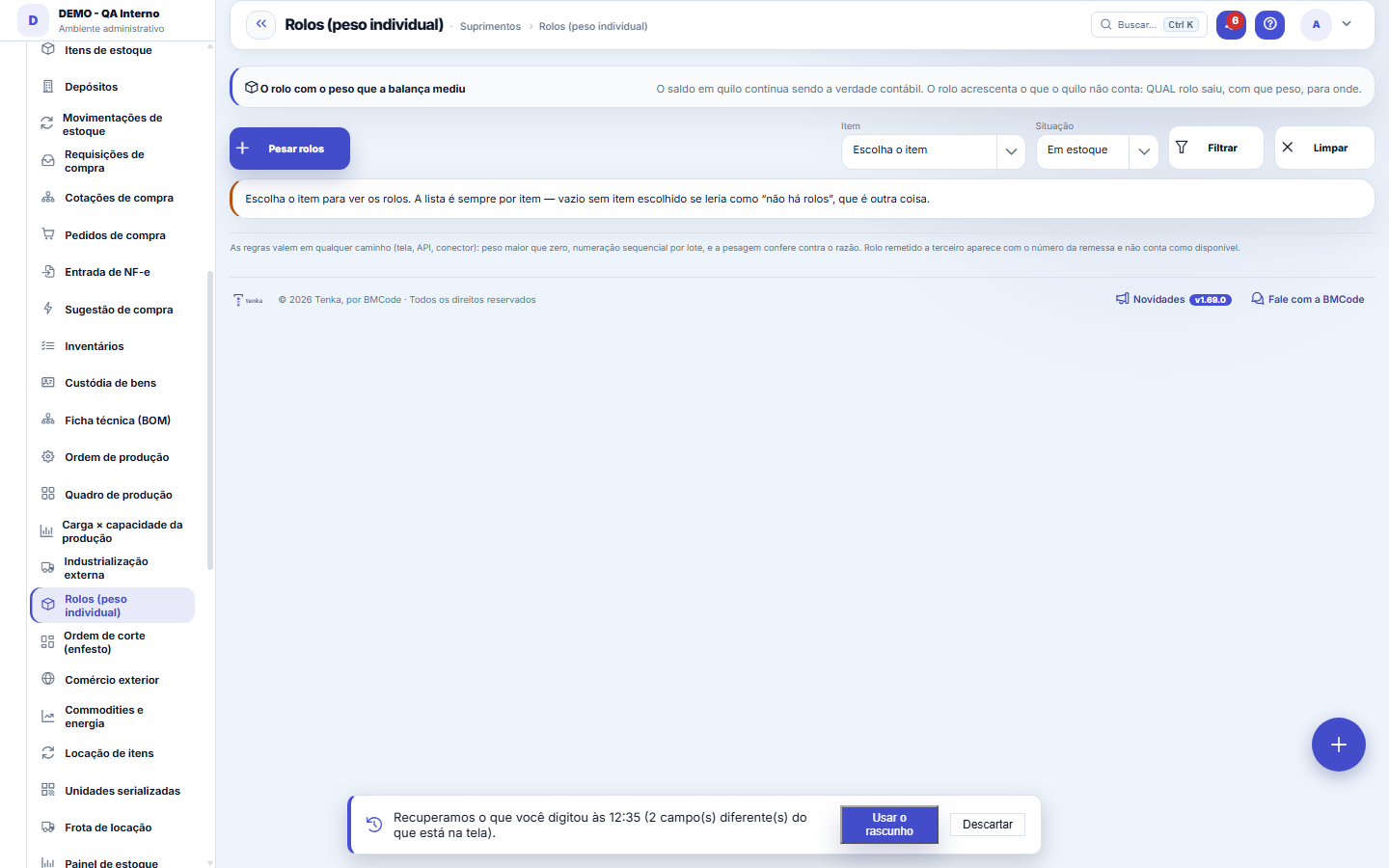
What you find on this screen
A portrait of the screen, read from the screen itself — it changes when the screen changes.
Available actions
Weigh rollsFilterClearOne more rollClose rollsCancelNew contract rateConfirmCheckCancel the roll
The list shows
Weight (kg)CompanyPOItemLotRoll no.Conditioned (kg)m/kgStatusShipmentActionsPackages+19
Form fields
Lote
Numerorolo
Pesoliquido
Pesobruto
Situação
Dhcadastro
Start here
O rolo é o detalhe do lote, não um segundo livro
The balance in kilos remains the accounting truth of stock. The roll adds what the knitting mill needs and the kilo doesn't tell: WHICH roll left, with what weight, to where. That's why weighing rolls doesn't change the balance — it describes what's already there.
How to
A numeração continua de onde parou
Rolls are numbered by (company, item, lot) in sequence. Weighed 3 today and 2 tomorrow in the same lot? Tomorrow 4 and 5 are created. That's what makes the roll number serve as a reference between the factory and the customer.
Cutting the roll for the rib
The order’s rib is 10.2 kg and the smallest roll is 28 kg. On the handheld, the picker scans roll 12, types the scale weight and confirms: roll 12-A is born with 10.2 kg and goes on the order, and 12 goes back to its location with 17.8 kg. The 12-A label prints right away; lot, dye lot and colour go with it.
Connect this computer’s scale
In the "Scale and printer on this computer" bar, click "Authorize a new scale" and pick the scale’s port in the browser list — once per computer. It then shows in "Device": choose the protocol (Toledo continuous; ENQ request for Toledo Prix, Filizola and Urano; generic; or your own expression), the speed and parity from the scale manual, and click "Connect scale". The weight read shows live and, once stable, fills the first empty weighing field. Your choice is remembered and the scale reconnects on its own. Works in Chrome and Edge on a computer, on an https address.
Print the label on the connected printer
In "How to print", choose: print dialog (any installed printer — the first time, pick the printer and a paper size matching the label); Zebra/ZPL over USB or serial (direct, no dialog — authorize the printer once); download the ZPL file; or PDF. When you close the rolls the label prints by itself, in the chosen template; "Print test" prints a sample roll. If direct sending fails, the print dialog opens instead.
Roll from the order and production lot
When weighing, choose the production order: the item, production lot and warehouse come from it and the lot becomes read-only — the roll inherits it. An item marked "Lot-controlled" does not close a roll without a lot. The order’s rolls show under the list’s "Production order" filter.
Check the conditioned weight of yarn
In the Check button of the yarn package, type the measured moisture. The seller thus records the conditioned weight that goes on the invoice. The buyer also types the conditioned weight on the supplier invoice: if what arrived is below it beyond the tolerance, a weight claim opens to the supplier, with the kilos of difference to ask for a discount on the bill.
Measure the metres of a fabric roll
In the Check button of the fabric roll, type the metres measured at spreading and, if measured, the width and weight per m². If blank, the article's values are used. The system shows the expected metres and the yield in metres per kilo; below the agreed value beyond the tolerance, a claim opens to the supplier. The Yield by supplier panel at the end of the screen compares expected, measured and agreed.
How do I record the moisture regain from the supplier contract?
In Rolls, scroll to Moisture regain agreed with suppliers and click New contract rate. Pick the supplier and the fiber, enter the rate in % over dry weight and, if the contract covers only one lot, the lot; the contract reference and validity are optional. The same supplier, fiber and lot combination can exist only once. The next weight check for that supplier already uses the new rate; what was already checked does not change.
Rules
Rolo sem peso não existe
The weight must be greater than zero. A roll entered with zero weight would count in the volume count and vanish from the kilo count — inventory would come to depend on which of the two numbers someone looked at first.
A pesagem CONFERE e mostra a diferença
After closing the rolls, the screen compares the sum of weights with the lot's balance in the ledger and shows the difference. A discrepancy here is operational information — edge loss, moisture, an unweighed roll — not a system error. Hiding the difference would be the defect: it disappears and nobody investigates.
Rolo remetido a terceiro não está na casa
A roll with SENT status went to the dye house or the sewing contractor through the External processing screen, and the shipment number appears in the list. It doesn't count as available — the material is with the third party, and it's the shipment that answers for it.
The location only changes by scanning
Moving a roll means scanning the roll and scanning the new position on the handheld. Whoever moves it without scanning leaves the roll "not found at its location" at the next count, which opens an incident. Changing warehouse or store is a transfer (with a packing list), never a relocation.
Cancelling does not delete
Cancelling a roll asks for a reason and marks it cancelled: it leaves the roll balance and the list total, but stays visible under the "Cancelled" filter, with who cancelled it, when and why. Only rolls in stock can be cancelled — a roll that left or is with a third party has a movement pointing to it. Reprint generates the roll label again through the chosen printer.
How the conditioned weight is calculated
Conditioned weight = scale weight × (100 + official regain) ÷ (100 + measured moisture). The official regain comes from the fibre in the item composition: cotton 8.5%, polyester 0.4%, viscose 11%, elastane 1.3%; blends by the average of the fibres. Wetter yarn weighs more on the scale, but the conditioned weight is the same: water does not become yarn.
Roll summaries say when they show only part of the data
In Rolls, the conditioned weight by lot and yield by supplier tables show the 30 most recent. When there are more, "Showing 30 of N" appears: filter the roll list by item or production order to see the others.
Where does the moisture regain of the conditioned weight come from?
Fiber by fiber, in this order: 1) the supplier contract rate for the LOT; 2) the supplier contract rate without lot; 3) the standard table chosen in Settings > Yarn: moisture regain source (ASTM D1909, the default, or BISFA). A contract out of its validity or in the trash does not count. If the chosen table has no value for the fiber (BISFA only covers man-made fibers), the check refuses and says what to do: change the source or record the contract. The package keeps the source and the calculation, and the Rate source column shows both.
Frequently asked questions
I chose the item and the list came back empty
The list is always by item — without an item chosen there's nothing to list, and the screen asks for the item instead of showing "no rolls". An empty result that looks like an answer is misleading: "there are no rolls of this item" and "you didn't tell me the item" are different things.
Was this article helpful?
In the same module: Production54
Production log entryOne log entry: who did it, on which production order, how many good pieces, the scrap and the hours. Read-onl…Cell balancingPeople per operation, bottleneck and pieces per day for a style in a cell, from the standard minute of the te…Fashion knowledge baseFormulas, rules and the house way, with the source.Biblioteca de operaçõesAs operações de costura da casa com o tempo padrão por tipo de máquina: monta o roteiro e cota o custo da peç…Bolsa da redeHoras de tear e de facção paradas e sobras (retalho, ponta de rolo, fio parado, encalhe) circulando entre as …Caminho críticoOs marcos da coleção e do pedido, planejado × real: o atraso de um marco empurra a entrega, a tela diz a nova…Opportunity itemsOpportunity detail (dictionary anchor).CertificationA certification (GOTS, OEKO-TEX, ISO 14001…) of the company, a supplier, an item or a lot: issuing body, numb…
Tenka Academy
Explore the AcademyStep-by-step learning paths for your industry, inside the platform.