

Retenção e expurgo (LGPD)
Cada tipo de dado tem um prazo de guarda. A tela mostra, ANTES de você ligar, quantos registros aquela política atingiria hoje — e depois mostra o histórico do que foi expurgado, com data e quantidade.
The screen
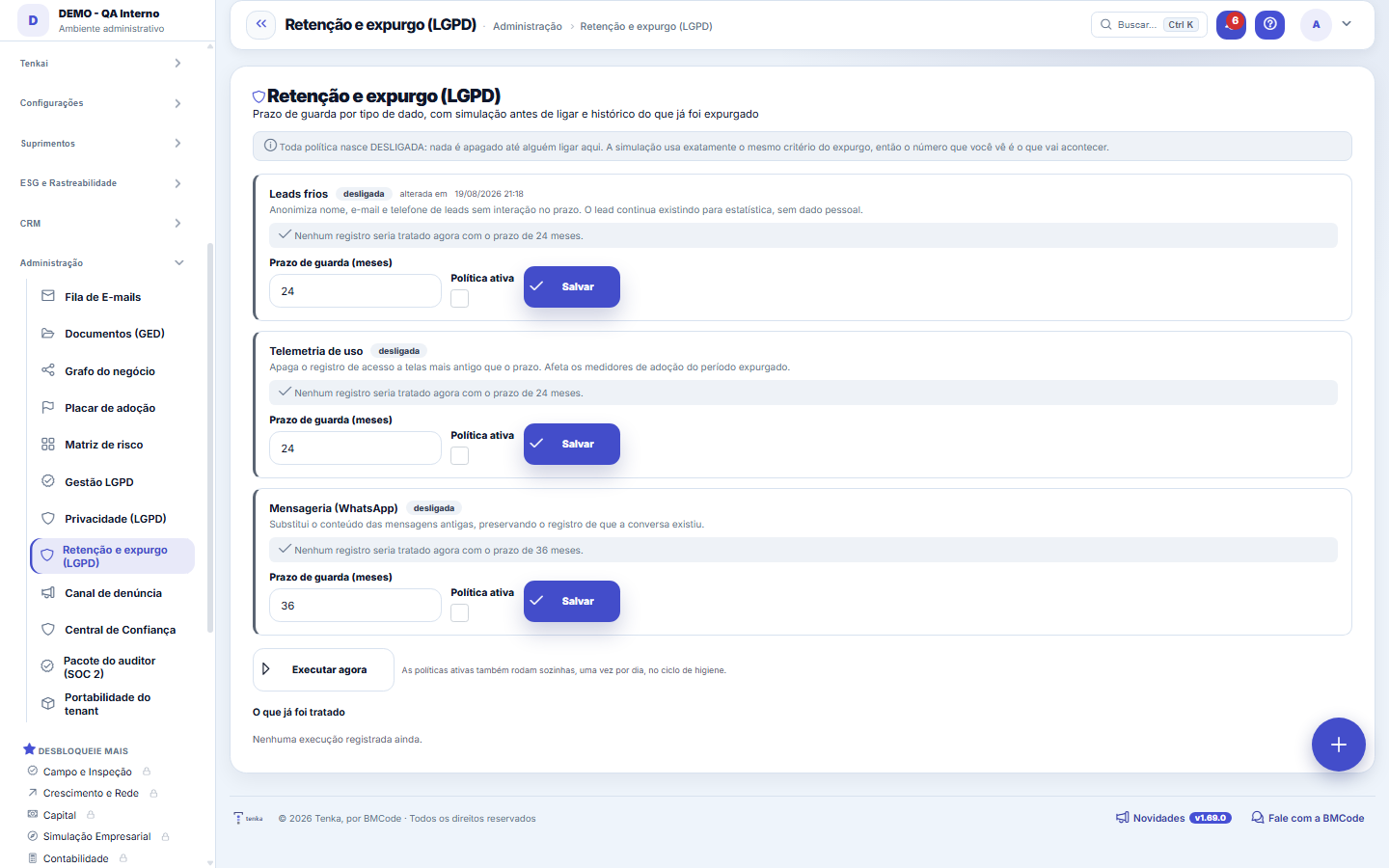
The real screen, in the theme you picked above.
What you find on this screen
A portrait of the screen, read from the screen itself — it changes when the screen changes.
Available actions
SaveRun now
The list shows
DataRetention period (months)How it is deleted
Form fields
Tipo de dadoCategoria de dado pessoal a que este prazo de retenção se aplica.
Prazo (meses)Por quantos meses o dado é guardado antes do descarte. Há um mínimo legal que a tela recusa furar.
AtivaPolítica inativa não descarta nada — o dado fica retido por tempo indeterminado.
Afetaria agoraQuantos registros o descarte pegaria se rodasse hoje. É a simulação antes de valer.
How to
Prazo mínimo de 6 meses, cobrado em dois lugares
The screen rejects a period shorter than 6 months, and the service rejects it again if any other path tries to save it. A short period on operational data deletes what was still in use.
Run now, without waiting for the cycle
The button runs the active policies right away, through the same path as the daily cycle — useful after turning on a policy to see the effect immediately. Each run leaves an event in the audit trail and appears in the history below.
Rules
Cold leads come switched on; the other policies you switch on
Since version 1.99.0 the cold leads policy comes switched on with 24 months: data of people who do not buy is not kept without a limit. Accounts that already existed got 30 days before it takes effect, and the card shows the date; whoever had switched it off on this screen stays off. Telemetry and messaging still delete nothing until someone switches them on here. Deleting is a business decision with an irreversible effect.
A simulação usa o mesmo critério do expurgo
The number of "records that would be affected now" comes from the SAME condition the purge would use — same cutoff date, same filters. If it shows zero, turning the policy on today deletes nothing; if it shows 4,312, that is what will happen in the next cycle.
Duas retenções diferentes convivem aqui — e só uma é sua
This screen governs the retention of PERSONAL DATA in your account: you choose the period, simulate how many records would be affected and turn it on whenever you want. Alongside it there is a second retention, the platform's, which you do not configure: that of the TECHNICAL BACKLOG — error logs, the queue of emails already sent, integration issues already resolved, old notifications. This second one decides nothing about people; it keeps the trace tables from growing forever and ending up competing for memory with the data you use every day. If you need the exact periods in effect in your environment, ask support: they can be adjusted without a new version.
Frequently asked questions
O que cada política faz, exatamente
Cold leads: anonymizes the name, email and phone of leads with no interaction within the period (the lead still exists for statistics, without PII). Telemetry: deletes screen access records older than the period. Messaging: replaces the CONTENT of old WhatsApp messages, preserving the record that the conversation existed.
O que o expurgo automático NUNCA apaga
Tax documents and labor data within the legal period, active contracts and customers with receivables coming due are blocked by design — the automatic routine refuses to delete them, even if the policy says otherwise. An integration issue that is still OPEN also never expires: it is work to be done, not history. And an email that was not sent (pending, with an error or awaiting resend) stays in the queue until it is resolved, however old it may be.
Why is the cold leads policy turned on, and how do I turn it off?
Since version 1.99.0 the cold leads policy comes turned on with 24 months in every company that never changed it, so data of people who do not buy is not kept without a limit. It takes effect on the date the card shows (30 days after the update). To not anonymize, untick Active and click Save; for another period, change the months and save. Saving on the screen records your decision and applies at once. Anonymization erases name, e-mail and phone of leads with no interaction in the period and cannot be undone.
What does "Run now" show?
It runs the enabled policies (those in their grace period wait for the date) and tells you the result: how many records were processed, that nothing had expired today, or that the run failed and nothing was deleted — in that case, try again. Each run's details are in the history just below.
Was this article helpful?
In the same module: Governance and compliance12
DRE tree viewThe DRE navigable by nature (account category): open the line and drill down to the entry that formed it. It'…Central LGPDOs documentos vivos da proteção de dados com estado e data — DPA, RIPD, runbook de incidente e conformidade d…Advance receivablesReceivables advancing as a BUTTON: the not-yet-due receivable invoices already in your accounts receivable tu…Email queueEverything the system tried to send by email: what went out, what failed and why.Service order mapDistributes service orders on the map by technician and region to build the day's schedule without overlap. T…LGPD management (old address)Old address of LGPD management: opens and goes on to the consent list.Error logThe exceptions the system recorded: when, on which screen, with which user, and what the technical failure wa…SDCA routineStructures the improvement routine (Standardize–Do–Check–Act) around a process. The cycle only closes if the …
Tenka Academy
Explore the AcademyStep-by-step learning paths for your industry, inside the platform.