

Integration webhooks
The tenant registers an ENDPOINT (a URL of yours) to be NOTIFIED via HTTP every time a business event happens in Tenka — a contract signed, an invoice paid, an FCA opened. Each notification is a POST signed with an HMAC-SHA256 of the body using a SECRET that only you and Tenka know (the X-Tenka-Sig…
What you find on this screen
A portrait of the screen, read from the screen itself — it changes when the screen changes.
The list shows
ItemWarehouseQtyAverage costAmountBalanceMinimumShortageTurnoverClassConsumed value% cum.
Form fields
QuantidadeSaldo do item no depósito.
Custo médioCusto médio do item, recalculado a cada entrada.
ReservadoQuanto do saldo já está comprometido com pedidos. O livre é a diferença.
Start here
Four questions, four boards
Balance per item answers "what do I have and where"; Below minimum answers "what's about to run out"; Turnover answers "what moves and what sleeps"; the ABC curve answers "where the money is". Open the dashboard before buying, not after.
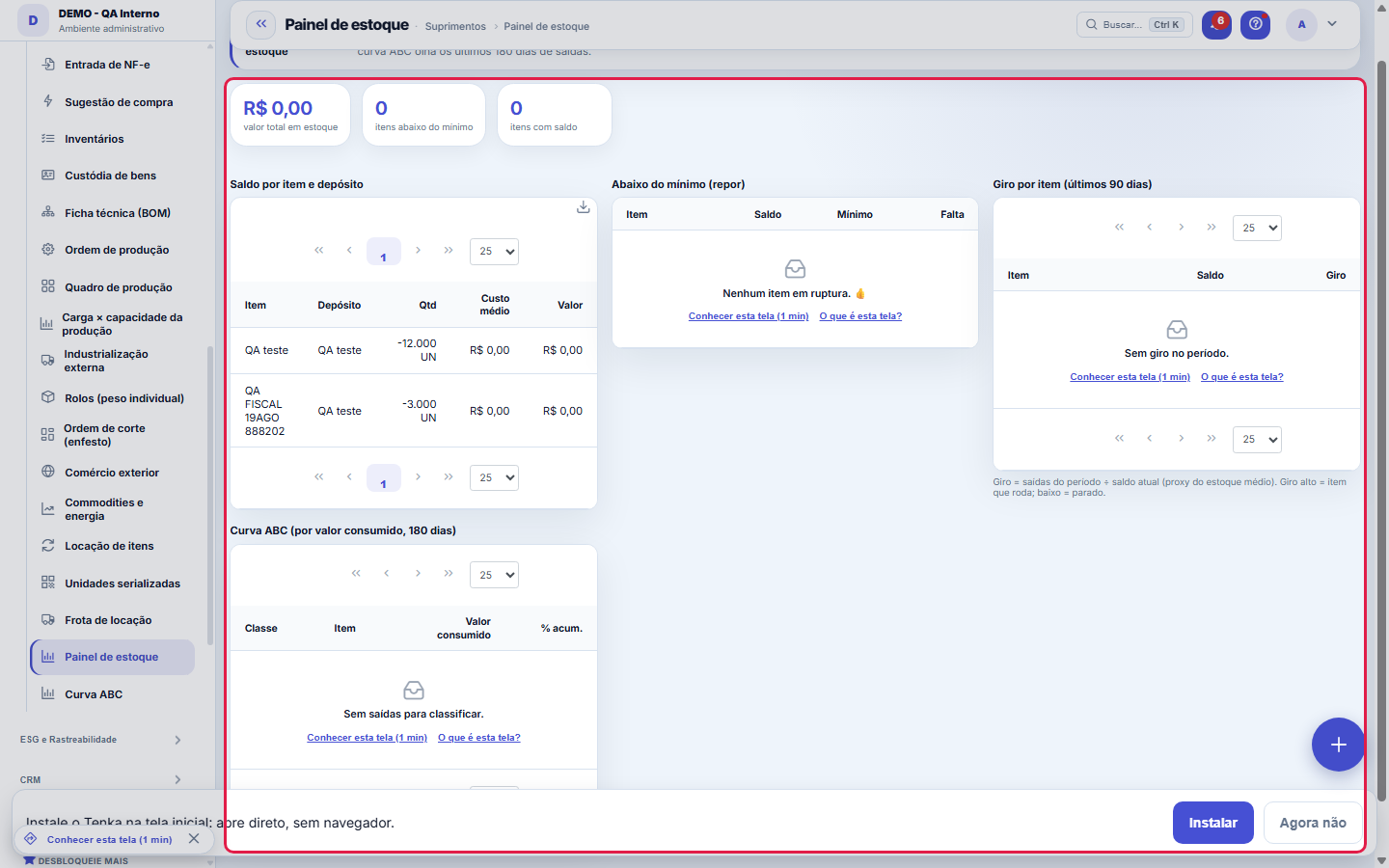
Inventory health in one place.
What this screen is
Inventory health in one place: balance and value per item and warehouse, items below minimum (stockout), turnover (issues ÷ stock) and ABC curve by value consumed — where the inventory's money lives.
How to
Saldo por item e depósito
Each row is an item in a warehouse, with quantity, average cost and value. The average cost is the history of receipts — it's what values the stock and feeds COGS, not the price on the last invoice.
What this screen answers
Turnover is how many times the balance was renewed in the period shown. High turnover with low balance = stockout risk; zero turnover with high balance = idle capital. Both extremes are first in line for action.
Rules
Abaixo do mínimo é a lista de incêndios
The Shortfall column says how much to buy just to get back to the minimum. This panel only works for those who registered minimum stock on items — an item without a minimum never appears here, even at zero. If the panel is always empty, suspect the records before celebrating.
Quem não vê valores vê o painel do mesmo jeito
The money cards and columns (total value, average cost, ABC curve) respect the View Amounts permission of the profile. Without it, the screen shows quantities and stockouts normally — only the money is hidden.
Who starts refusing outflows without stock
Every company created from version 1.99.0 on starts with "Stock: refuse outflows without stock in all flows" turned on. Companies that already existed on that day and demo companies were left off, so nothing changes for those already operating; turn it on in Parameters, Production group, once stock is up to date. In a new company, post the opening balance (the opening inventory) before the first sale: without it, every outflow asks for an authorization in this panel.
Outflow without stock: refuse, authorize or just flag
The Outflow without stock box lists the outflows of the last 90 days that left stock negative and those that left at zero cost. To refuse them, turn on "Stock: refuse outflow without stock in every flow" in Parameters (Production group). Turned on, the box shows the authorization form: choose the item, the warehouse (or any), the quantity that may leave without stock and the reason; the authorization is valid for 24 hours and the outflow that uses it carries its number. An item with no average cost does not leave without stock even with authorization: post the entry with the cost.
Frequently asked questions
Which question this screen answers
"How healthy is my inventory — what's about to run out, what doesn't move and where is the value?" The dashboard brings the four readings into one place: balance and value per item and warehouse; the list of items below minimum (the stockouts to tackle first); turnover (issues ÷ stock, what works and what sleeps); and the ABC curve by value consumed, which shows where the money lives. Start with the stockouts and move on to the A items on the curve — that's where attention and negotiation pay off most.
Was this article helpful?
In the same module: Explore21
Academia TenkaEscolha a trilha do seu papel e siga as lições — cada uma aponta a tela real onde se pratica. Ao completar a …Alocação na faltaQuando falta peça: quem leva pela prioridade do cliente, pedido completo primeiro e data, com a fatia de cada…Digital Employees OfficeAll the company's agents side by side, on one comparison screen: status (active/paused), executions this mont…Group chain cockpitThe group’s companies as links of the chain: kilos in and out, yield, margin per company and consolidated, an…Indicator cockpitThe engine room of a KPI: target × actual series (12 months), status light by period, root-cause-and-action i…How do you feel about money?The 10 questions of the CFPB Financial Well-Being Scale on the phone, once a quarter; the perceived score nex…Key per tenant (BYOK)Super admin screen for BYOK (Bring Your Own Key): per tenant, the status of its own encryption key and the ac…Size grid and storeLive size grid, EAN labels, reservation and picking, store replenishment.
Tenka Academy
Explore the AcademyStep-by-step learning paths for your industry, inside the platform.