

Digital Employees Office
All the company's agents side by side, on one comparison screen: status (active/paused), executions this month, what each one saved, how much it cost in AI against the monthly ceiling, and the last time it ran. At the top, total saved against total spent on AI and the aggregate return. Pause, react…
The screen
The real screen, in the theme you picked above.
What you find on this screen
A portrait of the screen, read from the screen itself — it changes when the screen changes.
Form fields
EmpresaEmpresa a que o balanço do ano se refere.
CNPJCNPJ da empresa consolidada no balanço.
SituaçãoEmpresa inativa não entra na consolidação do ano.
Regime tributárioSimples, presumido, real ou MEI. Muda como o resultado do ano deve ser lido.
MoedaMoeda funcional da empresa. Sem ela declarada, somar empresas mistura moedas em silêncio.
RamoRamo da empresa, usado para comparar o ano com pares do mesmo setor.
PlanoPlano contratado no período que o balanço cobre.
FaturávelSe a empresa entrou na cobrança no ano fechado.
% de faturamentoPercentual do faturamento usado no cálculo da cobrança da empresa.
Situação de cobrançaTrial, ativa, inadimplente ou cancelada ao longo do ano.
Ciclo de cobrançaSe a cobrança do ano foi mensal ou anual.
Fim do testeQuando o período de teste terminou e a conta passou a ser paga.
Primeiro resultadoQuando a empresa teve o primeiro resultado de valor na plataforma. Distância grande daqui é adoção lenta.
Start here
O que esta tela responde
The company's year on one panel: what grew, what was delivered, what changed. It is the screen for the year-end conversation — with the board, with the team, with the accountant.
What this screen is
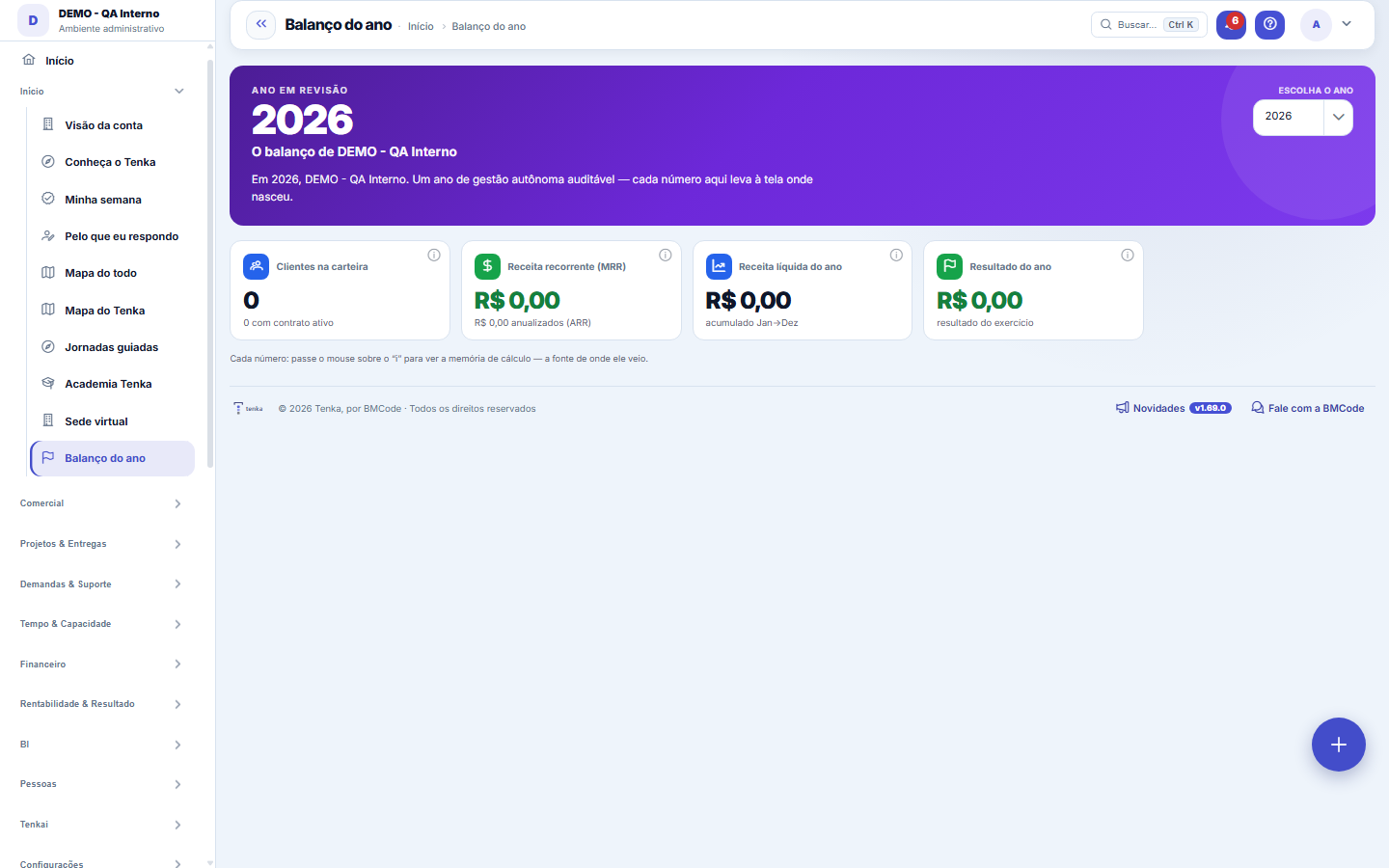
The year in review on a single panel: the few numbers that tell the story of the company's fiscal year — customers in the portfolio and recurring revenue (MRR/ARR), net revenue and result for the year from the management DRE, the cumulative scoreboard of the digital employees (runs, actions, R$ recovered/saved and reliability) and the geographic reach. Choose the year in the selector; each card carries the memory of where the number came from. Nothing new feeds the review — it only BRINGS TOGETHER what the modules already know. Amounts in R$ respect "See values".
Rules
What this screen answers
Nothing is recalculated here with its own criteria. If a value looks wrong, the place to investigate is the screen it comes from — fixing it there fixes it here, and the reverse does not exist.
Quem não pode ver dinheiro vê o painel sem os valores
The "See values" governance applies here as everywhere: for those without that permission, monetary fields come masked and the rest of the panel remains useful. Showing the screen to someone is not the same as releasing its numbers.
Comparison with the same period of the previous year
Changes always compare equal periods. In the current year, the dashboard adds January up to the current month and compares with the same months of the previous year; in a closed year, it compares January to December with January to December. For costs, going up means getting worse: an upward red arrow means the cost grew. The margin is compared in percentage points.
Frequently asked questions
Which question this screen answers
How was the year — in customers, revenue, result and in what the digital employees delivered? For the year chosen in the selector, the panel brings together customers in the portfolio and recurring revenue (MRR/ARR), net revenue and result from the management DRE, the cumulative scoreboard of the digital employees (runs, actions, R$ recovered or saved and reliability) and the geographic reach. Nothing is born here: each card only brings together what the source modules already know, and carries the memory of where the number came from.
How do I see where a number came from?
Click it. Indicators and subtotals open the management income statement already in the chosen year. In the month-by-month table, lines with entries (gross revenue, variable costs, fixed expenses) open the month’s detail with the entries that make up the value. Customers, recurring revenue and digital employees lead to their own screens.
Was this article helpful?
In the same module: Explore21
Academia TenkaEscolha a trilha do seu papel e siga as lições — cada uma aponta a tela real onde se pratica. Ao completar a …Alocação na faltaQuando falta peça: quem leva pela prioridade do cliente, pedido completo primeiro e data, com a fatia de cada…Group chain cockpitThe group’s companies as links of the chain: kilos in and out, yield, margin per company and consolidated, an…Indicator cockpitThe engine room of a KPI: target × actual series (12 months), status light by period, root-cause-and-action i…How do you feel about money?The 10 questions of the CFPB Financial Well-Being Scale on the phone, once a quarter; the perceived score nex…Key per tenant (BYOK)Super admin screen for BYOK (Bring Your Own Key): per tenant, the status of its own encryption key and the ac…Size grid and storeLive size grid, EAN labels, reservation and picking, store replenishment.Digital BuyerThe digital employee that replenishes stock before it runs out: suggests purchases based on turnover and proj…
Tenka Academy
Explore the AcademyStep-by-step learning paths for your industry, inside the platform.