

Digital Buyer
The digital employee that replenishes stock before it runs out: suggests purchases based on turnover and projected stockout (balance ÷ consumption), sends out the quote request via the supplier's link, builds the comparison grid, and PROPOSES the order. Within its authority (COMPRAS.ALCADA_AGENTE) …
The screen
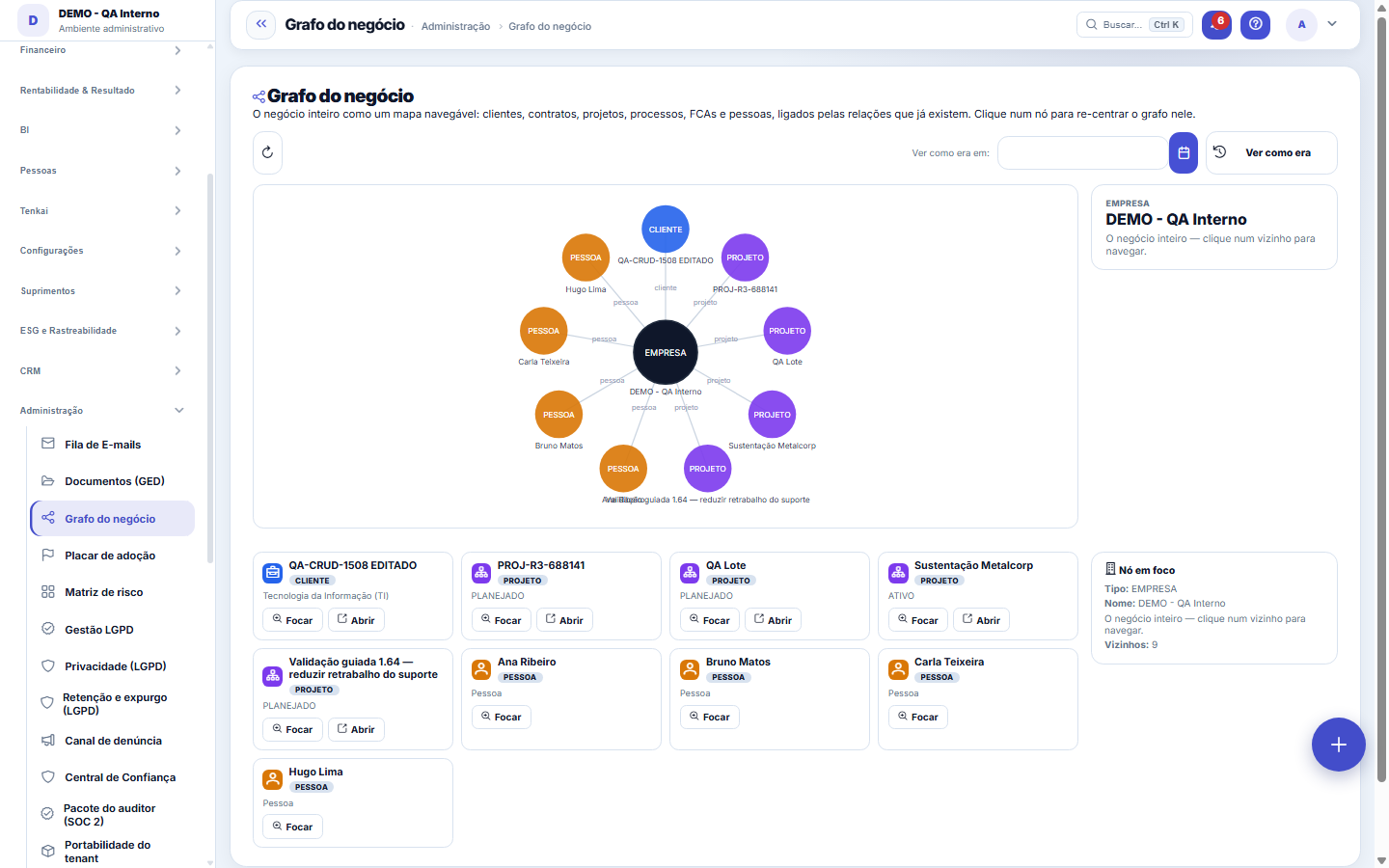
The real screen, in the theme you picked above.
What you find on this screen
A portrait of the screen, read from the screen itself — it changes when the screen changes.
Available actions
The entire businessSee how it wasTodayFocus
Form fields
NomeNome pelo qual o cliente é chamado. É o nó que aparece desenhado no grafo.
Razão socialRazão social registrada. É o que casa o cliente com o documento fiscal.
CPF/CNPJCPF ou CNPJ do cliente. É a chave que evita o mesmo cliente virar dois nós no grafo.
MatrizCliente matriz deste registro. É o que liga filial e matriz e revela o grupo econômico.
CódigoCódigo sequencial do cliente na empresa.
SegmentoEm que mercado o cliente atua. É por aqui que o grafo agrupa vizinhança.
OrigemDe onde o cliente veio: site, indicação, evento. Fica com o que o lead trouxe na conversão.
AtivoCliente inativo sai das listas de trabalho, mas as ligações dele continuam no grafo.
Start here
O que esta tela responde
How the things in your business connect: this customer has which contracts, which generate which projects, which produce which receivables/payables. Clicking a node recenters the map on it.
What this screen is
The whole business as a navigable map: customers, contracts, projects, processes, FCAs and people connected by the relationships that already exist in the system. Click a node to recenter the graph on it and see, in the side panel, the node's data with a direct link to the source screen. Read-only; financial values appear masked for those without permission to view values.
How to
Quando o grafo responde mais rápido que a busca
"What falls if this contract ends?", "where did this receivable come from?". NEIGHBORHOOD questions are what the graph does better than any list — the list shows records, the graph shows connections.
Rules
Respects "Show values"
Anyone who cannot see money navigates the whole graph with the values masked. The structure of the connections is not a secret; the numbers are.
Frequently asked questions
Which question this screen answers
"How does everything in my business connect?" — from a customer to the contract, the project, the process and the people. Click a node to recenter the graph on it; the side panel shows the data of the node in focus with the "Open the source screen" link. The "The whole business" button returns to the overview, and "See how it was on" rebuilds the map on a past date — useful for understanding what has changed since then.
Was this article helpful?
In the same module: Explore21
Academia TenkaEscolha a trilha do seu papel e siga as lições — cada uma aponta a tela real onde se pratica. Ao completar a …Alocação na faltaQuando falta peça: quem leva pela prioridade do cliente, pedido completo primeiro e data, com a fatia de cada…Digital Employees OfficeAll the company's agents side by side, on one comparison screen: status (active/paused), executions this mont…Group chain cockpitThe group’s companies as links of the chain: kilos in and out, yield, margin per company and consolidated, an…Indicator cockpitThe engine room of a KPI: target × actual series (12 months), status light by period, root-cause-and-action i…How do you feel about money?The 10 questions of the CFPB Financial Well-Being Scale on the phone, once a quarter; the perceived score nex…Key per tenant (BYOK)Super admin screen for BYOK (Bring Your Own Key): per tenant, the status of its own encryption key and the ac…Size grid and storeLive size grid, EAN labels, reservation and picking, store replenishment.
Tenka Academy
Explore the AcademyStep-by-step learning paths for your industry, inside the platform.