

Extensions App Store
The third-party extension store: apps other developers publish to extend the platform. Each extension declares, in its SIGNED manifest, exactly what it needs to access — which resources it READS, which it WRITES, and under what value ceiling. When you open an extension, you see this permission list…
The screen
The real screen, in the theme you picked above.
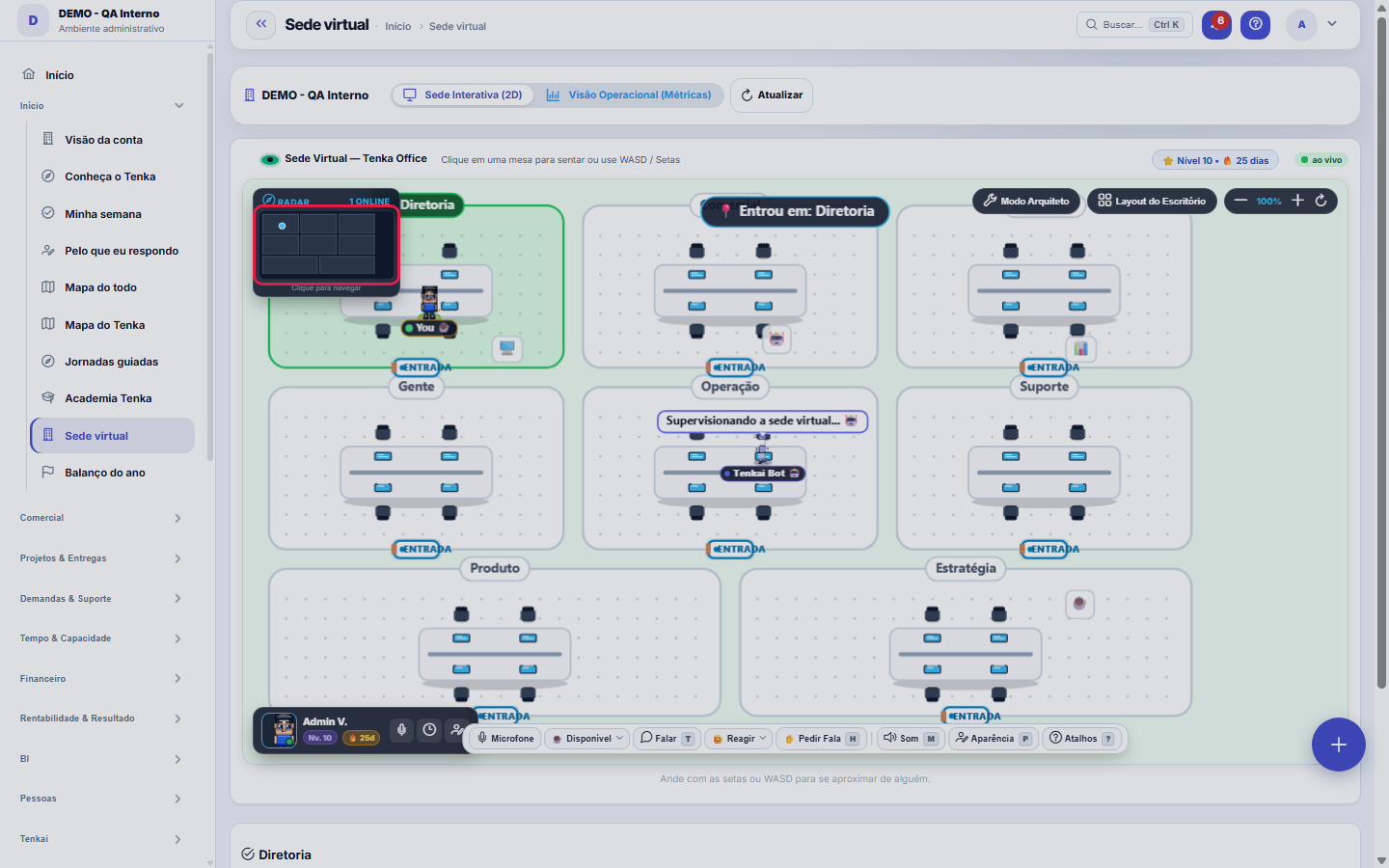
What you find on this screen
A portrait of the screen, read from the screen itself — it changes when the screen changes.
Available actions
RefreshAsk Tenka about this areaView this dayNowAsk Tenkai about this areaSave AppearanceCancelFechar
Form fields
NomeComo a sala é chamada na sede virtual. É o nome que a pessoa lê ao entrar.
ÁreaA que área da empresa a sala pertence: é o que agrupa quem trabalha junto.
CorCor da sala na planta. Serve para reconhecer a área de longe, sem ler o rótulo.
OrdemPosição da sala na sequência de exibição da planta.
AtivaSala inativa deixa de aparecer na planta, mas o histórico de quem passou por ela continua.
Start here
O que esta tela responde
The company as a map: the areas, who is present in each one, the digital employees in operation and the traffic light of how each area is doing.
What this screen is
The company as a navigable place: the 2D map of the areas (Board, Sales, Finance, People, Operations, Support, Product, Strategy), who is online now, the digital employees working at each area's desk with the month's scoreboard and the traffic light that communicates the state without opening anything (overdue items in Finance, queue in Support). Clicking a room opens Tenka in the context of that area, with the real numbers. Nothing new feeds the headquarters — everything already exists in the system; the headquarters just gives it a body.
How to
Clicar numa área muda o contexto do copiloto
When you select a room, Tenka starts answering about THAT area, with the numbers the headquarters is already showing. It is the short path between "the traffic light is yellow" and "why?".
Rules
A presença atualiza sozinha, com alguns segundos de atraso
The screen reloads presence periodically — it isn't real time to the second. A person who just came in may take a moment to appear, and that isn't a connection failure.
O Catálogo de Mobília só aparece no Modo Arquiteto
The side panel with the catalog stays hidden until you enter Architect Mode — the headquarters map needs the full width to be read. On 18/09/2026 it started opening on its own due to a side effect of a style cleanup, covering the right side of the map; it was fixed the same day. If it appears again without you having entered Architect Mode, it's a defect, not a setting.
A room removed from the headquarters goes to the trash
Removing a room in Architect Mode sends it to the trash instead of deleting it: whoever was in it is reassigned, but the room — name, position and furniture — can come back with Undo. It is the same behavior as the other records in the house since 18/09/2026.
Frequently asked questions
Which question this screen answers
How is the company NOW — who is online, what did the digital employees do and where is the pressure? The 2D map shows the areas (Board, Sales, Finance, People, Operations, Support, Product, Strategy), who is online in each one, the digital employees working at each area's desk with the month's scoreboard and the traffic light that communicates the state without opening anything — overdue items in Finance, queue in Support. Clicking a room opens Tenka in the context of that area, with the real numbers; nothing new feeds the headquarters, it just gives a body to what the system already knows.
Was this article helpful?
In the same module: Explore21
Academia TenkaEscolha a trilha do seu papel e siga as lições — cada uma aponta a tela real onde se pratica. Ao completar a …Alocação na faltaQuando falta peça: quem leva pela prioridade do cliente, pedido completo primeiro e data, com a fatia de cada…Digital Employees OfficeAll the company's agents side by side, on one comparison screen: status (active/paused), executions this mont…Group chain cockpitThe group’s companies as links of the chain: kilos in and out, yield, margin per company and consolidated, an…Indicator cockpitThe engine room of a KPI: target × actual series (12 months), status light by period, root-cause-and-action i…How do you feel about money?The 10 questions of the CFPB Financial Well-Being Scale on the phone, once a quarter; the perceived score nex…Key per tenant (BYOK)Super admin screen for BYOK (Bring Your Own Key): per tenant, the status of its own encryption key and the ac…Size grid and storeLive size grid, EAN labels, reservation and picking, store replenishment.
Tenka Academy
Explore the AcademyStep-by-step learning paths for your industry, inside the platform.