

Forecast via API
Tenka's forecast exactly AS A THIRD PARTY receives it via the API/MCP — with the HONESTY CONTRACT in plain view. One of our forecasts NEVER goes out as an isolated point: the package inseparably includes the value, the [lower, upper] interval, the sample size (n), the credibility weight Z (how much…
The screen
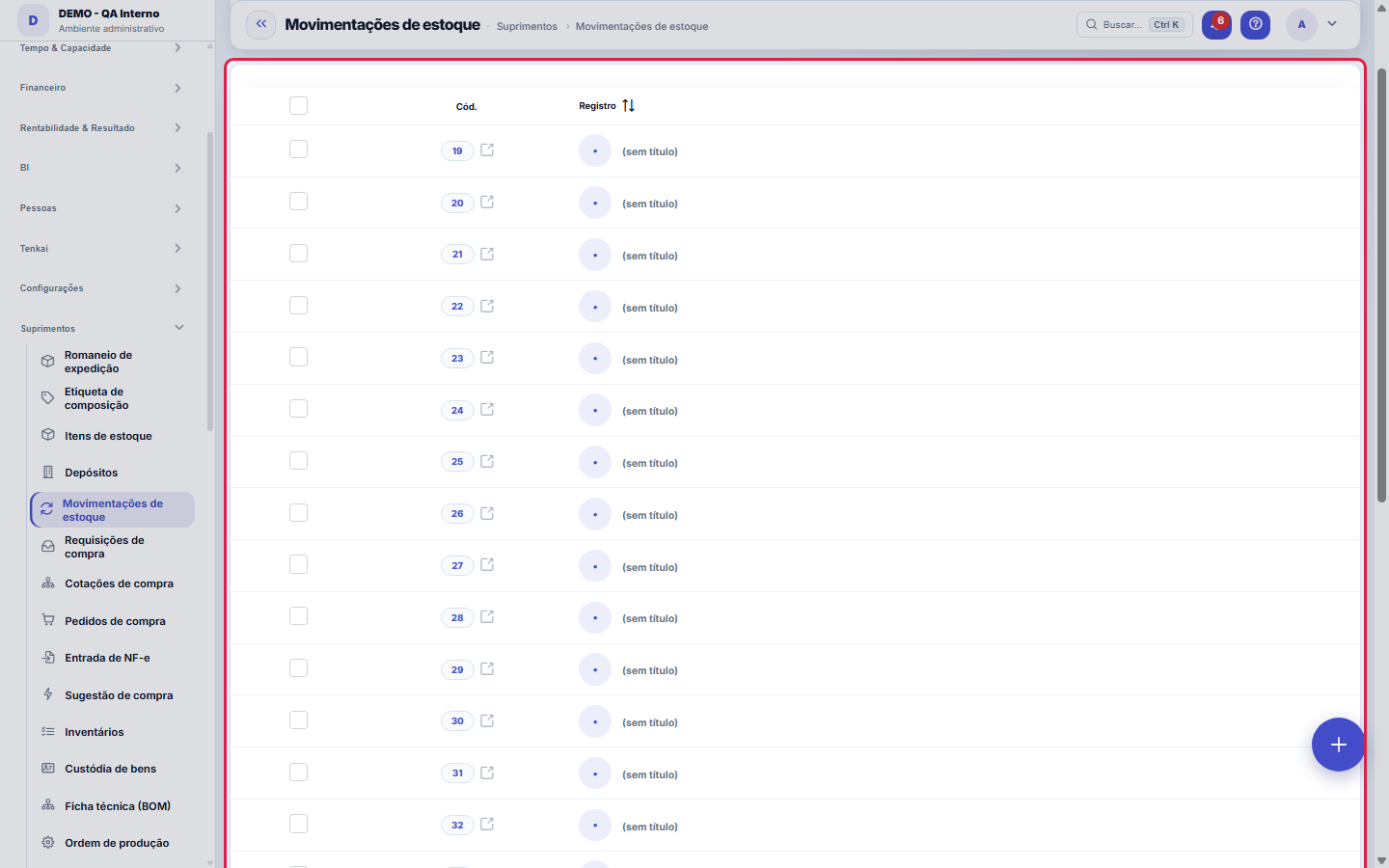
The real screen, in the theme you picked above.
What you find on this screen
A portrait of the screen, read from the screen itself — it changes when the screen changes.
Form fields
TipoEntrada, Saída, Ajuste ou Transferência.
ItemO item movimentado (nome resolvido do cadastro).
DepósitoO depósito onde ocorreu o movimento.
QuantidadeQuantidade movimentada.
Custo unit.Custo unitário: na entrada é o de compra; na saída/ajuste é o custo médio baixado.
Custo totalQuantidade × custo unitário. Na saída, é o CMV da linha.
DataData do movimento.
OrigemDe onde veio: compra, venda, inventário ou manual.
ObservaçãoObservação livre do movimento.
Start here
What this screen is
The stock ledger: receipts, issues, adjustments and transfers. A receipt recalculates the average cost; an issue is valued at it (COGS). Record a movement with the New button.
Para que esta tela existe
The stock ledger: receipts, issues, adjustments and transfers. A receipt recalculates the average cost; an issue is valued at it (COGS). Record a movement with the New button. — this is the role of the "Stock movements" screen within the platform.
How to
Busca, visões e export do razão
This list runs on the standard engine: free search and column filters can become named saved views, per user; the recycle bin (?excluidas=1) keeps what was deleted; and export comes out in Excel, PDF or CSV of the whole set. Cost fields obey the "View Amounts" permission of the profile — those without it see and export them masked. Links with ?q=text or ?fd_= open the ledger already narrowed down: that's how a clickable balance arrives showing only the movements that made it up.
Rules
O saldo e a SOMA desta tela — nunca um numero digitado
Each row here is a fact: came in, went out, was transferred or adjusted. The balance the Stock dashboard shows is the sum of these rows, and nothing else. That's why there is no "edit balance" in the platform: if the shelf has a different quantity from the system, the path is an ADJUSTMENT — which is recorded, with reason and author — not overwriting the number. Stock is only auditable as long as this rule holds.
A visão salva guarda busca, filtros, colunas e ordenação
When you save a view with the Views button, it stores four things: the search text, the applied filters, which columns appear (and in what order) and which column the list is sorted by. Applying the view restores everything at once — including resetting the sort and the page you were on, so the result is exactly what the view describes. Views saved before this version remain valid: whatever they didn't store simply doesn't change when applied.
O erro de preenchimento aparece no campo, ao sair dele
Nas fichas, sair de um campo já dispara a conferência do que dá para conferir na hora: campo obrigatório deixado em branco e e-mail mal formado. O aviso aparece embaixo do campo e desaparece quando você começa a corrigir. Campo numérico não precisa de aviso: ele simplesmente não aceita letra enquanto você digita. Isso é conforto, não a validação final: ao salvar, o sistema confere tudo de novo do lado do servidor.
Issue without stock: allowed or refused
By default the company accepts issues without stock: the balance may go negative, and each such issue is flagged on the Stock dashboard. On the movement form, the issue and the transfer show this notice. To refuse it in every flow (register, shipping, production, cutting and manual entry), turn on "Stock: refuse issues without stock in every flow" in Parameters, Production group; from then on, only an issue with an authorization given on the Stock dashboard goes through.
Frequently asked questions
What’s the difference between TRANSFER and an exit followed by an entry?
A transfer is a single movement between two of your warehouses: the total quantity doesn't change, it changes place. Posting an issue in one and a receipt in the other gives the same final balance, but lies in the consumption report — it becomes an "issue" nobody consumed, and the item's turnover looks higher than it is. That contaminates the ABC curve and the purchase suggestion.
Como descobrir quem mudou um campo desta ficha?
Open the record and look at the Timeline on the right: it shows each change as "from one value to another", with the person and the date. When there are many changes, use the two filters at the top of the timeline — one by field, the other by person. The search runs in the database, so old changes show up just the same. You can also ask Tenkai: "who changed contract 482?".
Why was the outflow refused for lack of stock?
Because your company is set to refuse stock outflows without stock: the system does not let the item balance go negative in that warehouse. First post the missing inflow (purchase, production, return or the opening inventory) and repeat the outflow. If the outflow must happen now, request the authorization in the Stock panel: whoever can authorize releases that outflow, with the reason, and it goes through.
Was this article helpful?
In the same module: Supply and inventory18
Buy from the networkAnchor partner offers, orders to the supplier and the invoice that arrives by itself.Contagem programadaContar o estoque da loja sem fechar: programe por loja e por grupo de produto o dia da semana de cada contage…Year in reviewThe year in review on a single panel: the few numbers that tell the story of the company's fiscal year — cust…Enablement kitThe partner becomes qualified in a vertical without eating up a week of the team's time. Pick the vertical an…Process mining (the real flow)Discovering the REAL as-is flow from the history the operation has already recorded — with no tool log to imp…Sector benchmarkHow YOUR INDUSTRY performs, indicator by indicator (average collection period, average margin, average ticket…Etiqueta de composiçãoA etiqueta obrigatória do produto têxtil, conferida antes de virar PDF.Composition label (sheet)The Conmetro label for a textile product: country of origin, responsible party, CNPJ, care instructions and t…
Tenka Academy
Explore the AcademyStep-by-step learning paths for your industry, inside the platform.