

Data migration
The migration assistant in customer mode: upload the file exported from your current system (Omie, Conta Azul, Bling, Jira, or Runrun), review and adjust the column mapping right on the screen, check the preview with sums and counts, and only then apply it. The link is by external code (the record'…
The screen
The real screen, in the theme you picked above.
What you find on this screen
A portrait of the screen, read from the screen itself — it changes when the screen changes.
Available actions
Seal chainRecalculateExport package
The list shows
ControlDescriptionResultCollected onMonthAccounts challengedAccounts blockedAccounts releasedAuthorizations grantedAuthorizations revokedAuthorizations expiredIn-house automated sessions+6
Form fields
CódigoIdentificador da regra de segregação, citado no relatório do auditor.
DescriçãoO risco que esta regra evita, em uma frase que o auditor entenda.
Função AA primeira das duas funções que não podem ficar na mesma pessoa.
Tipo da função ASe a função A é medida por tela, por verbo ou por alçada.
Função BA segunda função do par conflitante.
Tipo da função BSe a função B é medida por tela, por verbo ou por alçada.
SeveridadeQuanto pesa o conflito quando ele é encontrado. É o que define o que vira achado crítico.
AtivaRegra inativa para de acusar conflito, mas continua no acervo para consulta.
Start here
What you hand to an auditor
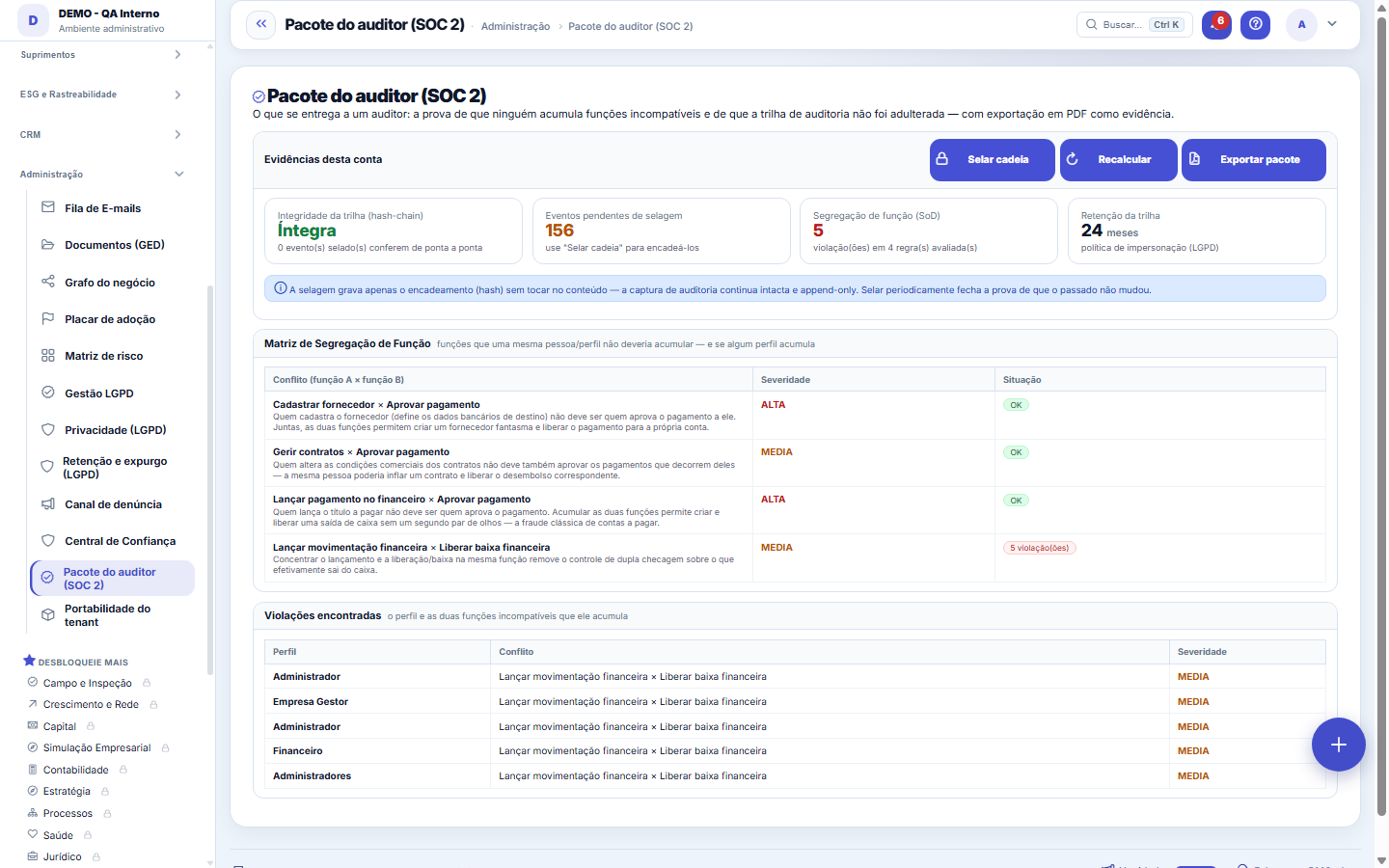
Two proofs in a single package: nobody accumulates incompatible functions (segregation of duties, SoD) and the audit trail has not been tampered with (hash chaining). "Export package" generates the PDF that serves as formal evidence.
What this screen is
The package you hand to an auditor: the Segregation of Duties (SoD) matrix with the violations found — profiles that accumulate functions that should be separated (who posts and who approves payment, who registers a supplier and who pays) —, verification of the audit trail's hash chain (proof that no line was tampered with) and export of everything to PDF as evidence. Only super administrators and administrators have access.
How to
Trail integrity (hash chain)
Each sealed event carries the hash of the previous one — tampering with any of them breaks the chain from there on. "Intact" = all sealed events check out end to end. "Tampered" = the screen points to the number of the first event where the chain breaks, which is where the investigation begins.
Seal the chain
Chains the still-pending events by hash. Sealing writes ONLY the chaining — it does not touch the content, which remains append-only. Sealing periodically closes the proof that the past has not changed: a pending event is an event whose immutability has not been sealed yet.
A matriz de segregação de função
Each row is a pair of functions that the same person should not accumulate (e.g., whoever approves does not execute), with a severity. OK = no profile accumulates them. Violation = the table below names the profile and the exact conflict.
Retenção da trilha
The card shows for how many months the impersonation trail is retained (LGPD policy). It is part of the package — the auditor asks, and the answer is measured here, not in a loose document.
Rules
Violação denuncia, não bloqueia
The screen does not deactivate anyone's profile — it exposes. The fix is in profile maintenance: remove, from one of the sides, the permission that creates the accumulation, and Recalculate to check. A HIGH severity violation left open on the eve of an audit is the most expensive item on this screen.
What the system proves on its own
The "Automatic collection" section lists the controls the system checks by itself, every cycle, with the date of the last check: audit trail intact in every company, no profile combining incompatible duties, trail retention defined, password policy in force, isolation between accounts on, unused accounts deprovisioned, access review up to date, recent backup and background jobs running only once. OK means the check passed; Failure, something needs attention before the audit; N/A, the environment does not allow evaluating it.
What goes into the auditor package
The PDF brings what the screen computes right now for this company (trail integrity, segregation-of-duties matrix, retention) and then the automatic collection with the date of each control. It is what an auditor asks for first: evidence produced by the system itself, dated, with no one assembling it by hand. If a control is in Failure, fix it before exporting — the package does not hide it.
Automation on logged-in accounts, month by month
The control shows, for each month, how many accounts were challenged, blocked and released for behaving like a robot, and how many company-authorized automations were granted, revoked or expired. The number of challenged accounts is a floor: an abandoned challenge leaves no record. The control fails if a company authorization stays valid for more than 30 days.
Frequently asked questions
Which question this screen answers
"Can I prove to an auditor that nobody accumulates incompatible functions and that the audit trail has not been tampered with?" The screen brings the three pieces of evidence together in one place: the segregation of duties matrix with violations by profile and severity, the hash chain verification (intact or tampered, with the exact point of the break), and the export of the package to PDF to attach as formal evidence.
"Collected on" does not change when I click Recalculate
Recalculate collects the evidence again when the last collection is more than 10 minutes old, and refreshes the screen — "Collected on" becomes now. Under 10 minutes, the screen shows the recent collection and says so. Besides that, the system collects by itself once a day, counting from the age of the last collection: restarting the server does not skip a day.
Who waived Legal approval?
The Legal approval waiver section shows the last 12 months: the contract, whether approval was waived or required again, who did it, when, and the approval status today.
Was this article helpful?
In the same module: Governance and compliance12
DRE tree viewThe DRE navigable by nature (account category): open the line and drill down to the entry that formed it. It'…Central LGPDOs documentos vivos da proteção de dados com estado e data — DPA, RIPD, runbook de incidente e conformidade d…Advance receivablesReceivables advancing as a BUTTON: the not-yet-due receivable invoices already in your accounts receivable tu…Email queueEverything the system tried to send by email: what went out, what failed and why.Service order mapDistributes service orders on the map by technician and region to build the day's schedule without overlap. T…LGPD management (old address)Old address of LGPD management: opens and goes on to the consent list.Error logThe exceptions the system recorded: when, on which screen, with which user, and what the technical failure wa…SDCA routineStructures the improvement routine (Standardize–Do–Check–Act) around a process. The cycle only closes if the …
Tenka Academy
Explore the AcademyStep-by-step learning paths for your industry, inside the platform.