

ABC curve
The stock's Pareto analysis calculated on the fly: it sorts items from highest consumption (COGS) to lowest and classifies them by cumulative % — A up to 80%, B up to 95%, C the rest. A few A items concentrate most of the money; that's where negotiation, attention, and stockout control pay off the …
The screen
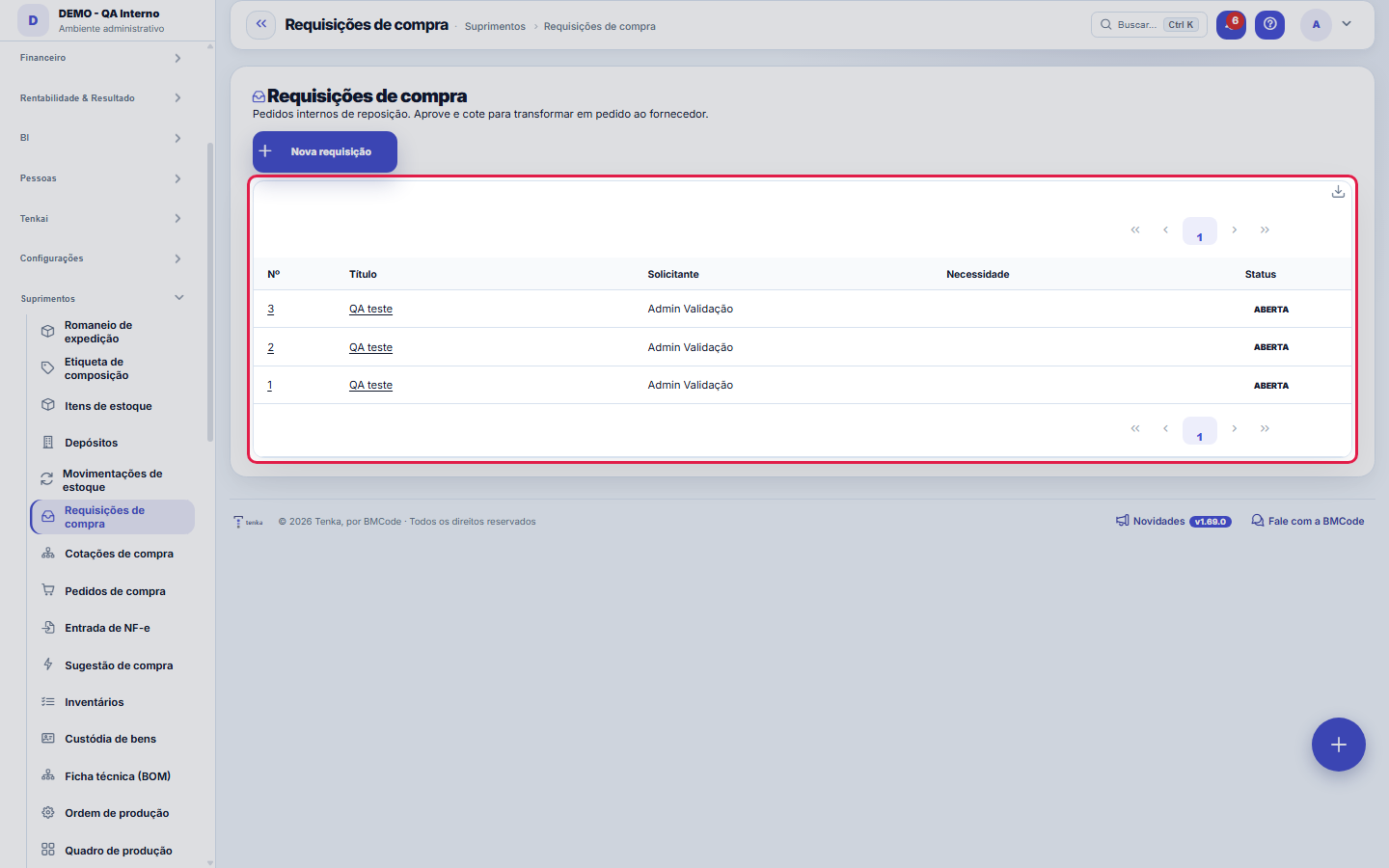
The real screen, in the theme you picked above.
What you find on this screen
A portrait of the screen, read from the screen itself — it changes when the screen changes.
Form fields
NºNúmero sequencial por empresa da requisição.
TítuloO que está sendo requisitado.
SolicitanteQuem pediu a compra.
JustificativaPor que a compra é necessária. É o que a alçada lê para decidir.
SituaçãoAberta, aprovada, cotada ou cancelada.
NecessidadePara quando o item é necessário.
ObservaçãoAnotações sobre a requisição.
Start here
Para que serve a requisição
It's the formal start of every purchase: someone on the team records what they need, by when, and why. It separates the need from the decision to buy — whoever asks isn't whoever approves, and the history shows everything that was requested, fulfilled or denied.
What this screen is
Internal replenishment requests: a department asks for items, the buyer approves, gets quotes from N suppliers and turns it into a purchase order. The head of the purchasing cycle (requisition → quote request → order → NF-e receipt).
How to
Data de necessidade é prazo, não enfeite
The Need date column says when the requester needs the material in hand. It's what orders the queue of whoever handles purchasing — a requisition past its date with a stalled status is operations being blocked in silence.
Requisição automática
The Purchase Suggestion screen generates a ready-made requisition with everything below minimum stock — for routine replenishment, start there instead of typing item by item.
Rules
What happens next
The approved requisition goes on to a quote request (when it's worth competing on price) or becomes a purchase order directly. Follow it by status; the requester doesn't need to ask in the hallway.
A visão salva guarda busca, filtros, colunas e ordenação
When you save a view with the Views button, it stores four things: the search text, the applied filters, which columns appear (and in what order) and which column the list is sorted by. Applying the view restores everything at once — including resetting the sort and the page you were on, so the result is exactly what the view describes. Views saved before this version remain valid: whatever they didn't store simply doesn't change when applied.
O erro de preenchimento aparece no campo, ao sair dele
Nas fichas, sair de um campo já dispara a conferência do que dá para conferir na hora: campo obrigatório deixado em branco e e-mail mal formado. O aviso aparece embaixo do campo e desaparece quando você começa a corrigir. Campo numérico não precisa de aviso: ele simplesmente não aceita letra enquanto você digita. Isso é conforto, não a validação final: ao salvar, o sistema confere tudo de novo do lado do servidor.
Frequently asked questions
Which question this screen answers
"What are the departments asking to buy and what have I already approved for quotes?" The requisition is the head of the purchasing cycle: a department asks, the buyer approves, the approved one becomes a quote request to N suppliers and then a purchase order. The Status column separates what awaits a decision from what is already moving; the Need date says the real deadline of whoever asked — it's by that you prioritize. Justification and Requester give the context to approve or refuse without back-and-forth.
Como descobrir quem mudou um campo desta ficha?
Open the record and look at the Timeline on the right: it shows each change as "from one value to another", with the person and the date. When there are many changes, use the two filters at the top of the timeline — one by field, the other by person. The search runs in the database, so old changes show up just the same. You can also ask Tenkai: "who changed contract 482?".
Was this article helpful?
In the same module: Supply and inventory18
Buy from the networkAnchor partner offers, orders to the supplier and the invoice that arrives by itself.Contagem programadaContar o estoque da loja sem fechar: programe por loja e por grupo de produto o dia da semana de cada contage…Year in reviewThe year in review on a single panel: the few numbers that tell the story of the company's fiscal year — cust…Enablement kitThe partner becomes qualified in a vertical without eating up a week of the team's time. Pick the vertical an…Process mining (the real flow)Discovering the REAL as-is flow from the history the operation has already recorded — with no tool log to imp…Sector benchmarkHow YOUR INDUSTRY performs, indicator by indicator (average collection period, average margin, average ticket…Etiqueta de composiçãoA etiqueta obrigatória do produto têxtil, conferida antes de virar PDF.Composition label (sheet)The Conmetro label for a textile product: country of origin, responsible party, CNPJ, care instructions and t…
Tenka Academy
Explore the AcademyStep-by-step learning paths for your industry, inside the platform.