

Meeting notes
Records the agenda, decisions, and action items from the meeting, each with an owner and a deadline. A decision that doesn't turn into an action item with a responsible person evaporates before the next meeting — the value of this screen is the follow-up, not the minutes.
The screen
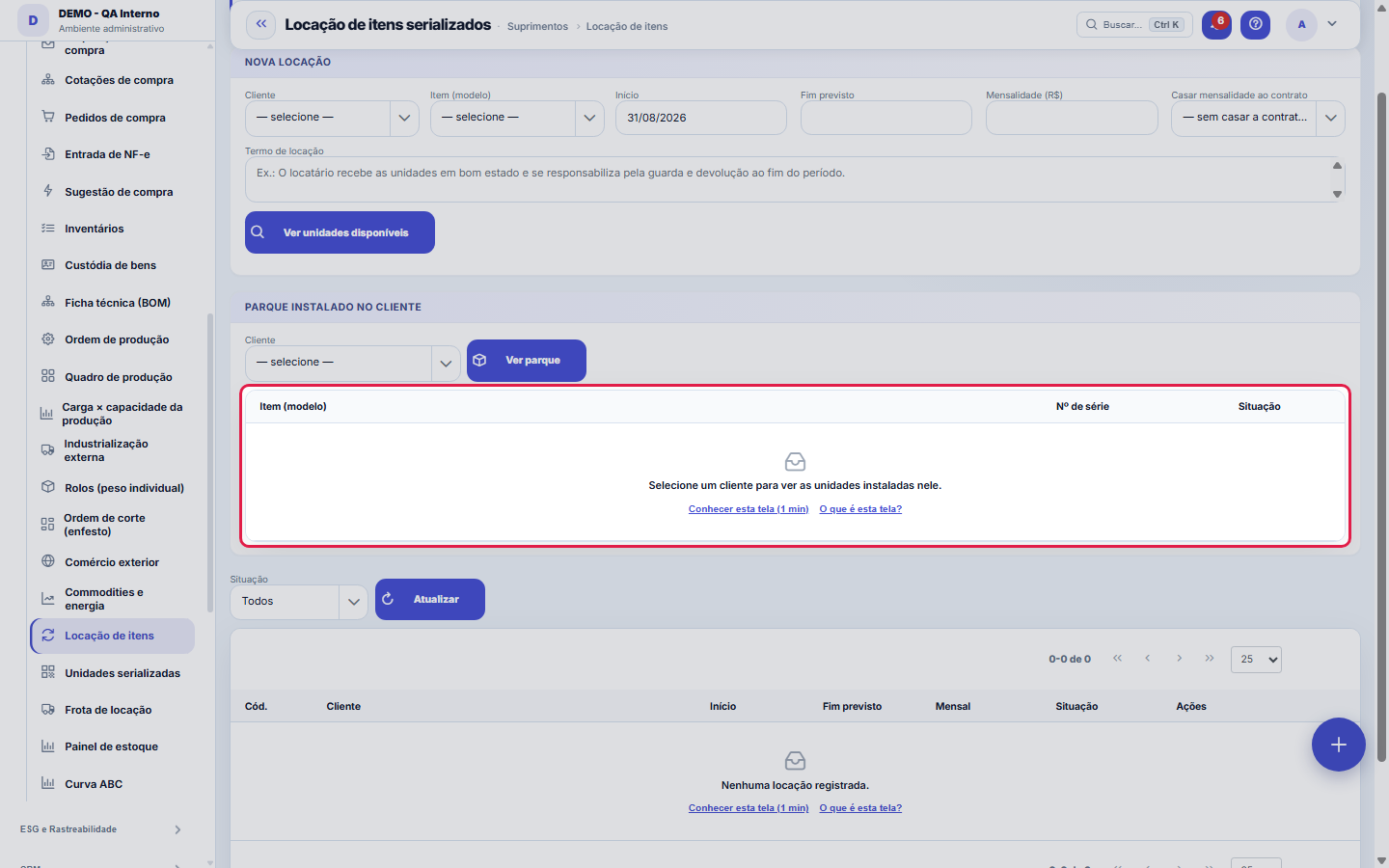
The real screen, in the theme you picked above.
What you find on this screen
A portrait of the screen, read from the screen itself — it changes when the screen changes.
Available actions
View available unitsRent out marked unitsView installed baseRefreshDetailsGenerate monthly chargeReturn
The list shows
Item (model)Serial no.StatusCodeCustomerStartExpected endMonthlyActionsUnitUnit valueReturned+1
Form fields
InícioQuando a locação começou.
FimQuando a locação termina ou terminou.
Valor mensalQuanto a locação rende por mês.
SituaçãoAtiva, encerrada ou cancelada.
TermoCondições do contrato de locação.
Start here
Detalhe, devolução e mensalidade
The detail lists the UNITS of that rental (each serial in the fleet) with the unit price and whether they've come back. Returns are per unit, not for the whole rental: you can receive part of the fleet and leave the rest in use. "Generate monthly fee" only appears on a rental tied to a contract — it's the contract that says which financial category and which due date to use.
Para que esta tela existe
Rental of serialized items: rents UNITS (by serial number) to a customer for a period, showing the FREE units in the interval (checking for overlap with other rentals), with a rental term and monthly fee. The monthly fee is TIED to a recurring contract of the customer — monthly billing follows the contract's pattern. Returns are unit by unit and release the serial back to rental stock. It also shows the installed base at each customer. — this is the role of the "Item rental" screen within the platform.
Rules
Where rental is in the menu
Asset rental and the rented equipment fleet are in the Rental and fleet group of the menu, separate from Supply Chain. Anyone who had access to Supply Chain still has access to them. Apparel, spinning and knitting companies and family accounts do not see this group, because these operations are not part of their day-to-day work.
A janela de detalhe mostrava a locação ERRADA até esta versão
Clicking the code or "Detail" brought nothing: the window opened blank (or repeating the previous rental), with no warning that something had failed. It's fixed, and returning a unit from inside the window now updates the list right away. If you tried to check the units of a rental before this version, check again.
Locar em três passos: cliente, período, unidades livres
Choose customer, item (model) and period, and click "See available": the screen lists only the units FREE in the interval, checking for overlap with other rentals — the same serial is never promised to two customers at the same time. Tick the units and confirm with "Rent selected". Monthly fee and term are recorded on the rental; returns, later, are unit by unit in the detail, and each returned serial goes back to rental stock.
Frequently asked questions
Que pergunta do dia a dia se responde aqui
"Which units are rented, to whom, and what is free to rent?" — whenever that question comes up, this is the screen that answers it.
Não aparece o botão "Gerar mensalidade" — por quê?
The button only exists on rentals tied to a recurring contract of the customer — it's the contract that sets the pattern for monthly billing. A rental with no linked contract has nowhere to inherit that rule from, so the button isn't shown on the row. To enable it, choose the contract in the "Tie to contract" field when creating the rental: the dropdown loads the selected customer's contracts (it refreshes when you change the customer).
Was this article helpful?
In the same module: Rental and fleet4
Fleet equipmentA rental equipment item: name, asset tag, daily rate, hour meter and the preventive maintenance interval.Trust documentsThe platform owner's cockpit for the trust documents that the tenant sees and downloads in the Trust Center: …Serialized unitOne physical unit of an item with a serial number, its status and the fixed asset that represents it.Labor accrualAccumulates month by month what the company owes for the 13th-month bonus, vacation, and payroll charges, eve…
Tenka Academy
Explore the AcademyStep-by-step learning paths for your industry, inside the platform.